

















PodGo
What is PodGo?
Picture turning your boring commute, gym session, or weekend chores into productive learning time without staring at a screen. That’s the simple but powerful idea behind this tool. You give it a topic—anything from “latest AI breakthroughs” to “how to improve sleep”—and it creates a short, well-spoken audio briefing you can listen to offline. It feels like having a smart friend who reads the important stuff for you and explains it clearly while you move through your day. I’ve used it on long walks and found myself actually remembering details later because the voice and pacing make the information stick.
Introduction
Most of us waste a lot of time in transit or doing repetitive tasks with nothing useful going into our heads. PodGo turns that dead time into something valuable by turning any topic into natural-sounding audio you can play with your screen off. It’s not just text-to-speech—it creates concise, engaging briefings that feel like mini podcasts tailored exactly to what you asked for. The best part? You build a personal library of these briefings so you can replay the ones that mattered most. For busy people who want to keep learning without sacrificing movement or focus, it’s become a daily habit that actually feels good.
Key Features
User Interface
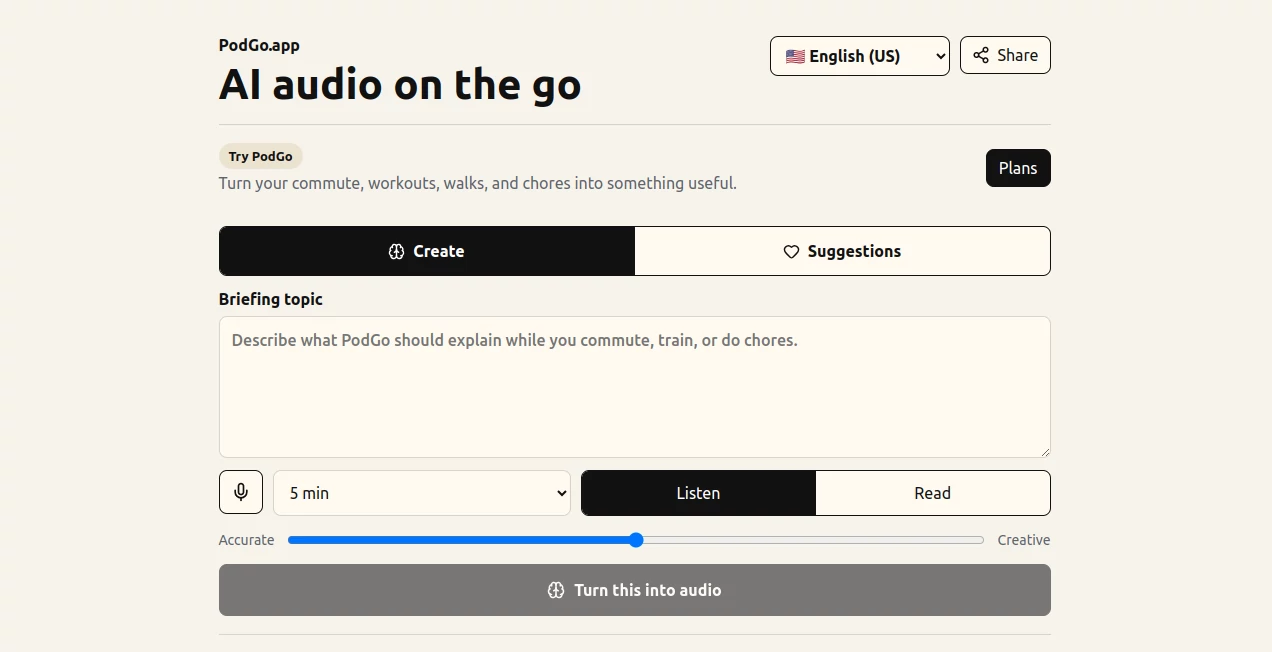
The design is wonderfully minimal. A big prompt box invites you to type or paste a topic, with quick suggestions below to get you started. Once generated, your audio appears in a clean library where you can favorite, replay, or delete items. Playback controls are simple and work great in the background. No cluttered menus or unnecessary steps—just type, generate, and listen. It’s the kind of interface you don’t think about because it just works.
Accuracy & Performance
The audio comes out clear and natural-sounding, with good pacing that doesn’t rush or drag. It pulls relevant information and condenses it intelligently, avoiding fluff while covering the key points. Generation is reasonably fast, and the voice quality holds up well even on longer briefings. Users often mention how surprisingly coherent and useful the summaries feel, even on niche topics.
Capabilities
You can generate briefings from any topic, paste articles or long text to be turned into audio, and build a reusable library of your favorite episodes. It supports multiple languages and works beautifully offline once downloaded. The tool shines at turning dense information into something you can absorb while walking, driving, or exercising—perfect for staying informed without adding extra screen time to your day.
Security & Privacy
Your generated briefings and listening history stay private to your account. There’s no sense that your prompts are being used to train models or shared publicly. It’s a clean, focused experience where your learning stays yours.
Use Cases
A busy professional listens to industry trend briefings during their morning commute and arrives at the office already up to date. A student turns dense textbook chapters into audio summaries they review while at the gym. Someone learning a new language generates daily briefings in their target language to practice listening during walks. Parents use it to stay informed on parenting topics while doing household chores. The common thread is turning otherwise lost time into meaningful learning.
Pros and Cons
Pros:
- Turns wasted time into productive listening without extra effort.
- Clear, natural voice that’s pleasant to listen to for longer sessions.
- Personal library lets you build your own collection of useful briefings.
- Simple enough for daily use, powerful enough for serious topics.
Cons:
- Best for summaries and overviews rather than very deep technical dives.
- Free tier has daily limits—serious users quickly upgrade.
Pricing Plans
It starts with a free plan that gives you a generous taste with daily generations—enough to see if the habit sticks. Paid plans remove limits, unlock higher quality voices, longer briefings, and priority generation. The upgrade feels worth it once you realize how much useful knowledge you’re absorbing during time you used to waste.
How to Use PodGo
Type or paste your topic into the prompt box (the more specific, the better). Hit generate and wait a short moment while it creates your briefing. Once ready, press play and enjoy—screen off, headphones in, go about your day. Save favorites to your library for easy replay later. You can generate multiple briefings on related topics to build a mini-series on something you’re learning. It quickly becomes part of your routine.
Comparison with Similar Tools
Generic text-to-speech tools sound robotic and don’t condense information intelligently. Podcast apps require hunting for existing episodes that may not cover exactly what you want. This one sits in the sweet spot: on-demand, well-summarized, natural-sounding audio tailored to your exact interests. It’s less about passive consumption and more about active, efficient learning on your schedule.
Conclusion
PodGo turns the overlooked moments of your day into genuine learning opportunities without forcing you to sit still or stare at another screen. It’s simple, effective, and genuinely useful—exactly what busy people need. Once you start using it regularly, you’ll wonder how you ever commuted, exercised, or did chores without it. The future of learning on the go isn’t about more screen time. It’s about better audio.
Frequently Asked Questions (FAQ)
How long are the generated briefings?
Usually 3–8 minutes—perfect for short activities but packed with value.
Can I listen offline?
Yes—download your generated audio and listen anywhere without internet.
Is the voice natural?
Very—the AI uses high-quality voices that sound human and engaging.
Can I generate in other languages?
Yes, it supports multiple languages for both input and output.
Do I need an account to try it?
You can start without one, but an account unlocks your personal library.
AI Productivity Tools , AI Text to Speech , AI Speech Synthesis , AI Voice & Audio Editing .
These classifications represent its core capabilities and areas of application. For related tools, explore the linked categories above.

PodGo Alternatives Product
Qwen3 TTS

TopPDF

Liftburst
Sonicker
YouTube Thum…

Trimless for…

Thinkesta

Gandr

XreplyAI
