
PrePublish
What is PrePublish?
There’s that nervous moment right before you click “publish”—the worry that something’s off with the tone, that you missed a typo, or that the piece could be sharper. Prepublish takes that anxiety away. It reads your draft like a thoughtful editor who actually understands your goals, then gives clear, actionable suggestions that make the final version noticeably better. I’ve used it on blog posts, social threads, and client proposals, and every time I come away thinking, “This reads like me, only better.” It’s the kind of tool that quietly elevates your writing without changing your voice.
Introduction
Good writing isn’t just about getting words on the page — it’s about making sure those words land well. Prepublish acts as that final checkpoint before you share your work with the world. It analyzes clarity, engagement, SEO potential, tone consistency, and overall impact, then offers smart improvements that respect your original intent. Whether you’re a solo creator, marketer, or part of a content team, it helps you ship with more confidence and fewer regrets. The best part? It doesn’t feel like a robot grading your homework — it feels like a skilled colleague giving constructive feedback.
Key Features
User Interface
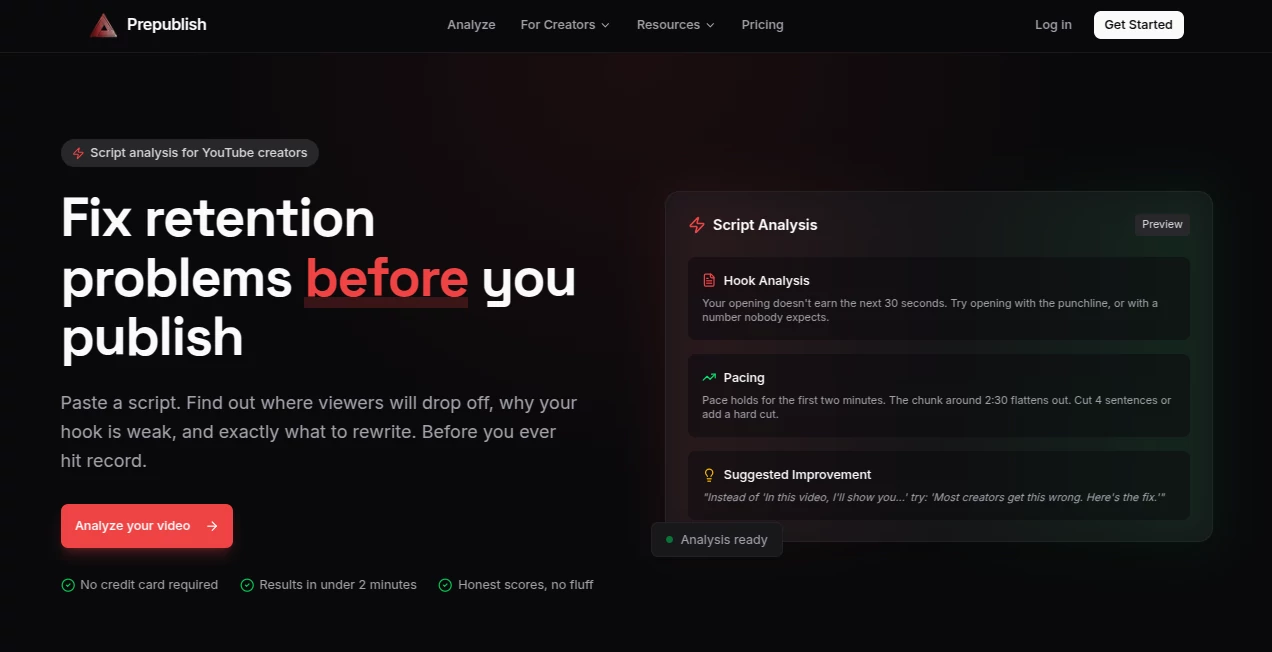
The interface is refreshingly straightforward. Paste your text or connect your Google Doc, and within seconds you get a clean dashboard with highlighted suggestions and an overall score. Everything is neatly organized: clarity, engagement, SEO, grammar, and tone. You can accept changes with one click or ignore them if they don’t fit your style. No overwhelming side panels or confusing tabs — just focused help that lets you stay in your creative flow.
Accuracy & Performance
The suggestions feel thoughtful rather than robotic. It catches awkward phrasing, repetitive words, and missed opportunities for stronger hooks. SEO recommendations are practical and up-to-date, while tone analysis actually understands context and audience. Processing is fast, even with longer pieces, and the accuracy keeps improving with use. I’ve found it especially good at spotting subtle issues that human editors sometimes miss on the third read-through.
Capabilities
It goes well beyond basic grammar checks. You get readability scoring, emotional tone analysis, SEO keyword opportunities, headline suggestions, structural improvements, and even audience-specific recommendations. It works beautifully for blog posts, LinkedIn articles, email campaigns, landing pages, and social threads. The ability to compare versions side-by-side makes it easy to see exactly how your changes improve the piece.
Security & Privacy
Your content stays private. Documents are processed securely and not used to train models unless you explicitly opt in. For writers and businesses handling sensitive or client material, that respect for privacy is genuinely reassuring. You can delete content from the platform anytime, and there’s no lingering data trail.
Use Cases
A blogger uses it to tighten posts before publishing and notices better engagement and time-on-page. A marketing team runs all campaign copy through it to maintain consistent brand voice across channels. Freelance writers polish client deliverables faster and with more confidence. Students improve essay clarity and structure before submission. Even busy executives clean up important emails and proposals. It fits naturally into almost any workflow where words matter.
Pros and Cons
Pros:
- Feedback feels human and respectful of your voice.
- Actionable suggestions that actually improve the final piece.
- Fast processing even for longer documents.
- Great balance between grammar, SEO, and creative quality.
- Helps writers level up without needing a full editor on retainer.
Cons:
- Very creative or highly stylistic writing sometimes needs manual overrides.
- Advanced team collaboration features are in higher plans.
Pricing Plans
It offers a generous free tier that’s actually useful for regular writing. Paid plans unlock unlimited checks, advanced SEO insights, team workspaces, and priority processing. The pricing feels fair for the time and quality improvements it delivers — many users say it pays for itself by preventing just one major publishing mistake or by saving hours of self-editing each month.
How to Use Prepublish
Head to the site and paste your draft or connect your Google Doc. Let it analyze the content (usually takes just seconds). Review the suggestions organized by category — click to accept any that improve the piece. Make your own tweaks where needed, then compare the before and after versions. When you’re happy, export the polished text or copy it directly. For recurring work, save templates or brand guidelines so future pieces stay consistent. The whole process is quick enough to become part of your regular publishing routine.
Comparison with Similar Tools
Many grammar and SEO tools feel mechanical or overly strict. Prepublish stands out because it combines solid technical analysis with an understanding of tone and audience. It’s less about rigid rules and more about helping your writing achieve its intended impact. Compared to hiring human editors, it’s dramatically faster and more affordable while still delivering meaningful improvements. For independent creators and small teams, it fills a sweet spot that bigger enterprise tools often miss.
Conclusion
Publishing shouldn’t be stressful. With the right support, it can be exciting again — the moment when your ideas finally meet the world in their best possible form. Prepublish gives you that support in a smart, approachable way. It respects your voice while gently pushing your work to a higher standard. Whether you write every day or just a few times a month, having this kind of thoughtful second opinion makes a real difference in both quality and confidence. Your readers will notice, and you’ll feel better about hitting publish every single time.
Frequently Asked Questions (FAQ)
Do I need to create an account to try it?
No — you can paste content and get feedback instantly as a guest.
Can it handle long-form content?
Yes, it works well with articles, ebooks, and long reports.
Is my content kept private?
Yes — your drafts are not used for training and are handled securely.
How does it compare to Grammarly?
It goes further by combining grammar with SEO, tone, and engagement insights tailored for publishing.
Can teams use it together?
Yes — paid plans include team workspaces and shared brand guidelines.
AI SEO Assistant , AI Content Generator , AI Rewriter , AI Writing Assistants .
These classifications represent its core capabilities and areas of application. For related tools, explore the linked categories above.

PrePublish Alternatives Product

wu tang name…

DocReplacer

SEOBlogger AI

Dolphinscribe
Ai Book Publ…

Domain Rank …

Surmado

Beamtrace

ForthWrite