Primio
What is Primio?
I’ve watched too many great app ideas die in the “I don’t know how to code” phase. The process always felt exhausting: learning Flutter or hiring expensive developers, dealing with endless revisions, and praying the final build actually works on both platforms. Then I tried this tool and the whole game changed. You describe what you want in plain English, and it generates real, production-ready Flutter code that compiles into native apps for both iOS and Android. No more months of back-and-forth. In many cases, you can go from idea to testable app in minutes. It still feels a bit like magic every time I see it happen.
Introduction
Primio takes the heavy lifting out of mobile app development by letting AI handle the code generation while keeping you firmly in control of the vision. Powered by Flutter, it produces clean, native apps that perform exactly as you’d expect from hand-written code. You don’t need prior coding experience, yet the output is professional enough for App Store and Google Play submission. It’s especially powerful for indie makers, small teams, and entrepreneurs who have brilliant ideas but limited time or budget. The best part is how fast you can iterate — change your prompt, regenerate sections, and see results almost instantly.
Key Features
User Interface
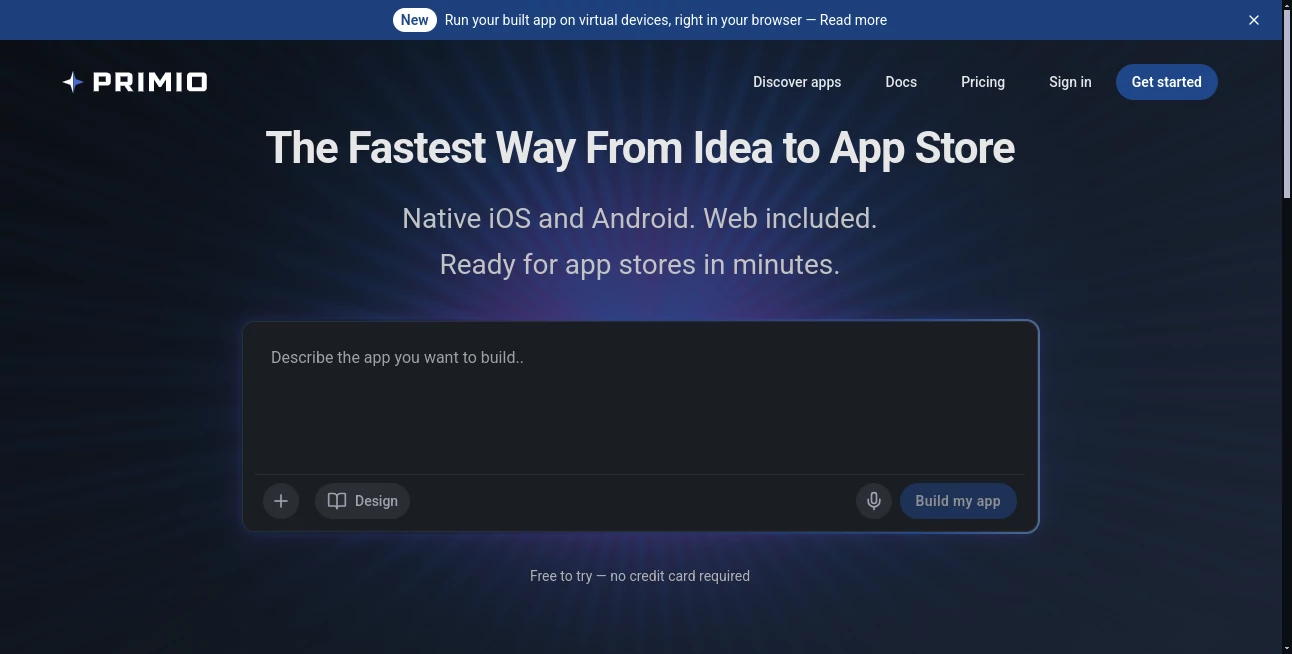
The workspace is clean and welcoming. You start with a chat-like prompt box where you describe your app in natural language. As the AI builds, you get a live preview and the ability to discuss changes directly in the interface. “Make the navigation bottom tab instead of side drawer” or “add dark mode support” — it understands and updates accordingly. Everything feels conversational rather than technical, which lowers the barrier dramatically for non-developers while still giving power users fine control.
Accuracy & Performance
The generated code is surprisingly solid. It produces clean Flutter/Dart that compiles without major issues and performs well on real devices. The AI has improved a lot at understanding complex features like authentication, API integration, state management, and even custom animations. Of course, you can review and tweak the code yourself if you want, which gives peace of mind. In practice, most users report getting to a functional MVP much faster than traditional development routes.
Capabilities
It supports full native apps with complex features: user authentication, push notifications, in-app purchases, camera access, maps, payments, and more. You can generate complete apps or specific screens and flows. The platform also handles asset management, debugging assistance, and even one-click builds for App Store and Google Play. Recent updates added the ability to drop in your own design assets and discuss refinements conversationally. It’s genuinely moving toward “describe once, ship everywhere” territory.
Security & Privacy
Your app ideas and generated code stay private. The platform is built with proper security practices for handling code generation and doesn’t train on your specific projects without permission. For businesses and serious indie developers, that trust factor is important when sharing product concepts or sensitive logic.
Use Cases
A solo founder validates a marketplace idea by generating a working prototype in a weekend instead of months. A small agency uses it to deliver client MVPs faster and at lower cost. A teacher builds a simple educational app for her students without needing a development team. Even larger companies use it to rapidly prototype internal tools. The common thread is speed-to-validation — turning ideas into testable reality before investing heavily.
Pros and Cons
Pros:
- Extremely fast path from idea to working native app.
- Real Flutter code you can export, modify, and own completely.
- Conversational refinement — talk to it like a developer partner.
- Significant time and cost savings compared to traditional development.
- Regular updates and new capabilities keep improving the experience.
Cons:
- Complex custom logic may still need manual code tweaking.
- Best results come from clear, well-structured prompts.
- Advanced enterprise features are on higher plans.
Pricing Plans
It offers a generous free tier so you can test ideas and generate basic apps without commitment. Paid plans unlock higher usage limits, priority generation, advanced features, and commercial usage rights. Pricing is reasonable for the massive time savings it delivers — many users find it pays for itself after the first successful prototype.
How to Use Primio
Sign up (quick and free to start), go to the builder, and describe your app in plain language. Be as detailed as you like about features, design preferences, and user flows. Review the generated preview, chat with the AI to refine anything that doesn’t feel right, and iterate until you’re happy. Export the Flutter code or trigger a build for testing on devices. From there, you can publish directly or continue customizing the code yourself. The whole loop encourages fast experimentation.
Comparison with Similar Tools
Many no-code platforms lock you into their ecosystem or produce lower-quality output. Others generate code but require heavy manual cleanup. Primio stands out by producing clean, native Flutter code that’s actually usable and ownable, while keeping the process conversational and fast. It sits in a sweet spot between pure no-code simplicity and full custom development power.
Conclusion
Mobile app development used to be gated behind technical expertise and big budgets. Tools like this are quietly removing those gates. Primio makes it possible for almost anyone with a good idea to bring it to life quickly, test it with real users, and iterate with confidence. Whether you’re an entrepreneur validating a startup concept, a creator building something personal, or a team shipping faster, it delivers real momentum. The future of app building feels a lot more accessible than it did just a few years ago.
Frequently Asked Questions (FAQ)
Do I need coding experience?
No — you can build entirely through natural language prompts.
What kind of apps can I build?
Almost anything — e-commerce, social, productivity, utilities, games, and more.
Is the code exportable and editable?
Yes — full Flutter/Dart code that you own and can modify freely.
How long does it take to generate an app?
Many basic to medium complexity apps are ready in minutes, with refinements taking additional short cycles.
Can I publish to App Store and Google Play?
Yes — the generated code is production-ready for both stores.
AI App Builder , AI No-Code & Low-Code , AI Developer Tools .
These classifications represent its core capabilities and areas of application. For related tools, explore the linked categories above.

Primio Alternatives Product

Mage Flow AI…

PromptCoder

AI Complianc…
DiRe-RAPIDS
Dedoctive
MyToolster W…

Lovable APP

Simple Dev T…
BootstrapKing