
Stripe Projects
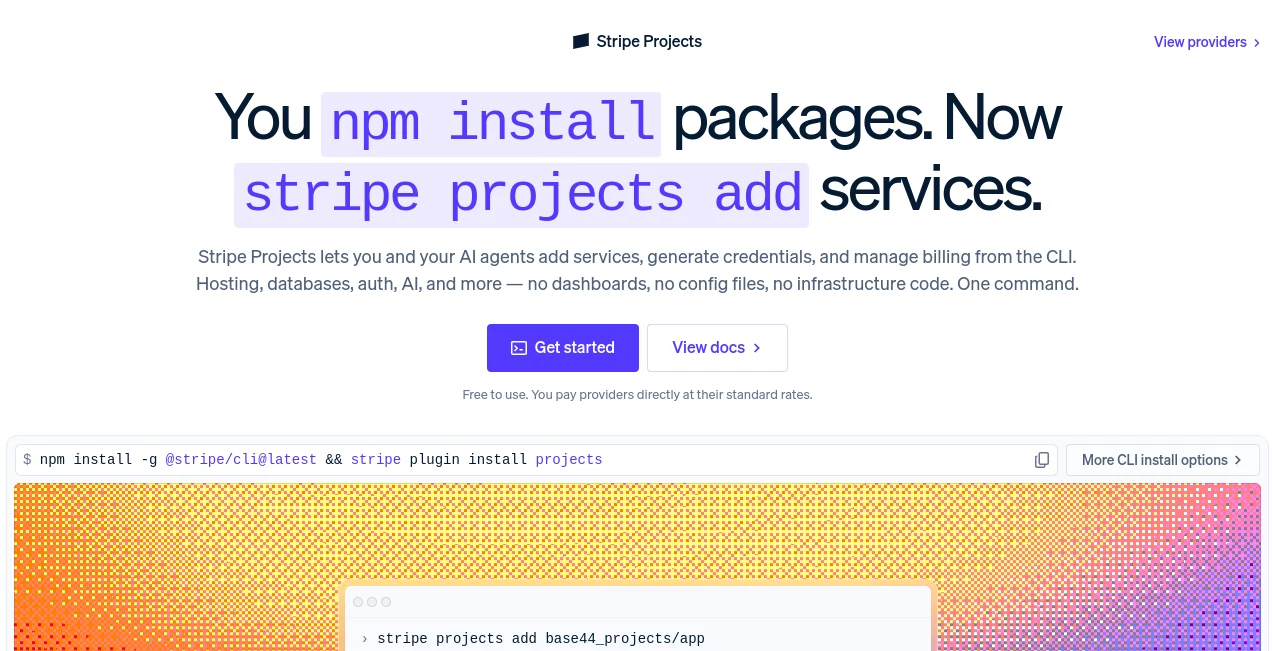
What is Stripe Projects?
Stripe Projects takes aim at one of the less exciting parts of software development: setting up the infrastructure behind an application. While modern developers can create code remarkably quickly, getting hosting, databases, authentication, AI services, analytics, and other infrastructure ready can still involve multiple accounts, dashboards, configuration screens, and credentials.
Stripe Projects brings that process into the command line. Developers can create a project, browse available providers, provision services, generate credentials, and manage provider plans without constantly leaving their development environment. It is also designed with AI coding agents in mind, making it easier for an agent to work with real services instead of stopping whenever a manual configuration step is required.
The approach is particularly appealing for developers who prefer a terminal-first workflow. Instead of spending an afternoon opening dashboards and copying API keys, a project can be assembled through a consistent set of commands.
Key Features
- Provision third-party services directly from the command line.
- Generate and synchronize service credentials with the development environment.
- Browse available providers through a central catalog.
- Manage provider plans and upgrades from the CLI.
- Support for hosting, databases, authentication, AI services, analytics, and other infrastructure.
- Portable environment variables that can move between machines, teammates, and coding agents.
- Templates for quickly starting complete application projects.
- Workflows designed to be usable by AI coding agents as well as human developers.
- Billing management that allows developers to manage provider subscriptions through the same workflow.
User Interface
The experience is intentionally different from a traditional web dashboard. The main interface is the command line, which makes the product feel familiar to developers who already spend most of their working day in a terminal.
Commands such as stripe projects init, stripe projects catalog, and stripe projects add provide a straightforward workflow for creating projects, discovering services, and adding infrastructure. The output also makes provisioning progress visible, including configuration completion, credential generation, and environment-variable updates.
For someone who prefers clicking through cloud dashboards, this approach may take a little adjustment. For a developer who lives in the terminal, however, it can remove a surprising amount of friction.
Accuracy & Performance
The biggest performance advantage is workflow speed rather than raw computational performance. Provisioning services through a repeatable CLI process reduces the number of manual steps required to get an application environment running.
The service also focuses on repeatability. Credentials can be generated and synchronized, while infrastructure changes can follow a consistent workflow instead of relying on a developer remembering every setting from a previous project.
This becomes especially useful when an application depends on several external services. A developer can establish the required stack without repeatedly jumping between unrelated provider dashboards.
Capabilities
The platform is built around the idea of treating infrastructure provisioning as a programmable part of the development workflow. Developers can initialize projects, inspect the provider catalog, add services, and upgrade provider plans from the command line.
It also supports a growing ecosystem of providers covering areas such as hosting, databases, authentication, analytics, AI infrastructure, email, monitoring, and developer services. This gives developers the flexibility to assemble different technology stacks instead of being locked into one infrastructure provider.
Another interesting capability is support for AI coding agents. An agent can work with the same provisioning workflow, allowing infrastructure setup to become part of an automated development process rather than a separate task that always requires human intervention.
Security & Privacy
Credential management is one of the more important parts of the product. Service credentials can be generated and returned to the development environment, while environment variables can be synchronized for use by applications and development tools.
Resources are provisioned in accounts owned by the developer, rather than creating an entirely separate infrastructure ecosystem. The workflow is also designed to make changes auditable and repeatable, which can be useful when projects involve multiple developers or AI agents.
As with any platform handling cloud credentials and billing information, developers should still follow sensible security practices, including protecting local environment files and limiting access to development machines and repositories.
Use Cases
AI application development: Developers building AI-powered applications can combine model access, databases, hosting, authentication, and other services without manually configuring every provider one by one.
Startup prototyping: Small teams can move from an application idea to a working infrastructure stack faster, which is particularly useful when testing several product concepts.
AI coding agents: Developers using coding agents can give their agents a more complete development workflow. Instead of writing code and then waiting for a human to configure infrastructure, the provisioning process can become part of the project itself.
SaaS development: A SaaS application may require authentication, databases, hosting, analytics, email, and billing. Bringing these services into one provisioning workflow can make initial setup much less fragmented.
Repeatable development environments: Teams working across multiple machines or projects can benefit from portable environment variables and standardized provisioning steps.
Rapid experiments: When testing a new technical idea, developers can spend more time validating the product and less time creating accounts and copying credentials between dashboards.
Pros and Cons
- Pros: Fast CLI-based provisioning, support for AI coding agents, centralized provider discovery, credential synchronization, repeatable workflows, portable environment variables, and a broad selection of infrastructure services.
- Pros: The service is free to use, while developers pay providers directly at their standard rates.
- Cons: Developers who strongly prefer graphical dashboards may find a CLI-first workflow less comfortable.
- Cons: The value of the platform depends partly on the availability and compatibility of the providers a particular project needs.
- Cons: Developers still need to understand the individual services they provision, including their pricing, limits, and security requirements.
Pricing Plans
Stripe Projects is free to use. Instead of charging an additional platform fee for provisioning, users pay the individual service providers at their standard rates.
This model is attractive for developers who already expect to pay for hosting, databases, AI APIs, authentication, analytics, or other infrastructure. The platform primarily simplifies how those services are provisioned and managed rather than replacing the providers themselves.
Provider plans can also be managed through the CLI, making it possible to upgrade or downgrade supported services without returning to a separate dashboard for every provider.
How to Use It
Getting started follows a developer-focused workflow. First, install the Stripe CLI and enable the Projects functionality. From there, a project can be initialized directly from the terminal.
Once a project exists, the provider catalog can be inspected to discover available services. A developer can then add the required provider and service using the appropriate command. During provisioning, credentials are generated and synchronized back to the project environment.
For example, a typical workflow starts by creating a project, browsing available providers, and then adding the services required by the application. Developers can also use the resulting workflow inside compatible AI coding environments, allowing an agent to participate in infrastructure setup.
The result is a development process where creating application infrastructure becomes much closer to installing a software dependency: identify what is needed, run the command, and continue building.
Comparison with Similar Tools
Traditional cloud setup usually requires visiting several provider websites, creating accounts, configuring individual services, locating API credentials, and manually adding those credentials to an application. Infrastructure-as-code tools can solve part of this problem, but they can also introduce their own configuration and maintenance overhead.
This platform takes a different route by focusing specifically on provisioning services through a unified CLI workflow. Its strongest distinction is the combination of service provisioning, credentials, billing, and AI-agent compatibility in one developer-oriented process.
It is not necessarily a replacement for every infrastructure-management solution. Teams with sophisticated existing DevOps systems may continue using their established tooling. For developers starting a new application, however, the simpler provisioning workflow can be a very practical alternative.
Conclusion
Setting up infrastructure has traditionally been one of the most fragmented parts of building software. The code may take minutes to generate, while the supporting services can take considerably longer to configure.
Stripe Projects addresses that gap with a terminal-first approach that brings service provisioning, credentials, provider management, and billing into a more consistent workflow. Its support for AI coding agents makes the idea even more relevant as software development becomes increasingly automated.
For developers building SaaS products, AI applications, prototypes, or multi-service projects, the ability to provision infrastructure without repeatedly switching between dashboards can make the development process noticeably smoother. It is a particularly interesting option for anyone who wants their infrastructure workflow to be as programmable as the code itself.
Frequently Asked Questions (FAQ)
What is Stripe Projects?
It is a CLI-based infrastructure provisioning platform that lets developers and AI coding agents add services such as hosting, databases, authentication, AI, and analytics to software projects.
Is it free to use?
Yes. The platform itself is free to use, while users pay individual infrastructure providers according to their standard pricing.
Can AI coding agents use it?
Yes. The workflow is specifically designed to work with AI coding agents, allowing agents to participate in provisioning and configuration rather than being limited to writing application code.
Can it manage API credentials?
Yes. Supported services can have credentials generated and synchronized back into the development environment, reducing the need for manually copying keys from provider dashboards.
What types of services can be provisioned?
The available catalog includes services across areas such as hosting, databases, authentication, AI, analytics, monitoring, email, and other developer infrastructure.
Does it replace cloud providers?
No. It acts as a provisioning and management layer for supported third-party services. Developers continue using the underlying providers and pay them directly.
Is it useful for SaaS development?
Yes. A SaaS application often requires several independent services, and a unified CLI workflow can simplify the initial setup and ongoing management of that stack.
Can developers use it without AI?
Yes. Although AI coding agents are an important part of its design, developers can use the command-line workflow directly for provisioning and managing supported services.
Can projects use multiple infrastructure providers?
Yes. The platform is designed around a catalog of providers, allowing developers to assemble a stack from different services rather than relying on a single infrastructure vendor.
AI API Design , AI Developer Tools , AI DevOps Assistant .
These classifications represent its core capabilities and areas of application. For related tools, explore the linked categories above.
Stripe Projects details
Website unavailable — View Alternatives
Pricing
- Freemium
Apps
- Web App
Categories

Stripe Projects Alternatives Product

freellm.net

AIQualityHQ

Timestamp Ro…

Vurge

Toonifyit

JSON-Tools

GOLANG COLLE…

Latency Atlas

Ito AI