QName AI Agent
What is QName AI Agent?
Finding a good domain is rarely just about discovering an available name. A useful domain also needs to make sense for the business, fit the market, and hold up when you look at factors such as age, traffic, keywords, and registration history. The Domain Lobster experience brings those checks into a conversational workflow, giving users a practical way to investigate domains without jumping between multiple research pages.
The agent is designed around domain research, WHOIS checks, and naming decisions. Its working set includes WHOIS coverage across more than 1,000 suffixes as well as traffic-related evidence such as domain rating, visits, and keywords. That makes it particularly interesting for founders, domain investors, marketers, and people choosing a name for a new AI or SaaS project.
Key Features
- Conversational domain research: Users can interact with the agent as a chat-based research surface rather than relying exclusively on traditional lookup forms.
- WHOIS checks: Domain information can be investigated through the platform's WHOIS coverage.
- Broad suffix coverage: The working set states coverage for more than 1,000 domain suffixes.
- Traffic evidence: Research can include signals such as domain rating, visits, and keywords, helping users look beyond simple availability.
- Domain naming decisions: The experience is built to support decisions around whether a domain is worth considering, not merely whether it can be registered.
- API-backed workflow: The agent uses a server API request path, making the research experience more structured than a basic static domain search.
User Interface
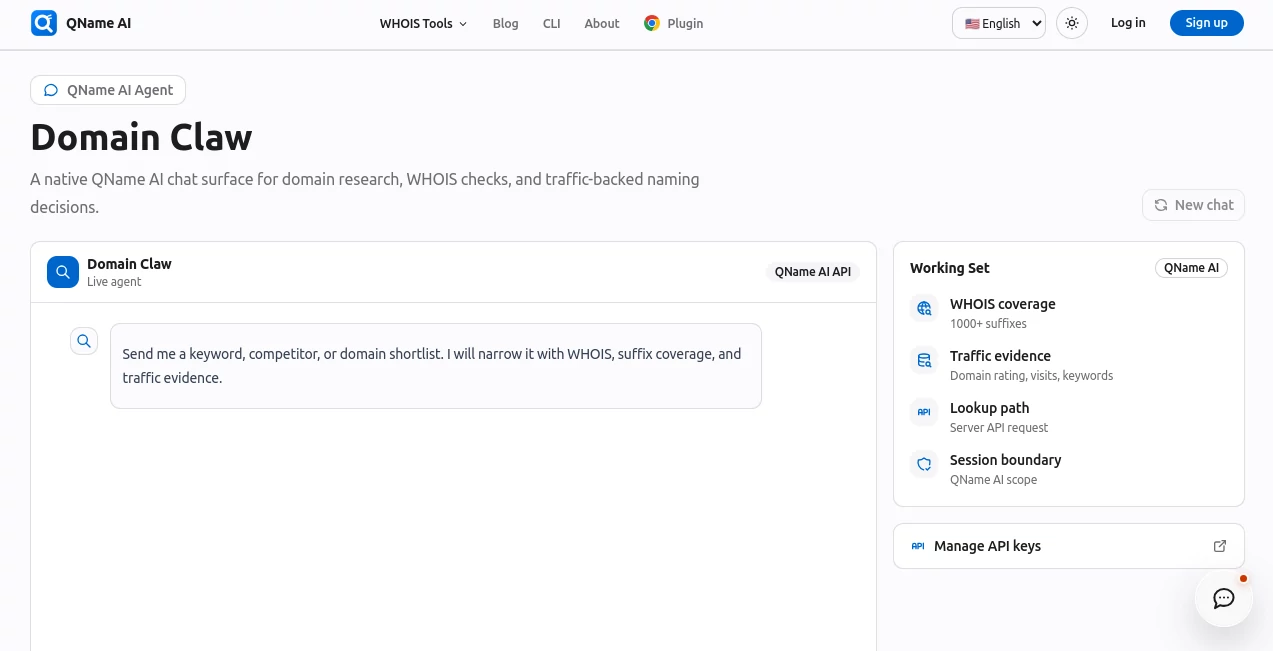
The interface is intentionally centered around conversation. Instead of presenting a crowded collection of filters, it provides a live agent surface where domain research can be approached through a chat workflow. This is a sensible design choice for exploratory searches because users often start with a broad idea and refine it as they discover new information.
The working set also makes the scope of the research visible, including WHOIS coverage, traffic evidence, the API request path, and the session boundary. That gives the experience a more focused feel than a generic AI chatbot with no clearly defined research purpose.
Accuracy & Performance
For domain research, useful answers depend heavily on the quality and freshness of the underlying data. The service combines WHOIS information with additional domain signals, including traffic-related evidence and keyword information. This creates a more useful research picture than checking registration status alone.
It is still important to treat any domain intelligence as decision-support data rather than a guarantee of future traffic, brand performance, or commercial success. A promising domain should ultimately be checked for trademarks, acquisition cost, historical reputation, and suitability for the intended business.
Capabilities
The strongest part of the experience is its focus. It is not trying to be a general-purpose assistant. Instead, it is built around domain discovery and research, with WHOIS information and market-related signals forming the foundation.
For example, someone planning a new AI product could use the agent to investigate several naming directions, compare available and registered domains, examine domain age, and review supporting signals before deciding which name deserves further attention. This makes the workflow particularly useful during the early stages of launching a website or online business.
Security & Privacy
The agent operates through an account-aware environment and a server API request path. The page also identifies a session boundary and provides an API-key management area, showing that access to the service is handled as an authenticated workflow rather than as an entirely anonymous lookup page.
As with any domain research service, users should avoid sharing confidential business information unless it is necessary for the task. API credentials should also be treated as private credentials and managed through the provided account controls.
Use Cases
- Startup naming: Explore domain options before committing to a company or product name.
- AI SaaS projects: Research domains around emerging AI categories and terminology.
- Domain investing: Examine age, registration information, and available traffic-related signals before evaluating a purchase.
- Rebranding: Investigate potential replacement domains before moving an established project to a new identity.
- Domain acquisition: Gather background information on registered domains that may be worth approaching the owner about.
- Marketing research: Study keyword and domain signals when assessing potential names for online projects.
Pros and Cons
Pros
- Focused specifically on domain research rather than general AI conversations.
- Combines WHOIS checks with additional domain intelligence.
- Supports more than 1,000 domain suffixes according to its working set.
- Conversational research can make exploratory domain searches easier.
- Traffic, keyword, and domain-rating signals can add useful context to a naming decision.
Cons
- It is specialized, so it will not replace a general-purpose AI assistant for unrelated tasks.
- Domain intelligence should be independently verified before making an expensive acquisition.
- Some functionality depends on account access and the available API scope.
Pricing Plans
The agent page does not publicly present a conventional list of subscription tiers or fixed prices. Access is connected to an account and the platform's API environment, so users should check the current account and API options before assuming that every research capability is available under the same plan.
For users evaluating it for professional domain research, the most important consideration is therefore not simply a monthly price but which WHOIS, traffic, and research capabilities are included with their level of access.
How to Use the Agent
- Open the Domain Lobster agent interface and sign in or check the available account access.
- Start with a domain idea, keyword, company concept, or specific domain that you want to investigate.
- Use the conversational interface to explore domain and WHOIS information.
- Review supporting signals such as domain age, traffic-related information, keywords, and domain rating where available.
- Compare several candidates rather than choosing the first available domain.
- For a serious acquisition, perform additional trademark, ownership, historical, and commercial checks before completing the purchase.
Comparison with Similar Tools
Traditional domain search services are usually excellent at answering one immediate question: is a domain available? That is useful, but it can leave the user with little context about a registered domain or the strength of an alternative name.
This agent takes a broader research-oriented approach. Its combination of conversational interaction, WHOIS coverage, and traffic-backed domain signals makes it more suitable when the goal is to investigate a naming opportunity rather than simply find an unregistered domain.
It also fits particularly well into early-stage startup research. A founder can move from an idea to a shortlist of domains and then investigate those candidates within the same research workflow. For experienced domain buyers, the additional signals can provide a useful starting point before deeper due diligence.
Conclusion
Choosing a domain is a small decision on the surface but can have a surprisingly large effect on a new project. A short, relevant name can become part of the brand for years, while a rushed choice can create problems that are difficult to undo.
The Domain Lobster approach is appealing because it treats domain discovery as research rather than a simple availability check. WHOIS information, broad suffix coverage, traffic-related evidence, keywords, and domain-rating signals give users more context when comparing potential names.
For founders, AI builders, marketers, and domain researchers who want to investigate names before making a commitment, it offers a focused workflow that can save time and lead to more informed domain decisions.
Frequently Asked Questions (FAQ)
What is this AI agent designed for?
It is designed for domain research, WHOIS checks, and making better-informed domain naming decisions. It combines conversational interaction with domain intelligence.
How many domain extensions does it cover?
The agent's working set states that its WHOIS coverage extends across more than 1,000 domain suffixes.
Can it provide traffic information?
Yes. The working set identifies traffic evidence including domain rating, visits, and keywords as part of the available research signals.
Is it useful for startup founders?
Yes. It can be useful when comparing possible company, product, SaaS, or AI project names before registering or acquiring a domain.
Does it only check whether a domain is available?
No. Availability is only one part of the research process. The experience is designed to investigate domains using WHOIS and additional domain-related signals.
Should I rely on its domain data before buying a domain?
It is better used as a research and decision-support tool. Before an expensive acquisition, independently verify ownership, trademarks, historical reputation, traffic claims, and the commercial value of the domain.
Does it offer API access?
The platform provides an API-oriented environment and an API-key management area. The exact capabilities and access available to an account should be checked in the current API settings.
AI Research Tool , AI Domain Name Generator .
These classifications represent its core capabilities and areas of application. For related tools, explore the linked categories above.

QName AI Agent Alternatives Product

Manus

TrueSource AI

LocalRAG!

SciFig
ZoraInsights

AI Job Risk …

Greek Numero…

Zloth

IntoTheBlock