
QuikQuik
What is QuikQuik?
There’s a special kind of relief when you can hand a client a professional, live website in under an hour instead of promising it for next week. This tool makes that possible. You describe the business in plain English or import a Figma design, and it generates a complete, hosted site with modern design, fast performance, and all the essentials already in place. Agencies and studios I’ve spoken with say it’s changed how they pitch and deliver—turning “we’ll get back to you” into “here’s your site, let’s tweak it together right now.” It feels like having an entire dev team that works at the speed of conversation.
Introduction
Building client websites the traditional way is slow, expensive, and full of back-and-forth. This platform flips the script. It combines smart AI generation with reliable AWS hosting so you can go from idea to live site in minutes, not days. Whether you start with a text prompt (“modern SaaS landing page for a project management tool”) or bring your own Figma design, it handles layout, copy, images, and deployment. The result is a clean, conversion-focused site with SSL, CDN speed, built-in SEO basics, and a simple client portal for easy handoff. For agencies juggling multiple clients and tight deadlines, it’s become one of those tools that quietly saves evenings and weekends.
Key Features
User Interface
The dashboard keeps things refreshingly straightforward. You can type a description, choose from industry templates, or upload a Figma file. Everything happens in one clean flow without unnecessary tabs or complexity. Previews appear quickly so you can iterate live with the client on the call. It never feels like wrestling software—just pointing the AI in the right direction and watching a real website take shape.
Accuracy & Performance
The generated sites look professional from the first try—good typography, balanced layouts, and sensible copy that matches the prompt. Because it deploys directly to AWS CloudFront, pages load fast globally with automatic SSL. In real use, agencies report first versions are often 80-90% ready, needing only small tweaks instead of full rebuilds. That speed and reliability compound when you’re delivering multiple sites per month.
Capabilities
You get full AI website generation from text or Figma, 20+ industry templates, custom domain support, mobile optimization, built-in analytics, and a client self-management portal. Sites are hosted reliably on AWS with CDN performance. You buy credits once and use them whenever needed—they never expire. It’s designed for speed without sacrificing the details agencies need to impress clients.
Security & Privacy
Everything runs on secure AWS infrastructure with automatic SSL. Client data stays protected, and the platform doesn’t require deep access to your other tools. For agencies handling multiple clients, that clean, secure deployment process removes a lot of the usual worries around hosting and handoff.
Use Cases
An agency lands a new SaaS client on Tuesday and delivers a polished live site by Wednesday afternoon. A freelance designer uses it to quickly prototype concepts during discovery calls, making proposals far more convincing. A studio building portfolio sites for creatives generates strong starter versions and then customizes the details. It shines whenever speed and professional appearance matter more than starting from a blank canvas.
Pros and Cons
Pros:
- Truly fast delivery—live websites in minutes instead of days.
- High-quality starting points that impress clients immediately.
- Flexible input methods: text prompts or Figma imports.
- Reliable AWS hosting with global CDN performance.
- Credits never expire, so you can work at your own pace.
Cons:
- Best as a powerful starting point—some clients still want deeper custom development.
- Advanced custom animations or complex functionality may need manual finishing.
Pricing Plans
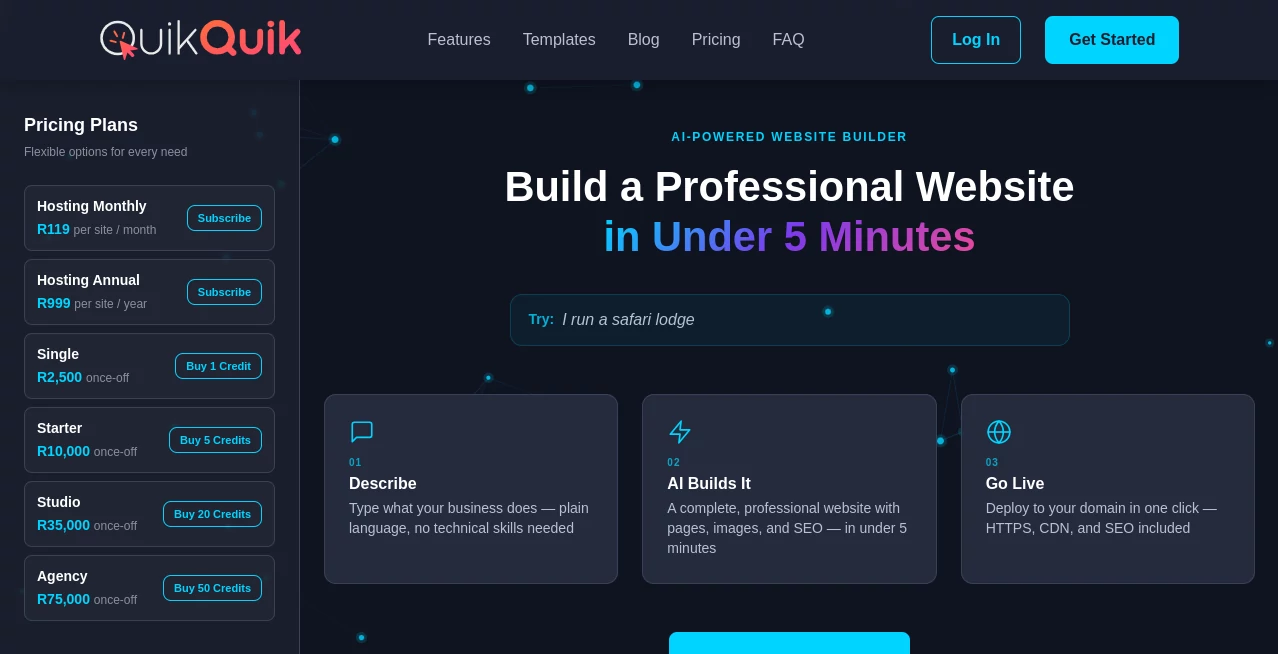
It’s credit-based and transparent. You buy credits once and use them over time as needed. Free or low-commitment options let you test the quality on small projects, while larger packs suit busy agencies delivering multiple sites per month. The model rewards efficiency—build faster, deliver more, and keep costs predictable.
How to Use QuikQuik
Describe your client’s business in plain English or upload a Figma design. Choose a starting template if you want a head start. Review the generated site, make quick edits, and publish—it deploys automatically with SSL and CDN. Share the live link with the client for instant feedback. Use the client portal for easy handoff or ongoing management. The whole process is designed to keep momentum instead of killing it with technical delays.
Comparison with Similar Tools
Traditional builders can feel slow and template-heavy. Other AI site generators often produce generic results or require heavy editing afterward. This one stands out for agencies because it balances speed with quality, offers strong Figma import, and deploys to professional AWS infrastructure. It’s less about replacing designers and more about removing the boring, time-consuming parts so creative teams can focus on what actually wins clients.
Conclusion
For agencies and studios under constant pressure to deliver faster without cutting corners, this tool is a genuine advantage. It turns website delivery from a bottleneck into a strength—fast, professional, and impressive from day one. When clients see a polished live site in the first meeting instead of waiting weeks, perceptions shift in your favor. In a competitive market, that kind of speed and quality becomes a real differentiator.
Frequently Asked Questions (FAQ)
How long does it take to generate a site?
Usually under 60 seconds for the initial version, then quick iterations after that.
Can I import my Figma designs?
Yes—strong Figma support is one of the standout features for design-focused teams.
Is hosting included?
Yes—deployed on AWS CloudFront with SSL, CDN, and good performance out of the box.
Do credits expire?
No—buy once and use whenever you need them.
Is it suitable for client handoff?
Absolutely—clean client portal and easy management tools make transitions smooth.
AI Website Builder , AI No-Code & Low-Code , AI Design Generator , AI Developer Tools .
These classifications represent its core capabilities and areas of application. For related tools, explore the linked categories above.

QuikQuik Alternatives Product

cznull

freellm.net

Z-Image

Niji V7

Ultralytics

AI Slop Canv…

img2img.net

VercelAPP

globalize.now