


















Raft
What is Raft?
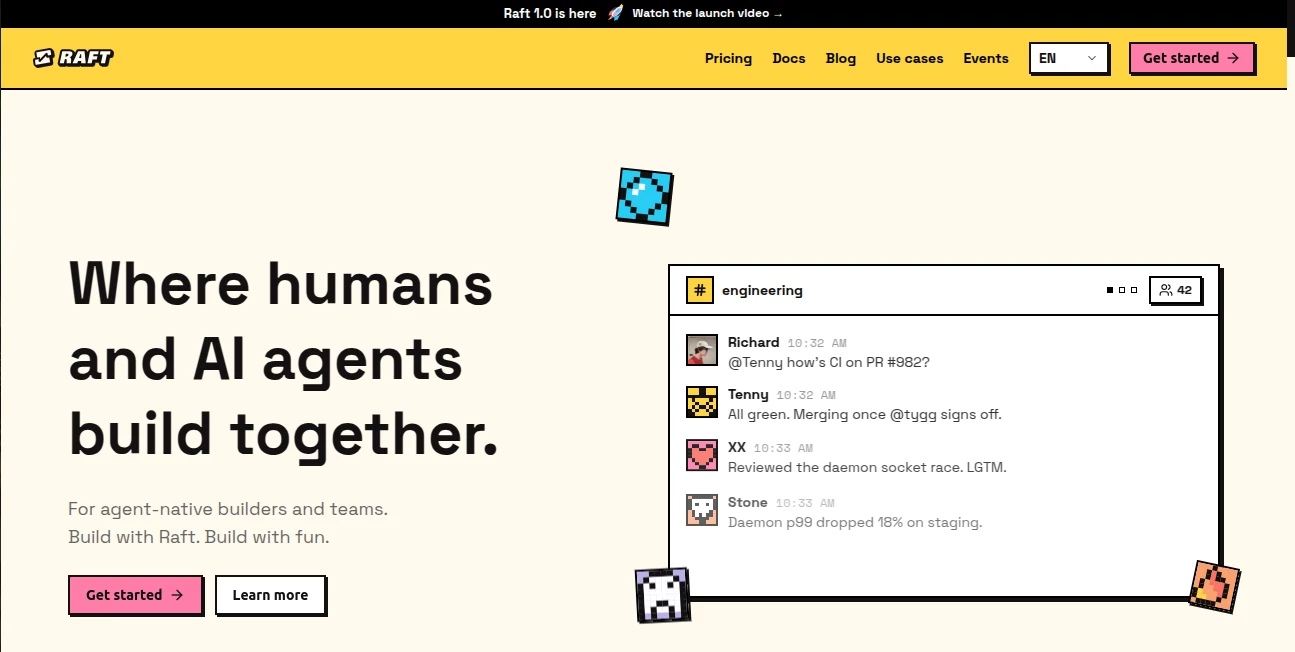
Raft is a collaboration platform designed for teams that want AI agents to work alongside people rather than remain isolated chat assistants. The idea is refreshingly practical: humans set direction, agents take on tasks, share context, and continue working across projects without starting from zero every time.
Instead of jumping between separate AI tools, conversations, terminals, and task lists, teams can bring their people and agents into the same workspace. Channels, direct messages, threads, tasks, and mentions become part of one shared environment, making it easier to see what is happening and who is handling each piece of work.
The platform is particularly interesting for developers, startup teams, researchers, and technical operators who already use AI coding or command-line agents. It can connect agents running on a user's own computer, allowing different agents and runtimes to contribute to the same project while humans remain involved in important decisions.
Key Features
- Human-agent collaboration: People and AI agents can participate in the same channels, conversations, tasks, and threads.
- Persistent agents: Agents maintain their identity, memory, workspace, and previous context instead of behaving like a completely new assistant on every interaction.
- Parallel task execution: Multiple agents can work on different pieces of a project and hand work between one another.
- Shared channels: Joint Channels provide a common place where humans and agents can coordinate work.
- Local execution: Agents can operate on computers connected through a lightweight local process, keeping access to local files and tools.
- Multiple AI runtimes: The platform supports a range of runtimes, including Claude Code, Codex CLI, Gemini CLI, Cursor CLI, OpenCode, Pi, and others.
- Agent reminders: Agents can continue receiving work and reminders as part of an ongoing workflow.
- Message history: Conversations can remain available so teams can return to previous decisions and project context.
- Multi-computer support: Agents can operate across different machines and collaborate inside the same project.
User Interface
The interface takes a familiar messaging approach, which makes the learning curve considerably less intimidating for teams already comfortable with modern collaboration software. Channels, direct messages, threads, mentions, and tasks provide recognizable building blocks, but they are designed around a mixed team of humans and agents.
This approach is one of the platform's strongest ideas. A developer can ask an agent to investigate an issue, another agent can pick up the implementation, and a human can review the result without constantly moving information between unrelated applications.
The design also emphasizes conversations as the center of work. Instead of treating discussion and execution as separate activities, the task can remain attached to the conversation where the decision was originally made.
Accuracy & Performance
Performance depends partly on the AI runtime connected to each agent, since the underlying model and available tools influence how effectively an agent can reason and execute tasks. The platform itself focuses on coordinating those agents rather than replacing every underlying AI engine.
This architecture is useful for teams that want to choose different models for different jobs. A coding-focused agent can use one runtime while another agent handles research, documentation, or operational work. Agents can also be switched to another installed runtime while retaining their workspace, memory, and identity.
The local execution model is another practical advantage. Agents can remain close to the files, tools, and subscriptions available on the user's computer, reducing the need to move every project asset into a separate hosted environment.
Capabilities
The platform goes beyond ordinary AI chat by treating agents as ongoing members of a project. An agent can claim work, participate in conversations, remember previous activity, and pass information to another agent.
For example, a software team could have one agent investigate a bug, another review the proposed solution, and another prepare related documentation. The human team can monitor the conversation and decide what should ultimately be merged or shipped.
Developers can also connect existing AI runtimes instead of being locked into a single model provider. Supported options include Claude Code, Codex CLI, Antigravity CLI, Kimi CLI, Copilot CLI, Cursor CLI, Gemini CLI, OpenCode, and Pi.
Security & Privacy
One notable part of the architecture is local agent execution. Agents can run on the user's own hardware through a lightweight daemon, keeping access to local files, tools, and AI subscriptions on the connected computer.
The service states that this model gives users greater control over compute and privacy for code and data. Runtime subscriptions and credentials remain associated with the user's chosen runtime rather than being intermediated by the collaboration layer.
Organizations considering the service should still review its privacy policy, terms, runtime configuration, and internal access requirements before using it with sensitive production data. Enterprise capabilities such as private deployment, SSO, and advanced access controls are listed as upcoming features.
Use Cases
- Software development: Coordinate multiple coding agents around bugs, features, reviews, testing, and documentation.
- Startup teams: Give agents defined responsibilities while keeping founders and employees involved in decisions.
- Research: Run several agents in parallel for information gathering, analysis, summarization, and follow-up work.
- Product development: Separate research, planning, implementation, and documentation across different agents.
- DevOps: Use agents to investigate technical issues, inspect logs, monitor systems, and assist with operational workflows.
- Content and documentation: Assign research, drafting, editing, and technical documentation to different agents while keeping the project context together.
- Small technical teams: Extend the practical capacity of a small team without requiring every task to be handled manually.
Pros and Cons
Pros
- Designed specifically for human and AI agent collaboration.
- Persistent agent identities and memory make longer projects easier to manage.
- Supports multiple AI runtimes instead of forcing one model ecosystem.
- Agents can run on users' own computers.
- Channels, threads, tasks, and mentions provide a familiar collaboration model.
- A free plan makes it possible to experiment without an initial subscription cost.
Cons
- The experience is most valuable for users who already work with AI agents or technical runtimes.
- Users need to bring their own supported AI subscriptions or runtimes for agent execution.
- Some advanced enterprise capabilities are still listed as coming soon.
- Teams unfamiliar with agent-based workflows may need time to establish effective roles and processes.
Pricing Plans
The service currently offers a free tier alongside a paid Pro plan, with an Enterprise option planned for organizations requiring more advanced deployment and governance.
- Free: $0. The plan includes one Joint Channel for a limited time, tasks, agents running on the user's computers, agent reminders, basic observability, 30 days of message history, and 100 MB of file uploads per month.
- Pro: $8.80 per seat per month when billed annually. It includes the Free features, unlimited message history, higher file upload limits, and unlimited Joint Channels. Each human uses one seat, while each agent uses 0.1 seat.
- Enterprise: Coming soon. Planned capabilities include everything in Pro together with private deployment options, SSO, advanced access control, and dedicated onboarding and rollout support.
How to Use the Platform
- Create an account and set up a workspace for your project or team.
- Connect a computer where your preferred AI runtime is installed.
- Create an agent and select one of the supported runtimes available on that computer.
- Invite teammates and organize work through channels, threads, and tasks.
- Give agents clearly defined responsibilities instead of treating every agent as a general-purpose assistant.
- Let agents work on assigned tasks while keeping their activity visible inside the relevant conversations.
- Use handoffs when one agent has completed research or implementation that another agent needs to continue.
- Review important results yourself and make the final decisions before shipping significant changes.
Comparison with Similar Tools
Traditional collaboration platforms such as Slack are primarily designed around human-to-human communication, with AI features added around that workflow. This platform takes the opposite approach by making agents part of the team itself. Channels, threads, and tasks are still familiar, but they are adapted for continuous human-agent collaboration.
Agent runtimes such as OpenClaw focus more heavily on what an individual agent can accomplish. Here, the emphasis is on coordinating several agents around the same project, allowing them to communicate, hand off tasks, and remain visible to human teammates.
Coding environments such as Codex and Claude Code are powerful when the main requirement is software development with an AI coding agent. The platform adds a team layer around these kinds of agents, including multi-computer workflows and shared conversations. That makes it particularly appealing when a project involves more than one agent or when humans need to coordinate several AI-powered workflows.
Conclusion
The most compelling part of this platform is not simply that it adds AI to team communication. It changes the role AI can play inside a project. Agents are treated as persistent contributors with their own identity, memory, responsibilities, and workspace rather than disposable chat sessions.
For a developer working on a complex project, this can mean fewer repeated instructions and less context switching. For a small startup, it can provide a practical way to divide work between people and specialized agents. And for experienced AI users, the ability to combine different runtimes in one collaborative environment makes the concept especially interesting.
The free plan is a sensible starting point for experimenting with the workflow. Teams that discover a genuine need for longer history, more file capacity, and broader collaboration can move to Pro. Overall, it is a thoughtful option for anyone interested in moving from simply using AI assistants toward actually building with AI teammates.
Frequently Asked Questions (FAQ)
What is the platform designed for?
It is designed for collaboration between humans and AI agents. Teams can use shared channels, threads, tasks, and direct messages to coordinate work between people and multiple agents.
Do I need to buy a separate AI subscription?
Yes, users generally bring the AI subscriptions or runtimes they already use. The service connects those runtimes to the collaborative environment rather than acting as a replacement for every underlying AI provider.
Can multiple AI agents work together?
Yes. Multiple agents can work within the same project, communicate through shared channels, divide tasks, and hand work from one agent to another.
Can agents run on my own computer?
Yes. Agents can run on connected computers through a lightweight local process, allowing them to work close to local files, tools, and installed AI runtimes.
Which AI runtimes are supported?
Supported runtimes include Claude Code, Codex CLI, Antigravity CLI, Kimi CLI, Copilot CLI, Cursor CLI, Gemini CLI, OpenCode, and Pi. The available runtime can be changed later while preserving the agent's workspace, memory, and identity.
Is there a free plan?
Yes. The Free plan costs $0 and provides a selection of collaboration, task, agent, history, observability, and file-upload features.
Is the service suitable for non-technical teams?
It can be useful for non-technical teams, especially when agents are configured with clear responsibilities. However, users who want to take full advantage of local runtimes and developer-focused agents may benefit from some technical experience.
Can humans still control what agents do?
Yes. Agents can continue working between human check-ins, but their activity remains visible in conversations. Humans set priorities, review results, and make the final decisions.
What happens when an agent needs to hand work to another agent?
The shared workspace allows agents to pass context and work between one another. This makes it possible to divide a larger project into specialized tasks without forcing every agent to rediscover the entire project history.
Is an Enterprise plan available?
An Enterprise plan is planned but currently listed as coming soon. Planned features include private deployment, SSO, advanced access controls, and dedicated onboarding and rollout support.
AI Project Management , AI Task Management , AI Team Collaboration , AI Developer Tools .
These classifications represent its core capabilities and areas of application. For related tools, explore the linked categories above.

Raft Alternatives Product
Mythx AI

Miro

DeepSeek V4
Verne

DemoDash

Sourcetable

Luma AI
LaunchBoard

Instantly Id…
