

















AI Dance Generator | ReelMuse

What is AI Dance Generator | ReelMuse?
ReelMuse is an AI-powered dance video generator that turns a single photo into a short dancing video. Instead of filming a performance or learning complicated video editing software, users can upload a clear photo, choose a dance template, and let the system apply the movement to the subject.
The workflow is particularly interesting for social media creators, casual users, and anyone who wants to give a still image some personality. The generator supports people, babies, and pets, while users can also upload their own motion video when they want more control over the movement.
The experience is built around a simple idea: start with a good image, select a movement, generate the clip, and review the result. This makes it approachable even for users who have little experience with AI video creation.
Key Features
User Interface
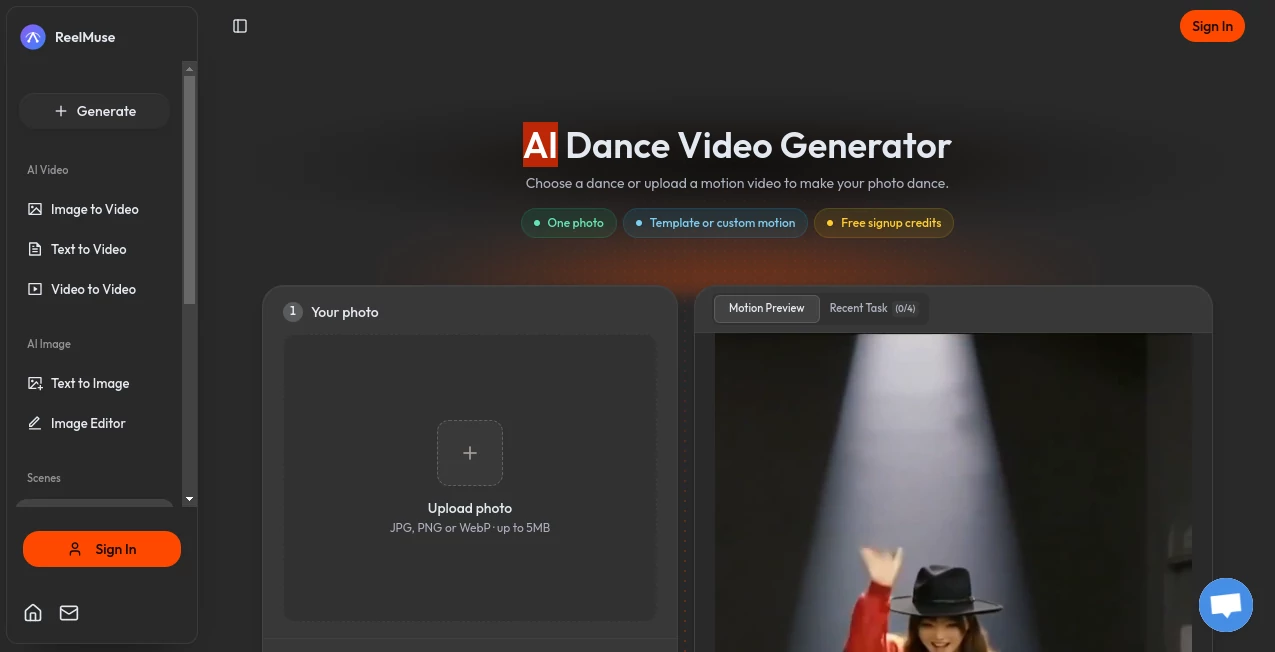
The interface keeps the main workflow straightforward. Users first upload a JPG, PNG, or WebP image of up to 5MB. They can then browse available dance templates or upload a video to use as a custom motion reference.
Dance templates can be filtered by subject and duration, which makes it easier to find a movement suitable for a particular image. There is also an optional notes field for adding a small instruction when the user wants to fine-tune the generated result.
Accuracy & Performance
The quality of the final clip depends heavily on the source image and the selected movement. A full-body photograph with a clearly visible face, arms, and legs gives the generator more useful visual information than a tightly cropped or heavily obscured picture.
The platform itself recommends keeping the subject easy to see, using even lighting, and choosing movement that matches the original pose. This is a practical approach because complicated choreography can make consistency more difficult, particularly around hands, feet, and facial details.
Generated clips can have different durations depending on the selected motion, with available templates ranging from short movements to clips lasting more than 20 seconds. Output quality on the dance generator is listed at 720p.
Capabilities
One of the more useful aspects of the generator is that users do not necessarily need to write a detailed dance prompt. A selected template already provides the motion reference, so the user can concentrate on choosing the right photo and movement.
For more flexibility, a personal dance video can be uploaded as the motion reference. This makes the workflow useful for creators who have a particular performance or choreography in mind rather than simply wanting to experiment with a preset.
The template collection includes different styles and scenarios, including K-pop, Amapiano, shuffle, stage performance, and other movements. Separate categories are also available for baby and pet dance creations.
Security & Privacy
Payments are handled through Stripe, and the service states that full card details are never shared with the platform. Available payment methods include major cards and digital payment options.
Users should also make sure they have the appropriate rights to any photographs or motion videos they upload. This is especially important when creating content featuring other people, recognizable individuals, or material intended for commercial use.
Use Cases
Social media creators can use the generator to turn portraits, character images, or existing photos into short clips suitable for visual posts. A still image that would normally remain static can become a more engaging piece of content with only a few steps.
It can also be useful for entertainment and personal projects. For example, a user could take a full-body portrait and apply a K-pop-inspired movement, or turn a pet photograph into a playful dance clip.
For marketing teams and creators, the tool can provide a quick way to experiment with short-form visual concepts before investing time in a larger production. Since purchased-credit generations do not carry a watermark, the paid workflow can also be suitable for commercial content when the user's source material is properly licensed.
Pros and Cons
One major advantage is the simplicity of the workflow. Users can begin with one photograph and do not need to understand complex animation software. The ability to choose from ready-made movements also removes much of the guesswork involved in writing motion prompts.
Another useful feature is the option to upload a custom motion video. This gives experienced creators a way to move beyond the preset templates.
There are limitations as well. The generated result does not guarantee an exact copy of the original person's identity, choreography, or timing. Complex movements may also produce less consistent hands, feet, or body proportions. Choosing a clear source image and relatively simple choreography can help reduce these problems.
Pricing Plans
The service offers subscription plans as well as pay-as-you-go credit options. The Lite plan is listed at $9.90 per month, with an annual option of $99 and 12,000 credits issued upfront.
The Pro plan is listed at $29.90 per month, or $299 when billed yearly, and provides 42,000 credits per year. The Studio plan is listed at $49.90 per month, or $499 annually, with 72,000 credits issued upfront.
All listed plans include access to the available video models, text, image, and video inputs, visible credit costs before generation, and commercial use with rights to user-provided inputs. Purchased-credit generations are presented without a watermark, while generations made entirely with signup or daily-login credits carry a watermark.
The actual credit cost depends on the selected workflow, model, and settings, so users should check the displayed generation cost before creating a video.
How to Use It
Start by uploading a clear photograph in JPG, PNG, or WebP format. A full-body image is generally preferable when the chosen movement involves steps or noticeable arm movement.
Next, browse the available dance templates and preview the movements. Choose one that matches the pose and proportions of the person, baby, or pet in the source image. If a specific movement is preferred, upload a suitable motion video instead.
Add an optional note if there is a particular detail that needs attention, then check the displayed credit cost and start the generation. Once processing is complete, review the entire clip rather than judging it from a single frame. If something looks unusual, try a clearer source image or simplify the movement before generating another version.
Comparison with Similar Tools
Many AI video platforms focus primarily on generating scenes from written descriptions, while this workflow is centered on animating an existing image. That distinction can make it more suitable when keeping a particular person, pet, or illustrated character as the starting point is important.
Traditional video editing software offers much greater manual control, but it also requires more time and technical knowledge. Template-based AI animation sits between these approaches: it provides less frame-by-frame control than professional editing software while making the creation process considerably faster.
Compared with general image-to-video workflows, a dedicated dance generator also removes some of the prompt-writing work because the motion is supplied by the selected dance template. Users who need a specific choreography can instead provide their own motion reference.
Conclusion
This AI dance video generator offers a practical way to turn ordinary photographs into short, entertaining motion clips. Its strongest point is the uncomplicated workflow: upload a photo, choose a movement, generate the video, and review the result.
The combination of ready-made dance templates and custom motion references gives both casual users and creators room to experiment. Results still depend on the quality of the source image and the complexity of the requested movement, but careful photo selection and simpler choreography can make a noticeable difference.
For anyone looking for a quick way to animate people, pets, babies, or visual characters without setting up a traditional video shoot, this is an accessible option worth exploring.
Frequently Asked Questions (FAQ)
Do I need to write a dance prompt?
No. A dance template already supplies the motion reference. Users can upload a photo, select a template, and generate the clip without writing a detailed prompt. Additional notes are optional.
Can I use my own dance video?
Yes. A personal motion video can be uploaded through the dance selector and used as a reference for animating the chosen photograph.
Which dance styles are available?
The template collection includes styles and movements such as K-pop, Amapiano, shuffle, beat-drop spins, and stage performances. Baby and pet-specific templates are also available.
Will the generated video copy the dance exactly?
Not necessarily. The source image and motion reference guide the generation, but exact identity, choreography, and timing are not guaranteed. It is recommended to inspect the face, hands, feet, and body throughout the finished clip.
Can I make a baby or pet dance video?
Yes. Dedicated template categories are available for babies and pets. Smaller movements such as gentle sways, paw lifts, hand gestures, and head movements are generally more suitable than complicated choreography.
How much does a dance video cost?
The generator displays the credit cost before generation. The amount can vary according to the selected workflow and settings. Users can choose between subscriptions and credit-based purchasing options.
Will the generated video have a watermark?
Videos generated entirely with signup or daily-login credits carry a watermark. Generations made with purchased credits are watermark-free.