
RemoveFrom.Video
What is RemoveFrom.Video?
Creating a polished video often means removing distracting elements such as watermarks, subtitles, timestamps, logos, or unwanted objects. Traditionally, this required advanced editing software, technical experience, and a significant amount of time. Thanks to modern artificial intelligence, that process has become much faster and more accessible.
This online solution automatically detects and removes unwanted content while preserving the original quality of the footage. Instead of leaving blurry patches or obvious edits, the AI intelligently reconstructs the surrounding area to create natural-looking results. Whether you are cleaning up personal videos, preparing marketing materials, or improving social media content, the platform makes professional video editing available to everyone without requiring complicated software.
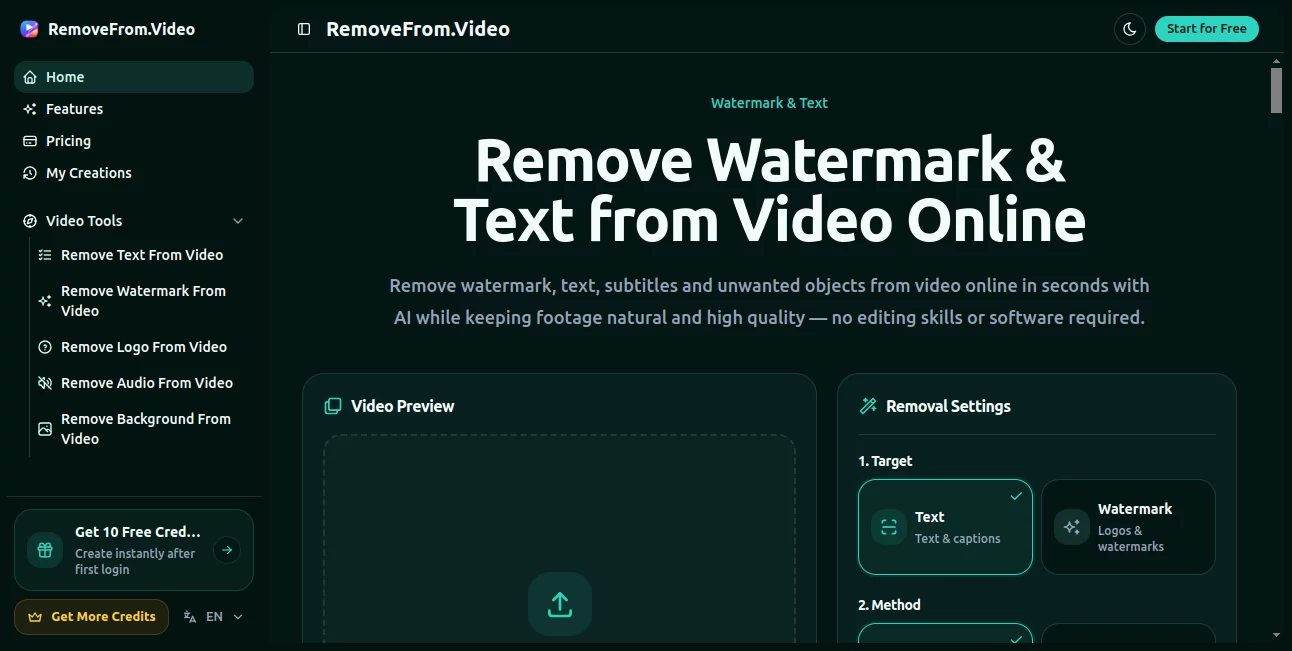
The entire workflow is browser-based, making it easy to upload a video, select the unwanted element, and receive a clean version within minutes. Even users with no editing background can achieve impressive results with just a few clicks.
Key Features
- Remove watermarks from videos automatically.
- Erase subtitles without noticeable visual artifacts.
- Delete logos, timestamps, text, and unwanted objects.
- AI-powered scene reconstruction for natural-looking footage.
- Works directly in a web browser without software installation.
- Fast processing suitable for short and long videos.
- Maintains high video quality after editing.
- Simple workflow designed for beginners and professionals.
- Supports multiple types of video content.
- No advanced editing knowledge required.
User Interface
The interface is refreshingly straightforward. Uploading a video, selecting the area that needs to disappear, and starting the processing takes only a few moments. The layout avoids unnecessary complexity, making it approachable for first-time users while remaining efficient for experienced content creators who value speed.
Accuracy & Performance
One of the strongest aspects of the platform is how naturally it fills the removed areas. Instead of simply blurring or cropping content, the AI analyzes nearby frames and reconstructs missing details to blend seamlessly with the original scene. This produces clean edits that look significantly more professional than traditional masking techniques in many common situations.
Processing is generally quick, allowing creators to complete editing tasks without waiting for lengthy rendering sessions. The final output retains impressive visual quality, making it suitable for online publishing and professional presentations.
Capabilities
The platform can remove many common distractions found in videos, including watermarks, subtitles, captions, logos, timestamps, unwanted people, objects, and other visual elements. It is useful for marketing videos, educational content, product demonstrations, social media clips, travel videos, presentations, and archived footage that needs cleaning before redistribution.
Security & Privacy
Because everything works online, users can complete editing without installing additional applications. This simplifies the workflow across different operating systems. As with any cloud-based service, users should review the provider's privacy policy before uploading confidential or sensitive videos.
Use Cases
- Cleaning subtitles from educational videos.
- Removing watermarks from personal footage where appropriate.
- Preparing promotional videos for marketing campaigns.
- Improving social media content before publishing.
- Removing distracting objects from travel videos.
- Enhancing product demonstrations.
- Editing business presentations.
- Creating cleaner video portfolios.
Pros and Cons
Pros
- Extremely easy to use.
- No software installation required.
- Natural AI-powered object removal.
- Maintains impressive video quality.
- Fast processing workflow.
- Suitable for beginners.
- Works entirely online.
Cons
- Complex moving backgrounds may require additional adjustments.
- Large video files can take longer to process.
- Internet connection is required.
Pricing Plans
The platform offers online AI video editing services with pricing options that may vary depending on usage requirements and available features. Users should check the official pricing page for the latest plans, supported limits, and commercial options.
How to Use RemoveFrom.Video
- Upload your video through the online editor.
- Select the watermark, subtitle, text, or unwanted object.
- Start the AI processing.
- Wait while the scene is reconstructed automatically.
- Preview the cleaned video.
- Download the finished result.
Comparison with Similar Tools
Compared with traditional desktop video editors, this solution dramatically reduces the amount of manual work required for object removal. Instead of using frame-by-frame masking or advanced editing techniques, artificial intelligence performs the difficult reconstruction automatically.
Compared with many online editors that rely on simple blurring or cropping, the reconstructed output appears significantly more natural, preserving the original composition whenever possible. This makes it an attractive choice for creators who prioritize both speed and visual quality.
Conclusion
Removing distracting elements from video no longer requires expensive software or professional editing experience. This AI-powered solution delivers a fast, intuitive workflow capable of producing remarkably clean results while preserving video quality.
For content creators, marketers, educators, businesses, and everyday users who regularly work with video, it provides an efficient way to produce cleaner and more polished footage in just a few simple steps. The combination of intelligent reconstruction, browser-based accessibility, and ease of use makes it a valuable addition to any modern video editing workflow.
Frequently Asked Questions (FAQ)
Can it remove video subtitles automatically?
Yes. The AI is designed to remove subtitles while reconstructing the background as naturally as possible.
Can beginners use this platform?
Absolutely. The workflow is simple enough for users without any video editing experience.
Does it require software installation?
No. Everything is performed online through a web browser.
Can it remove logos and watermarks?
Yes. It supports removing watermarks, logos, text, timestamps, and many other unwanted visual elements.
Is the output suitable for professional content?
In many common editing scenarios, the AI produces high-quality results that are suitable for marketing, business, educational, and social media videos.
AI Video Generator , AI Content Generator , AI Video Editor , AI Video Enhancer .
These classifications represent its core capabilities and areas of application. For related tools, explore the linked categories above.
RemoveFrom.Video details
Website unavailable — View Alternatives
Pricing
- Free
Apps
- Web App
Categories

RemoveFrom.Video Alternatives Product

Free AI Gene…

Schedpilot

Veo 3.2

RenderFlow AI

Gemini Omni …

LTX 2.3 AI V…

Veo 3.2

GPT Image 2-…

vizstudio