AI Resume Builder - Beat ATS
What is AI Resume Builder - Beat ATS?
Let’s be honest for a second. Nobody actually enjoys writing a resume from scratch. Staring at a blank page, trying to remember what you did three jobs ago, and worrying whether your font choice looks unprofessional – it’s a headache we’ve all been through. That’s exactly why this tool exists. It takes the pain out of resume building and turns it into something surprisingly simple, maybe even a little satisfying.
This platform isn’t just another template factory. It thinks about what recruiters actually want to see. Clean layouts, smart phrasing suggestions, and a workflow that doesn’t make you want to close the tab after two minutes. Whether you're a fresh graduate with zero experience or a senior manager with too many achievements to list, this builder adapts to you. No fluff, no confusing menus – just a straight path to a resume that opens doors.
Key Features
What makes this resume builder stand out from the dozens of other options out there? It’s not one big thing. It’s the small details that add up to a genuinely helpful experience.
User Interface
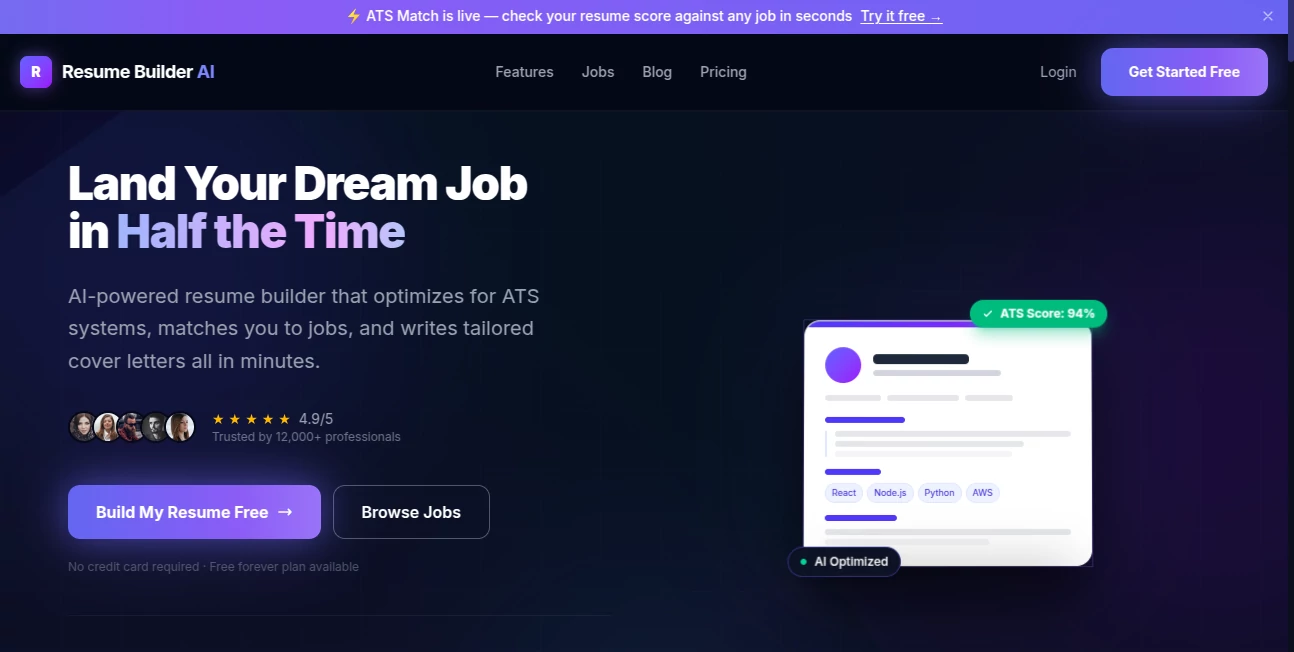
The moment you land on the page, nothing screams for attention. No flashing pop-ups, no "upgrade now" banners blocking your view. Just a clean, left-to-right workflow that guides you section by section. You fill in your details on one side, and on the other side, you see your resume come together in real time. That live preview is a game changer. Change a bullet point? It updates instantly. Switch a template? You see the result before committing. Everything feels smooth, like the tool is staying out of your way so you can focus on your story.
Accuracy & Performance
Here’s something most people don’t think about until it’s too late – spell check and grammar. You’d be shocked how many resumes get tossed because of a simple typo. This builder has a built-in proofreader that catches those embarrassing mistakes. It also checks for things like inconsistent date formatting, missing contact info, or overused buzzwords like "synergy" and "go-getter." The performance is snappy too. No lag when you type, no waiting ten seconds for a new section to load. It just works.
Capabilities
This isn’t just a one-trick pony. Beyond the standard resume builder, you get multiple template styles – from classic corporate to modern creative. You can download your final resume as PDF, DOCX, or even plain text for those old-school application systems. There’s also a cover letter builder attached, which saves a ton of time because it pulls your info automatically. No need to retype your work history for the hundredth time. For people applying to dozens of jobs, that’s a lifesaver.
Security & Privacy
Your personal information stays yours. The platform doesn’t store your resumes on some vulnerable server without your permission. You can save your progress to a local draft or work entirely in guest mode. When you finally download your resume, nothing gets shared with third parties. No hidden clauses about selling your data to recruiters. For something as sensitive as your phone number, email, and work history, that peace of mind matters.
Use Cases
Imagine a few real people. Sarah just finished her computer science degree. She has some freelance projects but no formal work experience. The builder’s "skills-first" template helps her highlight what she can do, not where she’s worked. Then there’s Mike, a construction site supervisor for fifteen years. He needs a traditional, straightforward resume that shows promotions and certifications. The chronological template does that perfectly. And what about Elena, a graphic designer switching industries? She needs a modern layout with room for a portfolio link. This tool has her covered too. Teachers, nurses, sales reps, even CEOs – anyone who needs a job can use this.
Pros and Cons
Pros:
- Live preview shows changes instantly as you type
- Built-in spell check and grammar suggestions catch common errors
- Multiple export formats including PDF and DOCX
- No account required to build and download your resume
- Templates range from conservative to creative, fitting any industry
Cons:
- Advanced customization like moving sections freely isn’t available
- The free version includes a small watermark on the corner of your PDF
- Some users might want more font choices beyond the five included styles
Pricing Plans
There’s a forever-free plan that lets you build one resume at a time with access to all basic templates. You can download it as PDF, but there’s a tiny "Made with" line at the bottom. It’s barely noticeable but it’s there. The Pro plan removes that watermark, unlocks all premium templates (about twelve additional designs), and gives you unlimited resume storage. Pro costs a flat $9 per month or $45 for a full year – which brings the monthly price down to less than four bucks. Compared to paying someone $200 to write your resume, this feels like pocket change.
How to Use This Resume Builder
Step one: open the website. That’s it. You don’t need to sign up first. Start by picking a template that feels right for your industry. Then fill in your contact details – name, phone, email, location. The builder will ask for your work history next. Add each job one by one. For each role, write a few bullet points about what you actually did. If you’re stuck, there are example bullets you can borrow and tweak. After that comes education, then skills, then any extra sections like certifications or languages. Once everything looks good on the live preview, hit the download button. Choose PDF for most job applications or DOCX if you want to edit later. You’ll have a professional resume in under twenty minutes.
Comparison with Similar Tools
Most resume builders fall into two camps. The first camp is overly simple – they give you a basic form and call it a day. The second camp is overly complicated – they try to sell you career coaching, LinkedIn optimization, and a dozen add-ons you don’t need. This tool sits right in the middle. Compared to Canva’s resume builder, this one is faster and more job-search focused. Canva is great for design but terrible for content structure. Compared to Zety or Novoresume, this platform is more affordable and doesn’t lock basic features behind a paywall. You can actually download a usable resume without paying a dime. That alone puts it ahead of many competitors.
Conclusion
A great resume won’t land you a job by itself – but a bad one will absolutely stop you from getting an interview. This builder removes the common obstacles that make people procrastinate on updating their resume. The interface is friendly, the templates look sharp, and the final output passes both automated tracking systems and human eyes. If you’ve been putting off fixing your resume because it feels like a chore, give this one a shot. Worst case, you waste ten minutes. Best case, you walk away with a document that actually feels like you – just a more polished, professional version.
Frequently Asked Questions (FAQ)
Do I need to create an account to use this?
No. You can build and download your resume without signing up for anything. Creating an account just lets you save multiple resumes for later editing.
Can I edit my resume after downloading it?
Yes. If you download as DOCX, you can open it in Microsoft Word or Google Docs and make changes. If you download as PDF, you’ll need to go back into the builder to edit and then re-export.
Is my data safe on this platform?
Absolutely. The tool doesn’t store your personal information unless you explicitly create an account and save a resume. No data is sold or shared with recruiters or third parties.
What if I have no work experience?
The builder includes templates designed for students and entry-level job seekers. You can focus on education, projects, volunteer work, and skills instead of traditional work history.
Can I use this for academic CVs or federal resumes?
For standard job applications, yes. For very specific formats like academic CVs (which need publications and research sections) or federal resumes (which require extreme detail), you might need a more specialized tool. But for 95% of job seekers, this works perfectly.
AI Cover Letter Generator , AI Resume Builder , AI Productivity Tools , AI Writing Assistants .
These classifications represent its core capabilities and areas of application. For related tools, explore the linked categories above.
AI Resume Builder - Beat ATS details
Website unavailable — View Alternatives
Pricing
- Free
Apps
- Web App
Categories

AI Resume Builder - Beat ATS Alternatives Product

VisualGPT

Vibebot.gg

Jasper

AntForms
ResumeFreePro

GenPPT AI
KronoPrompt

Resuque

Debate Tello…