
RimFit
What is RimFit?
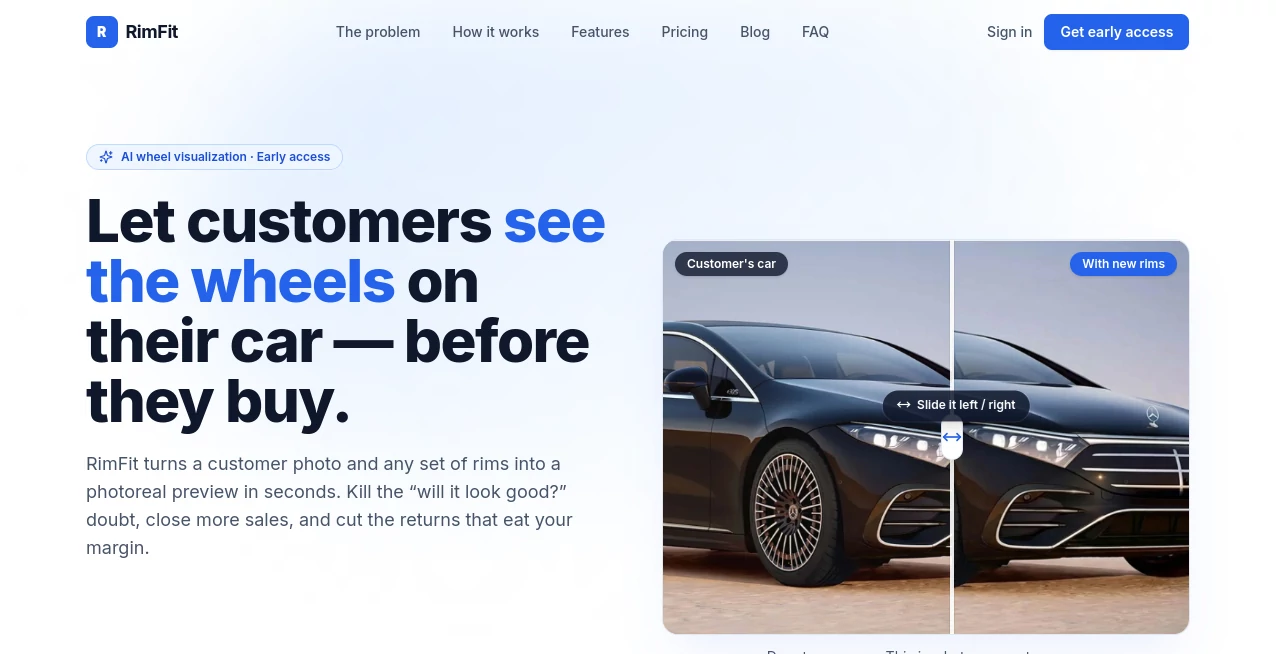
Walk into any tire and rim shop on a Saturday afternoon and you'll see the same scene play out over and over. A customer is standing at the counter, staring at a catalog photo of a wheel mounted on someone else's car, trying to imagine how it would look on their own. Nine times out of ten, they can't quite picture it, and that gap between "I like this wheel" and "I'm buying this wheel today" is where a lot of sales quietly slip away. This is the exact problem a new AI-powered visualization tool sets out to solve. Instead of asking customers to use their imagination, it shows them a photoreal image of their actual vehicle wearing the rims they're considering, generated in seconds right at the counter.
What makes this approach interesting isn't just the novelty of AI image generation. It's the way the tool is built specifically around the daily friction points of a wheel and tire business: hesitant buyers, slow manual mockups, and the costly returns that happen when someone buys a wheel that turns out not to fit or not to look the way they expected. Rather than being a generic image editor repurposed for cars, this is software built from the ground up for the counter, the sales floor, and the realities of fitment.
Key Features
User Interface
The workflow is built to be used by anyone on staff, not just a tech-savvy manager. A salesperson snaps a photo of the customer's car, picks the rims being pitched from the shop's catalog, and the rest happens automatically. There's no layering, no manual masking, none of the fiddly work that used to make Photoshop mockups a non-starter on a busy floor. The result is a clean, branded page that can be pulled up on a tablet or sent straight to the customer's phone.
Accuracy & Performance
Speed is one of the headline numbers here. A render typically completes in seconds rather than the minutes or hours a manual mockup would take, which matters a lot when a customer is standing right there waiting for an answer. The compositing is designed to keep the wheel's true size, finish, and proportions intact against the customer's actual vehicle, so the preview looks like a real photo rather than an obvious cut-and-paste job.
Capabilities
Beyond the visual preview, there's a fitment check that runs in the background, flagging bolt pattern, offset, and clearance issues before a quote ever goes out. That's a meaningful detail for any shop owner who has eaten the cost of a wheel that physically couldn't bolt onto a customer's car. The platform also builds an itemized install quote on the fly, covering things like lug nuts, TPMS sensors, and mount-and-balance labor, so the customer sees a full picture of the purchase rather than just a wheel price. Adding inventory to the catalog is handled by pasting a product URL, with the system pulling the name, specs, and image automatically instead of requiring manual data entry for every SKU.
Security & Privacy
Customer photos and vehicle data are handled through a modern, production-grade infrastructure stack rather than a patchwork of free tools, which matters for a shop handing over real customer images and contact information. Shared preview pages are also branded to the shop rather than generic, which keeps the customer experience consistent and professional from the first upload to the final quote.
Use Cases
- A tire and rim shop wants to turn a hesitant "let me think about it" into a closed sale on the spot.
- A sales team wants to upsell a full wheel package by showing the finished look before the customer commits.
- A shop owner wants to cut down on returns caused by wheels that don't suit a customer's vehicle once mounted.
- A counter employee with no design background needs to produce a professional mockup without touching Photoshop.
- A shop wants to catch bolt pattern or clearance mismatches before a deposit is taken, not after.
Pros and Cons
- Pro: Generates a photoreal preview of the customer's own car in seconds, no design skill required.
- Pro: Built-in fitment checking helps prevent costly wrong-fit returns.
- Pro: Branded, shareable pages give the shop a more polished, professional customer experience.
- Pro: Bulk catalog import via product URL saves significant setup time.
- Con: Currently positioned as an early-access product, so the feature set is still expanding.
- Con: Built specifically for wheel and tire shops, so it won't be a fit for general automotive marketing needs.
- Con: Available only in the US and Canada at this stage.
Pricing Plans
The platform offers a free starting tier, with paid plans beginning at $49 per month for a Basic option and $99 per month for a Pro option, alongside a custom Enterprise tier for larger operations. Every paid plan comes with a 14-day free trial, and shops that sign up early can lock in Pro-level access at no cost as part of the launch promotion. Pricing details are subject to change, so checking the official pricing page before committing is always the safest move.
How to Use RimFit
- Sign up and add your shop's branding so customer-facing pages match your store.
- Build your rim catalog, either manually or by pasting product URLs for automatic import.
- Snap a photo of the customer's vehicle right at the counter.
- Select the rims you're pitching and let the AI generate a photoreal preview.
- Review the automatic fitment check to confirm the wheel will actually bolt on.
- Send the branded preview and itemized quote to the customer by email or text.
Comparison with Similar Tools
Generic AI image generators can technically place a wheel onto a car photo, but they weren't built with bolt patterns, offsets, or installation quotes in mind, which means a shop using them is still doing the fitment math by hand. Manual Photoshop mockups offer more creative control in theory, but in practice they take far too long for a sales floor where a customer is waiting. What sets this tool apart is that it treats the sale and the fitment as one connected problem: the visual that closes the deal and the technical check that protects the shop's margin happen in the same few seconds, on the same platform, without switching between separate apps.
Conclusion
Selling wheels has always meant selling a picture the customer can't quite see in their head. This tool closes that gap directly, turning a hesitant browser into a confident buyer by showing them exactly what their own car will look like before they spend a dollar. For shops tired of losing sales to indecision or eating losses on wrong-fit returns, it's a genuinely practical answer rather than a flashy gimmick, and the early-access pricing makes it an easy thing to try out before the next busy season hits the floor.
Frequently Asked Questions (FAQ)
What does this tool actually do? It lets wheel and tire shops upload a photo of a customer's car along with a set of rims, then generates a photoreal preview showing exactly how those rims will look once installed.
How long does a render take? Most previews are ready in seconds, fast enough to use while the customer is still standing at the counter.
Do I need design experience to use it? No. The whole point is to replace manual Photoshop work, so anyone on staff can generate a professional preview with just a few clicks.
Does it check whether the wheels will actually fit? Yes, an automatic fitment check looks at bolt pattern, offset, and clearance before a quote goes out.
Is it available outside the US and Canada? At the moment, it's built and supported specifically for shops in the United States and Canada.
What does it cost? There's a free starting option, with paid plans from $49 to $99 per month plus a custom Enterprise tier, and every paid plan includes a 14-day free trial.
AI Photo & Image Generator , AI E-commerce Assistant , AI Design Generator , AI Image to Image .
These classifications represent its core capabilities and areas of application. For related tools, explore the linked categories above.

RimFit Alternatives Product

Nano Banana …

Deep Nostalg…

Seedream 5.0

Ernie Image

Seedance Stu…

UNi-1 AI

Best AI SVG …

SellerPic

Create a Car…