
RUN BiOS
What is RUN BiOS?
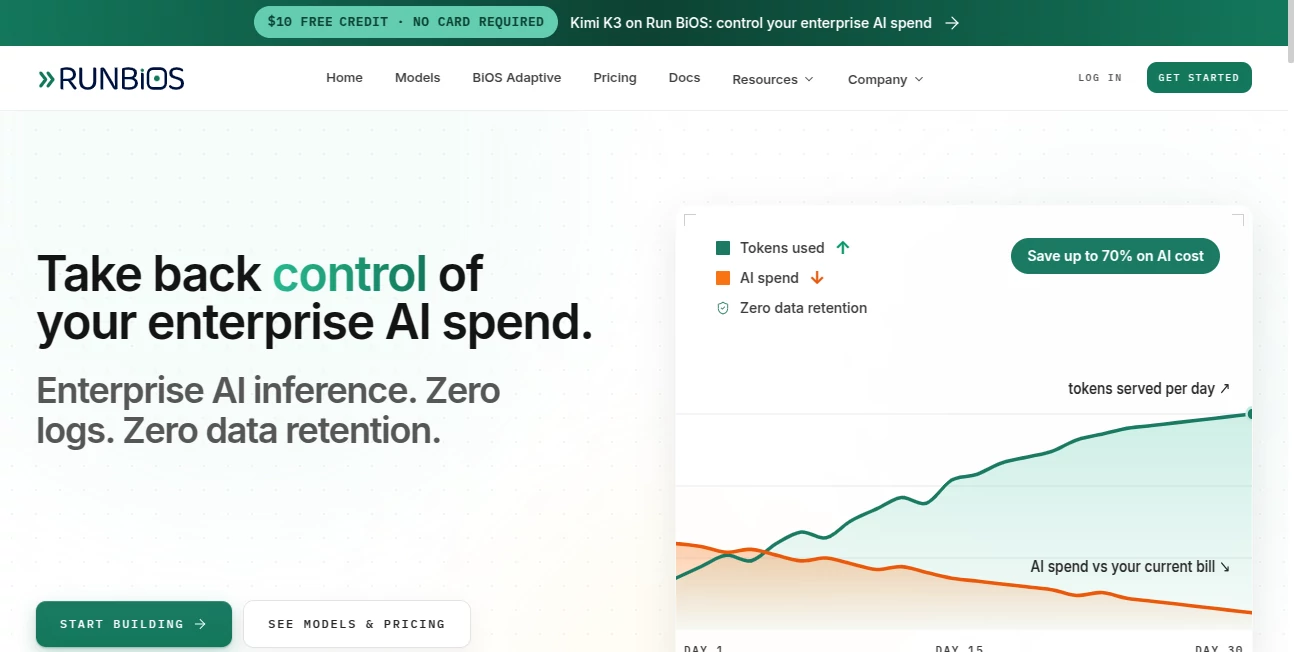
Run BiOS is an enterprise AI inference and fine-tuning platform designed for teams that need more control over how AI models are served, customized, and priced. Instead of building separate integrations for different model providers, developers can work with leading models through a single OpenAI-compatible API. The platform also brings serverless inference, adaptive model routing, custom fine-tuning, and dedicated model deployments into one environment.
One of the most appealing parts is the focus on keeping AI infrastructure practical at production scale. The platform positions inference cost, response speed, and data handling as first-class concerns rather than treating them as an afterthought. For a company already spending heavily on model APIs, that can make a meaningful difference.
The service currently provides access to model families including Claude, DeepSeek, GLM, Kimi, MiniMax, and Qwen. Developers can change the model they use without rebuilding their application around a completely different API structure.
Key Features
- OpenAI-compatible API for accessing multiple AI models through a familiar interface.
- Serverless inference with usage-based pricing measured per million tokens.
- Adaptive routing that can select an appropriate model for each request based on factors such as quality, speed, and budget.
- Fine-tuning on dedicated GPUs with ownership of the resulting model weights.
- Dedicated endpoints for serving fine-tuned or supported open models.
- Support for chat, completion, embedding, and reranking workloads.
- MCP server support for AI assistants and development environments.
- Python and TypeScript SDK options alongside REST API access.
- Workspace-based API keys with configurable permissions.
- Built-in billing, analytics, dataset, training, and deployment management.
User Interface
The platform dashboard is organized around the practical parts of running AI in production. Users can manage datasets, training jobs, models, deployments, API keys, billing, team members, and workspace settings from the same environment.
This structure makes sense for technical teams because the workflow does not stop at choosing a model. A developer may start by testing a serverless model, upload training data later, create a fine-tuning job, and eventually deploy the resulting checkpoint on dedicated infrastructure. Having those stages connected reduces the need to jump between unrelated services.
Accuracy & Performance
Performance depends heavily on the model selected and the workload, but the platform is designed around improving the economics and responsiveness of inference. Its adaptive routing option can choose a model for an individual request rather than forcing developers to hard-code one model for every task.
For teams handling large request volumes, this approach can be especially useful. A lightweight request does not necessarily need the same model as a difficult reasoning task, and automatically routing requests can help balance quality against infrastructure costs.
The platform also supports dedicated GPU deployments for workloads where predictable serving and model ownership matter more than the simplicity of serverless inference.
Capabilities
The platform covers considerably more than basic API access. Developers can browse supported models, manage datasets, run fine-tuning jobs, deploy checkpoints, and expose models through OpenAI-compatible endpoints.
Fine-tuning is particularly interesting for organizations with specialized data. A legal application, internal knowledge system, or domain-specific assistant may benefit from a model trained around hundreds or thousands of carefully prepared examples rather than relying entirely on increasingly complicated prompts.
There is also support for LoRA and QLoRA adapters, while deployed models can expose different endpoint types depending on the task. This gives technical teams room to build both general-purpose and highly specialized AI services.
Security & Privacy
Privacy is one of the platform's prominent selling points. The service states that prompts and responses are processed in memory and discarded after the request completes, with no request content retained as a stored archive. It also states that customer data is not used to train its models.
API access is controlled through scoped keys with permissions covering areas such as models, datasets, training, deployments, billing, analytics, and integrations. Keys can also have expiration periods, which is useful when access needs to be limited to a particular project or team member.
Organizations should still review the current privacy policy and security documentation before sending regulated or highly sensitive information, but the zero-retention approach gives the platform a strong privacy-oriented position.
Use Cases
- AI SaaS applications: Build applications that can access multiple leading models without maintaining separate API integrations.
- Enterprise AI: Give internal teams a centralized way to manage model inference, training, deployments, and spending.
- Model experimentation: Compare different models while keeping the application interface largely unchanged.
- Cost optimization: Route suitable requests to models that provide an appropriate balance between capability and price.
- Custom AI assistants: Fine-tune models using company-specific examples and terminology.
- Production deployments: Run trained checkpoints or supported open models behind dedicated HTTPS endpoints.
- Developer workflows: Connect AI assistants such as Claude, Cursor, Windsurf, and other MCP-compatible clients to the platform.
- High-volume inference: Use token-based serverless inference when managing GPUs directly would add unnecessary operational overhead.
Pros and Cons
Pros
- One OpenAI-compatible API for multiple model families.
- Access to a broad selection of modern AI models.
- Adaptive routing can simplify model selection.
- Fine-tuning and deployment are available in the same ecosystem.
- Customers retain ownership of fine-tuned model weights.
- Strong emphasis on zero data retention.
- Per-token serverless pricing can be attractive for scalable workloads.
- Dedicated GPU deployments are available for custom models.
- MCP, Python, TypeScript, and REST API support gives developers several integration options.
Cons
- The platform is primarily aimed at developers and technical teams rather than casual users.
- Understanding token-based pricing requires some familiarity with AI infrastructure costs.
- Fine-tuning introduces additional technical decisions around datasets, GPUs, and hyperparameters.
- Users looking for a simple consumer-facing chatbot may find the platform more advanced than necessary.
Pricing Plans
The pricing model is based primarily on usage rather than a conventional monthly subscription. Serverless inference is charged according to input and output tokens, while fine-tuning and dedicated model deployments use GPU-time-based billing.
The published model rates vary considerably depending on the model. For example, the current model library lists different input and output prices for DeepSeek, Claude, Qwen, Kimi, MiniMax, and other model families. This allows teams to choose infrastructure according to both capability and budget.
The platform currently offers new users $10 in credits without requiring a credit card to get started. Fine-tuning uses dedicated GPUs and is billed by the second, with published GPU pricing starting from $0.42 per hour for supported configurations.
Because inference prices can change as model catalogs evolve, users should check the live pricing information before estimating the cost of a production workload.
How to Use the Platform
- Create an account and access the platform dashboard.
- Create an API key with the permissions required for your project.
- Choose a model from the available catalog or use adaptive routing when you want the platform to select a suitable model.
- Connect your application through the OpenAI-compatible API, SDK, or REST interface.
- Monitor usage, billing, and application activity from the dashboard.
- If a general-purpose model is not producing the consistency or specialization you need, prepare a suitable dataset for fine-tuning.
- Create and monitor a training job using the available GPU options and training settings.
- Deploy the resulting checkpoint through a dedicated endpoint when the model is ready for production.
- Connect your application to the deployment using the provided OpenAI-compatible endpoint.
Comparison with Similar Tools
Compared with a typical single-model API provider, the platform takes a broader infrastructure approach. Instead of focusing exclusively on access to one model family, it combines several model providers with routing, fine-tuning, deployment, and workspace management.
It is also different from a traditional GPU hosting service. Developers do not necessarily need to manage the complete inference stack themselves when using serverless inference. When more control is required, dedicated deployments provide another path without forcing the entire workflow outside the platform.
The adaptive routing feature is another important distinction. Rather than deciding once which model should handle every request, teams can let the routing layer make the decision per request. For applications with mixed workloads, this can be a practical alternative to maintaining complicated model-selection logic inside the application.
Conclusion
For companies building AI products, the model itself is only part of the equation. API reliability, inference cost, deployment flexibility, data handling, and the ability to customize a model can become equally important once an application moves beyond the prototype stage.
This platform brings those concerns together in a developer-focused environment. Its combination of OpenAI-compatible access, serverless inference, adaptive routing, fine-tuning, dedicated deployments, and zero-retention positioning makes it particularly interesting for teams that want more control over their AI infrastructure.
The strongest fit is likely to be an engineering team building or operating an AI-powered product rather than an individual looking for a simple chatbot. For that audience, having the option to start with hosted inference and move toward custom training and dedicated serving without changing the overall ecosystem is a compelling advantage.
Frequently Asked Questions (FAQ)
What is this platform?
It is an AI inference and fine-tuning platform that provides access to multiple AI models through an OpenAI-compatible API while also supporting custom model training and dedicated deployments.
Does it support OpenAI-compatible APIs?
Yes. Existing applications using the OpenAI SDK can generally connect by changing the API base URL and authentication credentials rather than rewriting the entire integration.
Can I fine-tune my own model?
Yes. The platform supports fine-tuning on dedicated GPUs. Once training is complete, the resulting weights belong to the customer and can be deployed through a dedicated endpoint.
Which AI models are available?
The current catalog includes model families such as Claude, DeepSeek, GLM, Kimi, MiniMax, and Qwen, with availability, context sizes, and pricing varying by model.
What is adaptive routing?
Adaptive routing selects a suitable model for each request based on the task and the desired balance between quality, speed, and cost. This can reduce the need to hard-code a single model throughout an application.
Does the platform retain prompts and responses?
The service states that prompts and responses are processed in memory and discarded after the request completes. It also states that customer data is not retained for model training.
Is it suitable for enterprise applications?
Yes. Features such as scoped API keys, workspace management, usage tracking, fine-tuning, dedicated deployments, and production-oriented APIs make it suitable for technical teams building enterprise AI applications.
How is inference billed?
Serverless inference is priced per million input and output tokens. Custom training and dedicated deployments use GPU-time-based billing.
Can I start without paying upfront?
New users can currently start with $10 in credits without adding a credit card, allowing them to test the platform before committing to a paid workload.
Who should consider using it?
It is best suited to developers, AI startups, enterprise engineering teams, and companies that need to run AI workloads in production while keeping closer control over model selection, inference costs, customization, and deployment.
AI API Design , Large Language Models (LLMs) , AI Developer Tools .
These classifications represent its core capabilities and areas of application. For related tools, explore the linked categories above.

RUN BiOS Alternatives Product

Sourcetable

OhNoCode

Nestify

DeepSeek

Gemini Omni

PatentFig AI
JSON to TOON…

You.bot

Ito AI