
Save Email as PDF
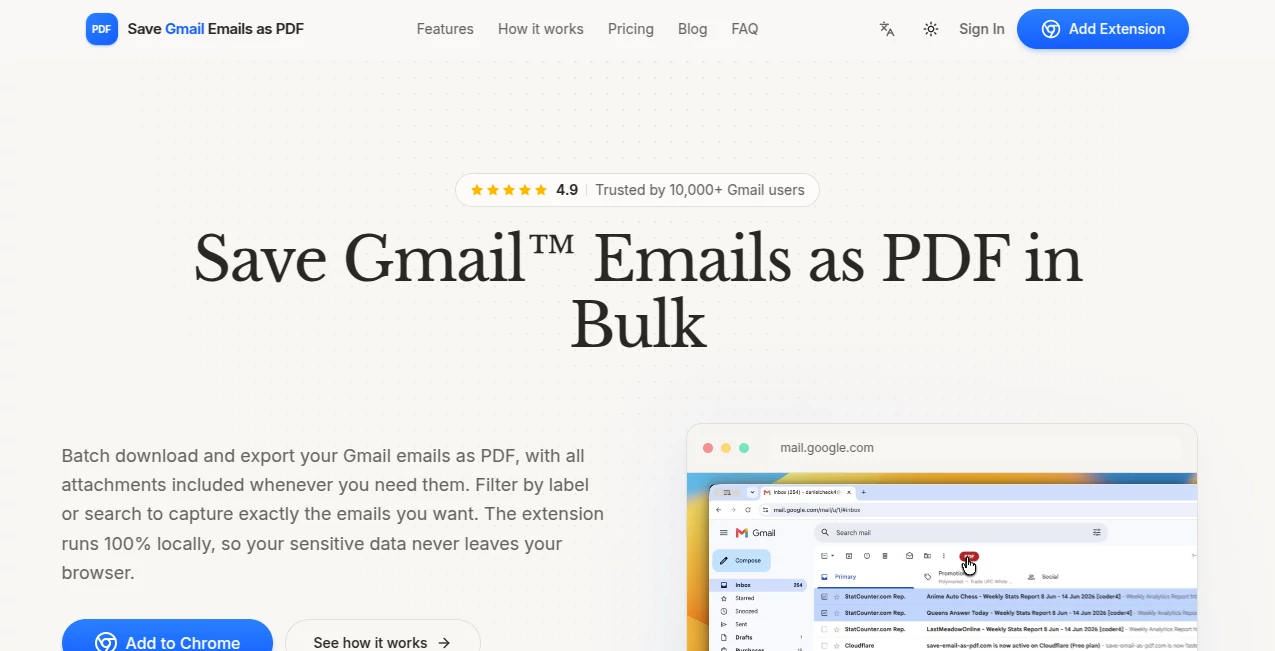
What is Save Email as PDF?
Managing email records can quickly become overwhelming, especially when important conversations, invoices, contracts, or client communications need to be archived in a secure and organized format. Save Emails as PDF offers a practical solution by allowing users to export Gmail conversations into PDF, HTML, or TXT files with just a few clicks. Designed for individuals, businesses, and legal professionals, the platform makes long-term email storage simple while preserving message formatting and attachments.
Unlike traditional print-to-PDF methods, this solution is deeply integrated with Gmail and Google Workspace, making the export process significantly faster and more flexible. Whether you're collecting documentation for legal purposes, preparing expense reports, or creating project archives, it helps transform scattered inbox conversations into clean, searchable documents that are easy to share and store.
Key Features
User Interface
The interface blends naturally into Gmail, eliminating the need to learn a completely new application. After installation, export options become available directly inside the inbox, allowing users to save individual emails or entire conversations without interrupting their workflow. The navigation is straightforward, making it suitable even for users with limited technical experience.
Accuracy & Performance
Email formatting is preserved with impressive consistency, including timestamps, sender information, attachments, and conversation order. Multiple emails can be merged into a single organized PDF with page numbering, making lengthy discussions much easier to review. Even large collections of emails can be processed efficiently without requiring manual formatting.
Capabilities
The platform supports much more than basic PDF exports. Users can combine conversations into a single document, export emails as HTML or TXT, convert attachments into PDF, generate compact documents that remove unnecessary signatures and quoted replies, encrypt sensitive files with password protection, and automatically save archives to cloud storage services. Mobile support and Google Workspace administration tools further extend its usefulness for business environments.
Security & Privacy
Security is one of the strongest aspects of the platform. Password-protected PDF generation with 256-bit encryption helps protect confidential information when documents are shared with colleagues, clients, lawyers, or accountants. OAuth authentication eliminates password sharing, while enterprise-grade infrastructure provides additional confidence for organizations handling sensitive communications.
Use Cases
Professionals across many industries can benefit from organized email exports. Legal teams can prepare email evidence for litigation or regulatory requests. Accountants can archive invoices and receipts received by email. Human resource departments can preserve employee communications. Freelancers and agencies can maintain project documentation, while customer support teams can store complete conversation histories for future reference. Even personal users can safely archive travel confirmations, financial records, and important family correspondence.
Pros and Cons
Pros
One-click Gmail integration.
Supports PDF, HTML, and TXT exports.
Can merge multiple emails into one organized document.
Includes attachments during export.
Password-protected encrypted PDFs.
Google Workspace and mobile compatibility.
Cloud storage integration for automated backups.
Useful for legal, accounting, and business documentation.
Cons
Primarily designed for Gmail and Google Workspace users.
Advanced features require a Premium subscription.
Free plan includes conversion limits.
Pricing Plans
A free plan allows users to convert up to 50 email conversations into PDF, HTML, or TXT files, making it suitable for occasional use. Premium subscriptions remove conversion limits while unlocking additional capabilities such as PDF encryption, team management, unlimited exports, and dedicated customer support. Business deployment options are also available for organizations using Google Workspace.
How to Use Save Emails as PDF
Install the Chrome extension or Google Workspace add-on.
Open Gmail and select one or multiple email conversations.
Choose the export option from the integrated menu.
Select your preferred format and customization options.
Download the generated document or save it directly to cloud storage for future access.
Comparison with Similar Tools
Many browser extensions rely on the browser's print function, which often strips formatting or requires multiple manual steps. This platform focuses specifically on email archiving, providing better organization, conversation merging, attachment handling, encrypted documents, and cloud integrations. Its specialized workflow makes it particularly valuable for professionals who regularly need complete and legally reliable email records instead of simple printouts.
Conclusion
Email often contains some of the most valuable business information, yet many people rely solely on their inbox as permanent storage. This platform offers a much smarter approach by transforming important conversations into structured, portable documents that are easy to archive, search, share, and protect. With seamless Gmail integration, advanced export options, strong security features, and support for professional workflows, it stands out as an excellent solution for anyone who wants dependable email backups without unnecessary complexity.
Frequently Asked Questions (FAQ)
Can attachments be included in exported documents?
Yes. Attachments can be preserved and even converted into PDF when supported.
Does it support exporting multiple emails together?
Yes. Multiple conversations can be combined into one organized PDF or exported separately.
Is password protection available?
Yes. Premium users can create encrypted PDF documents protected by passwords.
Can exported files be stored in cloud services?
Yes. Supported cloud storage integrations allow automatic archiving and sharing.
Is the free version sufficient for occasional users?
Yes. The free plan provides limited conversions, making it suitable for personal or light business use before upgrading if higher volume is needed.
AI Workflow Management , AI Documents Assistant , AI PDF , AI Productivity Tools .
These classifications represent its core capabilities and areas of application. For related tools, explore the linked categories above.
Save Email as PDF details
Website unavailable — View Alternatives
Pricing
- Free
Apps
- Web App
- Chrome Extensions
Categories

Save Email as PDF Alternatives Product

Calculadora …

Skygen AI

Overlap

Solovio

ForthWrite

Zivy

PDFgear

Trimless for…

VisualGPT