
ScholarSail
What is ScholarSail?
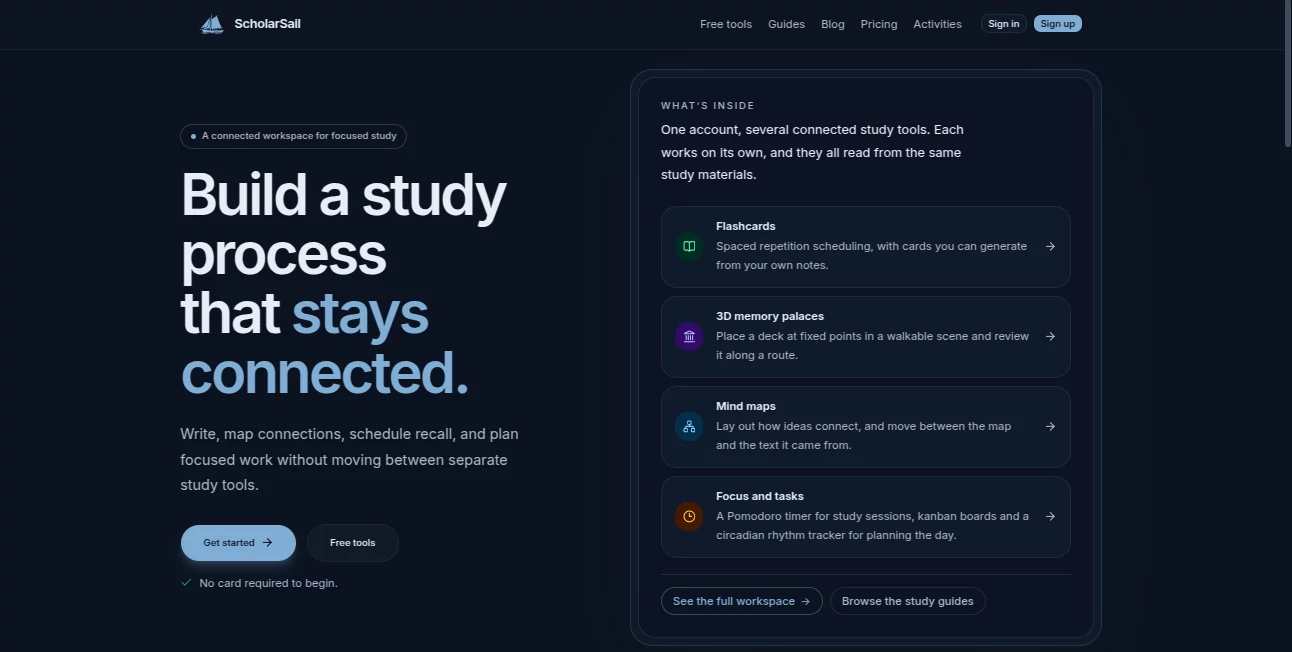
ScholarSail is a connected study workspace designed for learners who want more than a collection of disconnected study apps. It brings writing, visual organization, memory practice, and study planning into one environment, allowing students to move from understanding their material to reviewing and recalling it without constantly switching between tools.
The platform combines AI-generated flashcards, spaced repetition, mind maps, 3D memory palaces, task planning, Pomodoro sessions, and circadian rhythm tracking. The idea is refreshingly practical: your notes, cards, maps, and study plans can stay connected to the same learning material instead of being scattered across different services.
For example, a student preparing for an exam can start with a set of notes, turn important material into flashcards, organize difficult concepts in a mind map, and then use scheduled reviews to reinforce what was learned. That makes the workspace useful not only for creating study material, but also for building a repeatable study routine.
Key Features
- AI-generated flashcards from existing text and study notes.
- Spaced-repetition scheduling for reviewing cards at appropriate intervals.
- Front-and-back and cloze-deletion flashcard formats.
- Interactive online mind maps for organizing connected ideas.
- 3D memory palaces where flashcards can be placed at fixed locations along a route.
- AI-assisted brainstorming for developing ideas within mind maps.
- Pomodoro study sessions with session history.
- Kanban boards for organizing coursework and study tasks.
- Calendar, Gantt, and timeboxed views for task planning.
- Circadian rhythm tracking with schedule suggestions based on sleep and wake patterns.
- CSV import and export for flashcard workflows.
- Word document export and email reminders for scheduled reviews.
- Ambient noise and binaural-beat controls for focused study sessions.
User Interface
The interface is built around the idea of keeping study activities in one workspace. Rather than forcing users to jump between a flashcard application, a mind-mapping service, and a separate task manager, the platform connects these activities through shared study materials.
The mind-map workspace provides an online canvas where users can add nodes, connect concepts, edit labels, move branches, and use automatic layout. Flashcards are similarly straightforward, with options for manual creation, importing decks, or generating cards from text.
The 3D memory palace feature adds a different style of interaction. Instead of simply reading cards on a screen, learners can place them at fixed points in a walkable environment and review them along a route. For people who remember information better through locations and visual associations, this can make revision feel considerably less repetitive.
Accuracy & Performance
The platform's AI features are intended to help transform existing study material into useful learning resources rather than replace the learner's own judgment. Flashcards can be generated from text, while mind maps can be expanded with AI-assisted brainstorming.
A particularly useful part of the system is its spaced-repetition workflow. During a review session, users rate cards as Again, Hard, Medium, or Easy, and the next review interval is presented accordingly. Review events are also logged, giving learners a clearer picture of their study patterns over time.
As with any AI-generated educational material, generated cards and structures should still be checked against the original source. The strongest workflow is to use the AI as a fast starting point and then refine anything that needs additional context or precision.
Capabilities
The strongest aspect of the platform is the way several study methods complement one another. A learner can organize a complicated subject with a mind map, convert important information into flashcards, reinforce those cards through spaced repetition, and use a memory palace for information that benefits from spatial association.
Productivity features extend that workflow beyond learning content. Kanban boards can organize coursework into open, in-progress, and completed tasks, while dependencies can prevent a task from being treated as ready when another required task remains unfinished. The same work can also be viewed through calendar, Gantt, or timeboxed planning formats.
The circadian rhythm tracker adds another layer by using wake time and sleep duration to calculate daily phases and provide activity suggestions. Combined with Pomodoro sessions and session history, this gives students practical tools for planning not only what to study, but when to study it.
Security & Privacy
The platform's privacy policy states that it collects account information such as email addresses and login credentials, along with usage data, study activity, interaction patterns, feature usage, and technical information such as browser type, device type, IP address, and cookies.
According to the published policy, this information is used to operate the service, improve memory and productivity features, personalize learning functionality, maintain security, and analyze system performance. The company also states that personal data is not sold and that stored data is protected using industry-standard safeguards.
Users can request deletion of their data, while cookies can be disabled through browser settings. The service also provides a dedicated security page for responsible vulnerability reporting.
Use Cases
Students can use the workspace to turn lecture notes, reading material, or revision notes into structured flashcard decks and visual maps. This is especially useful during exam preparation, when having the source material and review process connected can save considerable time.
University students working on large subjects can use mind maps to break complicated topics into smaller relationships. Someone studying biology, for instance, could map relationships between systems and then create flashcards for terminology and key processes.
It can also be useful for professional learning. A person preparing for a certification can organize the syllabus with tasks, create flashcards from study notes, schedule recurring reviews, and use focused Pomodoro sessions to maintain a consistent routine.
Writers and researchers may also find the combination of text organization and mind mapping useful when planning a large project. Instead of keeping an outline in one application and notes somewhere else, connected material can remain part of the same study environment.
Pros and Cons
- Pros: Combines flashcards, spaced repetition, mind maps, memory palaces, and study planning in one workspace.
- Pros: AI can generate flashcards from existing text, reducing manual preparation time.
- Pros: 3D memory palaces provide an alternative to conventional screen-based revision.
- Pros: Kanban, calendar, Gantt, and timeboxed views make academic planning more flexible.
- Pros: A free plan is available without a monthly subscription.
- Cons: AI-generated study material still benefits from human review before being relied upon for important exams.
- Cons: Users looking only for a basic flashcard application may find the wider collection of tools more than they need.
- Cons: The memory-palace approach may take some experimentation before a learner finds a comfortable workflow.
Pricing Plans
The platform offers a free plan at $0 per month. It includes unlimited decks and cards, 30 AI credits each month, unlimited memory palaces, a Pomodoro timer with session history, CSV import and export, colored noise and binaural beats, Word document export, and email reminders for reviews.
For occasional increases in AI usage, credit packs are available without a recurring subscription. A 50-credit introductory pack costs $1 and is available once per account, while a 150-credit pack costs $5. Purchased credits remain valid for 12 months and are used after the monthly allowance.
The Premium plan costs $20 per month and includes everything in the Free plan, along with 1,000 AI credits per month and access to a higher-quality AI model for flashcard generation.
How to Use ScholarSail
Start by creating a free account and bringing your study material into the workspace. You can write your material directly or work with existing content, depending on the type of study project you are building.
Next, create flashcards manually or use AI to generate front-and-back or cloze cards from your text. During review sessions, rate how difficult each card was to recall so the spaced-repetition system can determine when it should return.
For subjects with many relationships, create a mind map and connect the major concepts. You can rearrange branches, edit labels, apply automatic layout, and use AI brainstorming when you need help expanding the structure.
If spatial learning suits you, place a deck inside a 3D memory palace and associate cards with specific locations along a route. Finally, organize your study workload with the task board and use Pomodoro sessions to turn the plan into focused study time.
Comparison with Similar Tools
Many educational applications focus on one particular method. A flashcard service may be excellent for retrieval practice, while a mind-mapping application may be better suited to visual organization. Productivity platforms, meanwhile, generally concentrate on tasks and schedules rather than learning itself.
The main distinction here is the combination. Instead of treating flashcards, mind maps, memory techniques, and study planning as separate activities, the platform places them inside a connected workflow. That makes it particularly appealing to learners who want one central environment rather than several specialized subscriptions.
It is not necessarily the right choice for someone who already has a highly optimized collection of separate tools. For a learner starting from scratch, however, having these methods available under one account can make building a consistent study system much easier.
Conclusion
A good study tool should do more than store notes. It should help turn information into something that can be understood, organized, recalled, and revisited at the right time. That is where this platform makes a strong impression.
With AI flashcard generation, spaced repetition, interactive mind maps, 3D memory palaces, task boards, Pomodoro sessions, and circadian planning, it covers several stages of the learning process without making users constantly move between different applications.
The free plan also makes it easy to experiment with the workflow before paying for additional AI capacity. For students, self-directed learners, and professionals preparing for exams or learning new subjects, it is a thoughtfully assembled option worth exploring.
Frequently Asked Questions (FAQ)
What is ScholarSail?
It is a connected study workspace that combines AI flashcards, spaced repetition, mind maps, 3D memory palaces, task management, Pomodoro sessions, and study-planning tools.
Can I generate flashcards with AI?
Yes. Flashcards can be generated from text and study material using AI. The system supports both standard front-and-back cards and cloze-deletion cards.
Does it have a free plan?
Yes. The Free plan costs $0 per month and includes unlimited decks and cards, 30 AI credits per month, memory palaces, Pomodoro sessions, CSV import and export, Word export, and review reminders.
What is spaced repetition used for?
Spaced repetition schedules reviews according to how well you remember individual cards. Cards that are difficult can return sooner, while cards recalled easily can be scheduled further into the future.
What are 3D memory palaces?
They are walkable environments where users can place flashcards at fixed locations and review them along a route, combining spatial associations with active recall.
Can I create mind maps?
Yes. The mind-mapping workspace lets you create and connect nodes, edit labels, rearrange branches, use automatic layout, and brainstorm related ideas with AI.
Does it include task management?
Yes. Kanban boards can be used for coursework and study tasks, with additional calendar, Gantt, and timeboxed views available for planning.
How much does Premium cost?
The Premium plan costs $20 per month and provides 1,000 AI credits per month plus a higher-quality AI model for card generation.
Does the platform sell personal data?
According to its published privacy policy, personal information is not sold. The policy explains that data may be shared with infrastructure providers, analytics services, or legal authorities when required.
Who can benefit most from it?
It is particularly well suited to students, exam candidates, university learners, and self-directed learners who want to combine active recall, visual organization, memory techniques, and focused study planning in one place.
AI Mind Mapping , AI Productivity Tools , AI Task Management , Education .
These classifications represent its core capabilities and areas of application. For related tools, explore the linked categories above.
ScholarSail details
Website unavailable — View Alternatives
Pricing
- Freemium
Apps
- Web App
Categories

ScholarSail Alternatives Product

Zloth

AI Fruit

Nifty

photo to URL

Notion

Agent Grid

KarmaGuy

Zivy

Classroom Sc…