
ScribeBox
What is ScribeBox?
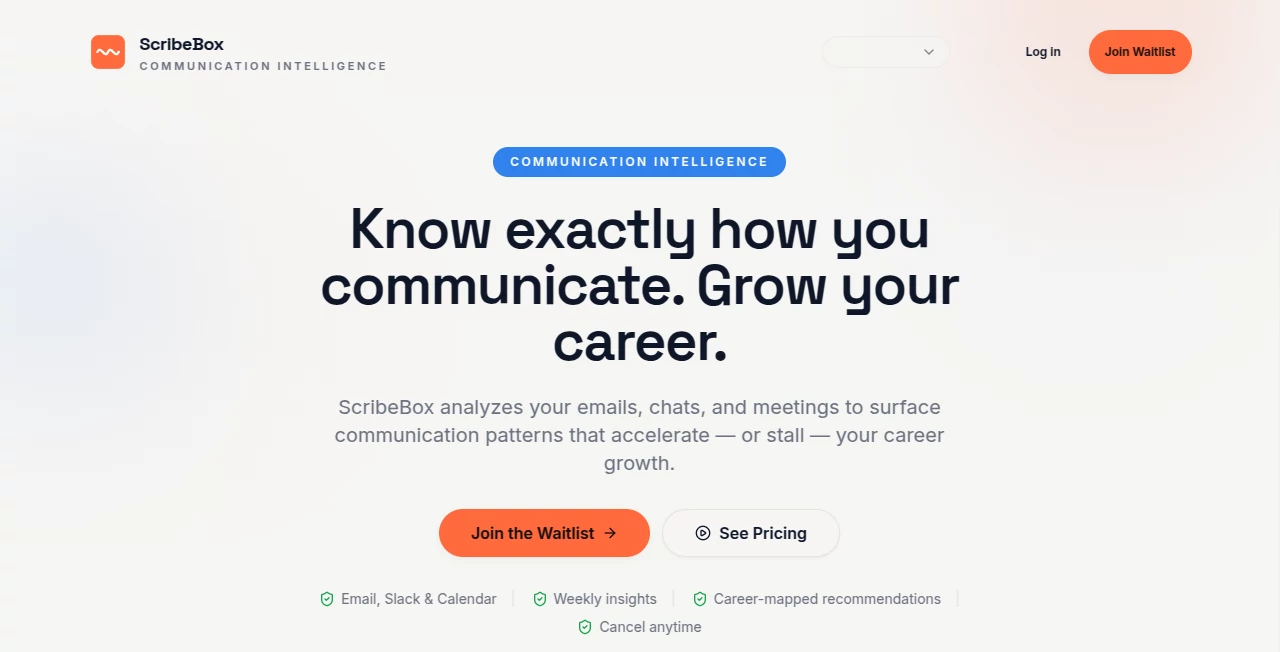
Most of us have no idea how we really come across in emails, meetings, or Slack messages. We think we’re clear, collaborative, and professional—until a promotion passes us by or feedback feels vague. ScribeBox quietly solves this by analyzing your actual communication patterns and showing you what’s working and what’s quietly holding you back. It’s not another productivity tracker. It’s a mirror that helps ambitious professionals see themselves the way their colleagues and managers do, then gives practical steps to improve.
Introduction
Your communication shapes your career more than most technical skills, yet it’s rarely measured. ScribeBox connects to your email, Slack, and calendar, then surfaces insights about clarity, tone, responsiveness, and influence. Instead of generic advice, it delivers weekly digests with patterns that actually matter for promotions and leadership roles. Many professionals on the waitlist say it’s the first tool that made them realize small habits—like response time or question-asking frequency—were shaping how others perceived their potential. It feels less like surveillance and more like a trusted career coach who only sees the patterns, never the private details.
Key Features
User Interface
The dashboard is refreshingly calm. After a quick 2-minute setup connecting your tools, you get a clean overview with your overall communication score and weekly highlights. Everything is designed to be scanned in minutes: trends, strengths, blind spots, and actionable recommendations. No overwhelming charts or jargon—just clear language and useful summaries that respect your time.
Accuracy & Performance
It focuses on patterns rather than reading every word, which makes the insights feel accurate and respectful. Users report the scores and observations align well with real feedback they’ve received from managers. Weekly digests arrive consistently, and the analysis improves over time as it learns your communication style. The speed is impressive—insights are ready every Monday without slowing down your tools.
Capabilities
It analyzes emails, Slack messages, and calendar meetings to calculate an overall communication score across clarity, tone, responsiveness, and influence. You get weekly trend reports, personalized recommendations tied to career milestones (like preparing for promotion), and team-level insights on paid plans. The tool helps you spot blind spots, such as whether you ask enough questions or communicate decisions clearly, and suggests concrete ways to improve.
Security & Privacy
Privacy is clearly a priority. It uses end-to-end encryption, never stores raw message content, and only extracts patterns and metrics. The platform is SOC 2 compliant with regular audits, and you can export or delete your data anytime. For professionals handling sensitive work, this respectful approach builds real trust.
Use Cases
A product manager discovers they’re perceived as too curt in emails and adjusts their tone before the next performance review. An engineering lead sees they dominate meetings and starts creating space for others, improving team morale. A salesperson notices their follow-up speed is excellent but their clarity needs work, leading to better close rates. Teams use the group view to strengthen overall communication health. Anyone serious about career growth uses it to turn soft skills into measurable advantages.
Pros and Cons
Pros:
- Insights feel relevant and tied directly to career outcomes.
- Privacy-first design makes it comfortable to use with real work data.
- Weekly format fits naturally into professional routines.
- Actionable recommendations go beyond generic advice.
- Quick setup with no heavy IT involvement needed.
Cons:
- Currently in waitlist/beta phase for many users.
- Team features require the higher tier.
- Relies on connecting your actual communication tools.
Pricing Plans
It offers a free tier for individuals to experience core insights. Paid plans unlock unlimited analysis, advanced recommendations, team features, and priority support. Pricing is positioned as an investment in career growth rather than just another subscription—many professionals see the value immediately after their first weekly digest.
How to Use ScribeBox
Sign up and connect your email, Slack, and calendar (takes about two minutes). The tool starts analyzing your recent communication and delivers your first insights shortly after. Review your weekly digest every Monday, read the personalized recommendations, and try one or two small changes. Over time, track how your score improves and how it affects real conversations and opportunities. It’s simple enough to become part of your routine without adding extra work.
Comparison with Similar Tools
Most productivity tools track tasks or time but ignore how you actually communicate. Generic feedback apps feel vague, while full surveillance tools feel invasive. ScribeBox sits in the sweet spot: it gives meaningful, private insights focused specifically on communication patterns that influence career progression. It’s less about monitoring and more about growth, which makes it feel refreshing and genuinely useful.
Conclusion
Communication is often the invisible factor that determines how far your career goes. ScribeBox makes that factor visible, measurable, and improvable without invading your privacy or adding stress. It’s the kind of tool that helps ambitious professionals take control of how they’re perceived and turn soft skills into a real competitive advantage. If you’ve ever wondered why some people with similar technical skills advance faster, this might be the missing piece. For anyone serious about growing their career, it’s worth joining the waitlist and seeing your own patterns for the first time.
Frequently Asked Questions (FAQ)
How private is my data?
Extremely. It extracts patterns only and never stores raw message content.
Which tools does it connect to?
Gmail, Slack, Google Calendar, Outlook, and more.
Is it suitable for teams?
Yes—team plans provide group communication health insights.
How soon do I get my first insights?
Usually within days after connecting your accounts.
Can I cancel anytime?
Yes, with no long-term contracts.
Other , AI Productivity Tools , AI Team Collaboration , AI Notes Assistant .
These classifications represent its core capabilities and areas of application. For related tools, explore the linked categories above.

ScribeBox Alternatives Product
Astic AI

InPage AI

Workik

Nifty

Hugging Face

Greek Numero…

Receipt AI

Weekly Brief

Nimbalyst