SeaArt
What is SeaArt?
still remember the first time I typed a wild idea into SeaArt and watched it turn into something far better than I imagined. One prompt later, a dreamy cyberpunk street scene appeared with lighting and atmosphere I couldn’t have drawn myself. It felt like having a talented artist friend who never gets tired and always understands what I mean. Since then, it has become my go-to place whenever I need images, videos, or even full characters — all in one spot without jumping between different tools.
Introduction
Creating visuals used to mean either spending hours learning complex software or settling for mediocre results. SeaArt changes that completely. It brings together powerful image generation, smooth video tools, character creation, and a lively community in one easy-to-use platform. Whether you’re a hobbyist exploring ideas at midnight or a professional needing quick assets, it delivers high-quality output without the usual headaches. The community aspect is especially nice — seeing what others create often sparks new directions you wouldn’t have thought of on your own.
Key Features
User Interface
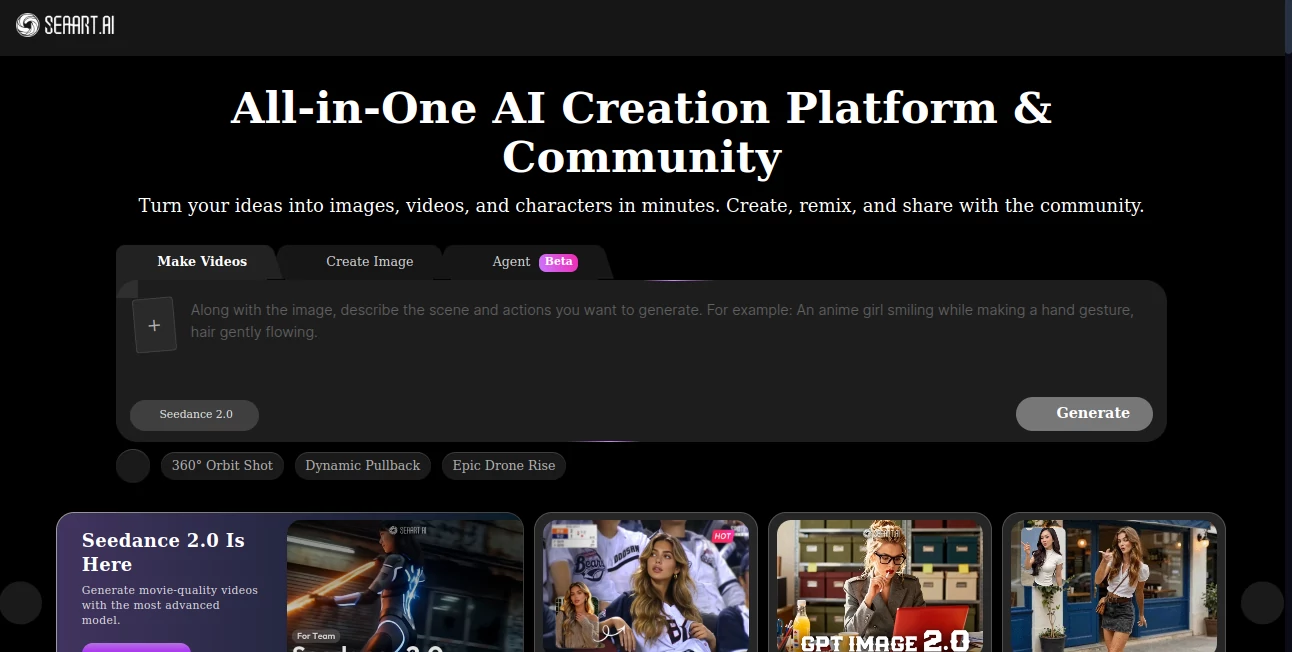
The workspace feels welcoming from the first click. A clean prompt box, easy model selection, and clear preview area make the whole process enjoyable. You can switch between image and video modes smoothly, and the community feed sits right there when you want inspiration. It never overwhelms you with too many options at once, yet gives enough control for serious work. Even on mobile it works surprisingly well when you just want to try a quick idea.
Accuracy & Performance
The results consistently impress with detail and coherence. Faces stay recognizable when you want them to, styles blend naturally, and video generations hold character consistency across frames better than many alternatives. Generation speed is fast enough to keep the creative flow going — you can try variations without long waits. It handles complex prompts well, understanding lighting, composition, and mood in ways that feel thoughtful rather than random.
Capabilities
You get strong text-to-image, image-to-image, and image-to-video tools, plus a growing selection of specialized models for different styles. Video features like Seedance let you create cinematic clips from text or images. There’s also character creation for consistent personas across scenes, community models to explore, and various artistic filters. The platform keeps expanding with new capabilities, making it feel like a complete creative studio rather than a single trick tool.
Security & Privacy
Your creations stay yours. The platform handles generations responsibly with good privacy practices, letting you focus on making art instead of worrying about where your prompts go. Community sharing is optional, so you can keep personal or client work completely private while still enjoying the public inspiration feed when you want it.
Use Cases
A concept artist generates quick variations of character designs to show clients in the morning meeting. A YouTuber creates eye-catching thumbnails and short video clips that match their channel style perfectly. A writer brings scenes from their novel to life as illustrations or short animations to share with readers. A small business owner makes professional product visuals and social media content without hiring a photographer. The versatility means almost anyone with ideas can turn them into something shareable and beautiful.
Pros and Cons
Pros:
- Truly all-in-one — images, videos, characters, and community in the same place.
- Strong consistency in characters and styles across generations.
- Regular updates and new models keep it feeling fresh.
- Fast enough to support real creative iteration instead of long waits.
- Generous free access lets you explore before committing.
Cons:
- Some advanced video features work best with paid credits for longer or higher-quality clips.
- Very specific or unusual artistic directions sometimes need a few tries to nail perfectly.
Pricing Plans
The free tier gives you a meaningful daily allowance to experiment and create regularly. Paid plans unlock faster generations, higher limits, priority access to new models, and more storage for your creations. Pricing feels reasonable for the creative freedom it provides — many users find the paid options pay for themselves quickly through time saved and quality gained.
How to Use SeaArt
Sign up (or jump straight in if you’re just exploring), type your idea in the prompt box, choose a model or style that fits your vision, and hit generate. For more control, upload a reference image or adjust settings like aspect ratio and quality level. Browse the community feed for inspiration when you feel stuck. Save favorites, remix existing creations, or generate video versions once you have an image you love. The whole process stays fast and intuitive, encouraging you to try more ideas than you normally would.
Comparison with Similar Tools
While many platforms focus on either images or video, SeaArt brings both together with solid character consistency and community features. It feels less clinical and more creative than purely technical tools, yet more powerful than simple fun generators. The regular model updates and hybrid capabilities give it an edge for users who want one reliable home for most of their AI creative needs.
Conclusion
SeaArt has become one of those rare tools that genuinely expands what feels possible on a normal day. It removes technical barriers so the focus stays on imagination and storytelling. Whether you create for fun, work, or somewhere in between, it delivers quality and joy in equal measure. If you’ve been waiting for an AI creative companion that understands both beauty and practicality, this one is worth diving into.
Frequently Asked Questions (FAQ)
How good is the video quality?
Very strong for short cinematic clips, especially with good prompts and reference images.
Can I use it for commercial projects?
Yes, paid plans include commercial rights for your generated content.
Is there a community aspect?
Absolutely — a vibrant feed where users share and discover creations every day.
Do I need advanced skills to get good results?
No — clear prompts and reference images get excellent results even for beginners.
AI Image to Video , AI Video Generator , AI Art Generator , AI Design Generator .
These classifications represent its core capabilities and areas of application. For related tools, explore the linked categories above.

SeaArt Alternatives Product

Pixelied

Retro Image …

Nano Banana …

Seedance 2.0
Roblox Man F…

Framepack AI

gempix2
Kling 3.0

vizstudio