
Seedance 2.5
What is Seedance 2.5?
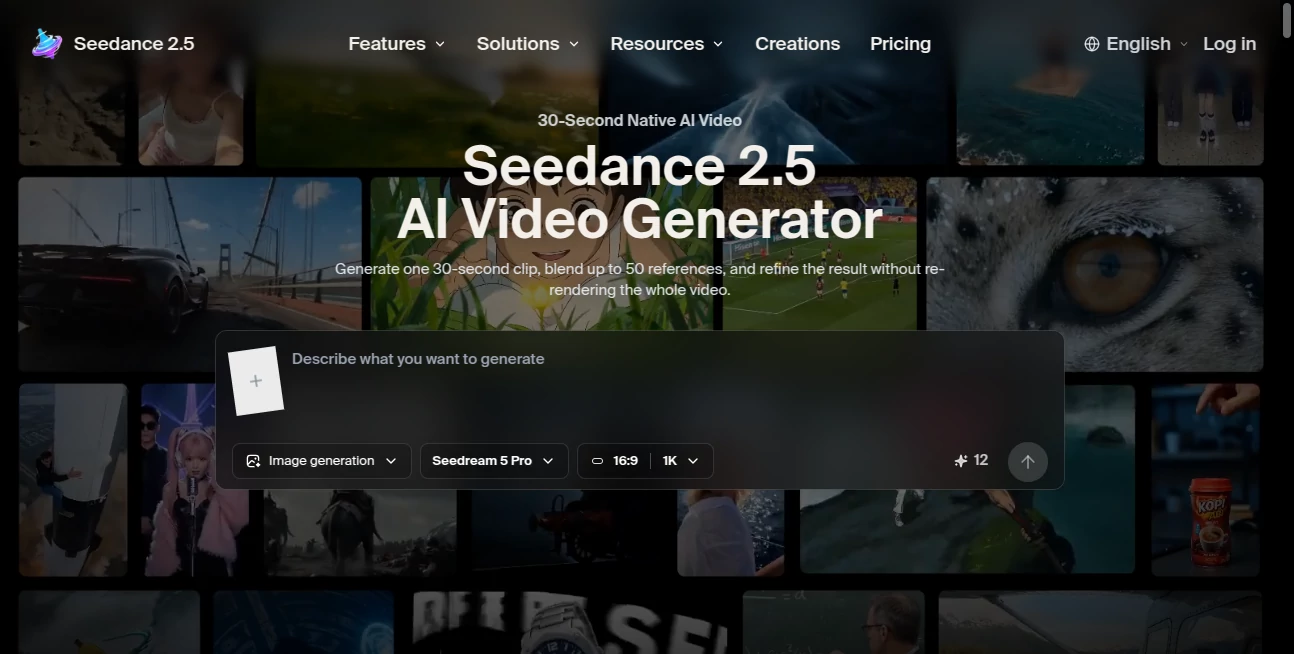
Seedance 2.5 is an AI video generation platform built around a simple but powerful idea: turning text, images, and creative references into complete video scenes without forcing creators to assemble every shot by hand. Its workflow is particularly interesting for people who need more than a short animated clip, since it can produce a single video of up to 30 seconds with scene changes, camera movement, pacing, and synchronized audio.
What makes the platform stand out is the amount of creative information a user can provide before generation. Up to 50 image, audio, 3D, and style references can be combined in a single workflow. That gives creators more control when they need a particular character, product, visual mood, movement style, or environment to remain consistent throughout a sequence.
For marketers, filmmakers, social media creators, educators, and e-commerce teams, this approach can save considerable time. Instead of generating several unrelated clips and stitching them together, users can start with a complete concept and refine selected parts after the initial render.
Key Features
- Generation of single AI video clips up to 30 seconds.
- Native 4K rendering for high-resolution video delivery.
- Support for up to 50 multimodal references, including images, audio, 3D assets, and style references.
- Text-to-video generation for creating scenes from written descriptions.
- Image-to-video animation for turning still images and concept art into moving footage.
- Native audio synchronization that aligns sound cues with visual actions.
- Multi-shot storytelling with attention to character, setting, and scene continuity.
- 3D white-box previews for checking camera movement, timing, and scene blocking before a full render.
- Local re-draw editing that allows selected regions of a generated video to be refined without rebuilding everything.
- Style and motion transfer for applying visual or movement characteristics to a new scene.
- Sketch-to-video generation for turning rough concepts into animated scenes.
- Product and campaign variant workflows for creating different versions from a master video.
User Interface
The workflow is organized around the creative process rather than a complicated editing timeline. Users can begin with a text prompt, an image, a product shot, a portrait, or another visual concept and then add references to guide the generation.
The preview stage is particularly useful for creators who want to check the composition before committing to a full render. The 3D white-box preview provides an early look at scene blocking, camera movement, and timing. This can make experimentation less frustrating because major problems can be identified before producing the final high-resolution clip.
For someone working on a product advertisement, for example, the workflow feels closer to preparing a small production brief than simply typing a prompt into an image generator.
Accuracy & Performance
The platform places considerable emphasis on motion, scene continuity, and physical behavior. Its capabilities include more believable movement involving contact, gravity, materials, and environmental interaction. These details matter when a generated scene needs to look convincing rather than simply visually attractive.
Native 4K rendering is another important advantage for professional workflows. Instead of relying on an enlarged lower-resolution output, the system is designed to generate the final video at native 4K. The ability to create a complete 30-second clip in one pass can also reduce the need to combine numerous short generations.
Actual results will still depend on the quality of the prompt, reference material, subject complexity, and generation settings. As with other generative video systems, a strong creative brief generally produces more predictable results than a vague instruction.
Capabilities
The system covers both straightforward generation and more advanced production workflows. Text-to-video lets users describe a scene, its pacing, camera behavior, and visual style. Image-to-video can animate an existing image while attempting to preserve the important characteristics of the original subject.
Its multimodal reference workflow is especially useful when consistency matters. A creator can provide several references to communicate appearance, movement, sound, style, or three-dimensional structure instead of relying entirely on text.
There are also tools for object and character replacement, style transfer, motion transfer, sketch-to-video creation, and regional re-drawing. Together, these features make the platform useful not only for creating a first draft but also for developing variations from an existing result.
Security & Privacy
Creators should review the platform's current privacy, data-handling, licensing, and usage terms before uploading confidential material. This is particularly important for businesses working with unreleased products, customer assets, private recordings, or recognizable individuals.
Commercial rights can also depend on the subscription plan and the rights associated with the material used in the generation. Anyone publishing commercial content should verify the applicable licensing conditions, likeness permissions, platform requirements, and disclosure obligations before distribution.
Use Cases
One of the strongest applications is e-commerce. A business can start with product photography and turn it into a polished promotional sequence, then create different versions for products, colors, languages, seasonal campaigns, or social platforms.
Social media teams can use the workflow for TikTok and Reels-style advertising, UGC-inspired content, short promotional scenes, and attention-grabbing openings. Since one generation can contain multiple shots, it can also be useful when a short advertisement needs a beginning, middle, and end rather than a single looping animation.
Creative teams can use reference-driven generation for concept development, storyboarding, music-based visuals, and narrative experiments. Educators and presenters can also create explanatory scenes where movement, timing, and cause-and-effect relationships are important.
For filmmakers and independent creators, the ability to preserve a character or environment across multiple shots can be particularly valuable. It does not replace traditional production in every situation, but it can make early visualization and short-form production considerably faster.
Pros and Cons
- Pros: 30-second single-clip generation, native 4K output, extensive multimodal reference support, synchronized audio, multi-shot storytelling, 3D previewing, and selective post-generation editing.
- Pros: Useful for commercial campaigns, product videos, social content, concept development, and image-to-video projects.
- Cons: High-volume generation can become expensive, particularly for professional production workflows.
- Cons: Output quality can vary depending on prompts, references, scene complexity, and generation settings.
- Cons: Availability, licensing, and commercial-use conditions should be checked carefully because the service page is an independent workflow site rather than an official ByteDance product page.
Pricing Plans
The available subscription options are designed around monthly credit allowances and different production volumes. The Starter plan is listed at US$29.90 per month and includes 900 credits, text-to-video, image-to-video, reference workflows, standard generation speed, and commercial usage.
The Pro plan costs US$49.90 per month and provides 1,800 credits, priority generation, higher-quality output, 2K/4K generation, and support for up to 10 reference images. Commercial usage is included.
The Premium plan is priced at US$99.90 per month with 3,800 credits and access to the full video workflow for heavier commercial production. The Max plan costs US$199.90 per month and includes 7,800 credits, the highest generation priority, and a workflow aimed at agencies, studios, and high-volume campaigns.
The website also advertises savings of up to 50% for yearly subscriptions. Because pricing, credits, availability, and licensing can change, users should verify the current plan details before purchasing.
How to Use the AI Video Generator
- Start with a text prompt, image, product shot, portrait, storyboard, or another creative reference.
- Add supporting image, audio, 3D, or style references when greater consistency is required.
- Use the 3D white-box preview to check the composition, camera movement, scene blocking, and timing.
- Generate the full video at the desired quality, with the system handling scene changes, pacing, and synchronized audio.
- Review the result and use local re-draw or other editing controls to refine specific areas.
- Create additional versions for different products, languages, campaigns, or social media formats when needed.
Comparison with Similar Tools
The platform occupies an interesting position among modern AI video generators. Its main focus is not simply producing the shortest possible clip; instead, it emphasizes longer single-pass generations, native 4K output, large numbers of references, synchronized audio, and continuity across multiple shots.
Compared with workflows that generate several short clips and require separate editing or stitching, a 30-second single generation can make certain narrative and advertising projects more straightforward. The reference capacity is another practical advantage when the visual identity of a product, character, or scene needs to remain consistent.
That does not mean it is automatically the best choice for every project. Availability, pricing, ecosystem integration, editing requirements, and licensing can make other video models a better fit depending on the creator's workflow.
Conclusion
This AI video generation workflow is an appealing option for creators who want to move from an idea to a complete, polished sequence with fewer production steps. The combination of 30-second generation, native 4K rendering, multimodal references, synchronized audio, scene continuity, and selective editing gives it a broader production focus than a basic text-to-video tool.
Its strongest value appears when the project requires consistency and variation at the same time. A marketing team can build one master concept and develop multiple campaign versions, while an independent creator can experiment with narrative scenes without manually constructing every shot.
It is worth approaching the platform with realistic expectations and checking current availability, pricing, licensing, and privacy terms before using it for sensitive or commercial projects. For creators looking for a faster way to explore high-quality video concepts, however, the workflow offers a compelling set of tools.
Frequently Asked Questions (FAQ)
What is this AI video generator?
It is a video generation workflow based on ByteDance's Seedance 2.5 model, designed to create video from text, images, and multimodal references.
How long can a generated video be?
A single generation can produce a clip of up to 30 seconds, including scene changes and tempo changes without requiring the user to stitch shorter clips together.
Does it support 4K video?
Yes. The platform advertises native 4K rendering rather than simply enlarging a lower-resolution video.
Can I turn an image into a video?
Yes. Image-to-video generation can animate still images while maintaining important subject and framing details.
How many references can be used?
A generation can use up to 50 image, audio, 3D, and style references, giving creators more control over the resulting scene.
Can it generate synchronized audio?
Yes. The workflow supports native audio synchronization so visual actions can be aligned with sound cues.
Can generated videos be edited?
Yes. Local re-draw tools can modify selected regions while preserving the established style and overall structure of the clip.
Is it suitable for commercial projects?
Commercial usage is available on the listed paid plans, but users should review the current licensing terms and ensure that they have the necessary rights for uploaded materials, people, brands, and other protected content.
Is it a free AI video generator?
The listed plans are subscription-based, starting at US$29.90 per month. Available credits and pricing should be checked before subscribing because plan details may change.
Is this the official product page?
No. The website identifies itself as an independent workflow page. Users should consult official ByteDance or Volcano Engine sources when they need authoritative information about availability, safety, licensing, or the underlying model.
AI Video to Video , AI Image to Video , AI Video Generator , AI Text to Video .
These classifications represent its core capabilities and areas of application. For related tools, explore the linked categories above.
Seedance 2.5 details
Website unavailable — View Alternatives
Pricing
- Freemium
Apps
- Web App
Categories

Seedance 2.5 Alternatives Product

Image2

Banana 2 Edi…

renderpop

Wan-Animate.…

Kyncept

UniVideo
gpt video

Mediagen

toolsclaw