
시댄스 2.0
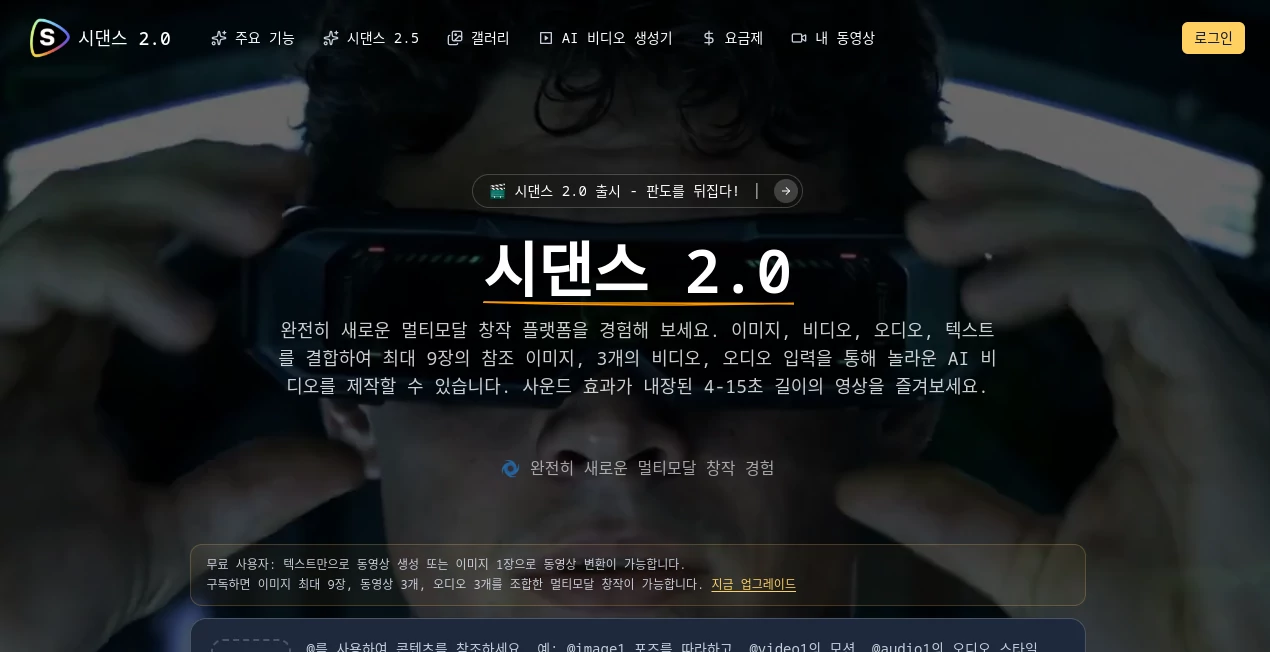
What is 시댄스 2.0?
Seedance 2.0 is a multimodal AI video creation platform built for creators who want more control than a simple text-to-video prompt can provide. Instead of starting from words alone, users can combine images, videos, audio, and text instructions to build short, polished video sequences. The platform supports up to nine reference images, three videos, and audio inputs, giving creators considerably more material to work with in a single generation.
What makes the workflow particularly interesting is the way different assets can be assigned specific roles. A reference image can define a character, a video can provide movement or camera direction, and an audio file can influence the soundtrack or atmosphere. For creators working on advertisements, social media clips, music visuals, product concepts, or cinematic experiments, this approach can make the creative process feel much closer to directing a scene than simply entering a prompt.
Key Features
- Multimodal generation using images, videos, audio, and text prompts.
- Support for up to 9 reference images and 3 videos with a combined video input limit of 15 seconds.
- Support for up to 3 audio files, with MP3 files up to 15 seconds.
- An @ reference system for telling the model exactly how individual assets should be used.
- Character and visual consistency across generated sequences.
- Camera movement and character motion replication.
- Video extension with continuity between scenes.
- Character replacement while retaining movement from an original video.
- Long-take and one-shot video creation using multiple references.
- Built-in sound effects, lip-sync capabilities, and music synchronization.
- Advanced editing features on higher-tier plans.
User Interface
The workflow is designed around a straightforward three-step process: upload assets, describe how those assets should be used with natural language and @ references, and generate a video between 4 and 15 seconds long. This structure keeps the interface focused on the creative task rather than surrounding the user with unnecessary controls.
The reference system is especially useful when a project contains several source files. Instead of vaguely describing which image should influence the result, creators can explicitly point to an asset such as @Image1 or @Video1. That makes the process easier to understand when experimenting with multiple characters, camera movements, outfits, scenes, or sound sources.
Accuracy & Performance
The platform places strong emphasis on consistency, motion, and instruction following. Its feature set is designed to preserve character faces, product details, text, and scene elements while also reproducing complex movements and camera techniques.
For example, creators can use one video as a movement reference and another as a camera reference, then describe how those elements should be combined. The system is also designed to handle effects such as cinematic transitions, particle effects, camera movement, and music-synchronized visuals. Results will naturally vary depending on the quality and clarity of the supplied references and prompt.
Capabilities
The strongest part of the platform is its ability to treat several types of media as creative instructions rather than merely as source material. A creator can provide several images for character or product references, use a video to guide movement, and add audio to influence the final atmosphere.
Its capabilities cover video generation, video extension, motion replication, character replacement, cinematic scenes, one-take sequences, story completion, audio generation, lip synchronization, and music synchronization. The ability to preserve movement while replacing a character can also be useful for visual experimentation and advertising concepts.
Security & Privacy
Privacy-related options become more important when working with unreleased products, client footage, or original creative assets. The platform provides private generation on its Standard and Premium plans, while the pricing page also lists downloadable video files and watermark-free output across the paid plans.
Creators should still review the platform's current privacy policy and terms before uploading confidential, copyrighted, or client-owned material. As with any online AI service, users should make sure they have the necessary rights to the files they provide.
Use Cases
Social media content: Short-form creators can turn reference images, existing footage, and music into visually engaging clips suitable for social platforms.
Advertising and marketing: Product images can be combined with movement references and cinematic prompts to explore campaign concepts without organizing a full production shoot.
Music videos: Music synchronization, cinematic camera instructions, and visual references make the platform useful for short music-video sequences and promotional visuals.
Film and storytelling: Multiple character and scene references can be used to create connected sequences, including long-take concepts and story completion from limited source material.
Creative experimentation: Artists can test unusual combinations of characters, camera movements, environments, costumes, and visual effects without building every element manually.
Video transformation: Existing footage can serve as a foundation for changing characters, extending scenes, or reproducing particular movements and camera techniques.
Pros and Cons
Pros
- Supports images, videos, audio, and text in the same creative workflow.
- Allows detailed asset control through @ references.
- Strong focus on character and scene consistency.
- Supports motion and camera movement replication.
- Can extend existing videos while maintaining visual continuity.
- Includes sound effects, lip synchronization, and music synchronization.
- Higher plans offer 4K output, parallel generations, batch processing, and advanced editing.
- Paid plans are presented without advertising or watermarks.
Cons
- Generated videos are limited to 4–15 seconds per generation.
- The most advanced capabilities require higher-tier plans.
- Users need to prepare suitable reference assets for more controlled results.
- Generation quality and consistency can still depend on the complexity of the prompt and source material.
Pricing Plans
The platform offers pay-as-you-go access as well as subscription plans. The displayed annual pricing includes a Starter plan at $21 per month when billed annually, a Standard plan at $56 per month when billed annually, and a Premium plan at $90 per month when billed annually.
The Starter plan includes 180 credits per month and up to 11 videos, HD output, one concurrent generation, downloadable videos, and watermark-free results. The Standard plan increases the allowance to 580 credits and up to 36 videos per month, while adding private generation, four concurrent jobs, and 4K resolution.
The Premium plan provides 1,300 credits per month and up to 81 videos, together with access to both basic and pro AI models, eight concurrent jobs, a priority generation queue, advanced video editing, batch processing, and early access to new features. Pricing and plan details can change, so users should verify the current offer before subscribing.
How to Use the Platform
- Upload your reference material, including images, videos, and supported audio files.
- Use natural language to describe the scene, movement, style, characters, camera behavior, or story you want to create.
- Use @ references such as @Image1 or @Video1 when you need to specify exactly which asset should control a particular element.
- Select a video duration between 4 and 15 seconds.
- Start the generation and review the resulting sequence.
- Download the finished video or continue refining the concept with different references and instructions.
Comparison with Similar Tools
Many AI video generators are primarily designed around text-to-video or image-to-video workflows. This platform takes a more asset-driven approach by allowing several reference types to work together. That distinction can be valuable when a creator already has footage, character references, product images, or audio and wants the AI to use those materials as explicit creative instructions.
It is particularly well suited to projects where movement and visual consistency matter. A creator can use one source for a character, another for camera movement, and another for audio, rather than relying entirely on a single written description. For users who simply want a quick video from a short text prompt, a simpler generator may be easier; for more controlled multimodal projects, this workflow offers considerably more flexibility.
Conclusion
This platform stands out by treating AI video generation as a combination of directing, editing, and asset management rather than a one-prompt experiment. The ability to combine multiple images, videos, audio files, and detailed references opens up practical possibilities for marketers, filmmakers, YouTube creators, digital artists, and social media teams.
Its support for motion replication, video extension, character replacement, long-take sequences, sound effects, lip sync, and music synchronization gives creators plenty of room to experiment. The short generation window will not suit every project, but for creating polished clips and building larger sequences piece by piece, it is a compelling option worth exploring.
Frequently Asked Questions (FAQ)
What types of files can be used as references?
The platform supports images, videos, and audio. Users can upload up to 9 images, 3 videos with a combined duration of up to 15 seconds, and 3 audio files with MP3 support and a 15-second limit.
How long can generated videos be?
Generated videos can be between 4 and 15 seconds long.
What is the @ reference system?
The @ reference system lets users identify specific uploaded assets inside their prompts. For example, an image can be assigned as a character reference while a video can be used to guide camera movement.
Can it extend an existing video?
Yes. Video extension is one of the platform's core capabilities, with the goal of maintaining continuity in movement and background as a sequence is extended.
Can it replace a character in a video?
Yes. The platform demonstrates character replacement while retaining the movement and performance of the original footage.
Does it generate audio?
The platform includes built-in sound effects and supports audio-driven workflows. Its listed capabilities also include lip synchronization, voice-related fidelity, and music synchronization.
Does it support 4K video?
Yes. 4K resolution is included with the Standard and Premium subscription plans according to the current pricing page.
Are generated videos watermarked?
The current paid plans list watermark-free video output, along with downloadable files.
Is private generation available?
Private generation is listed as a feature of the Standard and Premium plans.
Who can benefit most from this platform?
It is a strong fit for content creators, marketers, filmmakers, digital artists, music-video creators, and businesses that need short AI-generated video content with more control over reference material and movement.
AI Video to Video , AI Image to Video , AI Video Generator , AI Video Editor .
These classifications represent its core capabilities and areas of application. For related tools, explore the linked categories above.

시댄스 2.0 Alternatives Product

Blinkly AI

Viewra

MixHub AI
Artaivo

Nano Banana …

HappyHorse A…
gpt video
Video to GIF…

Grok Imagine…