


















Seed Imagine
What is Seed Imagine?
Creating professional visual content no longer requires advanced editing skills or a collection of separate creative applications. This platform brings image generation, video creation, editing, and refinement together in a single browser-based workspace, allowing creators to move from an idea to a polished result in just a few steps. Whether starting with a simple prompt or an existing reference image, users can quickly transform concepts into high-quality visual assets.
Designed for marketers, designers, content creators, filmmakers, and online businesses, the platform combines multiple leading AI generation models within one interface. Instead of switching between different services, users can experiment with various creative engines while keeping their workflow organized and efficient. The result is a smoother creative process with greater flexibility and consistent output.
From product photography and social media graphics to animated videos and concept illustrations, the platform supports a wide range of creative projects while remaining approachable for beginners and powerful enough for professionals.
Key Features
User Interface
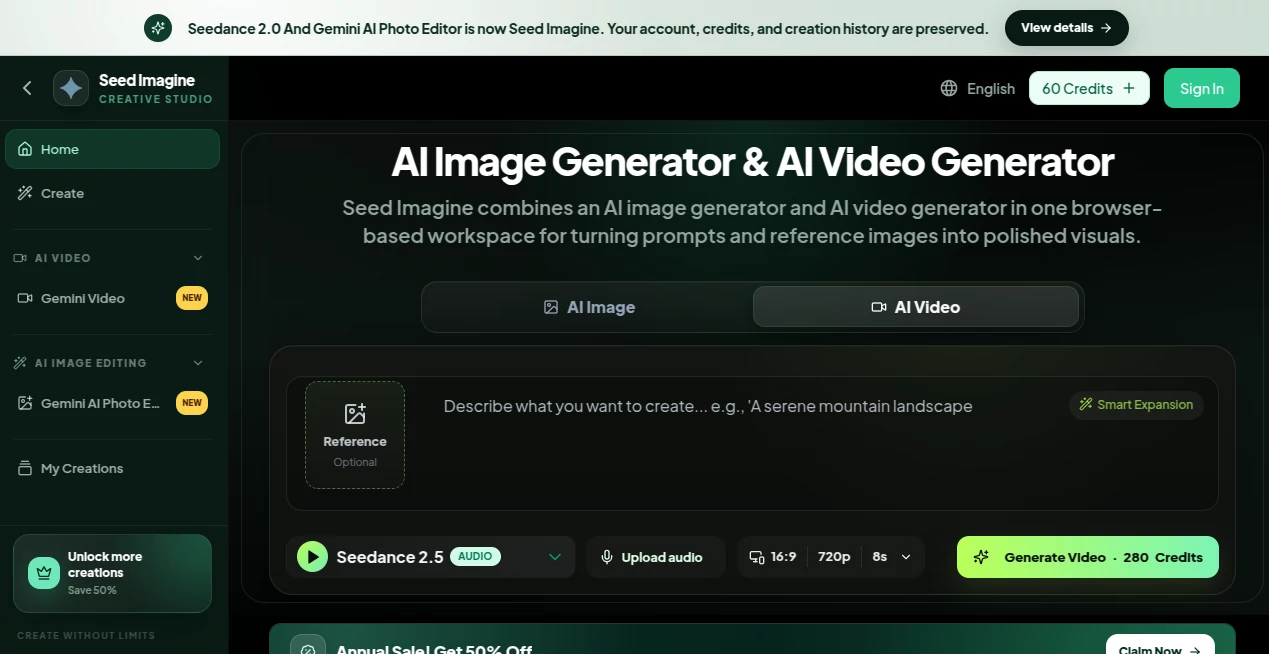
The interface is clean, intuitive, and optimized for creative work. Users simply enter a prompt or upload a reference image, choose whether they want an image or video, select their preferred AI model, and generate content in just a few clicks. Navigation remains straightforward even when working with multiple projects, making it suitable for both casual users and production teams.
Accuracy & Performance
By supporting several modern AI models in one workspace, the platform offers flexibility in balancing speed, quality, and creative style. Generated images feature impressive detail, while videos deliver smooth motion and cinematic presentation. Adjustable settings such as aspect ratio, duration, and resolution allow users to fine-tune outputs according to project requirements.
Capabilities
- AI text-to-image generation
- Image-to-image transformation
- AI text-to-video creation
- Image-to-video animation
- Reference image editing
- Product photography generation
- Background removal
- Photo restoration and colorization
- Virtual try-on experiences
- Character design and style variations
- Support for multiple AI generation models
- Flexible output settings for different platforms
Security & Privacy
Projects remain associated with the user's account, allowing permanent history on paid plans and convenient access to previous creations. Since everything operates directly in the browser, there is no complicated software installation required, making creative work accessible across multiple devices while keeping project management simple.
Use Cases
- Generate product images for e-commerce stores.
- Create engaging social media graphics and videos.
- Produce promotional marketing campaigns.
- Develop concept art for games and films.
- Create character illustrations for books and comics.
- Restore and enhance old photographs.
- Generate AI-powered fashion previews.
- Create short promotional videos from text prompts.
- Design visual assets for presentations and websites.
- Rapidly prototype creative ideas without expensive production.
Pros and Cons
Pros
- Combines image and video generation in one workspace.
- Supports several advanced AI models.
- Easy for beginners to learn.
- Fast browser-based workflow.
- Excellent variety of creative tools.
- Suitable for commercial content creation.
- Flexible generation settings.
- Free credits available for new users.
Cons
- Higher-quality generations consume more credits.
- Some advanced features require paid subscriptions.
- Generation speed may vary during peak usage.
Pricing Plans
A free tier allows users to explore the platform with complimentary credits. Paid subscriptions provide larger monthly credit allowances, unlimited downloads, permanent generation history, priority processing, and commercial usage options depending on the selected plan. Additional one-time credit packs are also available for creators with occasional workloads.
How to Use Seed Imagine
- Sign up and access the browser-based workspace.
- Write a descriptive prompt or upload a reference image.
- Select image generation or video generation.
- Choose the AI model that best matches your project.
- Adjust settings such as aspect ratio, duration, or resolution.
- Generate the content.
- Refine prompts or edit the result if needed.
- Download the finished image or video.
Comparison with Similar Tools
Unlike many creative AI platforms that specialize in only image generation or only video production, this solution combines both workflows within a unified interface. The ability to switch between multiple AI models, create images and videos from text or reference images, edit existing content, and manage projects from one dashboard significantly reduces the need for multiple subscriptions. This integrated workflow is especially valuable for marketing teams, creators, and businesses producing visual content on a regular basis.
Conclusion
For anyone looking to accelerate visual content production without sacrificing quality, this platform delivers an impressive combination of creativity, convenience, and flexibility. The unified workspace, broad collection of AI models, powerful editing capabilities, and support for both image and video generation make it an excellent choice for creators of all experience levels. Whether producing social media campaigns, product visuals, concept art, or promotional videos, it provides a reliable environment for turning ideas into polished creative assets.
Frequently Asked Questions (FAQ)
Can beginners use this platform?
Yes. The interface is designed to be simple enough for first-time users while offering advanced controls for experienced creators.
Does it support both images and videos?
Yes. Users can generate images, create videos from prompts, animate existing images, and edit visual content within the same workspace.
Can I upload my own images?
Yes. Reference images can be uploaded to guide generation or perform image editing tasks.
Is there a free version available?
Yes. Free credits are provided so users can test the platform before upgrading to a paid subscription.
Who is this platform best suited for?
It is ideal for marketers, designers, content creators, online businesses, agencies, educators, and anyone who regularly creates visual content.
AI Photo & Image Generator , Photo & Image Editor , AI Image to Video , AI Video Generator .
These classifications represent its core capabilities and areas of application. For related tools, explore the linked categories above.

Seed Imagine Alternatives Product

GPT Image 1.5

PicLumen AI …

Render of Dr…

LipPulse

HD Photo Con…

PDF to Video

Ltx 2.3

Seedance 3.0…

LongCat Image
