

















What is SellWhere?
SellWhere is a practical resale fee comparison tool built for sellers who want to know what they will actually keep after marketplace fees. Instead of checking several fee pages and doing the math manually, sellers can enter their sale details once and compare the expected payout across multiple resale platforms.
The idea is simple but genuinely useful. A $50 sale does not mean the same $50 payout everywhere. Depending on the marketplace, commissions, processing charges, and shipping-related fees can make a noticeable difference to the final amount. This tool puts those numbers side by side, making it easier to choose where a particular item should be listed.
Key Features
User Interface
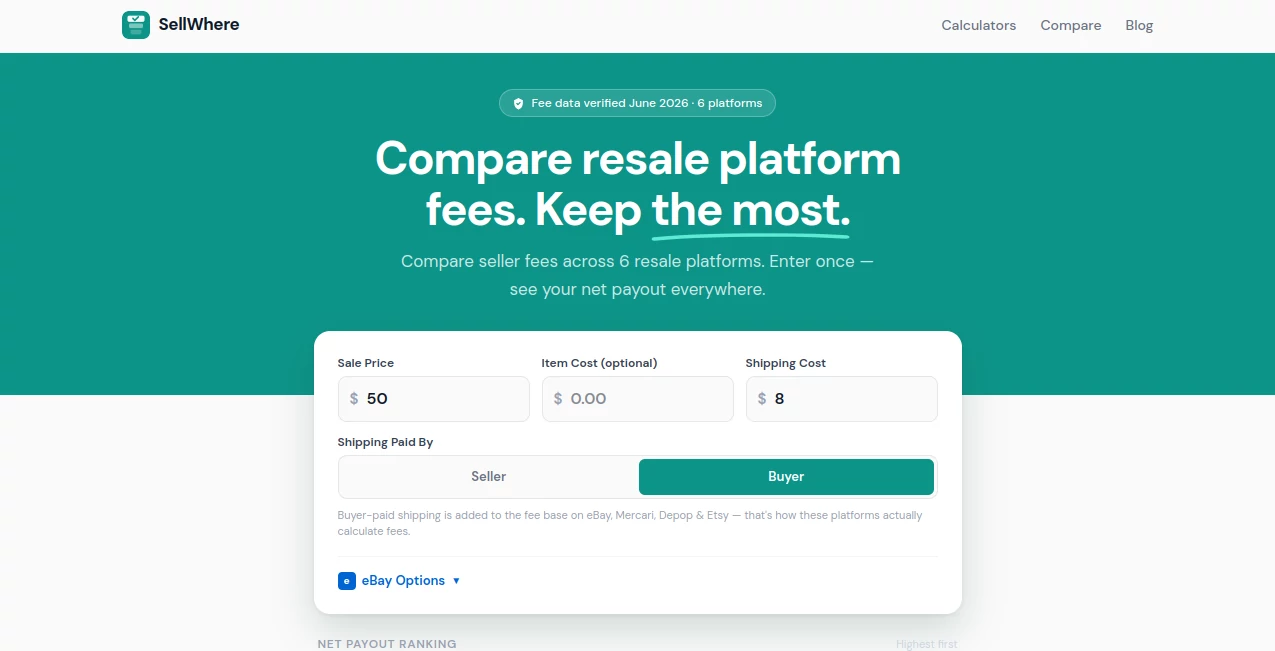
The interface is straightforward and focused on the calculation itself. Sellers can enter a sale price, optionally add the item's cost, provide shipping information, and specify who pays for shipping. The results are then presented as a ranked list based on the expected net payout.
This approach works especially well for people who sell across several marketplaces. There is no need to build a spreadsheet or remember the fee structure of every platform before deciding where to list an item.
Accuracy & Performance
The calculator uses marketplace fee structures to estimate what a seller can expect to receive after applicable charges. The platform states that its fee data was verified in June 2026, covering six resale platforms on the main comparison calculator.
It also takes an important detail into account: buyer-paid shipping can be included in the fee calculation on marketplaces such as eBay, Mercari, Depop, and Etsy. That small detail can otherwise lead to surprisingly inaccurate payout estimates.
Capabilities
The main calculator compares seller economics across Vinted, Depop, Mercari, Etsy, eBay, and Poshmark. Users can see the estimated net payout, the amount deducted in fees, and the effective fee percentage.
For example, on a $50 sale using the site's default comparison settings, Vinted shows a $50 payout, while Depop, Mercari, Etsy, eBay, and Poshmark produce progressively lower payouts. The result makes the financial difference between marketplaces immediately visible rather than leaving sellers to work it out themselves.
There are also individual calculators for specific marketplaces, along with side-by-side comparison tools covering combinations such as Mercari vs. Poshmark, Depop vs. eBay, and Vinted vs. Depop.
Security & Privacy
The calculator is designed around financial estimates rather than requiring sensitive account information. Sellers can enter the figures needed for a fee calculation without connecting their marketplace accounts. This keeps the experience focused on comparing costs and potential payouts.
As with any financial planning tool, the figures should be treated as estimates based on the applicable marketplace fee structure. Sellers should still check the current terms of the marketplace before making decisions involving unusual categories, subscriptions, promotions, or other special charges.
Use Cases
This tool is particularly useful for people who cross-list clothing, accessories, collectibles, handmade products, vintage goods, and other items across several resale marketplaces.
Imagine a seller has a jacket that should sell for around $50. Rather than automatically posting it on the marketplace they normally use, they can compare the expected payout first. If one platform leaves significantly more money after fees, that difference can influence the listing decision.
It is also useful when setting prices. Sellers can experiment with different sale prices and shipping arrangements to understand how much money will actually remain after marketplace charges. For regular sellers, that can turn fee calculations from an annoying afterthought into part of the pricing process.
Pros and Cons
- Pros: Compares multiple resale marketplaces in one place.
- Pros: Shows estimated net payout instead of only displaying headline fee percentages.
- Pros: Supports sale price, shipping, and optional item cost inputs.
- Pros: Accounts for buyer-paid shipping where it affects the marketplace fee calculation.
- Pros: Provides individual calculators and platform comparison pages.
- Cons: Marketplace fees can change, so sellers should verify unusual or newly introduced charges.
- Cons: The main comparison currently focuses on a selected group of resale platforms rather than every marketplace available.
Pricing Plans
The calculator is available as a web-based tool without a subscription plan being presented as a requirement for using the core comparison experience. The main purpose is to let sellers compare marketplace costs and estimate their potential payout without having to perform the calculations themselves.
How to Use SellWhere
Start by entering the expected sale price of the item. Add the shipping cost and indicate whether the seller or buyer is paying for shipping. If you want to calculate profit rather than simply compare payout, you can also enter the item's cost.
Once the figures are entered, the calculator compares the applicable fees across the supported marketplaces and ranks the results by net payout. Sellers can then choose the platform that makes the most sense for the particular item.
For a quick example, enter a $50 sale and compare the results. The difference between a marketplace with no seller fee and one charging a substantial commission becomes clear immediately.
Comparison with Similar Tools
Many fee calculators focus on one marketplace at a time. That approach is useful when a seller has already decided where to list an item, but it is less helpful when the real question is where the item should be listed in the first place.
The main advantage here is the cross-platform perspective. Instead of calculating an eBay payout, then opening another calculator for Mercari, and then repeating the process for Poshmark or Depop, sellers can compare several outcomes from the same set of numbers.
The platform also goes beyond a single general calculator by offering individual marketplace calculators and comparison pages. This makes it useful both for quick decisions and for sellers who want to investigate the fee structure of a particular marketplace in more detail.
Conclusion
For anyone who sells across multiple resale marketplaces, understanding the final payout is just as important as knowing the advertised selling price. Small differences in commissions and processing charges can add up quickly, especially for sellers completing dozens or hundreds of transactions.
This tool makes that comparison considerably easier. Its clean input system, payout ranking, shipping-aware calculations, and collection of marketplace-specific calculators give sellers a practical way to make listing decisions based on the money they are likely to keep.
Frequently Asked Questions (FAQ)
What does this tool calculate?
It estimates seller fees and net payouts across several resale marketplaces based on the sale price, shipping details, and optional item cost.
Which platforms can be compared?
The main calculator compares Vinted, Depop, Mercari, Etsy, eBay, and Poshmark. Additional calculators and comparison pages cover other marketplace combinations as well.
Can shipping costs be included?
Yes. Users can enter shipping costs and specify whether the seller or buyer pays for shipping. This is particularly important because some marketplaces include buyer-paid shipping in the amount used to calculate seller fees.
Can I calculate my profit?
Yes. The item cost is an optional input, allowing sellers to move beyond payout calculations and consider the money left after the cost of acquiring the item.
Why should I compare marketplaces before listing?
Different marketplaces can take very different amounts from the same sale. Comparing the expected payout first can help sellers choose a platform and price that better fit their profit goals.
Are the fee calculations always exact?
The calculations are designed to reflect the applicable marketplace fee structures, but sellers should verify current official marketplace policies for special categories, optional promotional services, subscriptions, or other circumstances that may change the final fee.
Is the tool useful for occasional sellers?
Yes. Even someone selling only a few items can use a quick comparison to avoid overlooking a meaningful difference in marketplace fees.