ShotAI
What is ShotAI?
Creating eye-catching visual content used to demand multiple apps, countless browser tabs, editing experience, and a surprising amount of patience. That routine is changing quickly. This platform brings image generation, video creation, editing tools, and advanced AI models into a single creative workspace designed for speed and flexibility.
Instead of forcing creators to jump between different services, it combines text-to-image generation, image transformations, text-to-video creation, and visual enhancement tools under one roof. For content creators, marketers, designers, and social media teams, that means less time spent switching tools and more time focused on ideas.
One thing that immediately stands out is the variety of modern AI models available. Rather than relying on a single engine, users gain access to multiple generation technologies optimized for different creative tasks. Whether someone wants cinematic visuals, realistic images, stylized content, or animated scenes, the process feels smooth and refreshingly direct.
Key Features
User Interface
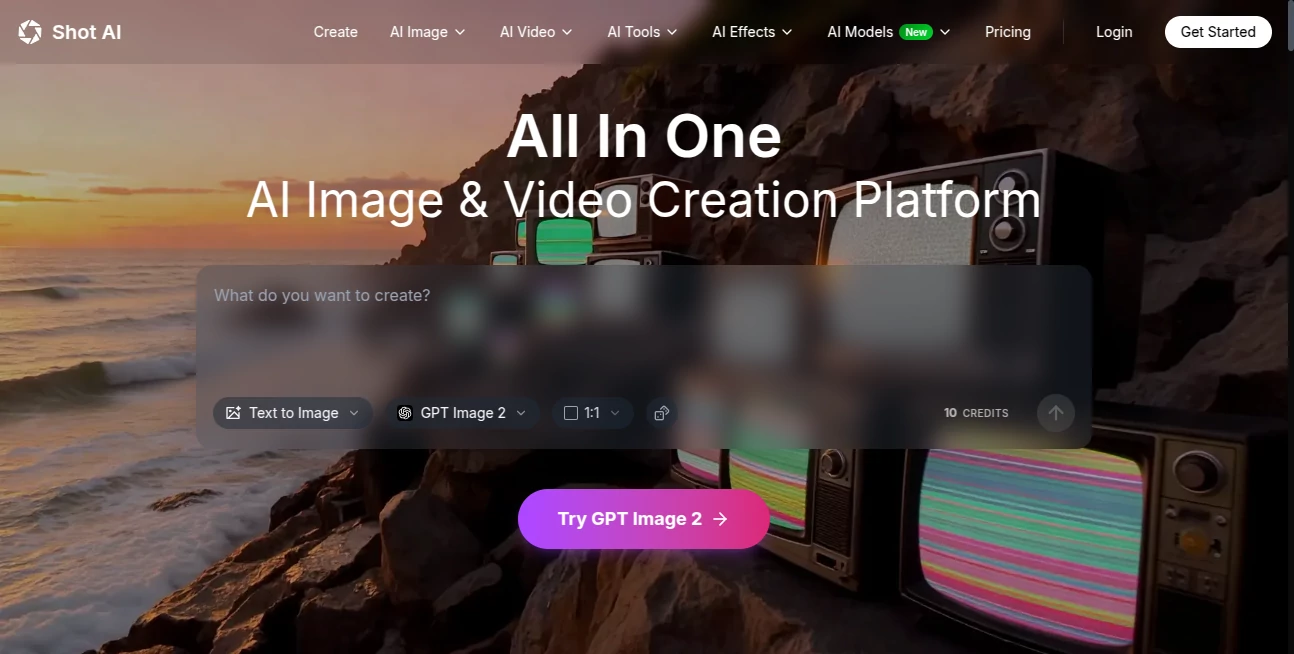
The interface feels approachable even for first-time users. Navigation is straightforward and organized around common tasks such as text-to-image, image-to-image, text-to-video, and image animation. The layout avoids unnecessary clutter, making experimentation enjoyable instead of overwhelming.
Users can move from idea to finished content without dealing with a steep learning curve. Uploading assets, entering prompts, and refining results takes only a few clicks.
Accuracy & Performance
Speed matters when creativity strikes. Image generation often completes in seconds, while video creation remains surprisingly fast considering the processing involved. Performance feels responsive even when handling advanced AI workflows.
The generated outputs show strong attention to detail, realistic motion behavior, and improved prompt understanding. Small creative instructions are interpreted with impressive precision, helping users achieve closer results with fewer attempts.
Capabilities
- Generate images from written prompts
- Transform existing visuals using image-to-image technology
- Create AI videos from text descriptions
- Animate static images into moving scenes
- Enhance image and video quality
- Remove backgrounds and improve visual details
- Access multiple advanced AI generation models
- Use templates for faster content production
A content creator working on short social videos, for example, can turn a simple idea into a complete visual concept without opening several editing applications.
Security & Privacy
Privacy matters, especially when creators upload original assets and commercial projects. The platform offers account-based storage while supporting file preservation features and commercial usage rights for generated content.
For professionals and businesses, this creates confidence that creative projects can move from concept to production with fewer limitations.
Use Cases
- Create marketing visuals and promotional videos
- Generate social media content at scale
- Produce engaging short-form videos
- Design concept art and illustrations
- Create visual assets for advertising campaigns
- Develop YouTube thumbnails and digital content
- Generate artistic ideas for creative projects
- Build content for online stores and product promotions
Pros and Cons
Pros
- Multiple AI models available in one platform
- Supports both image and video workflows
- Beginner-friendly interface
- Fast generation speed
- Commercial usage support
- Template system improves workflow efficiency
Cons
- Advanced generations can consume credits quickly
- Video creation may require more processing time than images
- High-volume creators may eventually need premium plans
Pricing Plans
New users receive free credits to explore features before subscribing.
- Lite: Designed for lighter creative workloads
- Plus: Increased monthly credits and task capacity
- Pro: Larger content production capability
- Max: High-volume creation with expanded limits
The credit system offers flexibility and allows creators to scale usage according to project needs.
How to Use ShotAI
Start by creating an account and accessing the dashboard.
- Choose a creation mode
- Write a text prompt or upload an image
- Select a preferred AI model
- Adjust settings if needed
- Generate results
- Refine or export the final content
The process feels remarkably simple. Even users with no design background can create professional-looking content in minutes.
Comparison with Similar Tools
Many creative AI platforms specialize in only one area. Some focus entirely on image generation while others prioritize video creation. This platform stands out by bringing both experiences together inside a unified ecosystem.
Another major difference comes from access to multiple AI technologies rather than a single generation engine. That flexibility gives creators more room to experiment and compare visual styles without constantly switching services.
For users who value convenience, speed, and variety, the experience feels more complete than many fragmented alternatives.
Conclusion
Modern creators need tools that keep pace with ideas. Waiting hours for editing workflows or moving files across several platforms no longer feels practical.
This solution delivers a polished environment where image generation, AI video creation, editing capabilities, and creative enhancement work together naturally. The combination of speed, accessibility, and powerful AI models creates a workflow that feels built around real creators rather than technical complexity.
For anyone looking to turn concepts into visuals quickly while maintaining creative control, this is a surprisingly capable option worth exploring.
Frequently Asked Questions (FAQ)
Can generated content be used commercially?
Yes. Users can create content for business, marketing, and commercial projects.
Do I need design or editing experience?
No. The interface is designed for both beginners and experienced creators.
Does it support image and video creation?
Yes. Users can create both visual formats within the same environment.
Can existing images be edited?
Yes. Image transformation and enhancement tools allow users to refine uploaded visuals.
Is there a free version available?
New accounts receive free credits that allow users to test features before upgrading.
AI Photo & Image Generator , AI Image to Video , AI Video Generator , AI Text to Image .
These classifications represent its core capabilities and areas of application. For related tools, explore the linked categories above.

ShotAI Alternatives Product
Veo 3.2 AI V…

AI Animate I…
Paper Animat…
Sora 2 Video

Viewra

Flowmata AI

Seedance 2.0
z image

Grok Imagine