


















Siftly
What is Siftly?
Anyone who runs a business or manages expenses knows the pain: a pile of receipts sitting on your desk, each one needing to be typed into a spreadsheet line by line. It’s tedious, error-prone, and steals time you’d rather spend on actual work. Siftly makes that frustration disappear. You snap a photo or upload a PDF, and it pulls out every line item, total, tax, date, and supplier automatically. In seconds you have clean, ready-to-use data. I’ve watched small business owners go from dreading expense reports to finishing them during a coffee break. It’s one of those tools that feels like it was built by someone who’s been through the same headache.
Introduction
Bookkeeping shouldn’t be the bottleneck in your day. Yet for freelancers, small teams, and accountants, manually entering receipt data remains a weekly (or daily) reality. Siftly changes that by using smart AI to read documents the way a careful human would—but much faster and without the fatigue. It handles messy receipts, scanned invoices, even slightly handwritten notes, and turns them into structured spreadsheet rows. The best part is how much control you still have: you can review and edit before exporting. It’s not about replacing your judgment—it’s about removing the boring, repetitive work so you can focus on what actually moves your business forward.
Key Features
User Interface
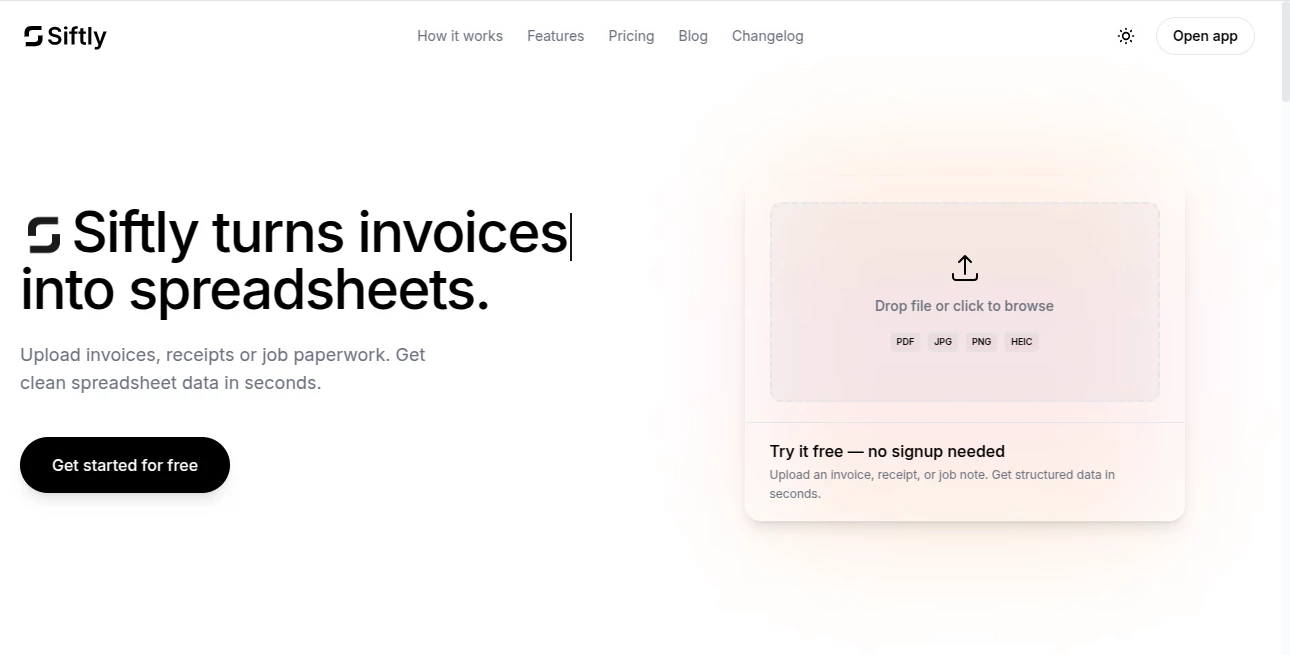
The whole process feels refreshingly simple. Drag and drop your files or click to upload—PDFs, photos, scanned documents all work. The AI processes them quickly and shows you a clean table with everything extracted. You can click any cell to fix or add details, then export with one click. No complicated menus or steep learning curve. Even if you’re not tech-savvy, you’ll be up and running in under a minute. The clean layout keeps the focus on your data rather than the tool itself.
Accuracy & Performance
It consistently pulls accurate line items, totals, taxes, dates, and supplier names from real-world documents. On standard business receipts and invoices, accuracy sits around 95% or higher, and you can always make quick corrections. Processing is fast—even batches of 10–15 documents finish quickly. The tool learns from your edits over time, getting smarter with your specific document styles. It’s reliable enough that many users trust the first pass and only spot-check the important fields.
Capabilities
Beyond basic extraction, it handles multiple currencies, VAT calculations, and different document layouts. You can upload folders of receipts at once, review everything in one table, and export as CSV, Excel, or directly to Google Sheets. It works with everything from Uber receipts to supplier invoices to handwritten job notes. The combination of speed and flexibility makes it practical for both occasional users and people processing dozens of documents weekly.
Security & Privacy
Your documents are processed securely and automatically deleted after extraction. Everything is encrypted, and there’s no long-term storage of your sensitive financial data. That peace of mind matters when you’re uploading real business records. The tool was clearly built with privacy in mind, so you can use it confidently without worrying about where your information ends up.
Use Cases
Freelancers quickly categorize monthly expenses for tax time without hours of typing. Small business owners track receipts from business trips or supplier purchases in real time. Accountants process client expense reports faster and with fewer errors. E-commerce sellers organize shipping and supplier invoices to keep better books. Even families use it to track household receipts for budgeting. Wherever paper or digital documents pile up, it turns chaos into clean data.
Pros and Cons
Pros:
- Saves hours every week by eliminating manual data entry.
- Works with real-world messy documents, not just perfect scans.
- Easy review and editing keeps you in full control.
- Multiple export options fit any workflow.
- Generous free tier lets you test with your actual documents.
Cons:
- Very poor quality or heavily damaged documents may need manual fixes.
- Free plan has monthly limits suitable for lighter users.
- Extremely complex multi-page documents can occasionally need extra attention.
Pricing Plans
It starts with a free plan that gives you a solid number of extractions per month—perfect for testing or light personal use. Paid plans (Plus and Pro) increase limits significantly, add faster processing, batch features, and priority support. Pricing is straightforward and reasonable, especially when you consider the time it saves compared to hiring help or doing everything manually.
How to Use Siftly
Go to the site and drag your receipt or invoice into the upload area. The AI processes it in seconds and shows a clean table with all the extracted information. Review the data—click any field to edit if needed. When you’re happy, choose your export format (CSV, Excel, or Google Sheets) and download. For multiple documents, upload them together and process as a batch. The entire workflow is fast enough that you can clear a whole stack of receipts during a single coffee break.
Comparison with Similar Tools
Many document scanners either require manual entry afterward or produce messy, hard-to-use results. Siftly stands out by combining high accuracy with an easy review step and flexible exports. It’s simpler than heavy accounting software yet more powerful than basic scanning apps. For users who want speed and reliability without complexity, it often becomes the preferred choice.
Conclusion
Expense tracking and bookkeeping don’t have to be painful weekly chores. Siftly turns one of the most tedious parts of running a business or managing personal finances into something quick and almost enjoyable. It gives you back time, reduces errors, and lets you focus on growth instead of data entry. Whether you’re a freelancer, small business owner, or part of a larger team, it’s one of those rare tools that quietly makes everyday work better. If you’re tired of typing receipt details, this is the relief you’ve been waiting for.
Frequently Asked Questions (FAQ)
What file types does it support?
PDF, PNG, JPG, and other common image formats work great.
How accurate is the extraction?
It achieves high accuracy on standard documents, and you can always review and edit results.
Can I process multiple receipts at once?
Yes—batch upload is supported, with higher limits on paid plans.
Is my data safe?
Yes—documents are processed securely and deleted after extraction.
Do I need to create an account?
You can start trying it without an account, though signing up unlocks more features and history.
AI Data Mining , AI PDF , AI Documents Assistant .
These classifications represent its core capabilities and areas of application. For related tools, explore the linked categories above.

Siftly Alternatives Product

Myjourney

JSON to Excel

TopPDF
Fill PDF fro…
The #1 Text …

Certificate …

Remove My Me…

ChatView-AI …

heicpdf.to
