
SignatureClear
What is SignatureClear?
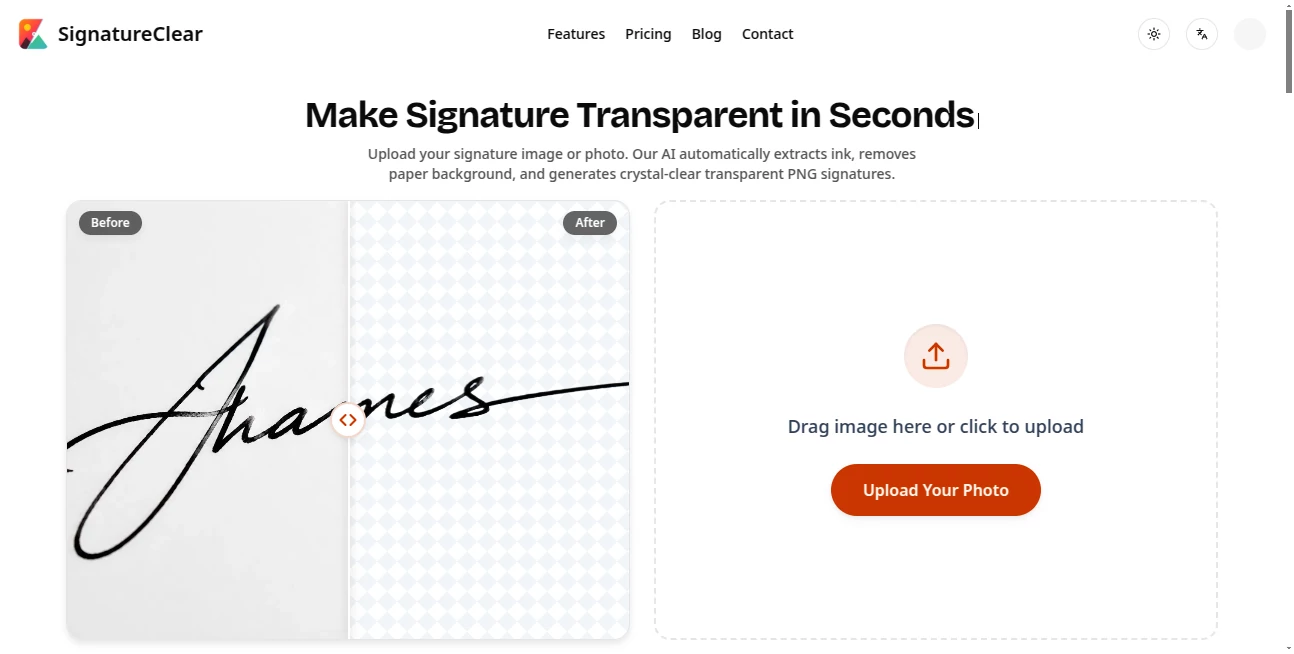
SignatureClear is an AI-powered image tool designed to turn handwritten signature photos and scans into clean, transparent PNG files. Instead of spending time manually erasing paper, shadows, or unwanted background marks, users can upload an image and let the system isolate the ink automatically.
The idea is refreshingly practical. Take a quick photo of a signature on paper, upload it, and get a version that can be placed directly into documents. It is particularly useful for people who regularly work with Word files, PDF contracts, forms, invoices, or other digital paperwork where a clean signature image is needed.
Key Features
- AI-powered signature background removal
- Extraction of blue and black pen strokes
- Preservation of fine handwriting details and natural pressure
- Transparent PNG export
- Removal of paper shadows, yellow tint, and dark spots from photographed signatures
- Support for casual phone photos and scanned signatures
- Automatic deletion of uploaded images within two days
- Uploaded data is not stored or used for AI training
- Additional background removal capabilities for portraits, food, pets, and vehicles
User Interface
The interface keeps the process straightforward. Users can drag an image into the upload area or select a file from their device. After processing, the result can be downloaded as a transparent PNG, making the workflow easy to understand even for someone who has never used an image-processing application before.
There is also a history area for processed results, while the overall layout puts the upload and download workflow front and center rather than surrounding it with unnecessary editing controls.
Accuracy & Performance
The main strength of the processing is its focus on handwriting rather than simply removing a generic background. The system is designed to extract blue and black ink while retaining fine lines and natural variations in pen pressure.
It can also deal with imperfections that commonly appear in real-world phone photos, including paper shadows, yellowish color casts, and dark spots. That makes it more practical than a workflow that assumes every signature arrives as a perfectly scanned image.
Capabilities
Although signatures are the central use case, the underlying background-removal technology extends further. The service showcases models optimized for people, food, animals, and vehicles, with attention to details such as hair, fur, body contours, ingredients, and glossy vehicle surfaces.
For a user who only needs a transparent signature, this broader capability is a useful bonus. Someone working with product photography or simple marketing assets may also find the same background-removal workflow helpful for other images.
Security & Privacy
Privacy matters more when the uploaded image contains a handwritten signature. The service states that uploaded images and signatures are automatically deleted within two days and are not stored or used for AI training.
This short retention period is reassuring for occasional document work, although users should still review the service's privacy and terms pages when processing particularly sensitive business or legal material.
Use Cases
A common example is signing a Word document. A user can photograph a handwritten signature, remove the paper background, download the transparent PNG, and place it into the document without carrying a white rectangle around the signature.
The same approach works well for PDF contracts, invoices, application forms, business paperwork, and other documents that require a reusable signature image. It can also be handy for freelancers, students, office workers, and small businesses that do not want to open a full image editor for a simple cleanup task.
Beyond signatures, the background-removal capabilities can help isolate people, dishes, pets, and vehicles for e-commerce, menus, marketing materials, or social content.
Pros and Cons
- Pros: Simple upload workflow, specialized signature extraction, transparent PNG output, useful cleanup for phone photos, support for blue and black ink, and a clear data-deletion policy.
- Pros: The broader image cutout capabilities make the service useful beyond handwritten signatures.
- Cons: The free allowance is limited to five credits and does not refresh monthly.
- Cons: Users processing images regularly will need a paid subscription for additional credits.
Pricing Plans
The service offers a free option with five sign-up credits, valid for 30 days. It includes AI-powered signature background removal and transparent PNG downloads, making it suitable for testing the workflow before paying.
The Pro plan costs $9.99 per month and provides 300 credits, transparent PNG downloads, two-day processing history, monthly credits valid for 30 days, and email support.
A previously offered Starter plan cost $4.99 per month and included 100 monthly credits, but the website currently marks this early-bird plan as no longer available.
How to Use SignatureClear
- Open the image-processing tool and upload a signature photo or scan.
- Wait while the AI detects and extracts the handwritten ink.
- Review the processed transparent result.
- Download the signature as a PNG file.
- Insert the transparent image into a Word document, PDF contract, form, or another digital document.
For better results, a reasonably clear photograph or scan with visible handwriting is a sensible starting point. A quick phone photo does not need to be perfect because the processing is designed to handle common paper shadows and color variations.
Comparison with Similar Tools
General-purpose background removers can certainly remove backgrounds from images, but a signature has different requirements. Fine pen strokes can disappear when an aggressive cutout process is used, while paper shadows and subtle variations in ink can make the result look artificial.
This service takes a more focused approach by specifically targeting handwritten signatures and preserving details such as fine lines and natural pressure. That makes it a better fit when the end goal is a reusable digital signature rather than simply creating an ordinary subject cutout.
Its additional support for portraits, food, pets, and vehicles also gives it some flexibility when the same user needs broader background-removal work.
Conclusion
For anyone who has ever photographed a handwritten signature and then struggled to remove the surrounding paper, this tool solves a very specific problem without turning it into a complicated editing project. The combination of automatic ink extraction, transparent PNG output, phone-photo cleanup, and short data retention makes the workflow particularly practical.
The free credits provide an easy way to test the results, while the Pro subscription is aimed at users who process signatures more frequently. Its broader image cutout capabilities are another useful touch, but the real appeal remains simple: turning an ordinary signature photo into a clean digital asset that is ready to use.
Frequently Asked Questions (FAQ)
Is it free to make a signature transparent?
Yes. New users receive five free credits that are valid for 30 days. The free plan includes AI signature background removal and transparent PNG downloads.
Can a phone photo of a signature be processed?
Yes. The service is designed to handle casual phone photographs and can automatically remove paper shadows, yellow tint, and dark spots.
Can the result be used in Word documents?
Yes. The transparent PNG output is designed for use in Word documents, PDF contracts, and similar digital paperwork.
What happens to uploaded signature images?
The service states that uploaded images and signatures are automatically deleted within two days and are not stored or used for AI training.
Does it only work with signatures?
No. Its background-removal models are also designed for portraits, food, pets, and vehicles.
How much does the Pro plan cost?
The Pro plan is $9.99 per month and includes 300 credits, transparent PNG downloads, two-day processing history, and email support.
Can I use the processed images commercially?
The website includes commercial-use information in its FAQ, but users handling commercial projects should review the current terms of service for the applicable usage conditions.
What happens if image processing fails?
The website provides an FAQ covering failed processing, but users should check the current service terms or support information for the specific handling of failed jobs.
AI Photo & Image Generator , Photo & Image Editor , AI Background Remover , AI Photography .
These classifications represent its core capabilities and areas of application. For related tools, explore the linked categories above.
SignatureClear details
Website unavailable — View Alternatives
Pricing
- Freemium
Apps
- Web App
Categories

SignatureClear Alternatives Product

FLUX 2

AI Polaroid …

bratgenerator

SeeDream 4.5

Edensign

Photo Locati…

SellerPic

AI Image Edi…

RemoveLayer