


















Simple PostgreSQL
What is Simple PostgreSQL?
Simple PostgreSQL is a modern desktop client designed to make working with PostgreSQL databases faster, cleaner, and more comfortable. Built for developers, database administrators, and teams who work with multiple PostgreSQL environments, it provides a focused workspace where users can connect, explore, edit, and manage databases without unnecessary complexity.
Instead of switching between different tools for local development, staging servers, and production databases, this application brings everything into one organized interface. Users can browse tables, run SQL queries, manage records, and move between different connections with ease while keeping database credentials stored locally on their own machine.
The tool focuses specifically on PostgreSQL rather than trying to support every database system. This dedicated approach allows it to provide a smoother experience with features designed around PostgreSQL workflows, making daily database tasks more efficient.
Key Features
User Interface
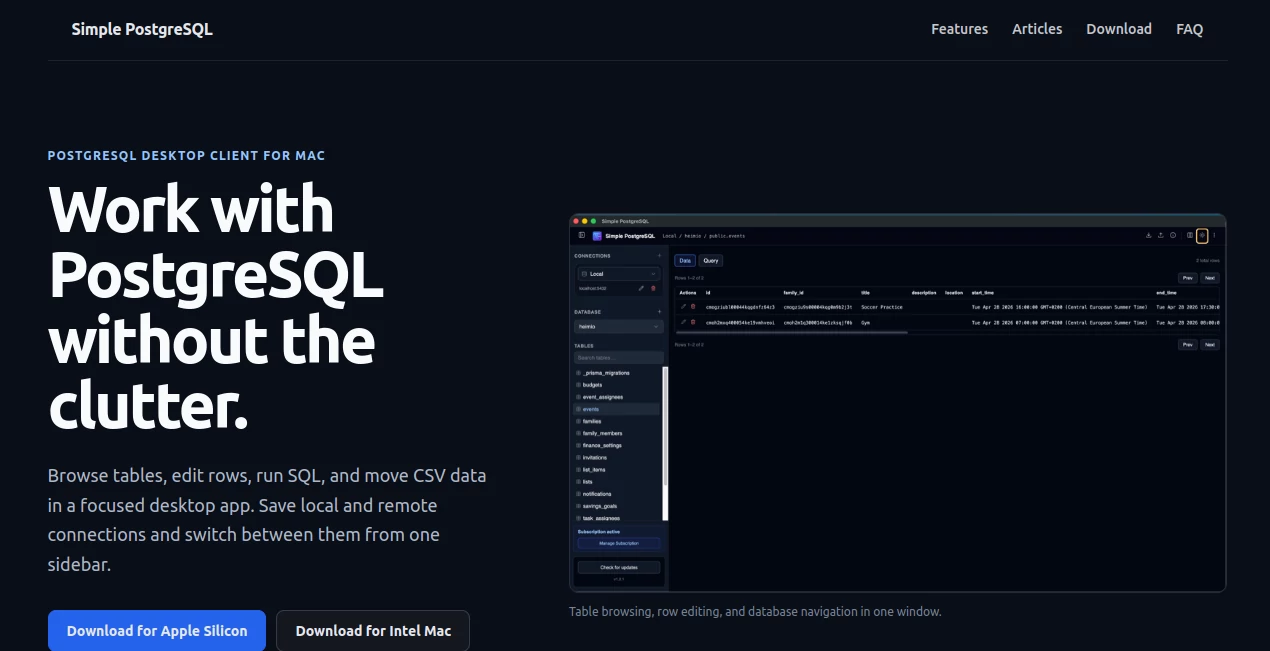
The application offers a clean and straightforward desktop interface that removes the confusion often found in traditional database management tools. Connections are displayed in a single sidebar, allowing users to quickly switch between development, testing, and production environments.
The table browser provides an easy way to view schemas, columns, and rows without writing SQL for every simple task. Users can navigate through database structures visually, edit information directly, and focus on the data they need.
Accuracy & Performance
The application is built to provide a reliable PostgreSQL workflow with responsive performance for everyday database operations. The SQL editor includes autocomplete support for tables and columns, helping developers write queries faster and reduce mistakes.
Pagination, structured data browsing, and optimized database connections create a smooth experience when working with different database sizes and environments.
Capabilities
The platform provides a complete set of essential PostgreSQL management features, including database connections, schema browsing, SQL query execution, row editing, and CSV data handling.
- Connect to local and remote PostgreSQL databases
- Browse schemas, tables, columns, and records
- Edit rows directly without complex SQL commands
- Write SQL queries with autocomplete assistance
- Import and export CSV files
- Manage multiple database environments from one application
Security & Privacy
Privacy is one of the main advantages of this desktop-based approach. Database credentials remain stored locally instead of being transferred to external servers. Users can manage their connections directly from their own device without requiring cloud accounts or third-party access.
This makes the tool suitable for developers and organizations that prefer keeping sensitive database information under their own control.
Use Cases
Simple PostgreSQL is useful for many professionals who work with PostgreSQL databases daily. Developers can use it during application development to inspect tables, test queries, and manage local databases. Teams can connect to staging and production environments from one place while maintaining a cleaner workflow.
It is also helpful for freelancers and database professionals who manage multiple client projects and need a lightweight alternative to complicated database administration software.
- Web application development
- Backend engineering projects
- Database testing and debugging
- Production database monitoring
- CSV data management
- Learning and exploring PostgreSQL structures
Pros and Cons
Pros
- Simple and focused PostgreSQL experience
- Clean desktop interface
- Supports unlimited database connections
- Local credential storage for better privacy
- No unnecessary database integrations
- Easy table browsing and editing
Cons
- Focused only on PostgreSQL databases
- Desktop application availability is limited compared to web-based tools
- Advanced enterprise database features may require specialized solutions
Pricing Plans
The platform offers a simple pricing model with a 14-day free trial available for new users. After the trial period, users can continue with an affordable yearly subscription that includes unlimited connections, database browsing features, SQL tools, CSV import and export, local credential storage, updates, and support.
The straightforward pricing approach makes it suitable for individual developers and professionals who want a reliable PostgreSQL client without complicated licensing structures.
How to Use Simple PostgreSQL
Getting started is designed to be quick and simple. Users can install the desktop application, create a database connection using their PostgreSQL credentials, and immediately begin exploring their databases.
- Install the desktop application
- Add a PostgreSQL connection using connection details or a connection URL
- Select a database environment from the sidebar
- Browse tables or write SQL queries
- Edit, export, or manage database information
Comparison with Similar Tools
Compared with traditional database management applications, this solution takes a more focused approach by concentrating only on PostgreSQL. Many database tools support multiple database engines, which can create a more complicated interface with features users may never need.
For developers who primarily work with PostgreSQL, a dedicated client can provide a cleaner experience, faster navigation, and a workflow designed around their main database technology.
Conclusion
For developers and teams working with PostgreSQL, having a simple and reliable database client can significantly improve productivity. This application combines essential database management features with a clean interface, strong privacy practices, and a workflow designed specifically for PostgreSQL users.
By removing unnecessary complexity and focusing on the tasks developers perform every day, it provides a practical solution for managing databases more efficiently.
Frequently Asked Questions (FAQ)
What databases does this tool support?
It is specifically designed for PostgreSQL databases and focuses on providing the best possible experience for PostgreSQL users.
Are database credentials stored online?
No. Connection information is stored locally on the user's device instead of being sent to cloud services.
Can I connect to remote PostgreSQL servers?
Yes. Users can connect to both local development databases and remote PostgreSQL environments.
Does it support SQL queries?
Yes. It includes a SQL editor with autocomplete features to help users write and manage queries efficiently.
Can I export database data?
Yes. Users can export table data to CSV files and manage database information more easily.
AI Productivity Tools , Code & IT , AI Developer Tools .
These classifications represent its core capabilities and areas of application. For related tools, explore the linked categories above.
Simple PostgreSQL details
Website unavailable — View Alternatives
Pricing
- Freemium
Apps
- Web App
Categories

Simple PostgreSQL Alternatives Product

Motion

Resyfy AI

GOLANG COLLE…

Overlap

Remove My Me…

Linkflare

BetterAntisp…

AiZolo

kling 3
