SnapSubtitles
What is SnapSubtitles?
Adding subtitles to videos has become essential for creators who want to reach wider audiences across social media, education, and business. This platform simplifies the entire workflow by combining AI-powered speech recognition with an intuitive subtitle editor, making professional captions accessible even for beginners.
Instead of spending hours transcribing dialogue manually, users can upload a video, let the AI generate accurate subtitles, customize their appearance, and export a polished result ready for publishing. The streamlined experience is particularly valuable for creators producing content for platforms where silent autoplay and accessibility play an important role.
Whether you're preparing YouTube tutorials, Instagram Reels, TikTok videos, online courses, or promotional content, the editing process feels remarkably fast without sacrificing quality. The balance between automation and manual customization makes it suitable for both casual creators and professionals.
Key Features
User Interface
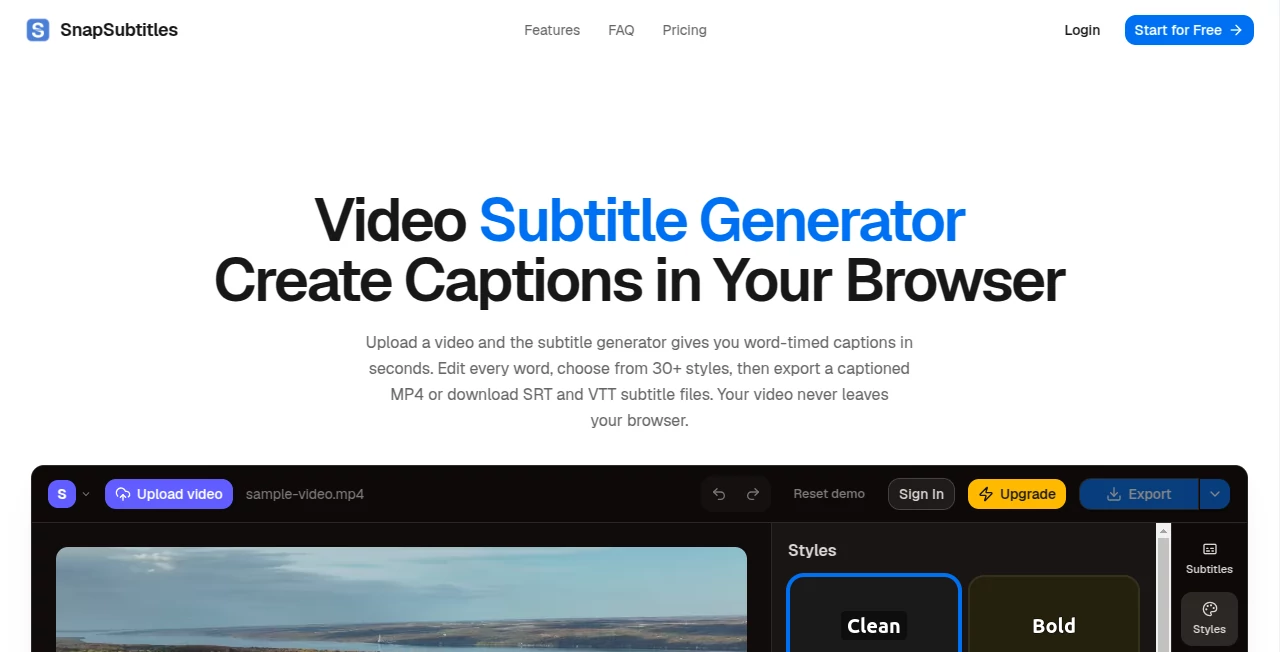
The interface is clean, modern, and designed around simplicity. Uploading a video requires only a few clicks, while subtitle editing happens directly on an interactive timeline. Text adjustments, font selection, color changes, positioning, and timing corrections are all easy to access without overwhelming the user.
Accuracy & Performance
Powered by AI speech recognition, subtitle generation is impressively fast and performs well across different speaking styles. While no automatic transcription system is perfect, the built-in editor allows quick corrections that significantly reduce the time normally required for manual captioning.
Capabilities
- Automatic subtitle generation from uploaded videos.
- AI speech-to-text transcription.
- Subtitle timing adjustment.
- Custom fonts and text styling.
- Color and background customization.
- Subtitle positioning controls.
- Fast subtitle editing timeline.
- Support for multiple content types.
- Video export with embedded subtitles.
- Suitable for short-form and long-form videos.
Security & Privacy
Uploaded content is processed online to generate subtitles, allowing creators to complete projects without installing desktop software. As with any cloud-based editing service, users working with confidential material should review the platform's privacy policy before uploading sensitive files.
Use Cases
- Creating subtitles for YouTube videos.
- Editing captions for TikTok and Instagram Reels.
- Producing accessible educational videos.
- Preparing corporate presentations.
- Generating subtitles for product demonstrations.
- Improving viewer engagement on social media.
- Making multilingual content easier to localize.
- Adding captions to marketing campaigns.
Pros and Cons
Pros
- Fast AI subtitle generation.
- Easy-to-use editing interface.
- Professional subtitle customization.
- Reduces manual transcription time.
- Ideal for content creators of all experience levels.
Cons
- Automatic transcription may require minor manual edits.
- Cloud-based workflow requires an internet connection.
- Advanced editing needs can still require manual adjustments.
Pricing Plans
The platform offers online subtitle creation with pricing that may vary depending on available plans and feature access. Users should check the official website for the latest information regarding free usage, premium subscriptions, and commercial licensing options. :contentReference[oaicite:0]{index=0}
How to Use SnapSubtitles
Start by uploading your video to the editor. After processing, the AI automatically creates subtitles based on the spoken audio. Review the generated captions, make any necessary corrections, customize fonts, colors, and placement, then export the finished video with professionally embedded subtitles ready for publishing.
Comparison with Similar Tools
Compared with traditional subtitle editors that rely heavily on manual transcription, this solution focuses on speed through AI automation while still giving creators full control over editing and design. Its combination of automatic speech recognition and visual customization makes it especially attractive for creators producing frequent video content for social media and online education.
Conclusion
For anyone who regularly publishes videos, efficient subtitle creation can dramatically improve accessibility, viewer retention, and audience engagement. This platform delivers an enjoyable editing experience by combining reliable AI transcription with flexible customization tools. The result is a workflow that feels approachable for beginners while remaining capable enough for professional creators who need polished subtitles without investing countless hours in manual editing.
Frequently Asked Questions (FAQ)
Does it generate subtitles automatically?
Yes. AI speech recognition automatically creates subtitles from uploaded videos.
Can I edit the generated subtitles?
Absolutely. Users can modify text, timing, appearance, and positioning before exporting.
Is it suitable for social media videos?
Yes. It works particularly well for YouTube Shorts, TikTok, Instagram Reels, and similar platforms.
Do I need to install software?
No. The service operates through a web-based interface.
Can subtitles be customized?
Yes. Users can personalize fonts, colors, styles, and placement to match their branding.
AI Video Generator , AI Video Editor , AI Speech to Text , AI Captions or Subtitle .
These classifications represent its core capabilities and areas of application. For related tools, explore the linked categories above.

SnapSubtitles Alternatives Product
Seedance 2.0

Viewra

LoveGen AI

Banana 2 Edi…
Video to GIF…

vizstudio

AI Dog Dance

Quso AI

Kling O1