


















SocialFinder
What is SocialFinder?
Let’s be real for a second. We’ve all been there—staring at a profile picture on a dating app or a mysterious commenter on social media, wondering, “Who is this person, really?” Or maybe you’re trying to reconnect with an old friend, but their name has changed three times since high school. The usual method? Spending hours copy-pasting usernames, digging through endless Google search pages, and hitting dead end after dead end. Frustrating, right?
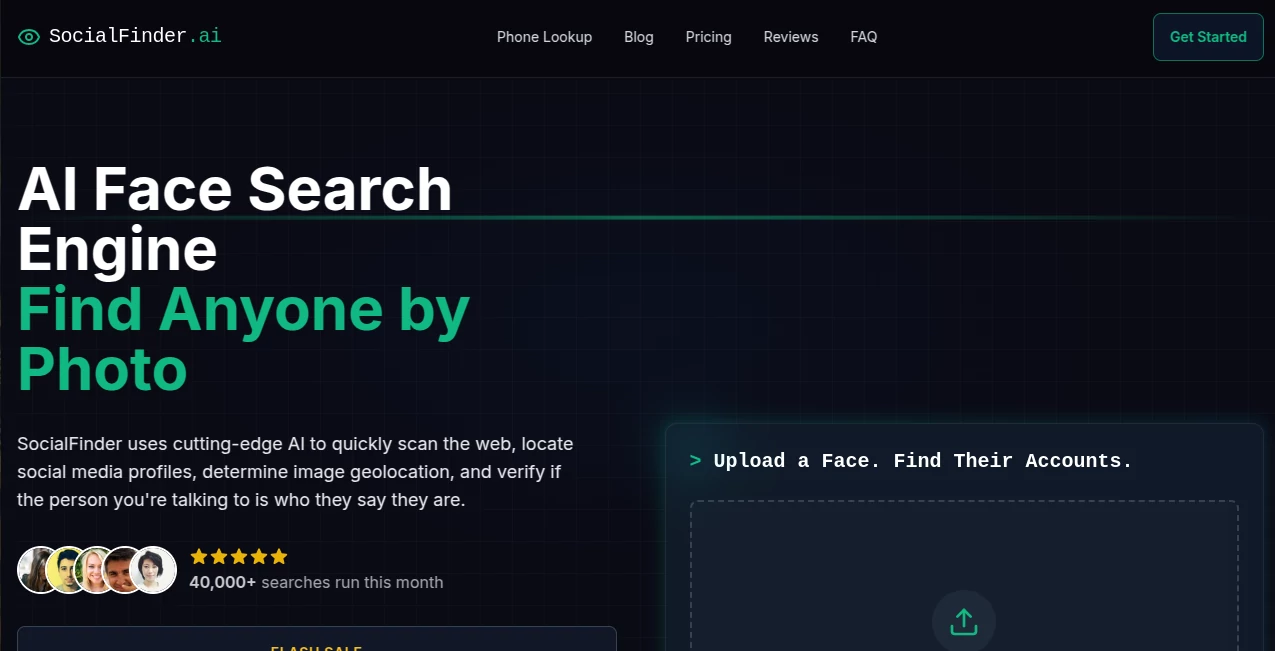
That’s exactly where this platform changes the game. Instead of guessing or playing digital detective for hours, you simply upload a single clear photo of the person you’re looking for. Within seconds, the AI scans thousands of platforms—not just the big names like Instagram and Facebook, but also news sites, blogs, dating apps, and even forgotten forum profiles. It pulls together everything into one clean report. Honestly? It feels a bit like magic the first time you see it work. And whether you’re a private investigator, a concerned parent, or just someone trying to verify an online date, this tool saves you an enormous amount of time and headache.
Key Features
So what exactly makes this platform stand out in a sea of people-search tools? It’s not just about finding a face—it’s about uncovering the full digital story. The system goes way beyond a simple image match and digs into how people actually exist online today. Let’s break down the core features that users keep talking about.
User Interface
No one wants to wrestle with confusing settings when they’re trying to find someone quickly. The design here is refreshingly straightforward. You land on the homepage, and there’s basically one thing to do: upload your photo. Drag, drop, and click search. That’s it. The results page is just as clean, showing you potential matches ranked by relevance with clear confidence scores. I’ve tested plenty of AI tools that feel like flying a spaceship, but this one feels more like using a smart, fast search engine that just happens to recognize faces.
Accuracy & Performance
Here’s where things get interesting. The technology doesn’t just look for similar-looking people—it analyzes dozens of unique facial markers like the distance between eyes, nose shape, and jawline curvature. This creates a kind of “digital fingerprint” for each face. In tests, matches with confidence scores above 90% tend to be spot-on. However, like any facial recognition tool, it’s not perfect. Common facial features or low-quality photos can sometimes lead to false matches. The smart move? Use the confidence scores as your guide and always do a quick manual check of the top results.
Capabilities
The most impressive feature might be the “hidden socials” detection. Imagine someone has an old Twitter account they haven't touched in years or a secondary Instagram they think is completely private. This tool can often surface those forgotten profiles, connecting dots that would take a human weeks to piece together. Another standout capability is image geolocation—it can estimate where a photo was taken based on visual clues in the background. For verifying someone’s story or location, that’s pure gold. The identity tracing feature then ties everything together, mapping out a person’s complete digital footprint across platforms.
Security & Privacy
Let’s address the elephant in the room. A tool this powerful comes with serious responsibility. The platform states in its privacy policy that personal and non-personal data is not shared with third parties. The terms of service also explicitly ban using the service for harassment, stalking, or any illegal activity. That said, as a user, you should only search for people when you have a legitimate reason—like verifying a date, finding a lost relative, or conducting a professional investigation. The technology itself is neutral; how you use it determines whether it’s ethical or not.
Use Cases
Different people use this tool for completely different reasons, and that’s what makes it so versatile. Here are the most common scenarios where it really shines:
- Online Dating Verification: Before meeting someone from Tinder or Bumble, run their profile photo. Are they using a fake name? Do their photos match their claimed location? This simple check has saved more than a few people from catfishing situations.
- Reconnecting with Old Friends: Lost touch with a college roommate or military buddy? A single old photo might be all you need to find their current social profiles and reach out.
- Professional Background Checks: Hiring managers and recruiters can verify that a candidate’s online presence matches their resume claims. It’s not about invading privacy—it’s about ensuring authenticity.
- Investigative Research: Journalists, private investigators, and even legal teams use this to locate persons of interest or verify sources. What used to take weeks of manual searching now takes minutes.
Pros and Cons
No tool is perfect, and being honest about both sides helps you decide if this is right for your needs. Here’s the real breakdown:
What Works Well:
The speed is genuinely impressive—most searches complete in under 30 seconds. Finding hidden or old accounts that don’t show up in normal searches is a huge advantage over free tools. The geolocation feature adds context that other people-search engines simply don’t offer. And the interface is so simple that anyone can use it, regardless of technical skill.
What Could Be Better:
There’s no free trial, so you can’t test accuracy before buying credits. Results depend heavily on how much public data exists about the person—if someone has almost no online presence, even the best AI won’t find much. Some users have reported occasional false positives, especially with common facial features. And of course, the ethical concerns around facial recognition mean you should always think twice before each search.
Pricing Plans
The platform uses a credit-based system, which means you only pay for what you actually use. Here are the current options:
- Basic Plan – $19/month: Includes 50 credits. Perfect for occasional searches, like verifying a dating profile once or twice a week.
- Pro Plan – $49/month: Includes 200 credits. Designed for professionals like recruiters or investigators who run multiple searches daily.
- Enterprise Plan – $99/month: Includes 500 credits. Best for teams or organizations with high-volume needs.
Each search typically costs one credit, making the Basic plan a low-risk way to test the waters. Keep in mind there’s no free version, so you’ll need to commit to at least the first month to see if it works for your specific situation.
How to Use SocialFinder.ai
Getting started takes less than two minutes. Follow these steps, and you’ll have results before you know it:
Step 1 – Choose the Right Photo: This matters more than you think. Pick a clear, front-facing photo with good lighting. Avoid sunglasses, hats, or heavy shadows. Higher resolution equals better results.
Step 2 – Upload and Search: Go to the homepage, drag your image into the upload box, and click the search button. The AI gets to work immediately—no complex settings or filters to adjust.
Step 3 – Review the Results: You’ll see a list of potential matches ranked by confidence score (percentage). Scores above 90% are highly reliable. Scores between 70-90% need a closer look. Click through to see which platforms each match came from—Instagram, news articles, LinkedIn, etc.
Step 4 – Verify Manually: The AI does the heavy lifting, but you should always do a quick sanity check. Does the username on the profile match other details you know? Do other photos on that profile clearly show the same person? Trust but verify.
Comparison with Similar Tools
How does this stack up against competitors like PimEyes or Lenso.ai? Each tool has its own focus. PimEyes is excellent for finding every instance of a face across the deep web, but it’s more about image copyright protection than finding social profiles. Lenso.ai offers solid reverse image search with a free tier, but its facial recognition isn’t as specialized. Where this platform really wins is in its specific focus on social media profiles and “hidden” accounts. If your goal is to find someone’s digital footprint—their active and inactive social accounts—rather than just every random place their photo appears, this is the better choice. The geolocation feature is also unique; most competitors don’t offer anything like it. On the downside, the lack of a free trial puts it at a disadvantage compared to tools that let you test before buying.
Conclusion
Look, facial recognition technology is powerful—almost uncomfortably so at times. But when used responsibly, tools like this solve real problems. Whether you’re protecting yourself from a potential catfish, finding a long-lost friend, or doing legitimate investigative work, having the ability to verify identities from a single photo is genuinely useful. The speed and accuracy are impressive, especially for finding hidden or old accounts that would otherwise stay buried. Just remember: great power requires great judgment. Use it ethically, double-check your results, and always respect other people’s privacy boundaries. If you can do that, this platform might just become your favorite digital tool.
Frequently Asked Questions (FAQ)
Is this tool legal to use?
Yes, it operates within legal boundaries by searching only publicly available information. However, using it for stalking, harassment, or any illegal activity violates the terms of service.
How accurate are the results?
Accuracy depends on the quality of the photo and how much public data exists about the person. High-confidence matches (90%+) are usually correct, but always do a quick manual verification.
Do I need to download any software?
No, everything runs in your web browser. No installation or app download is required.
Which platforms does it search?
It scans over 3,000+ platforms including major social networks (Instagram, Facebook, Twitter, TikTok), dating apps, news sites, blogs, and public forums.
Is my uploaded photo stored or shared?
According to the privacy policy, uploaded photos are used for search purposes and are not shared with third parties. However, as with any online tool, avoid uploading sensitive or private images of others without their consent.
What happens if no matches are found?
If the person has very little public online presence or the photo quality is poor, the tool may return few or no results. You won’t be charged for searches that yield zero matches on most credit systems—but double-check the specific plan details.
AI Social Media Assistant , AI Search Engine .
These classifications represent its core capabilities and areas of application. For related tools, explore the linked categories above.

SocialFinder Alternatives Product

Perplexity AI

Enji
Where Is Thi…

Diploria AI

Liftburst

TranAI

Linkedora

Beamtrace

Jasper
