
















Reverse Video Search
What is Reverse Video Search?
You’ve probably been there before. Someone sends you a wild clip—a supposed UFO sighting, a viral prank, or breaking news footage—and you can’t shake the feeling something’s off. Is this real? Where did it actually come from? Who originally posted it?
Scrolling through comments rarely gives you real answers. Typing descriptions into Google usually buries you in irrelevant results. What you need is a smarter way—one that looks at the video itself, not just the words someone wrote about it.
That’s exactly where this tool steps in. Instead of forcing you to guess the right keywords, it analyzes the actual visual content of your clip. Upload it, paste a link, and within moments you’ll see where else that footage appears online. Whether you’re a journalist chasing down misinformation, a creator tired of having your work reposted without credit, or just a curious person who wants the full story—this platform puts professional-grade video forensics right in your browser.
No expensive software. No complicated setup. Just results that actually help.
Key Features
User Interface
Some tools treat reverse video search like it’s brain surgery. Endless settings, confusing terminology, and forms that expect you to know exactly what you’re doing before you’ve even started. Not here.
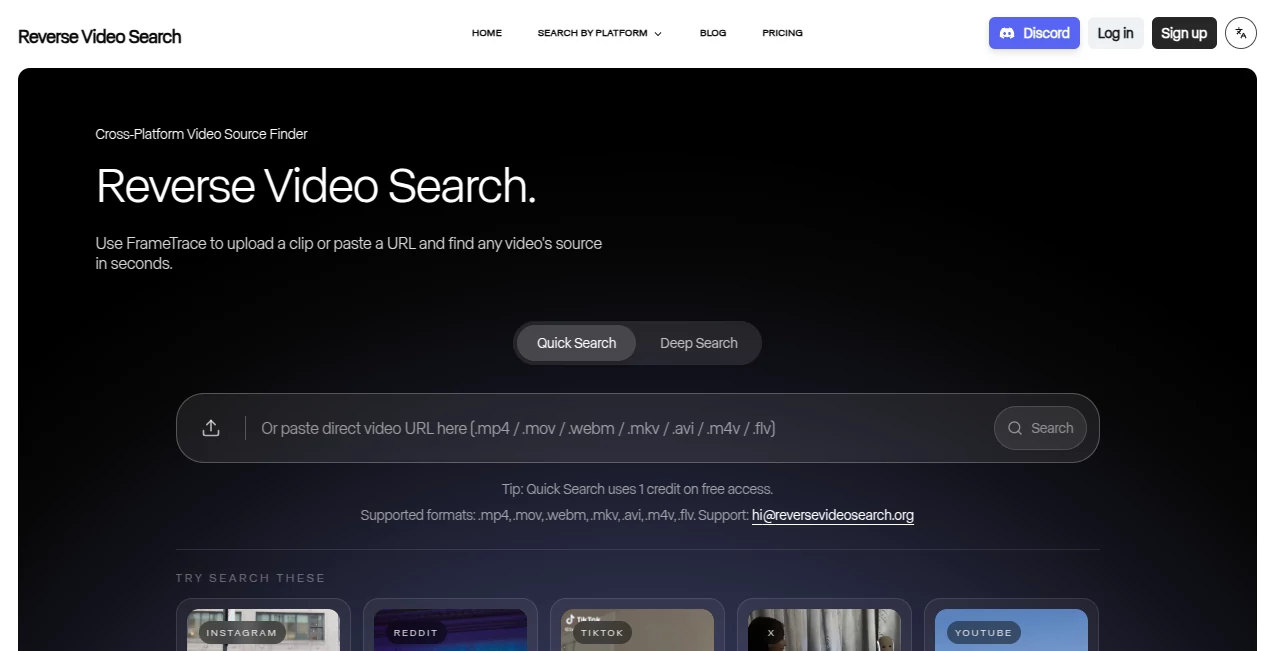
The homepage keeps things refreshingly simple. You’ve got two clear options: upload your video file directly from your computer, or paste a direct link to a clip you found online. That’s it. The platform accepts all the common formats too—MP4, MOV, AVI, MKV—so you won’t get stuck converting files before you even begin.
Everything loads fast, and the results appear in a clean, easy-to-read layout. You’ll see matching videos, along with source information that helps you trace things back to the original upload. No flashing ads. No pop-ups begging for your email address. Just a tool that respects both your time and your attention span.
Accuracy & Performance
Here’s where most reverse video search attempts fall apart. The old-school approach relies on filenames and metadata—which means a single careless rename or re-upload can make a clip completely disappear from search results. This platform doesn’t work that way.
Instead, it uses what the developers call DeepSearch technology. Rather than glancing at surface-level details like thumbnails or file properties, the system actually analyzes the entire video frame by frame. It looks at visual patterns, motion, composition, and subtle details that stay consistent even when someone tries to hide the original source.
Think about what that means in practice. A clip gets cropped, flipped horizontally, compressed to hell, and re-uploaded with new background music. A basic search would see a completely different file. But this engine still recognizes the underlying footage because it’s paying attention to what the video actually shows—not just what the file says about itself.
During testing across various types of content—news clips, memes, cinematic trailers, user-generated footage—the platform consistently surfaced relevant matches even when the circulating version had been heavily edited. That’s the difference between a toy and a tool you can actually rely on.
Capabilities
The platform handles a wide range of real-world scenarios. Content creators use it to track down unauthorized reposts of their work across social media. You drop in a clip from your channel, and the system shows you everywhere else that same footage has appeared—even if someone else added text overlays, watermarks, or sped up the playback.
Fact-checkers and journalists rely on it for a different reason. When a dramatic video starts making the rounds during breaking news, verifying authenticity becomes urgent. This tool helps you determine whether that footage is genuinely new or just recycled from an old incident in another country. One search can save hours of manual digging.
Researchers and investigators also find it invaluable for tracing viral content back to its earliest known appearance. Knowing when and where something first surfaced often provides the context needed to separate truth from manipulation.
On the flip side, if you’ve only got a low-resolution or heavily shortened version of a clip, the search can help you locate the original high-quality source. That’s a game-changer for video editors, archivists, and anyone building presentations who needs the best possible version of an asset.
Security & Privacy
Reverse searching a video usually means uploading that file to someone else’s server. That raises an obvious question: what happens to my footage after the search finishes?
The platform takes a privacy-first approach here. Uploaded videos aren’t stored indefinitely or shared with third parties. The processing happens, the results come back, and your content doesn’t linger in some database waiting to be scraped or misused.
That matters more than ever, especially for journalists working with sensitive material, businesses checking on proprietary content, or anyone who just doesn’t want their personal clips floating around forever. You get the search capability without sacrificing control over your own files.
Use Cases
- Content creators & video owners – Discover who’s reposting your work without permission and track down unauthorized uses across platforms.
- Journalists & newsrooms – Verify user-generated footage before publishing. Determine whether a clip actually shows what it claims to show.
- Fact-checkers & researchers – Trace viral videos back to their original source and earliest known appearance online.
- Casual users & social media fans – Find the full version of a short clip you loved, or check if that dramatic video someone sent you has been debunked elsewhere.
Pros and Cons
What works well:
- Analyzes actual video content, not just filenames or metadata
- Recognizes clips even after cropping, re-encoding, or visual edits
- Simple interface with no unnecessary complexity
- Works across multiple video formats including MP4, MOV, AVI, and MKV
- Privacy-focused approach means your uploads aren’t permanently stored
- Direct link option for when you don’t want to download the file first
Limitations to keep in mind:
- Best results come from direct file uploads rather than links
- Very short clips or heavily degraded footage may return fewer matches
- Like all search tools, it depends on what the web’s search engines have indexed
Pricing Plans
The platform keeps things accessible with a straightforward approach. You can perform reverse video searches without committing to any subscription or long-term plan, which makes it easy to test out with your own content first.
For regular users—whether you’re a creator checking for reposts weekly or a journalist verifying footage as part of your daily workflow—the value becomes obvious very quickly. Compared to the time you’d spend manually hunting down sources or the cost of dedicated video forensics software, this tool delivers professional-grade capability without the professional-grade price tag.
Specific pricing details are available directly on the website, but the model prioritizes usefulness over upselling. You won’t find hidden fees or bait-and-switch tactics here.
How to Use It
Getting started takes less than a minute. Head to the website, and you’ll see two main options right on the homepage.
Method one – File upload: This gives you the most accurate results. Click the upload area, select your video file from your computer (MP4, MOV, AVI, or MKV all work fine), and let the system do its thing. The platform recommends this approach whenever you have the original file available.
Method two – Video link: If you’ve got a direct URL to a video—not just a link to a webpage, but an actual direct video file link—you can paste that in instead. This works well when you spot a clip online and don’t want to download it locally first. Just keep in mind that file uploads tend to produce stronger matches.
Once your video is submitted, the engine gets to work. You’ll see results typically within seconds, showing you where matching or similar content appears across the web. From there, you can visit the source pages directly to confirm origins, check timestamps, or see who originally posted the footage.
For tougher searches where the clip has been heavily edited or appears in low quality, enabling DeepSearch mode gives you extra precision. It takes a bit more processing time but significantly improves the chances of finding that needle in a haystack.
Comparison with Similar Tools
Most people’s first instinct involves grabbing a screenshot from a video and running it through Google Lens or Google Images. That approach works sometimes—particularly for well-known clips or videos featuring recognizable faces. But it has a major blind spot: you’re only searching a single frame, not the video itself.
If that paused frame happens to be blurry, dark, or generic, the image search may return nothing useful even though the actual video has clear matches out there. You’re essentially hoping that one random moment contains enough unique information to trigger a match.
Other alternatives like Yandex Images or Bing Visual Search follow the same fundamental limitation. They’re designed for images, not video. TinEye offers better precision for finding the earliest appearance of an image, but again—it doesn’t actually analyze video content frame by frame.
This platform takes a fundamentally different approach. Instead of asking you to pick a representative still frame, it examines the entire clip. That means even if your video is dark, fast-moving, or filled with transitions, the engine can still pick up on visual patterns and motion signatures that persist across reposts and re-encodes.
In practical terms, that difference shows up in the results. A screenshot search might fail on a ten-second meme clip that’s been re-uploaded hundreds of times. But the full video search finds matches instantly because it’s working with so much more information.
That said, image-based reverse search still has its place. When you only have access to a single frame—for example, a thumbnail or a promotional still—Google Lens remains a solid backup option. But for anyone who actually has the video file or a direct link, there’s no contest. Analyzing the full footage always beats analyzing a single guess.
Conclusion
The web moves fast, and videos travel faster. A clip filmed in one context can get stripped of its original captions, edited into something completely different, and shared millions of times before anyone stops to ask where it actually came from.
Having a reliable way to trace that footage back to its source isn’t just convenient anymore—it’s becoming essential. Whether you’re protecting your creative work, doing responsible journalism, or just trying not to fall for yet another misleading post, this tool puts real investigative power in your hands.
It works the way you’d hope a modern search engine would work. Upload a video. Get answers. No fuss, no hidden agendas, no pretending that a single blurry screenshot tells the whole story.
Next time someone sends you a questionable clip or you spot your own work popping up somewhere unexpected, give it a try. You might be surprised how much the video itself has to say when someone finally asks the right questions.
Frequently Asked Questions (FAQ)
Does this work on any video I find online?
It works on most videos, especially those that have been shared publicly somewhere on the web. The more unique the visual content, the better your chances of finding solid matches.
What video formats can I upload?
The platform accepts common formats including MP4, MOV, AVI, and MKV. If your video plays on a standard media player, it will likely work here.
Is my video stored after I search?
No. The platform follows a privacy-first approach and does not permanently store uploaded content.
Does this cost money to use?
You can perform searches without a subscription. Visit the website for specific details on usage limits or premium features.
How is this different from taking a screenshot and using Google Images?
Screenshot searches only analyze one still frame. This tool examines the full video content, which produces far more accurate results—especially for clips that are dark, fast-moving, or visually complex.
Can I use this to find out who stole my video?
Absolutely. Content creators regularly use reverse video search to track down unauthorized reposts across social media platforms and video sharing sites.
Does it matter if the video has been edited or cropped?
The engine is designed to recognize content even after common edits like cropping, re-encoding, resolution changes, or added overlays.
How long does a search usually take?
Most searches complete within seconds. Larger files or DeepSearch mode may take a bit longer but still finish faster than manual searching ever could.
Do I need to install any software or browser extensions?
No. Everything runs directly in your browser through the website.