
SocialShot
What is SocialShot?
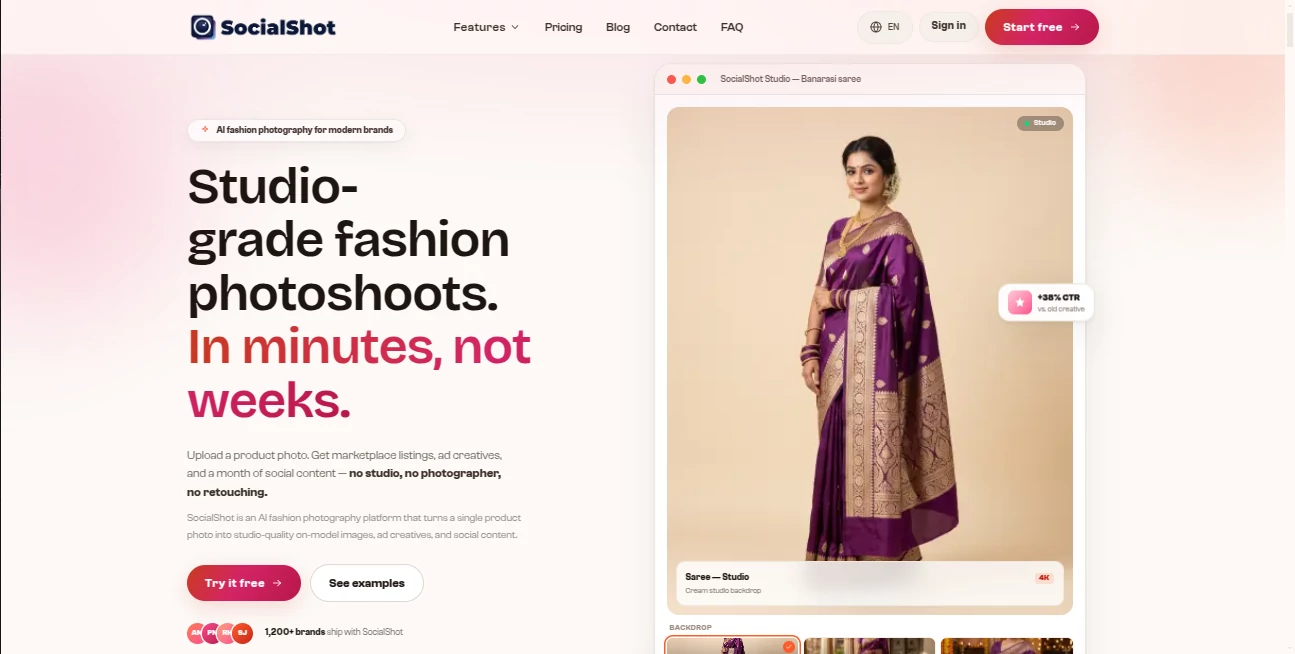
Creating professional product photography can be one of the slowest and most expensive parts of running a fashion or e-commerce brand. Traditional photoshoots often require models, photographers, studios, styling, retouching, and plenty of time. SocialShot AI takes a very different approach: upload a product photo and turn it into polished, studio-quality visuals, on-model images, marketplace listings, advertisements, and social media content.
The platform is built particularly with fashion and product-focused businesses in mind. A single product image can become a complete set of marketing visuals without requiring a physical studio or a professional photography team. The result is a much faster workflow for brands that need fresh creative content regularly.
With support for product photography, marketplace imagery, Meta and Instagram advertisements, and complete social campaigns, the platform brings several parts of the visual production process into one workspace. It also offers free credits when signing up, making it possible to test the workflow before committing to a paid plan.
Key Features
- AI-generated fashion and product photography from a single product image
- On-model product visuals designed for apparel and fashion brands
- Studio, outdoor, editorial, and lifestyle-style backgrounds
- 4K-ready image exports
- Marketplace-ready product imagery for platforms such as Amazon, Flipkart, Myntra, Meesho, Ajio, and Nykaa
- Product infographic variants for e-commerce listings
- Meta and Instagram ad creatives in multiple aspect ratios
- Carousel and story formats for social advertising
- AI-generated hooks and marketing copy for advertising creatives
- Social media campaigns with feed posts, carousels, stories, and a 30-day content plan
- Consistent AI models across different products and SKUs on selected plans
- Commercial usage rights for generated visuals
- AI video generation available with selected paid plans
User Interface
The workflow is refreshingly straightforward. Instead of building a complicated design from scratch, users begin by uploading a product image or catalog. They can then select the type of output they need, such as product photography, marketplace listings, advertising creatives, or a complete social campaign.
The process is particularly appealing for small teams. There is no need to prepare a detailed creative brief or spend time adjusting dozens of design elements manually. For example, a fashion seller could upload a flat-lay photograph of a jacket and use the generated results for a product page, an Instagram campaign, and an advertisement without starting each design separately.
Accuracy & Performance
Speed is one of the platform's strongest points. The website states that generated product visuals can be produced in around 30 seconds, compared with the days or weeks that a traditional photoshoot may require. The platform also reports more than 50,000 visuals generated and an average customer rating of 4.9 out of 5.
Image output can reach 4K resolution, which makes the platform more useful for professional product presentation rather than casual social graphics alone. The availability of different aspect ratios also helps when the same product needs to appear across marketplaces, feeds, stories, and advertising placements.
Capabilities
The platform goes beyond simply replacing a background. Its product photography workflow can create studio scenes, lifestyle compositions, and on-model images from a source product photo. This is especially useful for clothing brands that want to show how an item looks when worn without organizing a physical model shoot for every new product.
Its marketplace functionality adds another practical layer. Product listings can be prepared for major shopping platforms, with options such as white-background imagery and infographic-style variations. For advertising, users can create carousel and story creatives with platform-specific dimensions and marketing hooks.
The social campaign feature is also useful for brands that struggle with consistency. Instead of producing one image at a time, users can generate a broader content package containing feed posts, carousels, brand stories, and a 30-day plan. That makes the platform more of a creative production system than a simple image generator.
Security & Privacy
Privacy and usage terms are important considerations whenever a business uploads original product photography. The website provides dedicated Privacy Policy, Terms of Service, Refund Policy, and Cookie Policy pages for users to review before using the service.
For commercial teams, another useful point is that the paid plans advertise full commercial rights for generated visuals. This means the resulting images are intended for use across stores, advertisements, marketplaces, and other commercial materials, subject to the platform's terms.
Use Cases
Fashion brands are perhaps the clearest audience for this platform. A clothing company can turn a simple product photograph into on-model campaign imagery, lifestyle scenes, marketplace listings, and social advertisements without arranging a separate photoshoot for every collection.
E-commerce sellers can use it to improve product pages with more polished imagery and create alternative visuals for marketplaces. This is especially useful when a seller has dozens or hundreds of products and needs consistent photography at scale.
Marketing teams can use the advertising workflow to create multiple creative variations for Meta and Instagram. Different crops, layouts, carousel sequences, and hooks can make testing new campaign concepts considerably easier.
Small businesses and independent designers can also benefit. Instead of paying for a photographer every time a new product arrives, they can start with an existing product photo and produce additional creative assets digitally.
Agencies and studios may find the platform useful when handling multiple brands simultaneously. A faster generation workflow can make it easier to prepare product visuals and campaign variations without expanding the production team.
Pros and Cons
Pros
- Very fast product photography workflow
- Designed specifically around fashion and e-commerce use cases
- Can create on-model images from product photography
- Supports 4K output
- Useful marketplace-specific formats
- Advertising and social media creation are included in the same workflow
- Commercial rights are included with paid plans
- Low-cost entry plan compared with traditional photography
- Free credits are available at signup without requiring a credit card
Cons
- The strongest feature set is aimed at product, fashion, and commercial photography rather than general-purpose image creation
- AI-generated visuals may still require human review before being used in important campaigns
- Higher-volume businesses need a more expensive plan for additional monthly capacity
- Some advanced generation capabilities are limited to higher-tier subscriptions
Pricing Plans
The pricing structure is based on monthly image capacity and the level of generation features required. The entry-level Snap plan costs $2.99 per month and includes 25 on-model images, up to 4K exports, access to more than 600 AI models, full commercial rights, and a standard generation queue.
The Shoot plan costs $10.99 per month and increases the allowance to 100 on-model images. It also adds up to 4K exports with AI video, consistent models across SKUs, a priority generation queue, and overnight batch generation at a reduced cost.
For higher-volume brands and teams, the Scene plan costs $22.99 per month and includes 250 on-model images, 4K exports with AI video, consistent models across SKUs, top-priority generation, and a dedicated account manager.
New users can also receive free credits at signup, with no credit card required. The availability and exact terms of credits and subscription features should be checked before purchasing because pricing and plan details can change over time.
How to Use It
Getting started is simple. First, upload a product photograph. The source image can have an existing background or different lighting conditions, as the platform is designed to process the original product image and turn it into new creative variations.
Next, choose what you want to create. You can focus on product photography, marketplace listings, advertising creatives, or a broader social media campaign. Different services can be combined depending on the campaign.
Finally, let the platform generate and polish the visuals. The system can compose the scene, create marketing hooks, and format the resulting assets for different platforms. The generated images can then be reviewed and selected for use in product pages, advertisements, marketplaces, or social media.
Comparison with Similar Tools
The biggest difference between this platform and a traditional photography workflow is the production model. A conventional shoot depends on physical locations, photographers, models, lighting equipment, styling, and post-production. That approach can deliver excellent results, but it becomes expensive and slow when a store needs new visuals for every product.
General-purpose design platforms, meanwhile, are often excellent for editing and assembling marketing materials but still expect the user to provide the core photography. This platform starts closer to the product itself: a single image can become the foundation for an entire visual campaign.
It also has an advantage for brands that need more than one type of asset. Product shots, marketplace images, advertising creatives, and social campaigns can be produced through the same workflow. That makes it particularly interesting for e-commerce businesses where photography and marketing are tightly connected.
Conclusion
For fashion brands, e-commerce sellers, and marketing teams, professional product photography does not have to begin with a studio booking anymore. This platform offers a practical alternative by turning existing product images into polished commercial visuals, on-model photography, marketplace assets, advertisements, and social media content.
Its low starting price makes experimentation easy, while the higher plans are designed for businesses producing visuals at a larger scale. The combination of speed, 4K output, commercial rights, marketplace support, and advertising tools gives it a particularly focused position in the AI creative space.
If your business regularly needs new product imagery but does not want to organize a full photoshoot for every collection, this is one of the more practical AI workflows worth trying.
Frequently Asked Questions (FAQ)
What is this AI platform used for?
It is primarily designed for AI-powered fashion and product photography. It can turn a product photo into on-model images, studio scenes, marketplace listings, advertising creatives, and social media campaign assets.
Can it create images with AI models?
Yes. The platform can generate on-model product photography, making it particularly useful for clothing and fashion brands that want to showcase products without arranging a physical model shoot.
Can the generated images be used commercially?
Paid plans include full commercial rights for generated visuals according to the platform's current pricing information. Businesses should still review the applicable terms before using generated assets in major commercial campaigns.
Does it support e-commerce marketplaces?
Yes. The platform specifically supports marketplace-oriented imagery and lists Amazon, Flipkart, Myntra, Meesho, Ajio, and Nykaa among its supported platforms.
Can it create advertising content?
Yes. It can produce Meta and Instagram advertising creatives, including carousel and story formats, different aspect ratios, and marketing hooks designed for advertising campaigns.
How quickly can images be generated?
The website states that a generated product image can be ready in about 30 seconds. Actual generation time can vary depending on the selected workflow and current processing demand.
Is there a free trial?
Yes. New users receive free credits at signup and do not need to provide a credit card to begin testing the platform.
What is the cheapest paid plan?
The Snap plan starts at $2.99 per month and includes 25 on-model images per month, up to 4K export, access to more than 600 AI models, and commercial usage rights.
Can it create social media campaigns?
Yes. The social campaign workflow can produce feed posts, carousels, brand stories, and a 30-day content plan, allowing businesses to create a larger batch of marketing assets instead of working on individual posts.
AI Photo & Image Generator , AI Social Media Assistant , AI Photography , AI Advertising Assistant .
These classifications represent its core capabilities and areas of application. For related tools, explore the linked categories above.

SocialShot Alternatives Product

Nano Banana 2

BatchRemover

LyricStudio

Nano Banana …

OutfitSwap S…
Seedream 5.0

AI Hairstyle

DaVinci AI

Luma AI