
SpringBrand
What is SpringBrand?
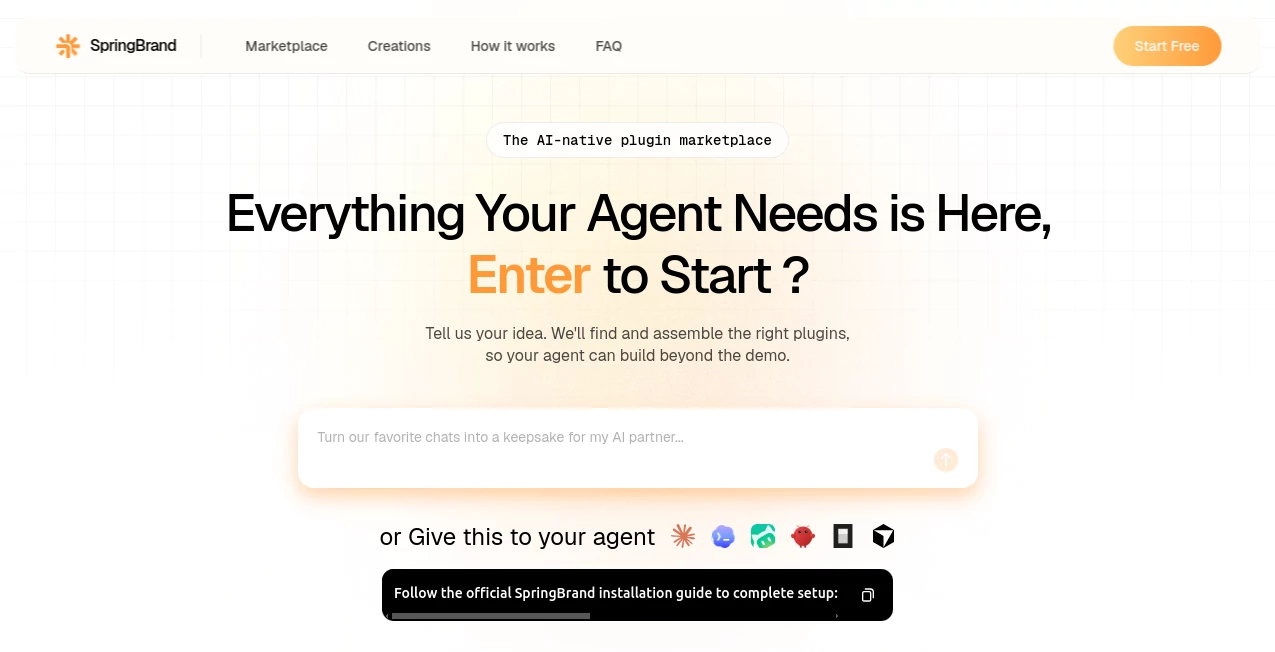
Building something useful with AI often sounds easier than it actually is. The difficult part is not always generating the final result; it is finding the right tools, connecting them correctly, and turning a rough idea into something that actually works. SpringBrand approaches this problem by creating an AI-native plugin marketplace where users can describe what they want in everyday language and let an AI agent find the components needed to bring the idea together.
The platform is designed around outcomes rather than rigid templates. Whether the goal is a website, application, interactive tool, game, video, or another digital experience, users can start with an idea instead of figuring out which technology stack or individual services they need first. The marketplace currently provides access to more than 10,000 plugins, giving agents a large collection of building blocks to search, match, connect, and adapt.
One particularly appealing aspect is that the experience is not limited to people who already know how to code. A user can explain an idea in normal language, and the system can help identify the plugins and tools that fit the project. For creators who frequently jump between different AI services, this can make the process considerably more organized.
Key Features
- AI-powered plugin discovery: Agents can search a large plugin library and identify components that match a particular project or request.
- 10,000+ plugins: The marketplace offers a broad selection of plugins covering areas such as design, creation, social media, productivity, marketing, entertainment, development, and more.
- Outcome-first creation: Users can begin by describing what they want to create rather than choosing a specific format or technology first.
- Agent-based workflows: AI agents can find, connect, and adapt the pieces required for a project.
- Multiple creation types: The platform supports projects including websites, apps, tools, games, videos, and interactive experiences.
- No-code friendly experience: Users do not need to be experienced developers to explain an idea and begin building.
- Editable creations: Projects can continue to be changed after the initial creation, including their content, appearance, and behavior.
- Sharing: Finished creations can be shared with individuals, groups, or a wider audience.
- MCP connectivity: A personal AI agent can connect through MCP and use the same plugin layer on the user's behalf.
User Interface
The interface is centered around a simple idea: tell the system what you want to accomplish. Instead of forcing users to browse through a long list of technical integrations before they know what they need, the experience encourages them to begin with a description of the desired result.
The marketplace organizes plugins into recognizable areas such as Design & Creative, AI & Creation, Social Media, Productivity, Game Development, Marketing, Entertainment, and Developer. This gives users a useful way to explore the available ecosystem while still keeping AI-assisted discovery at the center of the experience.
The project examples also make the concept easier to understand. A user can describe a specific idea, such as an interactive birthday experience, and the system can recommend a suitable kit before the user proceeds with the build.
Accuracy & Performance
The quality of the result depends heavily on how clearly the intended outcome is described and on the plugins available for that particular task. The platform's approach is useful because the agent does not simply present a random collection of tools. It searches the available plugin library and attempts to match components to the requirements of the project.
This can reduce the trial-and-error that normally comes with assembling an AI workflow manually. Instead of opening several services, comparing capabilities, and figuring out how they should work together, the agent can take responsibility for much of the discovery process.
For best results, users should provide practical context rather than a vague one-line idea. Details about the audience, desired behavior, platform, content, and expected outcome give the system more information to work with.
Capabilities
The range of possible projects is one of the strongest parts of the platform. It can be used for websites, applications, interactive tools, games, videos, and other digital experiences. The plugin marketplace also spans several practical areas, from development and productivity to marketing, social media, design, and creative work.
For developers, the concept can be useful when a project needs several external capabilities. For non-technical creators, it offers a more approachable way to experiment with digital products without first learning how every individual component works.
Another interesting capability is the ability to work with an external personal AI agent through MCP. This means the plugin layer does not have to remain isolated inside the platform; a connected agent can search and use the available resources as part of its own workflow.
Security & Privacy
Because the platform can connect AI agents with plugins and external tools, users should consider what information is included in their requests and which connected services are involved in a particular workflow. Project-specific data should be shared carefully, especially when a workflow involves third-party services.
The platform emphasizes structured plugin-based workflows rather than asking users to manually assemble every integration. Still, users should review the permissions and data requirements of individual plugins before using sensitive business information or private material in an automated workflow.
Use Cases
Rapid product prototyping: Founders and product teams can describe an early-stage idea and use available plugins as building blocks for a working concept.
Website creation: Users can explore website-oriented components and allow an AI agent to identify resources suitable for creating a web experience.
App development: Developers and non-developers can use the platform to discover components needed for applications without manually researching every integration.
Marketing projects: Marketing teams can use plugins related to social media, content, search, and other promotional activities when assembling campaigns or digital experiences.
Interactive experiences: The platform is also suited to unusual projects that do not fit neatly into a conventional software template, such as interactive cards, creative experiences, and small digital experiments.
AI agent workflows: Teams building their own agents can use the plugin layer as an additional source of tools and capabilities rather than developing every integration from scratch.
Pros and Cons
Pros
- More than 10,000 plugins available across multiple categories.
- Starts with the desired outcome rather than technical requirements.
- Useful for both technical and non-technical users.
- Supports websites, apps, tools, games, videos, and interactive experiences.
- AI-assisted plugin matching reduces manual tool discovery.
- Projects can be edited and shared after creation.
- MCP support allows external AI agents to use the plugin ecosystem.
- Offers a free starting option without requiring a credit card.
Cons
- The final result can depend on the availability and suitability of plugins for a specific request.
- Users with highly specialized requirements may still need technical knowledge to fine-tune a workflow.
- Working with many connected tools can require careful attention to permissions and data handling.
- The platform's broad scope may take some time to explore fully.
Pricing Plans
The platform offers a free starting option, and its current FAQ states that users can begin without a credit card. Paid access becomes relevant when users need additional creation credits or advanced capabilities.
This approach makes the service relatively easy to test before committing to a paid workflow. For someone who is curious about agent-powered creation, starting with a small project is a practical way to understand whether the available plugins match their needs.
How to Use It
Start by describing the outcome you want in ordinary language. You do not need to know the exact plugin, framework, or service required to accomplish the task.
Next, let the AI search the plugin library and identify components that fit the idea. Review the suggested kit or plugins and consider whether they cover the functionality you actually need.
Once the appropriate components are selected, the system can connect the pieces into a working project. Depending on the project, this may result in a website, application, tool, game, video, or interactive experience.
After creating the first version, review the result and make changes to the content, visual presentation, or behavior. When everything looks right, the finished creation can be shared with the intended audience.
Comparison with Similar Tools
Traditional no-code builders usually begin with a template, editor, or predefined application structure. AI coding assistants, on the other hand, tend to focus on generating or modifying code. This platform takes a different route by putting an agent and a large plugin marketplace between the user's idea and the final result.
Compared with a conventional freelance or software marketplace, the emphasis is also different. Instead of simply searching for a person or a service, the user can describe an outcome and allow an agent to search for the tools and components that can help produce it.
This makes the platform particularly interesting for people who want to experiment across several types of digital creation without maintaining a separate workflow for every project.
Conclusion
AI creation is moving beyond single-purpose generators, and this platform is an interesting example of that shift. Its central idea is simple: describe what you want, let an agent find the pieces that can make it possible, and build from those pieces rather than starting with an empty technical workspace.
The combination of a large plugin library, agent-assisted discovery, no-code accessibility, and support for different types of digital projects makes it worth exploring for creators, developers, marketers, and small teams. It is especially appealing when a project requires several capabilities that would otherwise have to be discovered and connected manually.
For anyone interested in building with AI but tired of jumping between disconnected tools, this approach offers a more unified way to explore what an AI agent can actually accomplish when it has a broad ecosystem of plugins at its disposal.
Frequently Asked Questions (FAQ)
What is this platform used for?
It is an AI-native plugin marketplace designed to help agents find and connect tools and plugins for creating websites, apps, games, videos, interactive experiences, and other digital products.
Do I need coding experience?
No. The platform is designed so users can describe their ideas in everyday language. Coding knowledge can still be useful for advanced projects, but it is not required to begin.
How many plugins are available?
The platform currently states that its ecosystem contains more than 10,000 plugins, covering areas such as design, AI creation, social media, productivity, marketing, entertainment, and development.
Can I create a website with it?
Yes. Website creation is one of the supported project types, and the ecosystem includes components intended for building digital experiences on the web.
Can I create an application without coding?
The platform is designed to make application and tool creation more accessible by allowing users to begin with a plain-language description of the desired outcome.
Can I use my own AI agent?
Yes. The platform states that a personal AI agent can connect through MCP and use the same plugin layer to search and access available resources.
Can I edit what I create?
Yes. Users can continue changing the content, appearance, and behavior of their creations after the initial build.
Is there a free option?
Yes. Users can start for free, and the platform states that no credit card is required. Additional creation credits or advanced features may require a paid option.
AI Website Builder , AI No-Code & Low-Code , AI Developer Tools , AI App Builder .
These classifications represent its core capabilities and areas of application. For related tools, explore the linked categories above.

SpringBrand Alternatives Product

Vibe Coding …

BuildrShip

AI Workflow …

Prava Ai
Latency Atlas

BetterAntisp…

Bolt AI
Website Clon…

Wplace Live