


















StarVeil AI
What is StarVeil AI?
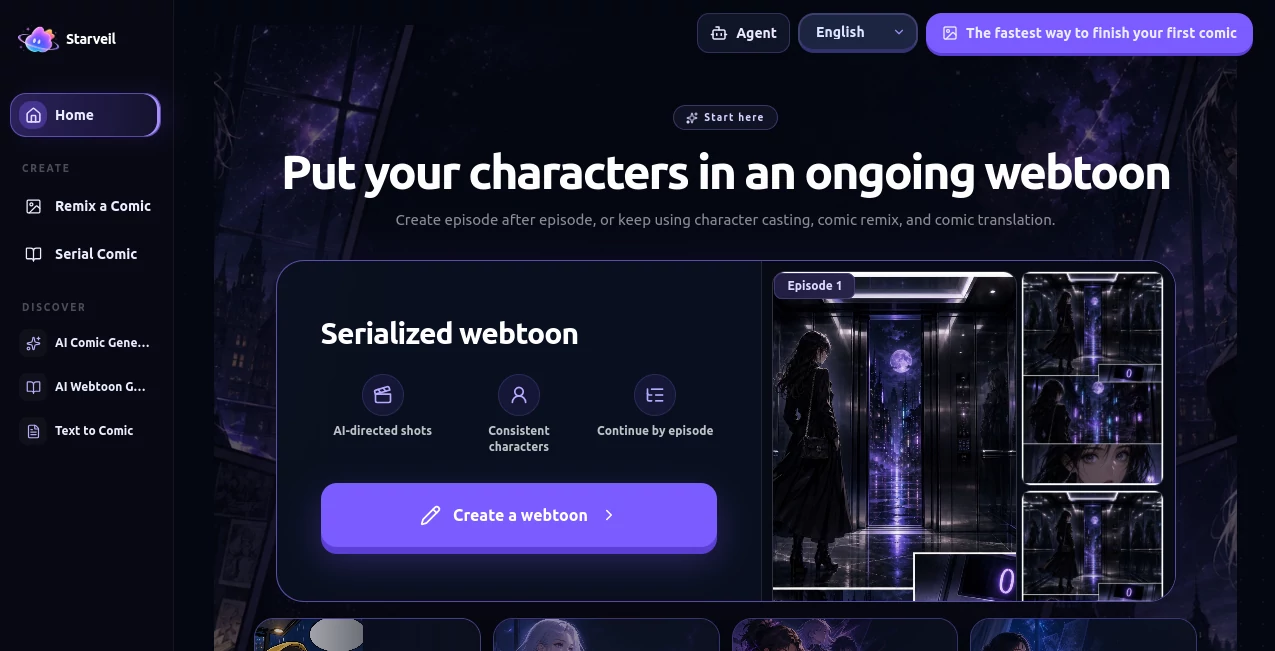
Turning a story into a comic usually means juggling writing, character design, panel composition, illustration, dialogue, and page layout. StarVeil AI brings these pieces into one creative workflow, allowing writers and creators to transform story ideas, scripts, novel chapters, or scene descriptions into multi-panel comics and vertical-scroll webtoons.
What makes the platform particularly interesting is its focus on recurring characters. Instead of generating every image as an isolated creation, creators can build reusable character references and bring the same cast back across panels, scenes, and episodes. This makes it a practical option for anyone planning a series rather than a single image.
The workflow also gives creators room to review and refine the result. Storyboards, dialogue, individual panels, and visual scenes can be adjusted before continuing with the next part of a project.
Key Features
- Text-to-comic generation from stories, scripts, outlines, and novel excerpts.
- AI-assisted storyboarding with scene transitions, pacing, visual focus, and panel planning.
- Reusable character references designed to improve consistency across panels and episodes.
- Short comic creation for compact stories and quick visual experiments.
- Serialized comic creation for longer-running stories and webtoon projects.
- Dialogue and speech bubble placement as part of the comic production workflow.
- Multiple visual directions including Japanese manga, Chinese manhua, Western comics, realistic styles, and ink-wash approaches.
- High-resolution generation and export, with supported workflows reaching up to 4K width.
- Comic remix and translation capabilities for creators working with existing material.
User Interface
The interface is built around the idea of moving through a story rather than simply entering an image prompt and waiting for a picture. Creators can work with characters, story beats, generated scenes, dialogue, and subsequent episodes as connected parts of the same project.
This approach is especially useful for serialized content. Once a cast has been established, bringing those characters into another scene feels more like continuing a production than starting from scratch. The workflow also lets creators inspect the generated visual beat before deciding what should happen next.
Accuracy & Performance
For comic creation, accuracy is about more than producing an attractive picture. Characters need to remain recognizable, scenes need to follow the story, dialogue needs to fit the action, and panels need to make sense when read in sequence.
The platform addresses this through structured character references and AI-assisted storyboarding. A typical generated episode contains around 8 to 12 panels, while generation time is generally around 2 to 5 minutes depending on complexity and server load. Paid plans receive higher generation priority.
The result will still benefit from human review. A creator who checks expressions, dialogue, pacing, and individual panels before publishing can get considerably more value from the workflow than someone who treats the first generation as a finished product.
Capabilities
The strongest capability is its character-first approach to comic production. A creator can establish a cast and reuse those visual identities throughout a story, which is particularly valuable for protagonists, supporting characters, rivals, and recurring locations.
Story input can range from a short concept to a longer piece of prose. The system can identify characters, important story moments, dialogue, and scene changes, then organize them into a visual sequence. The generated storyboard remains editable, giving creators more control over the final result.
It also supports vertical-scroll formats, making the workflow suitable for mobile-oriented webtoons. English and Chinese story input are supported, and creators can choose from several comic-oriented visual styles.
Security & Privacy
Story text and generated projects are stored in cloud services as part of the creation workflow. The service states that users can export or delete their content when needed. Creators should still review the platform's privacy terms before uploading confidential manuscripts, unreleased commercial material, or sensitive information.
For publishing, the service states that generated comics can be used for personal and commercial purposes across its plans. Creators should nevertheless review their final work for possible third-party intellectual-property or likeness concerns before commercial publication.
Use Cases
Novel adaptation: Authors can turn selected chapters or scenes into visual sequences without having to illustrate every panel manually.
Webtoon production: Independent creators can develop vertical-scroll episodes while keeping a reusable cast across an ongoing series.
Manga and manhua concepts: Writers can experiment with Japanese manga, Chinese manhua, and other comic aesthetics before investing in a larger production.
Social media storytelling: Short comics can provide a more visual way to present characters, jokes, stories, announcements, or promotional narratives.
Concept development: Game, film, and creative teams can use generated comic sequences to explore scenes and character interactions before moving toward more expensive production stages.
Education and teaching: Educators can turn selected explanations, fictional scenarios, or learning stories into visual sequences that are easier to consume on mobile devices.
Pros and Cons
- Pros: Character consistency is central to the workflow rather than an afterthought.
- Pros: Supports both individual short comics and serialized projects.
- Pros: AI storyboarding helps organize scenes, pacing, and panel structure.
- Pros: Multiple comic styles are available for different creative directions.
- Pros: High-resolution output can reach 4K width on supported plans.
- Pros: A free experience with signup credits makes it possible to test the workflow before paying.
- Cons: Credits are consumed for generation, regeneration, and character reference creation.
- Cons: Generated artwork and dialogue still need editorial review before publication.
- Cons: Higher-resolution and higher-volume production requires a paid plan.
Pricing Plans
The platform uses a credit-based system alongside 30-day VIP plans. At the time of writing, the Basic plan is listed at $6 for 30 days with 3,000 credits, while the Pro plan costs $12 for 30 days and includes 6,000 credits. Both are currently shown with a 50% promotional discount.
The Basic plan includes a fast generation queue, 2K generation, and unwatermarked original short-comic downloads. The Pro plan adds a higher-priority generation lane and unlocks 4K generation.
For teams and client-focused production, the Service plan provides 75,000 credits for $240 per 30 days, together with the highest priority lane, 4K generation, and commercial-priority support.
Credit usage varies according to the operation. A 1K short comic costs 25 credits, a 2K short comic costs 40 credits, and a 4K short comic costs 60 credits. Starting a new series currently uses 75 credits, continuing with another scene costs 25 credits, and creating a character reference image costs 20 credits.
There is also a free starting experience with 50 credits. Subscription credits are valid during the current billing cycle, while signup credits and separately purchased credit packs remain available until they are used.
How to Use the Tool
- Start with a story idea, scene description, script, outline, or novel excerpt.
- Create or select the characters who will appear in the story.
- Choose an appropriate comic style and visual direction.
- Let the AI organize the story into scenes, panels, dialogue, and visual beats.
- Review the generated sequence and identify panels or dialogue that need improvement.
- Regenerate individual scenes or panels when necessary instead of rebuilding the entire project.
- Continue the story by directing the next visual beat and keeping the relevant characters attached.
- Export the finished comic or vertical-scroll episode in the resolution supported by your plan.
Comparison with Similar Tools
Many AI image generators are excellent at producing individual illustrations, but creating a comic series requires a different workflow. A single attractive image does not automatically solve character continuity, panel pacing, dialogue placement, or the relationship between consecutive scenes.
This platform takes a more production-oriented approach. Its character library, storyboarding workflow, sequential generation, and vertical-strip output are designed around connected storytelling. That makes it particularly appealing to creators who want to produce episodes rather than simply generate standalone artwork.
For someone who only needs occasional concept art, a general image generator may be simpler. For a writer who wants to turn a recurring cast into a continuing comic or webtoon, the sequential workflow offers a more relevant set of tools.
Conclusion
Creating a comic traditionally requires a combination of storytelling, illustration, design, editing, and production skills. This platform does not eliminate the need for creative judgment, but it brings many of those production stages into a single workflow.
Its biggest advantage is the emphasis on continuity. Being able to reuse characters, continue a story episode by episode, edit generated scenes, and prepare vertical-scroll artwork makes it more than a basic image generator. For novelists, webtoon creators, independent artists, and anyone with a story waiting to become visual, it is a compelling way to explore that idea without starting the entire production process manually.
Frequently Asked Questions (FAQ)
Do I need drawing skills?
No. The workflow is designed for people who have a story idea but do not necessarily have drawing or professional illustration experience. The AI assists with character design, composition, rendering, storyboarding, and dialogue layout.
Can I create a series instead of a single comic?
Yes. Serialized projects can continue across multiple episodes while sharing the same character library, allowing recurring characters to return throughout the story.
How consistent are the characters?
The character library stores visual traits and reference images that are reused during generation. This is designed to reduce changes in facial features, clothing, and character identity between scenes and episodes.
What comic styles are supported?
Available styles include Japanese manga, Chinese manhua, Western comics, realistic approaches, ink wash, and additional visual directions that can be guided through descriptions.
Can I create a webtoon?
Yes. The platform supports vertical-scroll comic formats designed for mobile reading, making it suitable for webtoon-style publishing.
Does it support high-resolution output?
Yes. The service supports output up to 4K width on eligible workflows. The default 2K output is intended for many publishing platforms, while 4K can be useful for larger displays or print-oriented work.
Can generated comics be used commercially?
The service states that commercial-use rights are included across its plans, including the free plan. Creators should still review their final work for third-party rights, trademarks, copyrighted material, or recognizable likenesses before commercial publication.
Is there a free option?
Yes. New users receive 50 signup credits that can be used to explore the comic creation workflow before committing to a paid plan.
How much does comic generation cost in credits?
A 1K short comic currently costs 25 credits, a 2K short comic costs 40 credits, and a 4K short comic costs 60 credits. Continuing a series or regenerating a scene generally costs 25 credits, while creating a character reference costs 20 credits.
Can I use English stories?
Yes. English and Chinese story input are supported, with comic text generated in the corresponding language.
AI Photo & Image Generator , AI Illustration Generator , AI Anime & Cartoon Generator , AI Manga & Comic .
These classifications represent its core capabilities and areas of application. For related tools, explore the linked categories above.
StarVeil AI details
Website unavailable — View Alternatives
Pricing
- Freemium
Apps
- Web App
Categories

StarVeil AI Alternatives Product

Flowmata AI
image2ai.art

Flux 2 Cloud
Nano Banana …
GPT Image 2 …

Uni-1

grok images

Banana Promp…

Photo Grid C…
