digxi Studio
What is digxi Studio?
Creating detailed 3D assets has traditionally required specialized software, technical expertise, and countless hours of modeling. This platform changes that experience by allowing users to describe an idea with text or upload an image, then transforming those concepts into ready-to-use 3D models. It combines artificial intelligence with an active creator community, making digital design more approachable for artists, hobbyists, game developers, educators, and product designers.
What makes the experience particularly enjoyable is how naturally creativity flows from concept to finished model. Instead of spending time learning complicated modeling techniques, users can focus on imagination while AI handles much of the heavy lifting. Even better, completed assets can move beyond the digital world through integrated 3D printing options, giving creators a seamless path from inspiration to physical products.
Key Features
User Interface
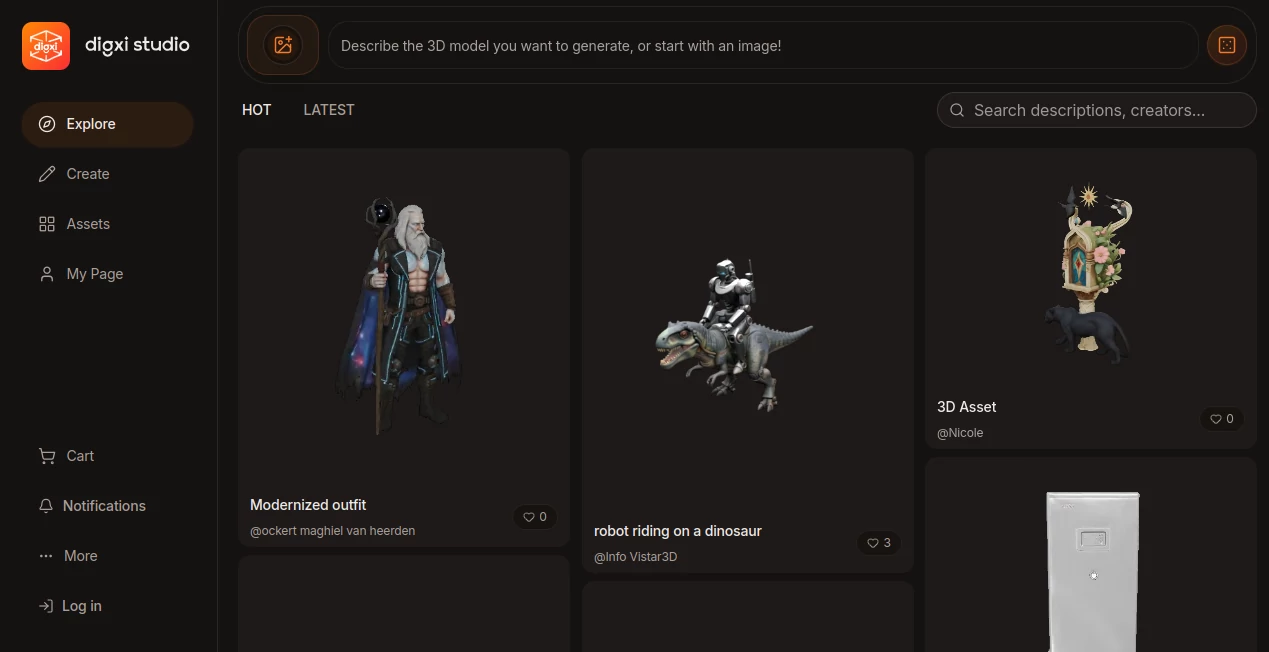
The interface is refreshingly simple. Users are welcomed with a prompt where they can either describe a model or upload a reference image. Navigation is clean, projects are organized in a personal asset library, and discovering community creations feels similar to browsing a creative marketplace. Beginners can start within minutes, while experienced designers appreciate the streamlined workflow.
Accuracy & Performance
The AI engine produces impressive results from natural language prompts and image references. Complex shapes, stylized characters, decorative objects, and conceptual designs are generated with remarkable consistency. Processing times remain practical, allowing users to iterate quickly and refine ideas without slowing down the creative process.
Capabilities
- Generate 3D models from text descriptions.
- Create 3D assets using uploaded images as references.
- Browse and explore community-generated creations.
- Store completed projects in a personal asset library.
- Prepare models for 3D printing.
- Support rapid concept visualization.
- Help designers prototype ideas faster.
- Encourage collaboration through community sharing.
- Suitable for both beginners and experienced creators.
- Accessible directly through a web browser without complicated installation.
Security & Privacy
User projects are managed through personal accounts, making it easier to organize generated assets while keeping individual work separated from public creations. Community sharing remains optional, allowing creators to decide which designs they want to showcase. Account-based asset management also provides convenient access across different sessions.
Use Cases
- Designing game characters and props.
- Creating prototypes for product development.
- Producing educational 3D models for classrooms.
- Generating printable figurines and collectibles.
- Building concept art for creative projects.
- Creating assets for animation and virtual environments.
- Visualizing architectural or decorative objects.
- Rapid experimentation during brainstorming sessions.
Pros and Cons
Pros
- Very easy for beginners to start creating.
- Supports both text and image-based generation.
- Integrated workflow from idea to printable model.
- Creative community for inspiration and sharing.
- No advanced 3D modeling knowledge required.
- Fast concept generation for rapid iteration.
Cons
- Some advanced projects may still require manual editing.
- Account registration is needed to manage assets.
- Pricing information is not fully transparent before signup.
Pricing Plans
The platform provides account-based access, while pricing details may vary depending on future plans and available services. Users should check the official pricing section for the latest information regarding subscriptions, credits, and premium features.
How to Use digxi Studio
- Create a user account.
- Enter a descriptive text prompt or upload a reference image.
- Generate a 3D model using the AI engine.
- Review and refine the generated asset.
- Save the project to your asset library.
- Download or prepare the model for 3D printing.
- Optionally share your creation with the community.
Comparison with Similar Tools
Unlike many AI-powered 3D generators that focus only on model creation, this platform extends the creative workflow by combining AI generation, community interaction, asset management, and direct preparation for physical manufacturing. The integration between idea generation, collaboration, and printable output offers a smoother experience than juggling multiple disconnected tools.
Conclusion
For anyone interested in transforming ideas into tangible 3D creations, this platform offers an impressive combination of accessibility, intelligent automation, and creative freedom. Whether you're experimenting with your first AI-generated model or producing assets for professional projects, the workflow feels natural and enjoyable. The addition of community features and 3D printing support makes it much more than a simple generator—it becomes a complete creative environment where imagination can quickly become reality.
Frequently Asked Questions (FAQ)
Can beginners create 3D models without experience?
Yes. The platform is designed so users can generate models using simple text prompts or images without learning traditional 3D software.
Can generated models be prepared for 3D printing?
Yes. One of its standout features is the ability to move from digital creation to printable 3D assets.
Does it support image-to-3D generation?
Yes. Users can upload reference images alongside text prompts to guide the AI during model creation.
Is there a community for sharing creations?
Yes. Users can browse, discover, and share models within the platform's creator community.
Who can benefit most from this platform?
Game developers, product designers, educators, artists, makers, hobbyists, and anyone interested in AI-powered 3D creation will find it valuable.
Design & Art , AI 3D Model Generator , AI Text to 3D , AI Image to 3D Model .
These classifications represent its core capabilities and areas of application. For related tools, explore the linked categories above.

digxi Studio Alternatives Product

FaceTo3D

Image to Thr…

Image to STL
Project Geni…

Meshy AI

BeYourCover

HY Motion
AI 3D World

genie3