
Muse
What is Muse?
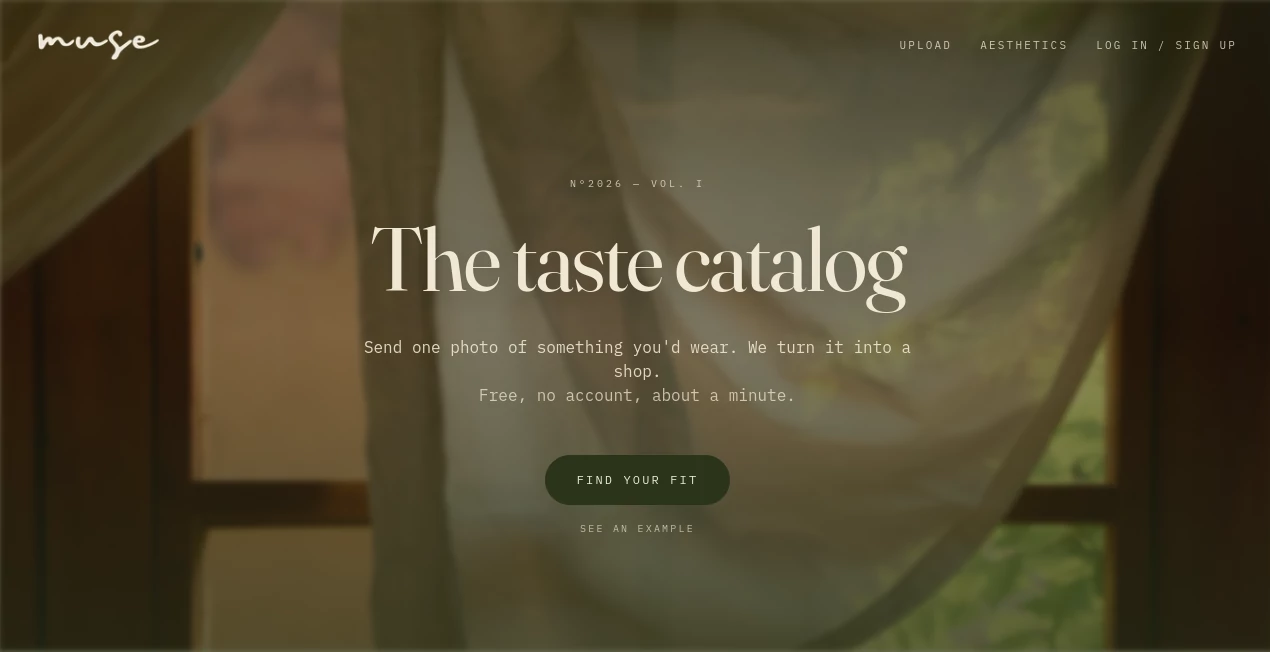
The Muse is a visual fashion discovery tool that turns the clothes, outfits, screenshots, and Pinterest inspiration you already love into something much more useful: a personalized shopping experience. Instead of trying to describe an outfit with the right words, you can simply upload an image and let the platform work from what it can see.
The idea is refreshingly simple. You provide one or more images of outfits or pieces that match your taste, and the platform looks at elements such as color palette, silhouette, texture, and overall mood. It then identifies the aesthetic behind your inspiration and connects it with real products that are available to buy from partner brands.
For anyone who has ever saved dozens of fashion pictures without knowing where to find similar clothes, this approach can save a surprising amount of time. There is no complicated setup, and the basic experience is free without requiring an account.
Key Features
- Image-based fashion discovery: Upload an outfit photo, screenshot, saved pin, or another fashion image and use it as the starting point for product discovery.
- Aesthetic recognition: The platform analyzes the common visual characteristics in your images and identifies a recognizable fashion aesthetic.
- Visual product matching: Inspiration images are connected with real, shoppable products from partner brand catalogs.
- Pinterest-inspired shopping: Saved Pinterest images can be used as inspiration, while signed-in users can optionally connect Pinterest to import an entire board.
- Real product links: Matching items lead to the retailer's own product page, allowing shoppers to purchase directly from the brand.
- No-account starting point: Users can upload fashion inspiration and explore results without creating an account.
- Multiple aesthetic directions: The system recognizes named styles such as old money, coquette, coastal, cottagecore, and other fashion aesthetics.
User Interface
The interface takes a deliberately straightforward approach. Rather than presenting users with a complicated dashboard, the experience centers around the image upload and discovery process. This makes sense for a fashion tool because the starting point is usually visual rather than textual.
The main journey is easy to understand: bring an image, let the system interpret it, and explore the resulting collection. The presentation also follows a magazine-like fashion concept, which gives the experience more personality than a conventional product search page.
Accuracy & Performance
Visual fashion discovery is useful precisely because people often recognize an outfit before they know how to describe it. By considering palette, silhouette, texture, and mood together, the platform takes a broader approach than simply looking for products with matching keywords.
The process is designed to be quick. The site says that a single image can be enough to get started and that the initial experience takes about a minute. For shoppers who normally spend considerable time searching for vaguely described clothing styles, that can make image-first discovery considerably more convenient.
Results can also become more meaningful when several related images are provided. A collection of saved outfits gives the system more information about the style a shopper actually prefers rather than relying on one isolated item.
Capabilities
The strongest capability is the connection between personal inspiration and actual shopping. Instead of stopping at a style description, the platform continues by finding products that share the visual characteristics of the submitted images.
It can also work as a personal aesthetic finder. Someone might know that they like a particular collection of outfits but have no idea what that style is called. Uploading those images can result in a named aesthetic and a corresponding selection of products.
Pinterest users get another useful option. Rather than manually browsing hundreds of fashion results, they can use saved pins as the raw material for a more personalized shopping experience. This makes the tool particularly interesting for people who already use image collections to plan outfits.
Security & Privacy
The service does not require an account for its basic image-upload experience, which keeps the barrier to trying it low. Pinterest connection is optional and is available for signed-in users who want to import a complete board.
It is also worth understanding how the shopping relationship works. The platform describes itself as an independent service rather than a retailer: it does not hold inventory, process the purchase, or ship the products. Purchases are completed on the respective brand's website under that brand's own terms.
Use Cases
- Finding clothes from a picture: Upload a photo or screenshot when you want to discover similar pieces without knowing the product name.
- Shopping a Pinterest collection: Use saved pins as visual references and turn an inspiration board into a more practical shopping starting point.
- Discovering your personal aesthetic: Submit several outfits you love to identify the style that connects them.
- Building a wardrobe around a style: Once an aesthetic is identified, explore matching products that fit the same visual direction.
- Finding alternatives: When you see an outfit you like but cannot identify the exact pieces, use the image as a starting point for similar products.
- Fashion research: Use multiple reference images to understand recurring colors, silhouettes, and moods within your personal taste.
Pros and Cons
- Pros: Free to use, no account required for the basic experience, image-first discovery, aesthetic identification, real shoppable products, Pinterest support, and direct links to retailer product pages.
- Pros: The concept works particularly well for shoppers who think visually and struggle to describe what they want using conventional search terms.
- Cons: Product availability depends on the catalogs of participating brands, so the exact item shown in an inspiration image may not always be available.
- Cons: Visual matching is naturally different from exact product identification, meaning similar recommendations should be viewed as alternatives rather than guaranteed replicas.
- Cons: Users looking for a very specific product by model number, brand, or exact textual specification may still prefer traditional shopping search.
Pricing Plans
The platform is free to use. There is no trial period, paywall, or mandatory account for the basic image-based experience.
The business model is based partly on affiliate commissions. When a shopper purchases through an eligible product link, a commission may be earned from the retailer's marketing budget without adding an extra cost to the shopper. The platform also states that commission rates do not determine which products appear higher in results.
How to Use It
- Choose a fashion image that represents something you would like to wear. This can be a screenshot, saved pin, outfit photo, or another image from your camera roll.
- Upload the image through the visual discovery experience.
- For a broader understanding of your style, provide several images that share the kind of fashion you normally save or wear.
- Let the system analyze the visual characteristics, including palette, silhouette, texture, and overall mood.
- Review the aesthetic identified from your inspiration.
- Explore the recommended products that match the visual direction.
- When you find something you like, follow the product link to the retailer's own website to view the item and complete the purchase.
Comparison with Similar Tools
Traditional fashion search usually starts with words. You might type something like “cream linen summer dress” and then work through pages of results. Visual shopping takes the opposite route: the image becomes the search query.
This makes the platform especially useful when you know what you like but cannot explain it. A screenshot from social media, an outfit saved months ago, or a photograph from the street can contain more useful information about your preferences than a few search terms.
Compared with a standard reverse-image search, the experience is also more focused on fashion discovery. The goal is not simply to locate the original image. It is to understand the style represented by the image and turn that inspiration into a collection of products that can actually be explored and purchased.
It is therefore best viewed as a bridge between visual inspiration and online shopping rather than as a conventional fashion marketplace or retailer.
Conclusion
For visual shoppers, fashion discovery can be frustrating when the only thing they have is a picture. The Muse addresses that problem with a simple idea: let the image explain the style instead of forcing the shopper to find the right words.
Its combination of image analysis, aesthetic identification, Pinterest inspiration, and real product matching gives it a practical role in the modern fashion-shopping process. The no-account starting experience also makes it easy to experiment without committing to a lengthy setup.
It will not replace every type of fashion search, particularly when an exact product or specification is already known. But when the starting point is “I love this look; where can I find something like it?”, this visual-first approach is a particularly natural way to begin.
Frequently Asked Questions (FAQ)
Is the service free?
Yes. The platform is free to use, and the basic experience does not require a paid subscription, trial, or paywall.
Do I need an account to upload an image?
No. You can start by sending an image without creating an account. An account is only needed for optional features such as connecting Pinterest and importing an entire board.
Can I use Pinterest images?
Yes. Saved Pinterest images can be uploaded as fashion inspiration. Signed-in users can also connect Pinterest to import a complete board.
Can it find clothes from a screenshot?
Yes. Screenshots are one of the intended types of visual input. The system analyzes the visual characteristics of the clothing and returns similar shoppable products when suitable matches are available.
Can it tell me what my fashion aesthetic is?
Yes. By analyzing one or more outfit images, it can identify a named aesthetic and use that style interpretation to create a related shopping selection.
Where do the recommended products come from?
Products come from partner brand catalogs. Each product links to the brand's own website, where the shopper can see the item and make the purchase directly.
Does the platform sell the clothes itself?
No. It operates as an independent discovery service rather than a retailer. It does not hold inventory, process orders, or ship products.
Does it cost more to buy through the product links?
The service states that when it earns an affiliate commission, the commission comes from the retailer's marketing budget and does not increase the price paid by the shopper.
Can I upload more than one image?
Yes. Multiple images can be used together, which can be particularly helpful when you want the system to understand your broader fashion taste rather than a single outfit.
Who is this tool best for?
It is especially useful for fashion shoppers, Pinterest users, style enthusiasts, and anyone who regularly saves outfit inspiration but struggles to turn those images into actual products they can buy.
AI Image Recognition , AI Photography , AI E-commerce Assistant .
These classifications represent its core capabilities and areas of application. For related tools, explore the linked categories above.

Muse Alternatives Product

Zorin

Publiq Studio

Face Shape D…

ShipGrowth

Vmake AI

FaceSwaply
AI Face Anal…

Sellerview.ai

HISAB 360