
Think10x.ai
What is Think10x.ai?
Learning becomes much easier when every question is explained visually instead of answered with a few lines of text. This platform transforms difficult concepts into step-by-step educational videos that make complex topics feel approachable. Whether solving mathematics, understanding science, or exploring technical subjects, learners receive clear explanations that can be paused, replayed, and explored further.
Unlike traditional AI assistants that focus primarily on written responses, this solution delivers personalized video lessons generated from text, voice, or uploaded images. Students can ask follow-up questions at any point during the explanation, creating an experience that feels much closer to working with a patient personal tutor than simply reading generated content. The result is an interactive learning environment designed to improve understanding rather than memorization. :contentReference[oaicite:0]{index=0}
Key Features
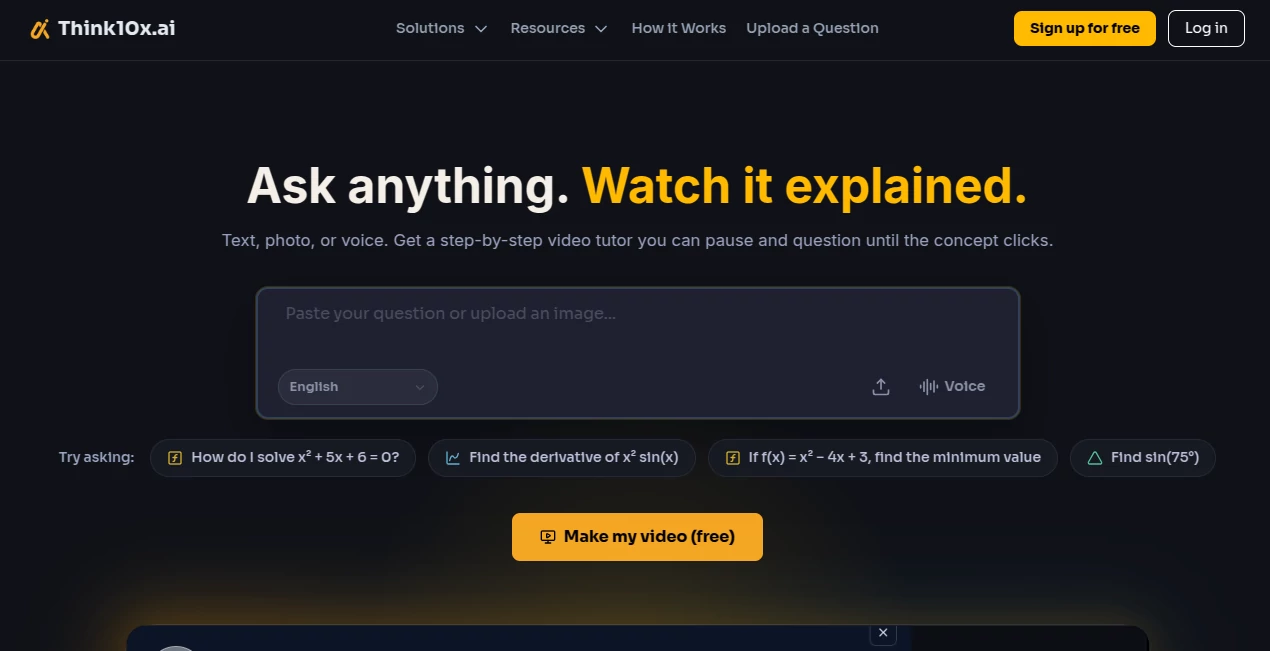
User Interface
The interface is refreshingly simple and built for speed. Users can type a question, upload a homework photo, or speak naturally using voice input. Explanations are delivered as easy-to-follow videos with intuitive playback controls, allowing learners to pause at any step and continue asking questions without losing context.
Accuracy & Performance
Every explanation is structured into logical steps instead of providing only the final answer. Animated visuals, narration, captions, and transcripts help reinforce understanding while reducing confusion. The platform is designed to generate educational videos quickly, making it practical for both individual learners and institutions that need scalable learning support. :contentReference[oaicite:1]{index=1}
Capabilities
- Generate step-by-step educational videos from text questions.
- Accept homework photos and textbook images.
- Support natural voice input.
- Provide explanations in video, voice, or text format.
- Allow follow-up questions during video playback.
- Create animated educational diagrams.
- Produce captions and transcripts automatically.
- Offer multilingual learning support.
- Provide API and white-label solutions for educational platforms.
Security & Privacy
The platform is built with an education-first approach and is intended for schools, tutoring organizations, and independent learners. Institutional integrations are supported through dedicated APIs and white-label deployment options, allowing organizations to keep their own branding while delivering AI-powered educational experiences. :contentReference[oaicite:2]{index=2}
Use Cases
- Students solving homework independently.
- Preparing for mathematics and science examinations.
- Understanding textbook concepts through visual explanations.
- Distance learning and online education.
- Tutoring platforms seeking automated video lessons.
- Schools building educational video libraries.
- Educational publishers enhancing digital textbooks.
- Developers integrating AI-powered educational videos into existing products.
Pros and Cons
Pros
- Interactive video explanations instead of static text.
- Supports text, image, and voice questions.
- Follow-up questions create a natural tutoring experience.
- Multiple response formats available.
- Useful for both individuals and educational institutions.
- API access for developers.
Cons
- Focused mainly on educational learning scenarios.
- Some advanced institutional capabilities require API or enterprise access.
- Internet connectivity is required for AI-generated video creation.
Pricing Plans
A free option is available for learners to experience the platform. Additional institutional services, API access, and white-label deployments are offered through dedicated business arrangements. Pricing for enterprise solutions is provided upon request. :contentReference[oaicite:3]{index=3}
How to Use Think10x.ai
- Open the platform.
- Type a question, upload an image, or use voice input.
- Choose your preferred response format.
- Watch the generated step-by-step explanation.
- Pause whenever something is unclear.
- Ask follow-up questions for deeper clarification.
- Continue learning until the concept is fully understood.
Comparison with Similar Tools
Many AI learning assistants focus on text-based conversations, requiring students to interpret long explanations on their own. This platform takes a different direction by automatically generating narrated educational videos complete with animations, captions, and interactive follow-up conversations. That combination makes it particularly valuable for visual learners and educational organizations that want scalable teaching resources instead of simple chatbot responses.
Conclusion
This educational platform introduces a refreshing way to learn by combining artificial intelligence with interactive video instruction. Rather than encouraging users to search through lengthy answers, it guides them through each concept visually and logically. The ability to ask questions while watching a lesson creates an experience that feels remarkably close to having a knowledgeable tutor available whenever needed. For students, educators, tutoring companies, and EdTech developers, it represents an impressive step toward more engaging and accessible digital education.
Frequently Asked Questions (FAQ)
What types of questions can it answer?
It can explain mathematics, science, and many academic subjects using text, images, or voice input.
Can I upload homework photos?
Yes. Homework, textbook pages, and other educational images can be uploaded for explanation.
Can I pause a lesson and ask more questions?
Yes. Video explanations are interactive, allowing follow-up questions during playback.
Does it support multiple response formats?
Yes. Explanations can be delivered as video, voice, or text depending on user preference.
Is it suitable for schools and educational companies?
Yes. API integration and white-label deployment options are available for institutions and EdTech platforms.
AI Video Generator , AI Homework Helper , AI Knowledge Base , AI Education Assistant .
These classifications represent its core capabilities and areas of application. For related tools, explore the linked categories above.

Think10x.ai Alternatives Product

CinemaDrop

Gemini Omni

gemini video

seedance 3.0

Sora-2.co

seedance 2

HappyHorse A…

Casper Pract…

Kling-4 Vide…