
TopMaker AI
What is TopMaker AI?
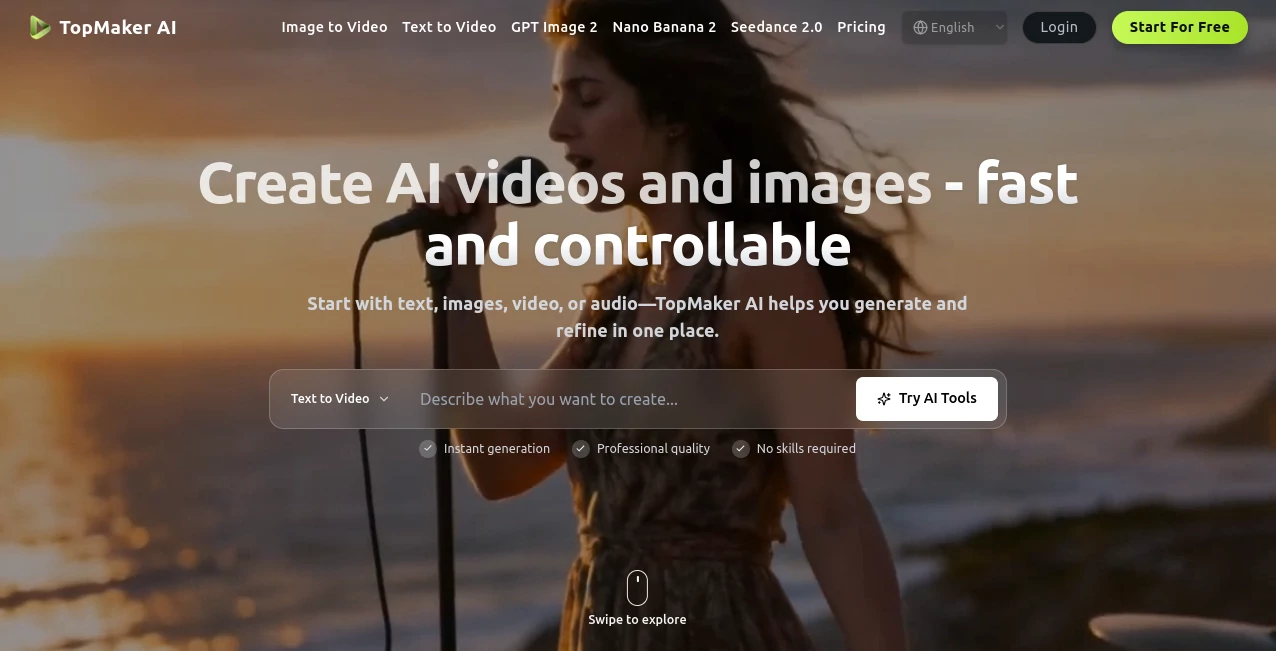
Creating professional visual content no longer requires advanced editing skills or switching between multiple creative platforms. This modern workspace brings together leading AI models for image and video generation, allowing creators to produce, refine, and compare results without interrupting their workflow. Whether the starting point is a simple prompt, an existing image, a short video clip, or even an audio file, everything happens inside one streamlined environment.
One of the biggest strengths of this platform is flexibility. Instead of locking users into a single generation model, it offers access to multiple cutting-edge AI engines, making it easy to experiment with different visual styles, quality levels, and production speeds. This approach helps marketers, designers, social media creators, agencies, and businesses generate polished content faster while keeping creative control throughout the entire production process.
From promotional videos and cinematic storytelling to product showcases and social media visuals, the platform simplifies complex AI workflows into an intuitive experience that saves both time and creative effort.
Key Features
- Generate videos from text prompts.
- Create animations from existing images.
- Transform videos into completely new visual styles.
- Generate high-quality AI images from text.
- Edit and restyle existing images.
- Access multiple leading AI generation models.
- Compare outputs across different models.
- Create content in up to 4K resolution.
- Maintain projects inside one unified workspace.
- Fast iteration without rebuilding prompts.
- Support for commercial creative projects.
- Simple workflow suitable for beginners and professionals.
User Interface
The interface is thoughtfully organized around creative workflows rather than technical settings. Users simply choose whether they want to generate content from text, images, or videos, select an AI model, and begin creating immediately. Navigation feels clean and distraction-free, making it comfortable for both experienced creators and newcomers.
Keeping prompts, reference assets, and generated results together inside one workspace also reduces unnecessary complexity. Instead of moving between different tools, every stage of production remains connected from the first concept to the final export.
Accuracy & Performance
The platform delivers impressive visual quality thanks to its collection of advanced AI generation models. Since creators can compare different engines for the same prompt, it becomes much easier to find the output that best matches a project's artistic direction, production timeline, or available budget.
Generation speed is also competitive, allowing rapid experimentation without slowing down creative momentum. This makes it practical for teams producing multiple marketing assets, social media campaigns, or client projects within tight deadlines.
Capabilities
The creative possibilities extend well beyond basic text-to-video generation. Users can animate still images, redesign existing footage, generate concept art, produce product visuals, create social media advertisements, develop cinematic story scenes, and experiment with multiple artistic styles without rebuilding each project from scratch.
The platform also supports workflows that benefit content creators, ecommerce businesses, advertising agencies, educators, musicians, and independent filmmakers looking for fast production without sacrificing quality.
Security & Privacy
Privacy is treated as an important part of the creative process. Generated content remains private unless users decide to share it, providing confidence for commercial projects and confidential production work. Clear billing policies, commercial usage options for eligible plans, and accessible customer support further contribute to a trustworthy experience.
Use Cases
- Create engaging social media videos.
- Produce advertising campaigns.
- Generate ecommerce product showcases.
- Create cinematic storytelling scenes.
- Build music video visuals.
- Generate UGC-style promotional content.
- Create educational presentations.
- Produce YouTube thumbnails and promotional images.
- Transform existing videos into new artistic styles.
- Create consistent visual assets for brands.
Pros and Cons
Pros
- Multiple premium AI models available in one platform.
- Supports text, image, and video workflows.
- Very beginner-friendly interface.
- Fast creative iteration.
- High-quality image and video generation.
- Suitable for commercial production.
Cons
- Premium models require paid credits or subscriptions.
- Rendering quality and speed vary between models.
- Advanced projects may consume credits quickly.
Pricing Plans
A free plan allows new users to explore the platform with limited generations and standard features. Paid subscriptions unlock higher generation limits, premium AI models, priority processing, higher-resolution exports, commercial usage rights, and additional creative capabilities for professional users and teams. Enterprise options are also available for organizations with larger production requirements.
How to Use TopMaker AI
- Create a free account.
- Select a workflow such as text-to-video, image-to-video, video-to-video, text-to-image, or image-to-image.
- Write a prompt or upload existing media.
- Select the AI model that best matches your project.
- Generate the first version.
- Refine prompts or settings until satisfied.
- Export the finished content for publishing or commercial use.
Comparison with Similar Tools
Unlike many AI creative platforms that rely on a single generation engine, this solution combines numerous leading AI models inside one production workspace. This makes experimentation significantly easier because creators can compare results, optimize costs, and select the model that best matches each project instead of adapting every project to a single technology.
The unified workflow also eliminates much of the friction involved in moving between separate applications for image generation, video creation, editing, and refinement, making production noticeably more efficient.
Conclusion
This platform successfully combines flexibility, creative freedom, and professional-quality AI generation into one streamlined workspace. The ability to work with multiple industry-leading models while keeping every asset organized in a single environment makes content production significantly faster and more enjoyable.
Whether producing marketing campaigns, product demonstrations, cinematic stories, social media content, or creative experiments, it offers an efficient workflow that adapts to projects of every size. For creators looking to maximize quality without increasing production complexity, it represents an impressive all-in-one solution.
Frequently Asked Questions (FAQ)
Can beginners use this platform?
Yes. The interface is designed to make AI content creation accessible even for users with no editing experience.
Does it support multiple AI generation models?
Yes. Users can choose from several leading AI models depending on quality, speed, and creative requirements.
Can I create both images and videos?
Yes. The platform supports text-to-image, image-to-image, text-to-video, image-to-video, and video-to-video workflows.
Is there a free version?
Yes. A free plan allows users to explore the platform with limited generations before upgrading.
Can generated content be used commercially?
Commercial usage is available with eligible paid plans according to the platform's licensing terms.
AI Photo & Image Generator , AI Image to Video , AI Video Generator , AI Text to Video .
These classifications represent its core capabilities and areas of application. For related tools, explore the linked categories above.

TopMaker AI Alternatives Product
Subclip

Nano Banana …
Blur & Unblu…

SellerPic

Nano Banana …
Render of Dr…
Sora AI Vide…
Veo 4 AI

WonderShare …