
Caddi
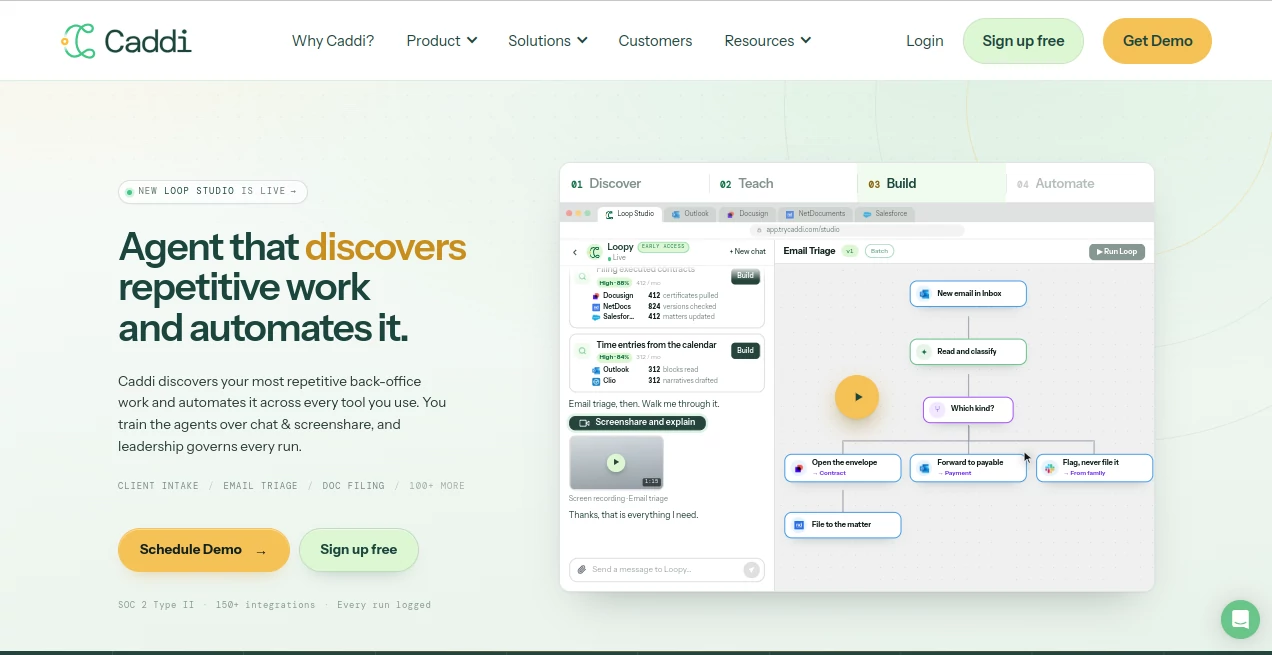
What is Caddi?
Back-office teams rarely struggle because there is nothing to automate. The real problem is finding the repetitive work buried inside inboxes, documents, spreadsheets, CRM systems, and other business software. Caddi takes a practical approach to that problem by discovering recurring processes, learning how people actually perform them, and turning those processes into repeatable automations.
The platform is designed for organizations that already have established tools but spend too much time moving information between them. A team might sort incoming email, open an electronic signature envelope, check the documents, file the completed agreement, update a client record, and notify another department. None of these actions is particularly complicated on its own, yet together they can consume hours every week.
Instead of asking employees to write technical specifications for every workflow, the platform lets them demonstrate a process through screen sharing and conversation. It can then build a workflow that handles routine steps while flagging unusual situations for human review.
Key Features
- Discovers repetitive work across existing business systems.
- Builds automations from screen recordings and natural-language explanations.
- Supports more than 150 integrations with commonly used business applications.
- Combines AI judgment with deterministic automation for repeatable execution.
- Provides searchable and replayable records of automation runs.
- Flags exceptions instead of making unsupported guesses.
- Allows teams to update processes through conversation rather than rebuilding them from scratch.
- Includes administrative controls designed for organizations with security and compliance requirements.
User Interface
The interface is built around the idea of a conversation rather than a complicated automation canvas. Users can describe what they want to automate, demonstrate the process through screen sharing, and interact with the resulting workflow.
This approach is particularly appealing to people who understand their company's processes but do not necessarily want to learn another programming language or automation framework. The workflow view also makes it easier to see what happens at each stage and where an exception has been detected.
Accuracy & Performance
A notable strength is the separation between reasoning and execution. AI can be used when a process requires interpretation or judgment, while deterministic code handles steps that need to happen consistently. This reduces the risk of an automation behaving differently every time it runs.
For repetitive operations such as email triage, document filing, payment reconciliation, and client intake, this distinction can make a meaningful difference. Once a process has been validated, routine actions can follow the same defined path, while unusual cases can be held for a person.
Capabilities
The platform can work across the applications a business already uses instead of requiring teams to replace their existing software. Examples shown by the company include Microsoft Outlook, DocuSign, NetDocuments, Salesforce, Clio, QuickBooks, Microsoft 365, SharePoint, and other business systems.
Its discovery capabilities are also useful before automation begins. Rather than choosing a process based purely on intuition, teams can identify recurring activities and see which ones appear to offer the greatest opportunity for automation.
Once a process is taught, the system can capture rules and edge cases. If a document is only partially signed, for example, the workflow can hold the item instead of filing it automatically. That kind of exception handling is important when automation touches real business records.
Security & Privacy
Security is positioned as a core part of the platform rather than an optional add-on. The service states that it is SOC 2 Type II compliant and supports OAuth and SSO connections. It runs under each user's existing credentials and inherits the access permissions already granted to that user.
The company also states that connected-system content is not used to train models and that OpenAI and Anthropic calls operate under zero-retention terms. Every automation run can be reviewed, including the decisions made and permissions used. Teams can also pause a workflow or disconnect an integration when necessary.
These controls are especially relevant for firms handling confidential client information, financial records, legal documents, or other sensitive business data.
Use Cases
- Email triage: Sort incoming messages, identify relevant categories, and route information to the appropriate system.
- Document filing: Move completed documents into the correct workspace while following naming and version rules.
- Client intake: Transfer information between email, CRM, document management, and other systems.
- Payment reconciliation: Match payment information and update financial records without manually repeating the same checks.
- New matter creation: Coordinate repetitive administrative steps when opening a new client matter.
- Contract administration: Monitor completed agreements and move the appropriate records through established filing processes.
- Internal operations: Automate recurring administrative work across finance, talent, IT, and marketing teams.
A good example is a legal or financial team that receives hundreds of similar messages each month. Instead of having an employee repeatedly inspect every message and manually copy information into several systems, the workflow can perform the predictable parts and send unusual cases to the responsible person.
Pros and Cons
- Pros: Strong focus on real business workflows, screen-based process training, broad integration support, deterministic execution, exception handling, detailed run history, and security controls suitable for professional organizations.
- Cons: The pricing is aimed primarily at businesses rather than casual individual users. More advanced governance and enterprise capabilities are reserved for higher plans, and organizations may need time to properly document and validate complex processes before putting them into production.
Pricing Plans
A 14-day free trial is available with the Individual plan. The Individual plan costs $100 per user per month and includes 200 credits per user each month, 10 active loops, 30 days of run history, MFA, team management, a security log, and knowledge base support.
The Team plan costs $250 per user per month and increases the allowance to 1,000 credits per user and 20 active loops, while retaining the core security and management features.
The Business plan costs $6,500 per month or $60,000 when billed annually. It includes 20,000 credits, 100 active loops, advanced integrations, Scout, SAML SSO, two years of run history, and a 99% uptime SLA.
Enterprise pricing is custom and is intended for organizations requiring larger usage allowances, multi-instance support, centralized integration governance, priority execution, implementation services, and additional enterprise controls.
How to Use It
- Connect the business applications required for the process using the available authentication options.
- Choose a repetitive process that is clearly defined and happens frequently.
- Describe the process and demonstrate how it is performed through screen sharing.
- Explain the decisions and exceptions that matter, just as you would when training a new employee.
- Review the resulting workflow and test it before putting it into regular use.
- Monitor run history and review exceptions or unusual cases.
- Update the process when business rules or underlying systems change.
Comparison with Similar Tools
Traditional workflow automation platforms are often excellent at connecting predefined triggers and actions, but they can require considerable manual configuration. On the other hand, newer AI agents may be flexible but can rely on a language model during every step of execution.
This platform takes a middle-ground approach. AI is used to understand the process and help build the workflow, while deterministic automation handles the repeatable execution. For organizations that care about consistency, traceability, and predictable behavior, that design can be more attractive than an agent that independently rethinks the entire task every time it runs.
It is also different from starting with a blank automation builder. The discovery component is intended to help teams identify which repetitive processes are actually worth automating before investing time in building them.
Conclusion
For businesses drowning in repetitive administrative work, the most valuable automation is not necessarily the flashiest one. It is the process that quietly saves employees from doing the same five, ten, or twenty steps every day.
This platform stands out by focusing on that practical reality. Employees can demonstrate how work is currently done, AI can help turn that demonstration into an automation, and deterministic execution can keep routine processes consistent. Add detailed run records, exception handling, broad integrations, and enterprise-oriented security controls, and the result is a serious option for teams looking beyond simple task automation.
The 14-day trial also provides a sensible way to test the concept with one real process before committing to a broader rollout.
Frequently Asked Questions (FAQ)
What type of work is best suited for automation?
Repetitive, rule-based processes that involve multiple business applications are a strong starting point. Email triage, document filing, client intake, payment reconciliation, and similar administrative tasks are good examples.
Does it replace human decision-making?
No. The system is designed to automate defined processes while flagging situations that fall outside the established rules. Human approval can therefore remain part of sensitive workflows.
Does it work with existing business software?
Yes. The platform advertises more than 150 integrations and is designed to connect with the tools organizations already use rather than requiring a complete software replacement.
Is there a free trial?
Yes. New users can start with a 14-day free trial of the Individual plan.
How much does the Individual plan cost?
The Individual plan is $100 per user per month after the free trial and includes 200 credits per user each month and up to 10 active loops.
How is security handled?
The service states that it has SOC 2 Type II certification, supports OAuth and SSO, operates using users' existing permissions, and provides logged and replayable automation runs.
Can an automation be stopped if something goes wrong?
Yes. A running loop can be paused, and its connection can be removed when necessary. This gives teams a direct way to intervene rather than waiting for a process to finish.
Is this suitable for small teams?
It can be. The Team plan is designed for small groups that want to build and share automations, while larger organizations can use the Business and Enterprise options for expanded usage and governance.
AI Workflow Management , AI Productivity Tools , AI Developer Tools , Business .
These classifications represent its core capabilities and areas of application. For related tools, explore the linked categories above.

Caddi Alternatives Product

ClearWork

DeepSeek V4

Workik

Nova AI

IdeaHunter

CtrlOps

Calculadora …

GetVivix

Resyfy AI