Unblurry
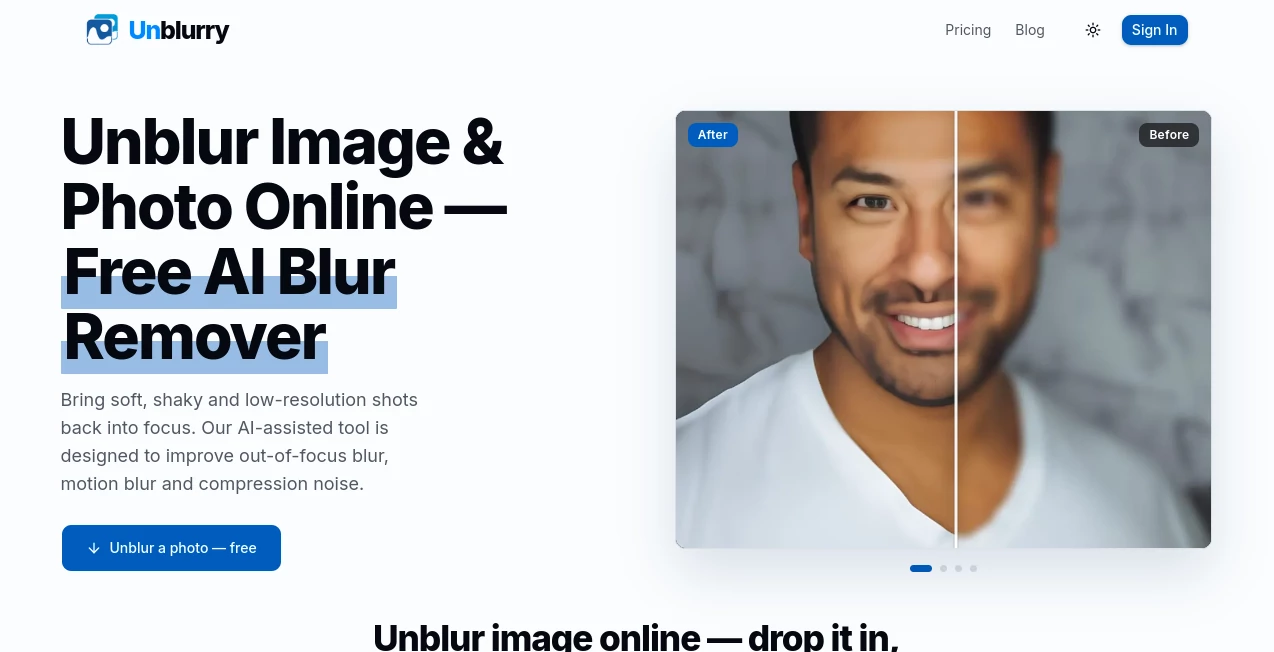
What is Unblurry?
Blurry photos can ruin an otherwise perfect moment. Whether the image was captured in low light, affected by camera shake, or compressed after being shared online, restoring sharpness is often difficult with traditional editing software. Fortunately, modern AI technology has made image enhancement much more accessible for everyone, from casual users to professional designers.
This online solution is designed to recover details from soft, blurry, and low-resolution photos using advanced artificial intelligence. Instead of requiring complex editing skills or expensive software, users simply upload an image and allow the AI to analyze blur patterns, improve edges, reduce compression artifacts, and restore natural-looking details in just a short time.
The platform is suitable for enhancing portraits, product photos, travel pictures, scanned documents, old photographs, social media images, and many other visual assets. Because everything works directly in the browser, there is no complicated installation process, making it an excellent choice for anyone looking for fast and reliable image restoration.
Key Features
User Interface
The interface is clean, modern, and intentionally simple. Uploading an image requires only a few clicks, making the experience comfortable even for first-time visitors. The workflow follows a straightforward upload, process, preview, and download sequence, reducing unnecessary complexity.
Navigation is intuitive, allowing users to focus on improving their images rather than learning editing software. The responsive layout also works well across desktops, laptops, and mobile devices.
Accuracy & Performance
The AI engine is trained to recognize different kinds of image degradation instead of simply increasing sharpness. It identifies soft focus, camera shake, motion blur, and compression artifacts before applying suitable restoration techniques.
Unlike traditional sharpen filters that often introduce halos or excessive noise, the enhancement process attempts to preserve natural textures while recovering missing details. Processing is typically completed within a short period, depending on image size and internet speed.
Capabilities
- Restore blurry photographs.
- Reduce motion blur.
- Improve out-of-focus images.
- Enhance low-resolution pictures.
- Reduce JPEG compression artifacts.
- Improve image clarity for portraits.
- Recover details from travel photos.
- Enhance product photography.
- Improve social media images.
- Restore scanned photographs.
- Increase perceived image sharpness.
- Browser-based processing without software installation.
Security & Privacy
Since the service operates online, users can process images without installing desktop applications. This approach offers convenience while minimizing compatibility issues across different operating systems. As with any cloud-based image processing platform, users should review the official privacy policy before uploading confidential or sensitive images.
Use Cases
- Improve family photos captured with camera shake.
- Restore old scanned memories.
- Enhance profile pictures for social media.
- Improve product listings for online stores.
- Create sharper marketing materials.
- Restore travel photography.
- Enhance presentation graphics.
- Improve blog and website images.
- Increase image quality before printing.
- Enhance educational materials.
- Improve real estate photographs.
- Restore compressed messaging app images.
Pros and Cons
Pros
- Very easy to use.
- No advanced editing skills required.
- Browser-based workflow.
- Supports multiple types of blur.
- Improves low-quality and compressed images.
- Fast AI processing.
- Suitable for both personal and professional use.
Cons
- Extremely damaged images may not recover perfectly.
- Processing quality depends on the original image.
- Internet connection is required.
- Cloud processing may not suit highly confidential images.
Pricing Plans
The platform offers free AI image unblurring capabilities for users who want to improve blurry photos online. Depending on future service updates, additional premium features or higher processing limits may become available.
How to Use Unblur Image & Photo Online
- Open the website.
- Upload the blurry image.
- Allow the AI to analyze the photo.
- Wait while the enhancement process finishes.
- Preview the improved result.
- Download the enhanced image.
Comparison with Similar Tools
Compared with conventional photo editors that rely on manual sharpening filters, this AI-powered solution focuses on intelligent restoration. Instead of requiring users to adjust multiple editing parameters, the system automatically detects image defects and applies suitable corrections.
Many image editing applications provide sharpening controls, but they often struggle with motion blur and severe softness. AI-assisted restoration generally delivers more natural-looking improvements while saving significant editing time. For users who simply want clearer photos without learning professional software, this browser-based approach offers a practical alternative.
Conclusion
Recovering blurry images no longer requires advanced editing expertise or expensive desktop software. By combining artificial intelligence with a simple browser-based workflow, this solution makes photo restoration accessible to almost everyone.
Its ability to improve soft focus, reduce motion blur, minimize compression artifacts, and enhance low-resolution photos makes it valuable for photographers, content creators, students, marketers, online sellers, and everyday users alike. The straightforward interface and fast processing create an enjoyable experience while delivering noticeably sharper results.
Whether restoring treasured memories or preparing professional visuals for websites and social media, this AI-powered image enhancement tool provides an efficient way to transform blurry photos into clearer, more attractive images.
Frequently Asked Questions (FAQ)
Can it remove motion blur?
Yes. The AI is designed to improve images affected by motion blur alongside other common blur types.
Does it improve low-resolution images?
Yes. The enhancement process attempts to restore details and improve overall visual quality.
Do I need editing experience?
No. The workflow is designed for beginners as well as professionals.
Can I use it for product photography?
Yes. It can improve product images for e-commerce listings and marketing materials.
Is the tool free?
The service offers free AI-powered image unblurring functionality according to its website.
Photo & Image Editor , AI Photo Enhancer , AI Photography , AI Image to Image .
These classifications represent its core capabilities and areas of application. For related tools, explore the linked categories above.

Unblurry Alternatives Product

Picsart

PixRestorer

Artguru

AI Hairstyle

picenhancer.…

FaceShapeDet…

CMeIn

PaperYak

Toolsbench