
Binary to Text Converter
What is Binary to Text Converter?
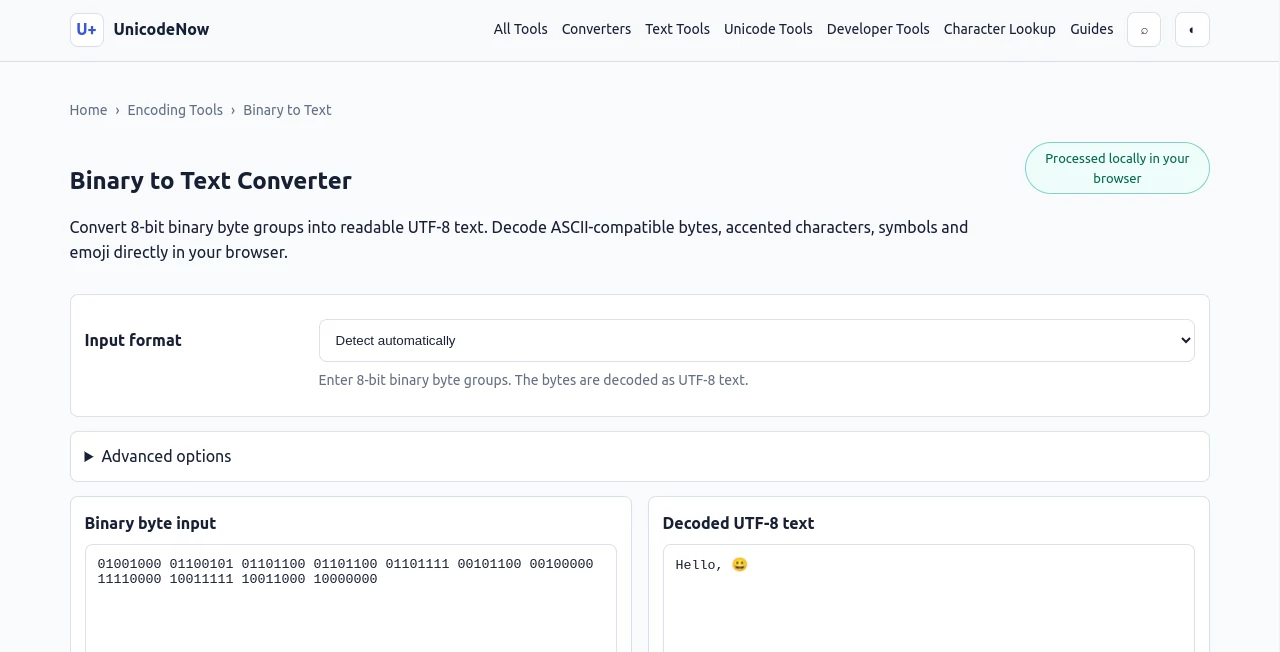
UnicodeNow’s Binary to Text Converter is a practical browser-based utility for turning 8-bit binary byte sequences into readable UTF-8 text. It is particularly useful when working with encoded data, debugging text representations, checking byte sequences, or simply trying to understand how binary data maps to ordinary characters.
What makes the tool especially useful is that it is not limited to basic English letters. It can handle ASCII-compatible data as well as accented characters, symbols, non-Latin text, and emoji through UTF-8 decoding. For anyone who has ever been handed a long sequence of 0s and 1s and needed to know what it actually says, this provides a quick way to get an answer without installing software.
The converter also takes a careful approach to malformed input. Instead of quietly changing incomplete or invalid data, it validates the binary structure and provides clear feedback when something is wrong.
Key Features
- Converts 8-bit binary byte groups into readable UTF-8 text.
- Supports ASCII-compatible binary data, accented characters, symbols, and emoji.
- Accepts binary separated by spaces, commas, tabs, or line breaks.
- Can also process continuous binary strings without separators.
- Validates binary input before attempting to decode it.
- Detects incomplete byte groups and invalid binary characters.
- Provides strict and replacement handling for malformed UTF-8 sequences.
- Offers optional Unicode normalization.
- Includes copy, clear, example-loading, and TXT download controls.
- Processes the conversion locally in the browser.
User Interface
The interface is deliberately straightforward. There is no complicated setup or unnecessary workflow between entering binary data and seeing the decoded result. Users can paste their byte sequence into the input area, select an appropriate input format when needed, and start the conversion.
The example built into the page is also helpful for first-time users. A sequence representing “Hello” followed by an emoji demonstrates something that is easy to miss when working with binary: one visible character does not always equal one byte.
Controls for decoding, copying the result, clearing the input, loading an example, and downloading the resulting text make the page convenient for both quick checks and small development tasks.
Accuracy & Performance
The conversion process follows the UTF-8 byte structure rather than treating every eight-bit group as an independent character. That distinction matters when dealing with accented letters, symbols, and emoji, because a single character can require multiple UTF-8 bytes.
For example, the emoji 😀 is represented by four UTF-8 bytes. The converter recognizes those bytes as a sequence instead of trying to display each byte independently. This makes the output much more reliable for real-world Unicode data.
Input validation is another strong point. A byte must contain exactly eight binary digits, while a continuous binary string needs a total length divisible by eight. Invalid characters, oversized groups, and incomplete sequences are reported instead of being silently modified.
Capabilities
The converter is more flexible than a basic binary-to-ASCII decoder. Standard ASCII data works naturally because ASCII values occupy the first 128 byte values preserved by UTF-8. At the same time, UTF-8 allows the same workflow to cover characters outside the ASCII range.
Users can enter binary using several common formats. Space-separated bytes are supported, but so are comma-separated values, line-separated input, and continuous binary such as 0100100001101001. This is useful when copying data from different sources where formatting is not consistent.
For malformed UTF-8, strict mode stops when an invalid sequence is encountered, while replacement mode can decode valid surrounding data and represent malformed portions with the Unicode replacement character. This gives users more control when diagnosing imperfect byte sequences.
Security & Privacy
Privacy is one of the more appealing aspects of this converter for routine decoding work. The binary input is processed locally with JavaScript in the browser and is not submitted to the site's servers. This makes it a convenient choice when working with text that users would rather keep within their own browser session.
Local processing also removes the need to upload a file or send a request to a remote conversion service just to decode a short sequence of bytes. As always, users should still follow their own organization's security policies when handling sensitive information.
Use Cases
This tool can be useful in a surprisingly wide range of situations. Developers can use it while inspecting byte-level data, troubleshooting encoding problems, or checking whether a binary representation corresponds to the expected text.
Students studying computer science can use it to make the relationship between binary, bytes, ASCII, and UTF-8 easier to understand. Instead of looking at an abstract explanation, they can enter an actual byte sequence and immediately see the resulting text.
It is also useful for documentation and testing. A developer preparing examples for an encoding tutorial, debugging an API response, or checking a manually constructed byte sequence can quickly verify the result.
Even casual users may find it useful when they encounter binary text online or in a technical file and want to understand what the sequence represents without installing a dedicated application.
Pros and Cons
- Pros: Simple interface, UTF-8 support, handles emoji and non-ASCII characters, accepts several binary formats, validates malformed input, offers strict and replacement modes, and processes data locally.
- Pros: Continuous binary input can be decoded without manually inserting spaces between every byte.
- Pros: Copy and TXT download options make the resulting text easy to reuse.
- Cons: The tool is designed around UTF-8, so it is not intended to decode arbitrary legacy text encodings.
- Cons: Users unfamiliar with bytes and UTF-8 may need a little background knowledge to understand why some characters require multiple binary groups.
Pricing Plans
The converter is available as an online utility without a paid plan or subscription requirement. Users can open the page, enter their binary data, and perform the conversion directly in the browser.
There is also no need to create an account simply to decode a sequence. That makes it particularly convenient for occasional tasks where installing dedicated encoding software would be unnecessary.
How to Use Binary to Text Converter
Start by pasting your binary data into the input field. If the sequence already contains spaces, commas, or line breaks between bytes, the automatic input handling can recognize those common separators. A continuous sequence can also be entered when its total length is divisible by eight.
Next, choose the desired handling for invalid UTF-8 if necessary. Strict mode is a good choice when you want malformed data to be identified rather than altered. Replacement mode can be useful when you want to recover the readable portions of a sequence containing damaged bytes.
After decoding, review the resulting text. You can copy it for use elsewhere or download the output as a TXT file. For a quick first test, loading the built-in example is an easy way to see how the conversion works before entering your own data.
Comparison with Similar Tools
Many basic binary converters are built primarily around simple ASCII characters. That is fine for sequences containing ordinary English letters, but it becomes limiting when the data contains accented characters, symbols, or emoji.
This converter takes a UTF-8-oriented approach, which gives it a broader range of practical applications. It understands that bytes are part of an encoding sequence rather than automatically assuming that every byte represents a complete visible character.
It also stands out through its validation behavior. Instead of silently padding or trimming malformed binary input, it reports structural problems. For developers and students trying to understand exactly what is happening at the byte level, that behavior can be more useful than a converter that simply produces an output at any cost.
Conclusion
For anyone who needs a quick way to turn binary byte sequences into readable text, this converter offers a clean and capable solution. Its support for UTF-8 makes it considerably more useful than a tool limited to basic ASCII, while its input validation helps prevent confusing results caused by malformed data.
The local browser processing is another practical advantage, particularly for users who prefer not to send their input to a remote service. Add the flexible separator handling, Unicode support, error reporting, and simple export controls, and the result is a handy utility for developers, students, technical writers, and curious users alike.
Frequently Asked Questions (FAQ)
How do I convert binary to text?
Enter your binary data as 8-bit byte groups and select the appropriate input format if required. The converter decodes the bytes as UTF-8 and displays the resulting text.
Does every binary group need eight bits?
Yes. When using separated byte groups, each group must contain exactly eight binary digits. Continuous input is automatically divided into eight-bit groups when the total number of bits is divisible by eight.
Can it convert binary to ASCII?
Yes. Standard ASCII bytes decode correctly because ASCII values are preserved within UTF-8. The converter goes beyond ASCII by also supporting the wider range of characters represented by UTF-8.
Can I decode binary without spaces?
Yes. A continuous binary sequence can be entered without separators. For successful byte grouping, the total number of binary digits must be divisible by eight.
Why can one character require several binary groups?
UTF-8 uses a variable-length encoding system. Basic English characters commonly require one byte, while accented characters, symbols, and emoji can require two, three, or four bytes.
What happens if my binary input is invalid?
The converter validates the binary before decoding. Invalid characters, incomplete byte groups, and groups longer than eight bits are reported instead of being silently corrected.
What happens when the binary forms invalid UTF-8?
Strict mode stops and reports the invalid sequence. Replacement mode can decode valid surrounding bytes while inserting the Unicode replacement character where malformed data occurs.
Is my binary input uploaded to a server?
No. The conversion is performed locally in the browser using JavaScript, so the binary input is not submitted to the service's servers.
Can I save the converted text?
Yes. After decoding, the resulting text can be copied directly or downloaded as a TXT file using the available controls.
Code & IT , AI Developer Tools .
These classifications represent its core capabilities and areas of application. For related tools, explore the linked categories above.
Binary to Text Converter details
Website unavailable — View Alternatives
Pricing
- Free
Apps
- Web App
Categories

Binary to Text Converter Alternatives Product

TruthSpine

Emergent

TokenCalcula…

Lovable APP

Simple Dev T…

Devplan

Kimi K2.5

EasyRouterAI

Website Audi…