Mado
What is Mado?
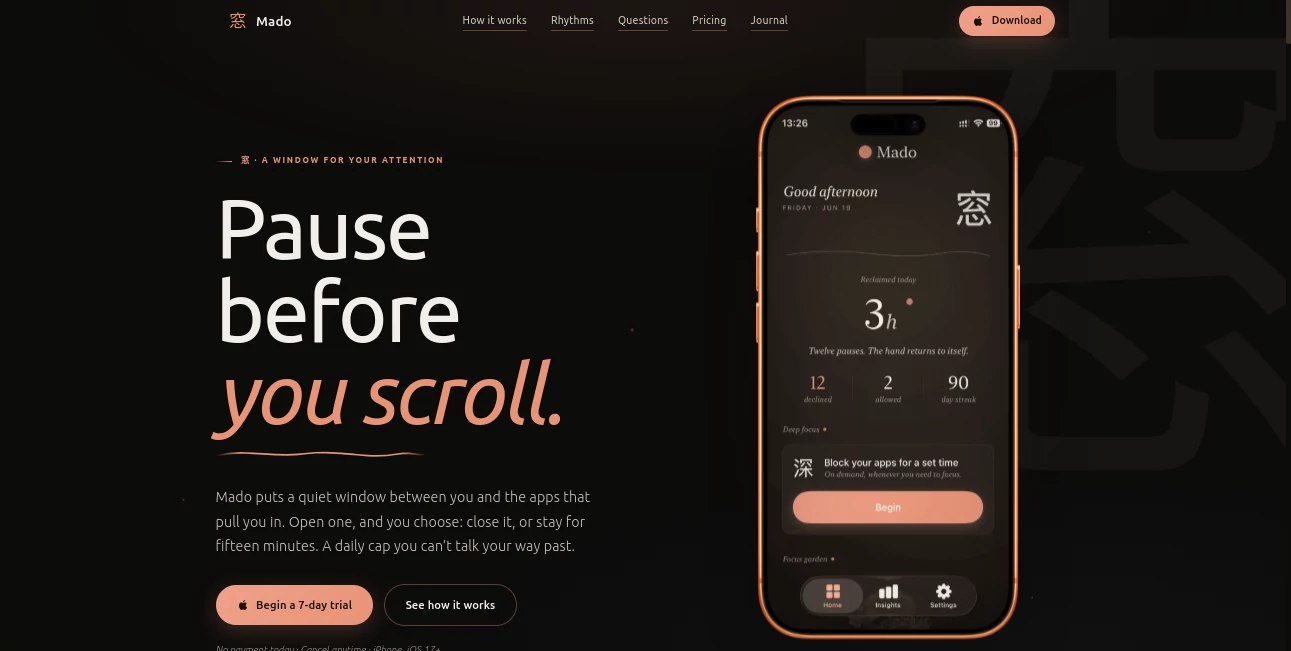
Mado is an iPhone app designed to create a deliberate pause between you and the apps that easily turn a quick check into a long scrolling session. Instead of simply telling you to use your phone less, it changes what happens when you open a distracting app. You get a simple choice: close it or use a fifteen-minute session.
The idea is refreshingly straightforward. Social platforms, video apps, news feeds, and other attention-heavy applications remain available, but accessing them is no longer completely automatic. The app introduces a small moment of friction that can help turn an unconscious habit into an actual decision.
For someone who repeatedly opens Instagram, TikTok, YouTube, X, Reddit, or similar apps without really intending to, this approach can feel much more practical than relying on willpower alone.
Key Features
- Fifteen-minute sessions for selected distracting apps
- Daily usage rhythms with one, two, or three sessions per app
- Deep Focus sessions lasting from 15 minutes to four hours
- Scheduled blocking for work hours, evenings, or custom periods
- Insights showing pauses, sessions, and time reclaimed
- Daily streaks and seven achievement milestones
- Home Screen widget for quick progress checks
- Multiple hand-painted Japanese-inspired app icons
- Local storage for personal app selections, sessions, streaks, and achievements
User Interface
The interface takes a deliberately calm approach. Rather than covering the screen with warnings, timers, or aggressive notifications, the central experience is built around a quiet pause window. When a protected app is opened, the user is given two clear choices: leave the app or spend one fifteen-minute session.
The visual direction also separates the experience from many traditional screen-time utilities. Japanese-inspired typography, brushwork, landscapes, and minimalist icons give the application a more relaxed personality. There are eighteen icons to choose from, including designs inspired by Fuji, bamboo, waves, koi, lanterns, and other visual motifs.
The home screen works as a simple record of progress, showing information such as declined pauses, time reclaimed, streaks, and achievements. It feels less like a punishment system and more like a personal dashboard.
Accuracy & Performance
The application relies on Apple's Screen Time technologies, including DeviceActivity and FamilyControls, rather than attempting to estimate usage from ordinary activity tracking. This makes the experience closely integrated with the iPhone environment.
Its main strength is consistency. Once the daily session budget has been used, the protected app remains paused until the next day. There is no extra five-minute option or simple extension button. This removes one of the common weaknesses of conventional screen-time limits: the ability to ignore the limit at exactly the moment when self-control is lowest.
Deep Focus is handled separately from the normal daily rhythm. A user can start a focus period between fifteen minutes and four hours without consuming the day's regular sessions.
Capabilities
The core system is based around three daily rhythms. Shizuku provides three fifteen-minute sessions per app each day, Nagare provides two, and Izumi provides one. This makes it possible to start with a gentler restriction and become more disciplined later.
Scheduling adds another useful layer. Users can keep the system active at all times or configure specific periods, such as weekday working hours or a nightly wind-down. A schedule can also cross midnight, which is useful for routines that continue into the following day.
Deep Focus is particularly useful when the goal is immediate concentration rather than long-term habit management. A student writing an assignment or a professional preparing a report can start a focused block and keep selected distracting apps unavailable for the chosen period.
Security & Privacy
Privacy is one of the stronger aspects of the product. App selections, intervention history, streaks, and achievements are stored locally on the iPhone. The service states that it does not receive users' Screen Time data or information about which specific apps they open.
The application uses Apple's Screen Time APIs, while subscription management is handled through RevenueCat. Product analytics are collected through Mixpanel using pseudonymous information, and advertising attribution may use AppsFlyer when the user grants Apple's tracking permission.
According to the published privacy policy, locally stored personal data is protected by iOS security and does not use cloud synchronization. This is an important distinction for people who want stronger control over their personal usage information.
Use Cases
This application is particularly useful for people who repeatedly find themselves opening social media or entertainment apps without a clear reason. The fifteen-minute session model works well for someone who still wants occasional access but wants to prevent an unplanned hour from disappearing into a feed.
It can also be useful during work or study. A custom schedule can reduce access to distracting apps during working hours, while Deep Focus provides a stronger temporary barrier when uninterrupted concentration matters.
Another practical scenario is an evening routine. Instead of trying to remember to activate a blocker every night, users can create a scheduled wind-down period. Once configured, the system handles the pause automatically.
For people who dislike harsh digital-detox applications, the softer approach may also be appealing. The goal is not to make the phone unusable. It is to make opening certain apps a conscious decision.
Pros and Cons
Pros
- Simple fifteen-minute access model
- No daily extension or easy override after sessions are exhausted
- Useful Deep Focus mode with sessions up to four hours
- Flexible scheduling options
- Calm and attractive interface
- Local storage for important personal usage data
- Streaks, achievements, insights, and widget support
- Seven-day free trial
Cons
- Designed specifically for iPhone users
- Requires iOS 17 or later
- The strict approach may feel restrictive for users who need frequent short access to social apps
- Subscription is required after the trial period
- It is focused primarily on distraction control rather than broader productivity management
Pricing Plans
The service offers a seven-day free trial with no payment required during the trial period. After the trial, the monthly plan is listed at $9.99 per month, while the yearly option costs $49.99 per year, representing a stated saving of 58% compared with the monthly price.
Pricing is handled through Apple's App Store and may vary depending on the user's region. There is no advertising-based experience or account requirement presented on the product's pricing section.
How to Use Mado
- Install the application on an iPhone running iOS 17 or later.
- Select the apps you want to put behind the pause window.
- Choose a daily rhythm: one, two, or three fifteen-minute sessions per app.
- Open a protected application when you need it and decide whether to close it or use one of your available sessions.
- Create a schedule if you want the pause system to operate during particular hours.
- Use Deep Focus when you need a stronger distraction-free period.
- Review your insights, streaks, achievements, and reclaimed time to understand how your habits are changing.
Comparison with Similar Tools
Apple's built-in Screen Time is a useful starting point for monitoring usage and setting app limits, but its traditional limit system can be easier to override. The approach here is more specific: access is divided into fixed fifteen-minute sessions and the daily allowance cannot simply be extended once it has been consumed.
Traditional app blockers can also be more aggressive, sometimes making the entire phone feel restricted. This solution takes a middle ground. The selected applications remain usable, but every opening requires a deliberate choice.
That difference matters for people who do not actually want to quit social media. They may simply want to stop opening an app automatically and spending far longer there than intended.
Conclusion
The strongest idea behind this product is also its simplest one: create a pause before the scroll. Rather than depending entirely on motivation, it changes the moment when a habitual app opening happens.
The combination of fifteen-minute sessions, daily caps, scheduled protection, Deep Focus, progress insights, and a privacy-conscious architecture makes it an interesting choice for iPhone users who want more control over distracting applications without completely abandoning them.
It will not magically change someone's relationship with a phone, and that is probably a good thing. Its job is smaller and more practical: give users a moment to decide whether they actually want to spend the next fifteen minutes scrolling.
Frequently Asked Questions (FAQ)
What does Mado do?
It adds a pause before selected distracting apps open. Users can either close the app or use a fifteen-minute session from their daily allowance.
How long is each session?
Each regular session lasts fifteen minutes. The number of sessions available per app depends on the selected daily rhythm.
Can I schedule when apps are paused?
Yes. You can use preset schedules for weekday work hours or a nightly wind-down, or create your own days and times. There is also an Always-on option.
What is Deep Focus?
Deep Focus is a separate concentration mode that can keep selected apps unavailable for anywhere from fifteen minutes to four hours. It does not consume the regular daily session allowance.
Can I stop a locked Deep Focus session early?
If the lock is enabled, the focus timer cannot be ended early, even by the person who started it.
What happens after I use all my daily sessions?
The selected app remains paused until the next day, when the session allowance resets. There is no additional extension button.
Does it collect my Screen Time data?
The published privacy policy states that app selections, sessions, streaks, and achievements remain on the device and that the service does not receive your Screen Time data or the specific apps you open.
Is there a free trial?
Yes. A seven-day free trial is available. After the trial, the listed subscription options are monthly and yearly plans.
Does it require an account?
No account is required for the core experience. Subscription status is managed through Apple's App Store infrastructure.
What iPhone version is required?
The product is designed for iPhone and requires iOS 17 or later.
AI Life Assistant , AI Productivity Tools .
These classifications represent its core capabilities and areas of application. For related tools, explore the linked categories above.

Mado Alternatives Product

GetFIT App
Hintder AI

ace.me

MakeGraph
IdeaHunter
Astic AI

Trimless for…

GPT Image 2 …

ClawBridge