
Scenes AI
What is Scenes AI?
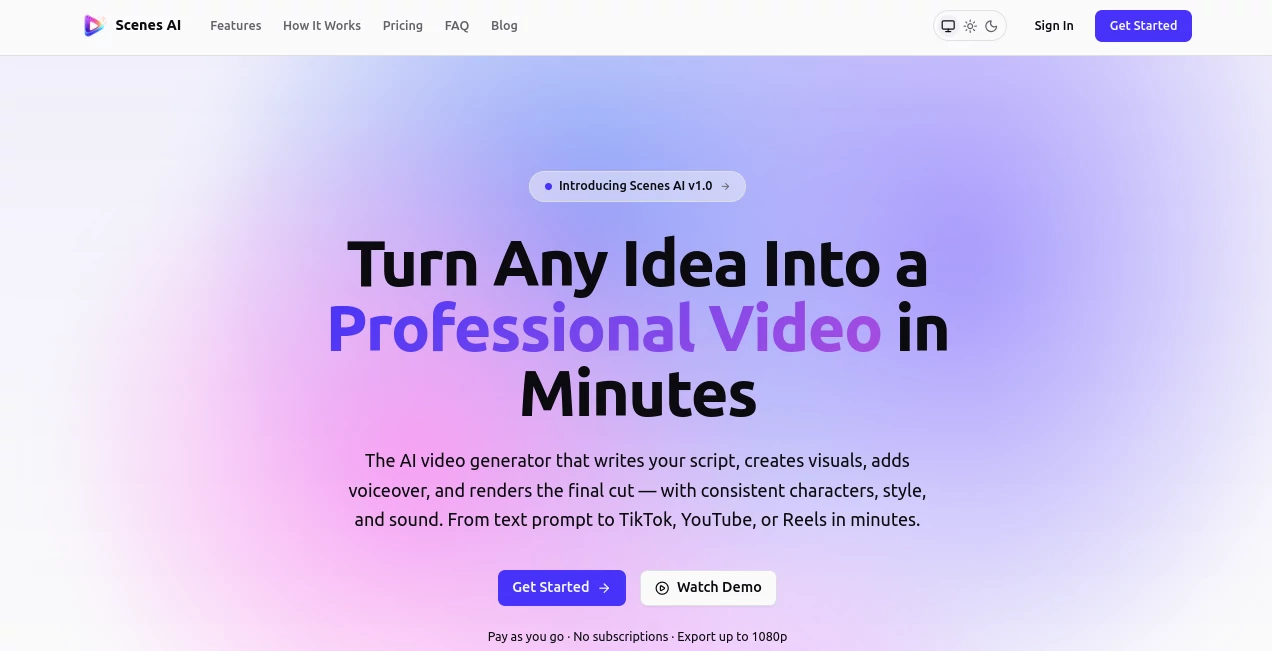
Creating engaging videos usually means juggling multiple creative tools, writing scripts, designing visuals, recording voiceovers, editing scenes, and exporting content for different platforms. This platform brings every step into a single workflow, allowing creators to transform a simple text prompt into a polished video without switching between applications.
Instead of generating isolated clips, the platform focuses on complete storytelling. It develops scripts, plans scenes, creates visuals, generates natural voice narration, adds background music, and renders a finished video while giving users approval checkpoints throughout the production process. The result feels much closer to working with a digital production studio than a basic AI generator.
Whether you're producing marketing campaigns, educational lessons, product demonstrations, YouTube videos, TikTok shorts, or social media content, the workflow is designed to reduce production time while maintaining creative control. Even users with little or no editing experience can produce professional-looking content in just a few minutes.
Key Features
User Interface
The interface is refreshingly straightforward. Users simply describe their idea in plain English, select the desired video length, choose an aspect ratio, and define the overall tone. Instead of overwhelming creators with dozens of technical settings, the platform guides them through a clean approval process that keeps creativity flowing.
Each production stage is clearly organized, allowing users to review scripts, inspect storyboards, approve generated visuals, and confirm voiceovers before the final render begins. This structured workflow makes video production feel predictable and enjoyable.
Accuracy & Performance
The platform follows a multi-stage AI production pipeline that analyzes prompts, writes scripts, plans scenes, generates visuals, synthesizes voice narration, composes music, and produces a final HD video. Most projects can be exported in less than ten minutes, making it suitable for creators who need fast turnaround without sacrificing quality.
One of its strongest capabilities is maintaining consistency throughout a project. Characters, visual style, narration, and overall presentation remain coherent across multiple scenes and even across episodes, making it especially useful for recurring video series.
Capabilities
- Generate complete videos from simple text prompts.
- Create scripts automatically before production begins.
- Build scene-by-scene storyboards.
- Generate AI visuals in multiple artistic styles.
- Create realistic AI voiceovers.
- Add AI-generated background music.
- Export videos up to Full HD 1080p.
- Support landscape, portrait, and square formats.
- Maintain character continuity across episodes.
- Create videos for YouTube, TikTok, Instagram, and other social platforms.
Security & Privacy
The approval-based workflow ensures users remain in control throughout production instead of automatically publishing AI-generated content. Projects can be reviewed before rendering, reducing unwanted outputs and helping teams maintain quality standards. Collaborative workspaces also make it easier for organizations to manage shared projects and creative reviews.
Use Cases
- Marketing campaign videos.
- Product launch announcements.
- Educational tutorials.
- YouTube content creation.
- TikTok and Instagram Reels.
- Business presentations.
- Explainer videos.
- Brand storytelling.
- Social media advertising.
- Video series with recurring characters.
Pros and Cons
- Pros
- Complete end-to-end AI video workflow.
- Simple interface suitable for beginners.
- Script, visuals, voice, music, and rendering in one platform.
- Human approval at multiple production stages.
- Consistent characters and visual style across episodes.
- Supports multiple export formats for different social platforms.
- Fast rendering with Full HD output.
- Cons
- Advanced filmmakers may still require external editing software for highly customized productions.
- Rendering costs increase with longer videos.
- Creative results still depend on providing clear prompts.
Pricing Plans
The platform uses a pay-as-you-go pricing model rather than monthly subscriptions. Users pay only for the final rendered video, making it an attractive option for occasional creators as well as businesses that produce content when needed. Full HD exports are included, and pricing scales according to video duration.
How to Use Scenes AI
Begin by describing your video idea using natural language. Choose the preferred duration, aspect ratio, audience, and visual style. Review the AI-generated script and request revisions if necessary. After approval, inspect the generated storyboard, visuals, voiceover, and music before starting the final render. Once everything looks right, export the completed video in the format that best matches your publishing platform.
Comparison with Similar Tools
Many AI video generators specialize in producing individual clips, requiring users to combine multiple tools for scripting, editing, narration, and publishing. This platform stands apart by integrating the entire production workflow into one environment. Its emphasis on story continuity, consistent characters, structured approvals, and multi-platform exports makes it particularly appealing for creators building recurring content rather than isolated videos.
Conclusion
For creators who want to transform ideas into polished videos without spending hours editing, this platform offers an impressive balance between automation and creative control. Its guided workflow removes much of the complexity from video production while still allowing users to review every important step. From marketing teams and educators to independent content creators, it delivers an efficient way to produce professional videos that are ready for modern social platforms.
Frequently Asked Questions (FAQ)
Can beginners create professional videos?
Yes. The workflow is designed for users without professional editing experience, making video creation straightforward from start to finish.
Can videos be exported for social media?
Yes. Videos can be exported in multiple aspect ratios suitable for YouTube, TikTok, Instagram, LinkedIn, and other major platforms.
Does it generate voiceovers automatically?
Yes. AI-generated narration is included as part of the production pipeline, along with background music.
Can it create recurring video series?
Yes. One of its strongest features is maintaining consistent characters, style, and storytelling across multiple episodes.
Is there a monthly subscription?
No. The platform follows a pay-as-you-go pricing model where users pay for rendered video output instead of a recurring subscription.
AI Video Editor , AI Text to Video , AI UGC Video Generator , AI Video Generator .
These classifications represent its core capabilities and areas of application. For related tools, explore the linked categories above.

Scenes AI Alternatives Product

Gemini Omni

Seedance 2.0

Pinci.ai

AI Motion Co…

Seedance 2.0

PDF to Video
Veo 3.2 AI V…

Viewra

bridger west…