


















SubStudio
What is SubStudio?
Adding subtitles to video can quickly become one of the most repetitive parts of editing. Watching the same footage, typing every sentence, fixing timestamps, and then adjusting the appearance takes time that could be spent on the actual content. SubStudio approaches this problem with an AI-powered workflow that handles transcription, subtitle alignment, styling, review, and export in one place.
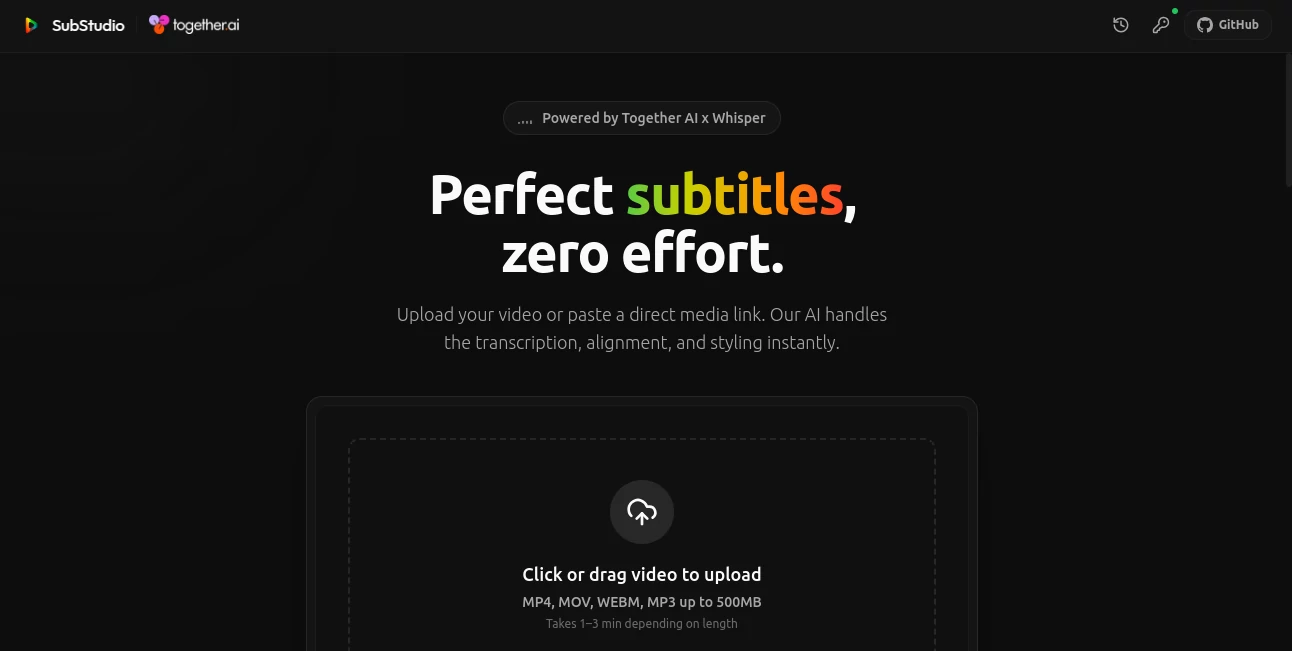
The platform lets creators upload a video or provide a direct media link, then processes the spoken content into synchronized subtitles. It supports common media formats including MP4, MOV, WEBM, MP3, and WAV, with uploads of up to 500MB. Processing typically takes around one to three minutes depending on the length of the media.
For someone producing YouTube videos, social clips, educational material, interviews, or other spoken-content projects, having the transcription and subtitle workflow handled automatically can remove a surprisingly large amount of manual work.
Key Features
- AI transcription: Spoken audio is converted into text automatically using Whisper-based technology.
- Word-level timing: Subtitles can be aligned with individual words, helping create more precise timing and cleaner captions.
- Multiple subtitle styles: Users can choose from presets such as Classic, TikTok, Modern Box, Cinematic, Outline, and Bold Center.
- Direct media links: Instead of uploading a local file, users can provide a supported direct media URL.
- Built-in subtitle editor: Generated captions can be reviewed and edited before export.
- Subtitle search: A search function makes it easier to locate specific words or phrases inside a generated transcript.
- Fast processing: The service is designed to turn a video into editable subtitles without requiring a long manual transcription process.
User Interface
The interface keeps the workflow focused on the task at hand. The process follows a straightforward sequence: import the media, process the audio, edit the generated subtitles, review the result, and export it.
The editor also makes the timing and text easy to inspect. This is particularly useful when working with longer videos where manually searching through an entire transcript would be inconvenient.
The visual style presets are another practical touch. Rather than creating subtitle formatting from scratch every time, creators can start with a predefined look and concentrate on the content.
Accuracy & Performance
Transcription quality is especially important when subtitles are generated automatically. The service uses Whisper through Together AI for its transcription workflow, combining speech recognition with word-level timing information.
The website reports an average transcription processing time of around 1.8 seconds in its example interface, while also noting that actual processing can take approximately one to three minutes depending on media length. This makes it suitable for creators who want to move quickly from raw footage to a workable subtitle draft.
Word-level timestamps are particularly useful for short-form content because captions can follow speech more closely instead of appearing as large blocks of text that feel disconnected from the speaker.
Capabilities
The tool is more than a basic speech-to-text converter. Its workflow combines transcription with subtitle editing and visual presentation, allowing users to review the generated text, adjust its appearance, search through captions, and prepare the result for export.
It also supports several popular media formats and accepts direct media links, giving users flexibility in how they provide their source material. The combination is well suited to projects where subtitles need to be created quickly but still reviewed before publication.
Security & Privacy
Privacy considerations matter whenever video or audio files are processed by an online service. The platform presents its processing workflow directly through the web interface and explains the supported media inputs, but users should still review the current privacy information before uploading confidential interviews, unreleased commercial footage, or other sensitive material.
For ordinary content production, the simple upload-and-process workflow keeps the experience focused without requiring a complicated setup.
Use Cases
YouTube creators: Long-form videos can be turned into synchronized subtitles without manually transcribing every section of the recording.
Short-form content: TikTok-style and bold subtitle presets make the workflow useful for creators producing attention-focused social videos.
Educators: Lectures, tutorials, and recorded lessons can benefit from searchable and synchronized captions that make spoken material easier to follow.
Interview and podcast creators: Conversations often contain long stretches of dialogue, making automated transcription particularly valuable during the editing stage.
Marketing teams: Product demonstrations, promotional videos, and social campaigns can be prepared with captions without adding another manual transcription step to the production process.
Freelance video editors: Editors working across multiple projects can use automated transcription and reusable subtitle styles to reduce repetitive captioning work.
Pros and Cons
Pros
- Simple upload and processing workflow.
- Supports several common video and audio formats.
- Word-level subtitle timing.
- Multiple ready-made subtitle styles.
- Built-in editing and review functionality.
- Direct media-link importing is supported.
- Uses Whisper-based AI transcription through Together AI.
Cons
- Processing time varies according to media length.
- Automatically generated transcripts may still require human review.
- Direct media links must use supported file formats and extensions.
- The maximum upload size shown on the website is 500MB.
Pricing Plans
The web version currently provides a free starting experience with one free credit available on the interface. Users can upload a supported media file or try the sample video to evaluate the workflow before committing to a larger production process.
No paid subscription pricing is prominently presented on the main web application interface. This makes the free entry point particularly useful for creators who want to test transcription quality, timing, and subtitle styling with their own content.
How to Use It
Start by opening the web application and choosing whether to upload a media file or provide a direct media link. Supported uploads include MP4, MOV, WEBM, and MP3, while the interface also accepts WAV links.
Once the media is imported, let the AI process the audio. The system generates the transcript and creates synchronized subtitle segments.
Next, review the generated captions in the editor. You can search the subtitle text, inspect the timing, and choose a visual preset such as Classic, TikTok, Cinematic, or Bold Center.
After making any necessary corrections, review the complete result and proceed to export. The workflow is designed to keep transcription, editing, styling, and review together instead of forcing users to move between several separate applications.
Comparison with Similar Tools
Many transcription services focus primarily on converting speech into plain text. This approach is useful when the final goal is a written transcript, but video creators often need more than text. They need timing, readable captions, visual styling, and a way to review everything before the video is finished.
This platform stands out by combining those stages into a single workflow. Word-level timestamps are especially useful for social content, while the collection of subtitle presets provides a faster starting point for creators who want captions that look intentional rather than simply functional.
It also occupies an interesting middle ground between a dedicated transcription service and a traditional video editor. Instead of trying to replace a full professional editing suite, it concentrates on one of the most time-consuming parts of video production: creating and preparing subtitles.
Conclusion
For creators who regularly work with spoken video, automated subtitles can save considerably more time than their small role in the final edit might suggest. The combination of Whisper-powered transcription, word-level timing, subtitle styling, editing, search, and export makes this platform a practical solution for turning raw speech into usable captions.
Its straightforward workflow is arguably its strongest quality. Upload the media, let the AI handle the first transcription pass, review the result, select a style, and prepare the subtitles for the finished project. For YouTube creators, educators, marketers, editors, and social-media teams, that can turn a tedious part of production into a much quicker step.
Frequently Asked Questions (FAQ)
What types of files are supported?
The web interface supports MP4, MOV, WEBM, and MP3 uploads, and it also supports direct media links for MP4, MOV, WEBM, MP3, and WAV files.
How large can an uploaded file be?
The website currently lists a maximum upload size of 500MB.
Does it create subtitles automatically?
Yes. The AI transcribes the spoken audio and generates synchronized subtitle segments that can then be reviewed and edited.
Can I change the subtitle appearance?
Yes. Several preset styles are available, including Classic, TikTok, Modern Box, Cinematic, Outline, and Bold Center.
Does it provide word-level timestamps?
Yes. The platform highlights word-level timing as one of its core capabilities, allowing subtitles to follow speech more precisely.
Is there a free option?
Yes. The web interface provides a free starting experience and currently shows one free credit available for new use.
Do automatically generated subtitles need to be reviewed?
It is always sensible to review AI-generated captions before publishing, especially when videos contain names, technical terminology, accents, background noise, or overlapping speakers.
Who can benefit most from this tool?
YouTube creators, social-media creators, educators, marketers, podcasters, interview producers, and freelance video editors can all benefit from a faster subtitle workflow.
Can I import a video using a link?
Yes. The interface accepts direct media links, provided the URL ends with a supported media extension.
Does it replace a full video editor?
It is better viewed as a focused subtitle and caption workflow rather than a replacement for a complete professional video-editing application.
AI Video Editor , AI Transcription , AI Speech to Text , AI Captions or Subtitle .
These classifications represent its core capabilities and areas of application. For related tools, explore the linked categories above.

SubStudio Alternatives Product
SubtitleGene…

mp3tourl
AudioScribe

Seedance 2.5

ModelsLab

Zeemo AI

Riverside.fm

OmniVideo
Voza Transcr…
