


















Veeso AI
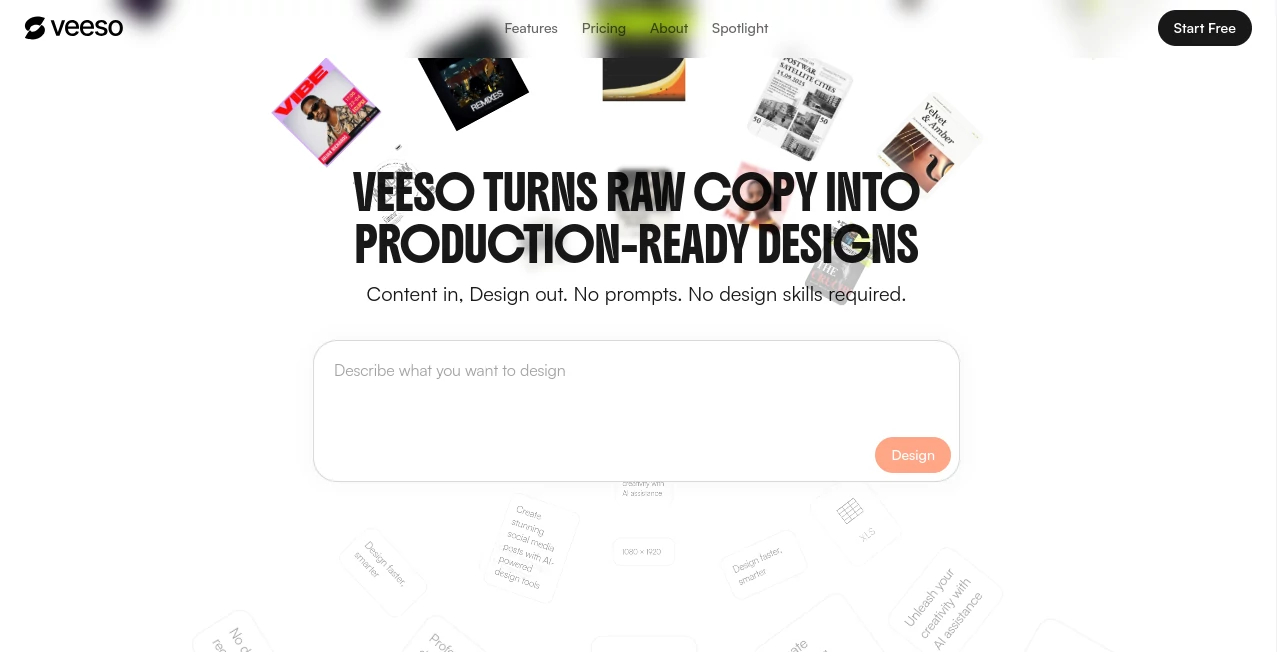
What is Veeso AI?
There's a moment every marketer, founder, or solo creator knows too well — you've written the copy, you know exactly what you want to say, but the design just isn't coming together. You either spend hours wrestling with templates or shell out money for a freelance designer. Neither option feels right when you're moving fast and working lean.
That's the exact problem this tool was built to fix. It flips the traditional design workflow on its head by starting with your content — your words, your message — and turning it into a polished, export-ready visual in under a minute. No prompts. No design skills. No back-and-forth.
The philosophy behind it is called Content-First Design: your information drives the structure, not a rigid template you have to force your content into. You paste what you want to say, and the AI figures out how it should look.
Key Features
User Interface
The interface is clean and approachable — even for someone who has never opened a design tool before. There's no steep learning curve here. You type or paste your content into a text area, describe what you're trying to design, and within seconds a fully structured design appears in front of you.
What makes the editing experience genuinely different is that the output isn't a flat image. Every element — every headline, paragraph, and layout block — is editable directly inside the canvas. You can click on text and change it immediately without dealing with image layers or external editing apps. For anyone who has spent frustrated minutes trying to fix a typo inside a Canva image, this feels like a genuine upgrade.
The design canvas supports multiple format outputs — social posts, presentations, newsletters, brochures, reports, banners, and more — all from the same interface without switching tools.
Accuracy & Performance
The core generation engine, called Magic Template, doesn't just slap your text onto a background. It reads the structure of your content — its length, hierarchy, tone, and intent — and builds a layout that actually makes sense for that specific piece. A product launch post gets treated differently from a multi-page investor report, because the AI adapts the visual structure to fit the content type.
Most users report going from a blank page to a share-ready design in under 60 seconds. That's not a marketing claim — it's a realistic reflection of how streamlined the generation process is when you don't have to think about typography, spacing, or layout rules manually.
The consistency across multiple outputs is also worth noting. When you create several pieces from the same brand style, the tool maintains visual coherence across all of them — something that typically requires a seasoned designer to manage.
Capabilities
Beyond layout generation, the tool includes a solid set of image editing features built directly into the workflow. You don't need a separate app to clean up visuals before adding them to your design.
- Background Removal: Handles products, portraits, and complex scenes with precise cutouts.
- HD Upscaling: Boosts image resolution up to 4x using AI-powered detail restoration — useful when working with lower-quality source photos.
- Image Style Transfer: Over 15 different visual styles including Realistic, Cyberpunk, Line Art, Watercolor, and more. One click transforms the mood of any image.
- Multi-page Generation: Pro users can generate up to 20 pages from a single content input — ideal for pitch decks, brochures, and long-form reports.
- Brand Kit Support: Ultra plan users can upload brand colors, fonts, and style guidelines to ensure every output stays on-brand without manual adjustment.
- Export Flexibility: Export as PNG, PDF, PPT, SVG, or HTML depending on your use case.
The range of output formats is genuinely broad. Social Media Posts, Posters, Carousels, Presentations, Newsletters, Restaurant Menus, Invitation Cards, Flyers, Pull-Up Banners, Album Covers — all built from your text input.
Security & Privacy
All design source files and projects created on the platform belong entirely to the user. The company is explicit about this: they cannot access or use your content without your permission. For businesses and agencies creating sensitive materials — investor decks, internal reports, client deliverables — this matters.
Commercial licensing is included in all paid plans, meaning any design you create can be used for business purposes, including fonts and media assets embedded in the output.
Free plan outputs are for personal and non-commercial use only, with a small badge applied to exported files. Upgrading removes the badge and unlocks commercial rights.
Use Cases
The range of people using this tool reflects just how broadly the problem of "I need a designed piece but don't have a designer" shows up across industries.
- Social Media Managers: Creating on-brand posts for multiple platforms and accounts without having to start from scratch every time. One user managing multiple social accounts described it as the first tool that kept visual identity consistent across channels without constant manual adjustment.
- E-commerce Sellers: Product detail pages, promotional posters, and multilingual marketing materials. Small teams selling across multiple countries have found it particularly useful for generating the same content in different languages without losing design quality.
- Founders and Startups: Pitch decks, one-pagers, and investor materials. For teams that can't afford a full-time designer, it fills a real gap between a rough Google Slides deck and something that actually looks credible.
- Content Creators: Long-form posts, carousels, and visual summaries that stand out in a crowded feed. The style differentiation features help creators maintain a distinctive look without spending hours on visual production.
- Marketing Agencies: Batch creation of campaign materials, newsletters, and ad assets for multiple clients. The speed advantage compounds significantly when you're producing at volume.
- Event Organizers: Event promos, invitations, and schedules — generated quickly and consistently from the event brief.
Pros and Cons
- Pro: Genuinely fast — raw text to finished design in under 60 seconds is realistic, not aspirational.
- Pro: Fully editable output. Not an image — actual text blocks you can click and change.
- Pro: Handles a wide range of output formats from one workflow.
- Pro: Built-in image editing tools mean fewer apps to juggle.
- Pro: Free plan is usable with daily credit refreshes — not just a trial with a hard expiry.
- Pro: Brand consistency features on higher plans make it genuinely scalable for teams.
- Con: Credits expire and don't roll over — heavy users will need to plan usage within billing cycles.
- Con: API access and brand kit management are locked behind the top-tier Ultra plan.
- Con: No student or education discounts currently available.
- Con: Multi-page generation (up to 20 pages) is a Pro feature — free users are limited on longer formats.
Pricing Plans
There are three plans, with both monthly and annual billing options. Annual billing saves up to 17%.
- Free – $0/month: 100 daily refresh credits, 300 bonus credits for new users, full access to the editor, standard export with a Veeso badge, and the ability to upload up to 5 asset images per generation. Good for personal projects and exploring the tool before committing.
- Pro – $16.67/month (billed annually): Everything in Free, plus 6,000 monthly credits, badge removal, commercial licensing, advanced export formats (PPT, SVG, HTML), higher-quality AI image assets, upload up to 20 images per generation, multi-page generation up to 20 pages, and priority support.
- Ultra – $100/month (billed annually): Everything in Pro, plus 40,000 monthly credits, brand kit management, API access, unlimited cloud storage, custom contracts and invoicing, early access to beta features, and dedicated support. Built for agencies and businesses operating at scale.
Credits are consumed by AI-powered actions — generating designs, background removal, AI chat modifications — but not by manual editing or exporting. This means if you're doing a lot of fine-tuning after generation, your credits stretch further than you might expect.
How to Use Veeso AI
Getting started takes less than two minutes from sign-up to first design.
- Step 1 – Create an account: Sign up for free. New users receive a 300-credit welcome bonus in addition to the daily 100-credit refresh.
- Step 2 – Describe what you want to design: Type or paste your content into the input area. You can be as simple as "a social post announcing our summer sale" or as detailed as a full product description with bullet points and a CTA.
- Step 3 – Generate: The AI analyzes your content, determines the appropriate structure, and produces a fully designed layout. This typically takes a few seconds.
- Step 4 – Edit directly: Click into any text block or element to adjust wording, swap images, tweak layout sections, or apply a different image style. No Photoshop skills required.
- Step 5 – Export or share: Download in your preferred format — PNG, PDF, PPT, SVG, or HTML — or share directly to social media in one click.
For recurring use cases, paid plan users can set up brand kits so that every new design automatically reflects the right colors, typography, and style without manual configuration each time.
Comparison with Similar Tools
The most common comparison point is Canva, which has become the default for non-designer design work. The key difference is in the starting point. Canva starts with a template — you choose a layout and then fill it with your content. This tool starts with your content and builds the layout around it. For users who already know what they want to say, that reversal in workflow saves significant time.
Adobe Express follows a similar template-first logic to Canva, with deeper integration into the Adobe ecosystem. It's a strong choice for Adobe users but carries more complexity than most SMB teams need.
Gamma is another AI-driven tool worth mentioning, focused primarily on presentations and documents. It's polished, but the output format range is narrower — it excels at decks but doesn't handle social posts, posters, or print materials with the same depth.
Where this tool distinguishes itself is the combination of format breadth (social, print, presentation, newsletter, and more from one place), direct text editability in the output, and the content-first generation approach. For teams that produce high volumes of diverse visual content from text inputs, that combination is hard to match at this price point.
Conclusion
If you've been stitching together a design workflow across multiple tools — one for templates, another for image editing, a third for export — this is the kind of tool that makes you want to simplify. It handles a remarkable range of design tasks from a single starting point: your words.
The Content-First approach isn't just a positioning line. It's a genuinely different way of working that feels natural once you've experienced it. You're not adapting your content to fit a template; the design is adapting to your content. That shift matters, especially when you're producing frequently and can't afford to spend an hour on every single piece.
For solo founders, lean marketing teams, and content creators who want professional output without a professional design budget, this delivers real value — at a free tier that's actually usable, not just a teaser.
Frequently Asked Questions (FAQ)
Is the free plan genuinely usable or just a limited trial?
It's genuinely usable. You get 100 credits refreshed every day, plus 300 bonus credits when you sign up. The main limitations are the Veeso badge on exports and personal-use-only licensing. For someone exploring the tool or working on personal projects, it holds up well.
Can I edit the text after the design is generated?
Yes. The generated output is not a flat image — it's a fully editable design file. You can click into any text block and change it directly, just as you would in a word processor. This is one of the core differentiators from tools that output images you'd need to re-edit in Photoshop.
Does it work for multilingual content?
Yes. Users creating content in multiple languages have found it handles different scripts and languages well, generating properly structured designs regardless of the input language.
What happens to unused credits at the end of the month?
Monthly subscription credits do not roll over — they expire at the end of your billing cycle. Daily credits reset every day at midnight UTC and also don't accumulate. Planning your usage within billing periods is worth considering for heavy workloads.
Is API access available for integrating into existing workflows?
API access is available on the Ultra plan at $100/month. This makes it feasible to integrate design generation into existing content pipelines, CMS workflows, or product features that require automated visual output.
Who owns the designs I create?
You do. All design files and projects belong entirely to you. The platform does not claim any rights over your content or outputs.
Can I use it for print materials?
Yes. Print is one of the supported output formats, alongside social media, presentations, newsletters, and digital banners. Pull-up banners, flyers, and brochures can all be generated and exported in print-ready formats.
AI Design Assistant , AI Presentation Generator , AI Design Generator , AI Graphic Design .
These classifications represent its core capabilities and areas of application. For related tools, explore the linked categories above.

Veeso AI Alternatives Product
ComicsMaker

Banana Promp…

Wplace Toolk…

imagen 5

Ernie Image

AI Tattoo Ge…

AI Age Progr…

SlideStorm AI

Photoshoot A…
