
Verli
What is Verli?
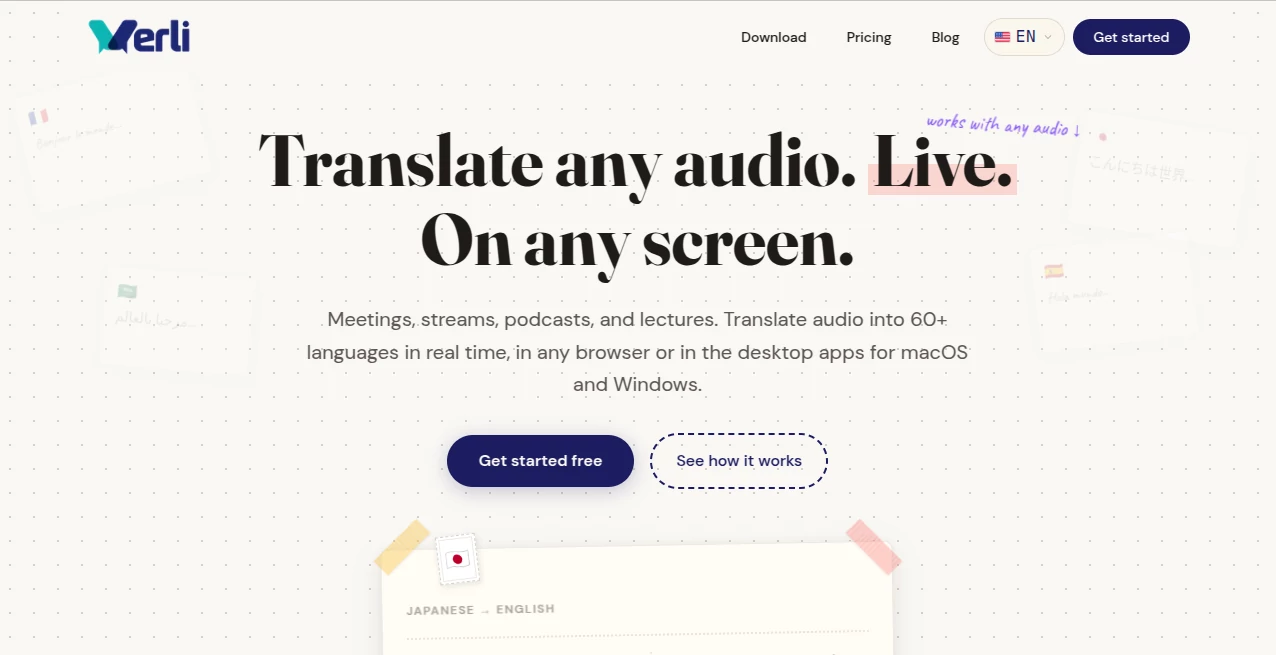
Language should never be a barrier when learning, working, or enjoying content from around the world. Verli makes real-time audio translation simple by converting spoken conversations into more than 60 languages while the audio is still playing. Whether you're attending an international meeting, watching a live stream, listening to a podcast, or following an online lecture, the platform helps you understand every moment without waiting for post-event translations.
Designed for both professionals and everyday users, the platform works directly in supported web browsers and also offers dedicated desktop applications for macOS and Windows. This flexibility allows users to access live translation across different environments without changing their existing workflow. Fast processing, broad language support, and an intuitive experience make it an excellent choice for anyone communicating across languages.
Key Features
User Interface
The interface is clean, modern, and easy to navigate. Users can start translating audio with minimal setup, making it suitable for both beginners and experienced professionals. Browser support eliminates unnecessary installation for many scenarios, while desktop applications provide a seamless experience for longer sessions.
Accuracy & Performance
Real-time translation is optimized for speed, allowing conversations to remain natural without significant delays. Advanced speech recognition captures spoken language accurately, while multilingual translation helps preserve the original meaning throughout meetings, lectures, interviews, and online events.
Capabilities
- Translate live audio into more than 60 languages.
- Support meetings, webinars, podcasts, live streams, and online lectures.
- Work directly inside compatible web browsers.
- Desktop applications available for macOS and Windows.
- Real-time speech recognition and translation.
- Suitable for business, education, and personal communication.
- Quick setup with minimal learning curve.
- Cross-platform accessibility.
Security & Privacy
The platform is designed to process live audio efficiently while supporting secure user experiences. It is suitable for professional communication where reliable handling of spoken content is important, making it valuable for businesses, educators, and international teams.
Use Cases
- Participating in multilingual business meetings.
- Following international webinars and conferences.
- Understanding foreign-language podcasts.
- Watching live streams from creators around the world.
- Attending university lectures in different languages.
- Supporting remote teams with global members.
- Learning new languages through live content.
- Improving communication during international collaboration.
Pros and Cons
Pros
- Supports more than 60 languages.
- Real-time translation with minimal delay.
- Works in browsers as well as desktop applications.
- Simple and beginner-friendly interface.
- Useful for business, education, and entertainment.
Cons
- Translation quality may vary depending on audio clarity.
- Some advanced features may require a paid subscription.
- Performance depends on a stable internet connection.
Pricing Plans
The platform offers multiple pricing options depending on user needs. Visitors should check the official website for the latest information regarding free access, subscription plans, and premium features.
How to Use Verli
- Open the web application or install the desktop app.
- Select the language spoken in the audio.
- Choose your preferred translation language.
- Start your meeting, lecture, stream, or podcast.
- Follow translated speech in real time as the conversation continues.
Comparison with Similar Tools
Compared with traditional transcription services that generate text after a recording ends, this solution focuses on live communication. Its combination of browser compatibility, desktop applications, and support for more than 60 languages makes it particularly useful for users who need instant understanding instead of delayed translations. It is well suited for professionals, students, remote teams, and anyone consuming international content in real time.
Conclusion
For users who regularly interact with multilingual audio, this platform delivers an impressive combination of speed, accessibility, and convenience. Real-time translation across meetings, podcasts, lectures, and live streams helps eliminate communication barriers while maintaining a smooth listening experience. Cross-platform support and extensive language coverage make it a practical choice for individuals and organizations looking to communicate more effectively across the globe.
Frequently Asked Questions (FAQ)
1. How many languages are supported?
The platform can translate live audio into more than 60 languages.
2. Can it translate live meetings?
Yes. It is designed for real-time meetings, webinars, online lectures, and other live conversations.
3. Does it work without installing software?
Yes. Many features are available directly in supported web browsers, while desktop applications are also available for macOS and Windows.
4. Is it suitable for education?
Yes. Students and educators can use it to understand lectures and educational content presented in different languages.
5. Who benefits the most from this platform?
Business professionals, remote teams, students, content creators, and anyone consuming multilingual audio content can benefit from its real-time translation capabilities.
AI Translate , AI Speech Recognition , AI Transcription , AI Meeting Assistant .
These classifications represent its core capabilities and areas of application. For related tools, explore the linked categories above.

Verli Alternatives Product

livetalktran…

Whisper AI

Gpt Realtime…

Jamy.ai | Au…

TopPDF
RewriteBar

EasyVC
TranscribeYT

VoiceMOAT