

















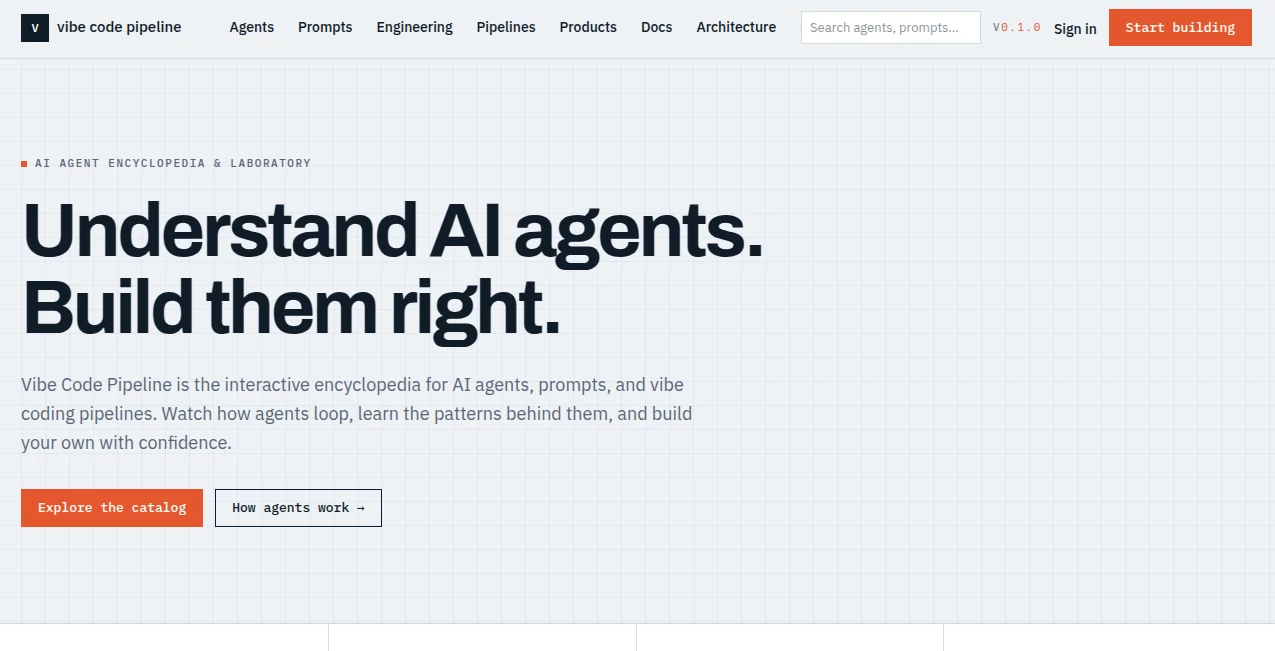
What is Vibe Code Pipeline?
Vibe Code Pipeline is an interactive encyclopedia and laboratory built for people who want to understand AI agents before putting them into production. Instead of treating an agent as a mysterious chatbot, the platform breaks down how agents receive input, plan tasks, use tools, work with memory, verify results, and produce an output.
The idea is particularly useful for developers, product managers, founders, and curious builders exploring agentic AI. Rather than jumping straight into implementation, visitors can study working patterns, compare architectures, explore prompts, and follow conceptual simulations that make complex systems much easier to reason about.
One of the strongest aspects is its practical focus. The experience feels closer to an engineering reference library than a conventional AI directory, giving users a place to learn how agent systems are structured and how different pieces fit together.
Key Features
- Interactive catalog of more than 1,000 documented AI agents.
- Step-by-step conceptual simulations covering inputs, planning, tool calls, memory, verification, and outputs.
- Prompt library with more than 1,000 templates, recipes, and system prompts.
- Guides covering AI agents, prompt engineering, LLM foundations, and vibe coding.
- Architecture diagrams and explanations of agent workflows.
- Agent builder that generates a prompt and architecture blueprint based on selected patterns.
- Engineering methods covering approaches such as DSPy, promptfoo, Guidance, and TextGrad.
- Glossary containing more than 100 AI and agent-related terms.
- Community area for discussing agents, prompts, and vibe coding.
User Interface
The interface is organized around discovery and learning rather than complicated configuration. Visitors can move between agents, prompts, engineering methods, pipelines, products, guides, and architectural concepts from a central navigation structure.
For someone researching an unfamiliar agent pattern, this organization makes a noticeable difference. Instead of opening several unrelated documentation pages, you can move from an agent example to its workflow, then to the relevant prompt or engineering concept. The result is a more connected learning experience.
Accuracy & Performance
The platform takes an important step toward clarity by distinguishing its simulations from live model execution. The agent demonstrations are conceptual walkthroughs of observable workflow stages rather than claims that a live AI model is running behind every example.
This distinction is valuable for anyone evaluating AI systems. It keeps expectations realistic while still showing how an agent can reason through inputs, call tools, inspect results, and reach an output. The large catalog and structured explanations also make it useful as a reference when comparing different approaches to agent design.
Capabilities
The platform covers the full journey from understanding an agent to thinking about deployment. Its material ranges from basic single-agent concepts to multi-agent orchestration, prompt engineering, structured outputs, routing, memory, and software development pipelines.
The blueprint builder is another useful touch. Instead of requiring users to start with API keys or a deployment environment, it produces the structural ingredients for an agent: a prompt and an architecture blueprint. That makes it especially suitable during the planning stage of a project.
The vibe coding pipeline section is also worth attention for developers experimenting with AI-assisted software development. It presents the broader software pipeline from an initial idea through development and deployment, with agents positioned at different stages of the process.
Security & Privacy
The service publishes a dedicated privacy policy and explains what information it collects. Account emails, newsletter subscriptions, community activity, product submissions, bookmarks, and certain analytics events are handled according to the stated policies.
There are also several privacy-focused choices worth noting. The service states that it does not sell personal information, does not use user content to train a private model, and does not load third-party advertising or analytics scripts. Server logs may contain standard request information for security purposes.
For users who accept analytics cookies, events such as page views, simulation plays, and searches may be recorded, while the stated policy says those analytics rows do not store an IP address or account identity.
Use Cases
- Learning AI agents: Study how agents operate without needing to build an entire system from scratch.
- Developer research: Explore architecture patterns before choosing an implementation approach.
- Prompt engineering: Browse reusable prompt templates, recipes, and system prompt examples.
- Product planning: Use agent patterns and architecture blueprints when planning an AI-powered product.
- Vibe coding: Understand how AI agents can participate in different stages of software development.
- Multi-agent research: Learn how multiple specialized agents can coordinate within a larger workflow.
- AI education: Use the guides, glossary, simulations, and diagrams as a structured learning resource.
- Technical comparison: Compare approaches and concepts before committing engineering time or infrastructure.
Pros and Cons
Pros
- Free access to the core educational resources.
- Large catalog of documented agents and prompt templates.
- Clear distinction between conceptual simulations and live AI execution.
- Useful combination of examples, guides, prompts, and architecture concepts.
- Helpful for developers, founders, and product teams exploring agentic systems.
- Agent blueprint builder provides a practical starting point for new projects.
Cons
- The simulations are conceptual and do not execute live AI models.
- Users looking for a ready-to-deploy production agent will still need their own implementation environment.
- The breadth of material may feel extensive for someone looking for a single-purpose AI tool.
Pricing Plans
The platform is free to use. The encyclopedia, agent simulations, guides, glossary, prompt library, and community are available without a paid subscription. The current version does not offer a paid tier.
This makes it particularly appealing for people who are still researching an idea. You can explore agent architectures, read the documentation, inspect prompts, and experiment with the conceptual builder before spending money on infrastructure or model usage.
How to Use the Platform
- Start by browsing the agent catalog and choose a workflow that matches the problem you want to understand.
- Open the corresponding simulation and follow the stages from input through planning, tool usage, verification, and output.
- Use the guides and glossary when an unfamiliar agent or engineering term appears.
- Browse the prompt library for system prompts, templates, and practical recipes.
- Explore architecture and engineering methods to understand alternative implementation patterns.
- When you have a project idea, use the builder to create a conceptual prompt and architecture blueprint.
- Take the resulting structure into your preferred development environment when you are ready for real implementation.
Comparison with Similar Tools
Many AI resources focus on one narrow part of the development process: prompt generation, model access, coding assistance, documentation, or agent execution. This platform takes a different approach by bringing several learning layers together.
Instead of simply giving users an AI interface, it focuses on explaining what happens behind the interface. The combination of agent simulations, prompt resources, architecture material, engineering methods, and vibe coding pipelines makes it more suitable as a research and learning environment than as a conventional chatbot or autonomous agent service.
It is also deliberately transparent about what it does not provide. The simulations are educational rather than live model executions, so developers should view the platform as preparation and guidance rather than a replacement for their production stack.
Conclusion
For anyone trying to make sense of AI agents, the biggest challenge is often not finding another model or another chatbot. It is understanding how all the components fit together. This platform addresses that problem with a surprisingly broad collection of examples, simulations, prompts, guides, and engineering concepts.
The free access model makes it easy to explore without committing to a subscription, while the clear distinction between simulated workflows and live execution keeps the experience grounded. Developers can use it for research, founders can use it to shape product ideas, and newcomers can use it to build a more practical mental model of agentic AI.
If your goal is to move from simply hearing about AI agents to actually understanding how they are designed, this is a useful place to start.
Frequently Asked Questions (FAQ)
What is this platform used for?
It is an educational and interactive resource for understanding AI agents, prompts, architectures, engineering methods, and vibe coding pipelines.
Does it run live AI models?
No. The agent demonstrations are conceptual simulations showing workflow stages such as input, planning, tool calls, results, verification, and output.
Is the platform free?
Yes. The current version provides its encyclopedia, simulations, guides, glossary, prompt library, and community without a paid tier.
Who can benefit from it?
Developers, founders, product managers, students, and anyone interested in understanding how AI agents and AI-assisted development workflows are designed can benefit from the platform.
Does it include prompts?
Yes. The platform includes a prompt library with more than 1,000 templates, recipes, and system prompts.
Can I build an AI agent with it?
The built-in builder can generate a prompt and architecture blueprint based on selected patterns. It does not deploy or execute a live agent, so the resulting structure must be implemented in an appropriate development environment.
Does it cover multi-agent systems?
Yes. Its educational material ranges from basic single-agent concepts to multi-agent orchestration and the patterns used to coordinate multiple agents.
Can users submit products or prompts?
Yes. Registered users can submit products and prompts, with submissions reviewed by the team before becoming publicly available.