
















What is Video to Text?
Video to Text is an AI-powered transcription solution designed to transform video and audio files into accurate, searchable text transcripts. It helps creators, businesses, students, researchers, and professionals save time by turning spoken content into organized text within minutes.
Instead of manually listening to long recordings and typing every sentence, users can upload their media files and receive structured transcripts with timestamps, speaker identification, and multiple export options. The platform supports 99 languages, making it a practical choice for global teams and multilingual content creators.
Whether you are preparing subtitles for videos, reviewing interviews, converting online courses into notes, or creating written content from podcasts, this tool provides a simple workflow that removes the most time-consuming part of content processing.
Key Features
User Interface
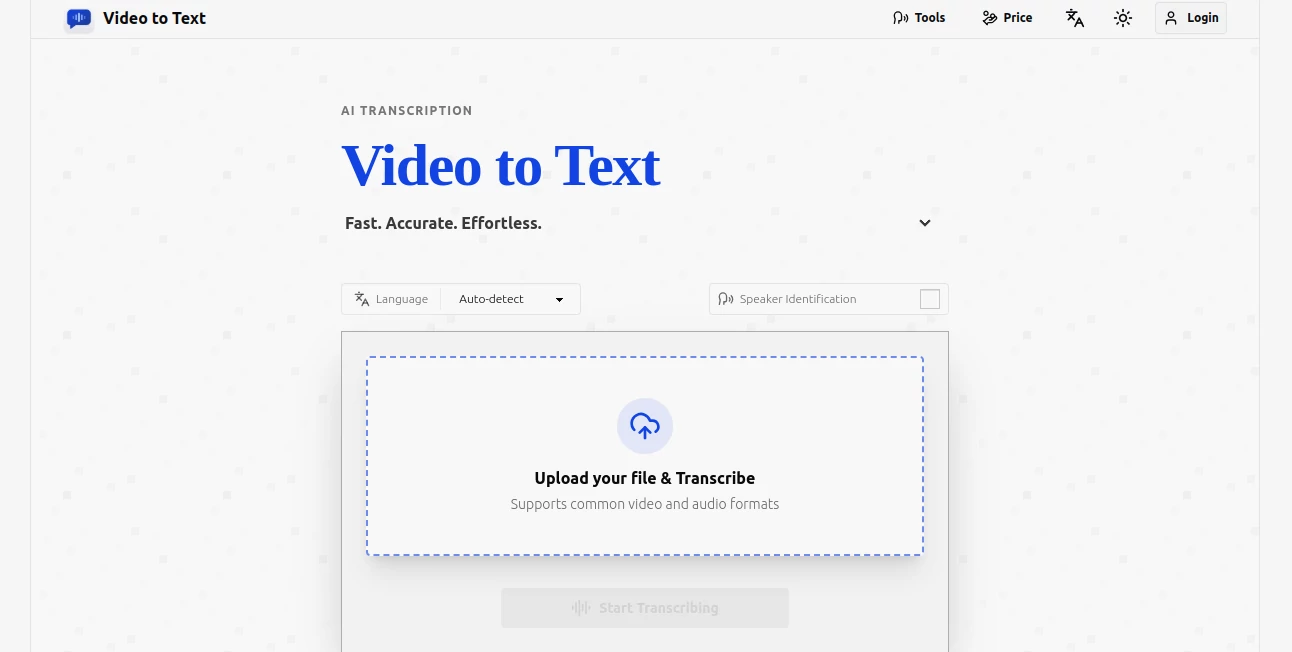
The platform focuses on simplicity. Users can upload supported video or audio files, select language preferences, and start the transcription process without complicated settings. The clean workflow makes it suitable for both beginners and professionals who need quick results without spending time learning complex software.
The straightforward upload, processing, and export system allows users to move from raw recordings to usable text with only a few steps.
Accuracy & Performance
Accurate transcription is one of the most important features for any speech-to-text platform. The AI system is built to recognize spoken words, detect languages automatically, and handle different types of recordings including interviews, meetings, educational content, and online videos.
With support for 99 languages and multilingual recognition, it can help users process international content and recordings where multiple languages may appear in the same file.
Capabilities
The platform offers a range of useful transcription capabilities including speaker identification, timestamps, and flexible export formats. These features make reviewing conversations, editing subtitles, and organizing large amounts of spoken information much easier.
- Convert video and audio files into text transcripts
- Support for 99 languages with automatic language detection
- Speaker identification for interviews and meetings
- Timestamped transcripts for easier navigation
- Export transcripts as TXT, SRT, VTT, or CSV files
- Support for popular video and audio formats
Security & Privacy
The platform is designed with user privacy in mind. Uploaded files are processed temporarily, and users can export their completed transcripts to keep the information they need. This approach provides a practical balance between convenient processing and responsible file handling.
Use Cases
AI transcription can be valuable in many professional and personal situations. Content creators can quickly generate subtitles for YouTube videos, social media clips, and online courses. Marketing teams can turn recorded discussions into written content for blogs, newsletters, and campaigns.
Businesses can use transcripts to organize meetings, document interviews, and create searchable records. Students and researchers can convert lectures, webinars, and recorded presentations into detailed notes for easier study.
- YouTube and social media content creation
- Podcast transcription and repurposing
- Online course and educational material creation
- Business meetings and interviews
- Subtitle generation for videos
- Research and documentation workflows
Pros and Cons
Pros
- Supports a wide range of languages
- Simple upload and transcription workflow
- Includes speaker labels and timestamps
- Multiple export formats available
- No subscription requirement with pay-as-you-use pricing
- Useful for creators, teams, and professionals
Cons
- Large files may require more processing time
- Advanced editing features are not the main focus
- Users with very high transcription volume may need larger minute packages
Pricing Plans
The pricing model is based on transcription minutes instead of monthly subscriptions. New users can try the service with 30 free transcription minutes, allowing them to test the quality before purchasing additional minutes.
- Starter: $9.90 for 200 minutes
- Recommended: $19.90 for 600 minutes
- Best Value: $99 for 6,000 minutes
This flexible approach is helpful for users who only need transcription occasionally and do not want to pay for unused monthly subscriptions.
How to Use Video to Text
- Upload a supported video or audio file.
- Select language settings and transcription options.
- Let the AI process the recording.
- Review the generated transcript.
- Export the result in your preferred format.
Comparison with Similar Tools
Many transcription platforms focus on either professional meetings or general speech recognition. This solution stands out by combining multilingual transcription, speaker recognition, timestamps, and flexible exports in one simple workflow.
For creators who mainly need subtitles, researchers who need searchable recordings, or businesses that process interviews regularly, having these features together can reduce the need for multiple separate tools.
Conclusion
Video to Text provides a practical way to convert spoken content into organized written information quickly and efficiently. Its combination of language support, speaker detection, timestamps, and flexible pricing makes it a valuable option for anyone working with video and audio content.
From content creators looking to speed up production to companies managing large amounts of recorded information, this AI-powered transcription platform helps transform recordings into useful assets with less manual effort.
Frequently Asked Questions (FAQ)
Can I transcribe videos in different languages?
Yes. The platform supports 99 languages and includes automatic language detection for easier multilingual transcription.
What export formats are available?
Users can export transcripts in TXT, SRT, VTT, and CSV formats depending on their workflow needs.
Can it identify different speakers?
Yes. Speaker identification helps separate conversations and makes interviews, meetings, and discussions easier to review.
Is there a free version available?
New users receive 30 free transcription minutes to test the service before purchasing additional minutes.
What types of files are supported?
The platform supports common video formats such as MP4, MOV, MKV, WEBM, and M4V, as well as audio formats including MP3, WAV, M4A, FLAC, OGG, AAC, and OPUS.