


















Video Face Swap
What is Video Face Swap?
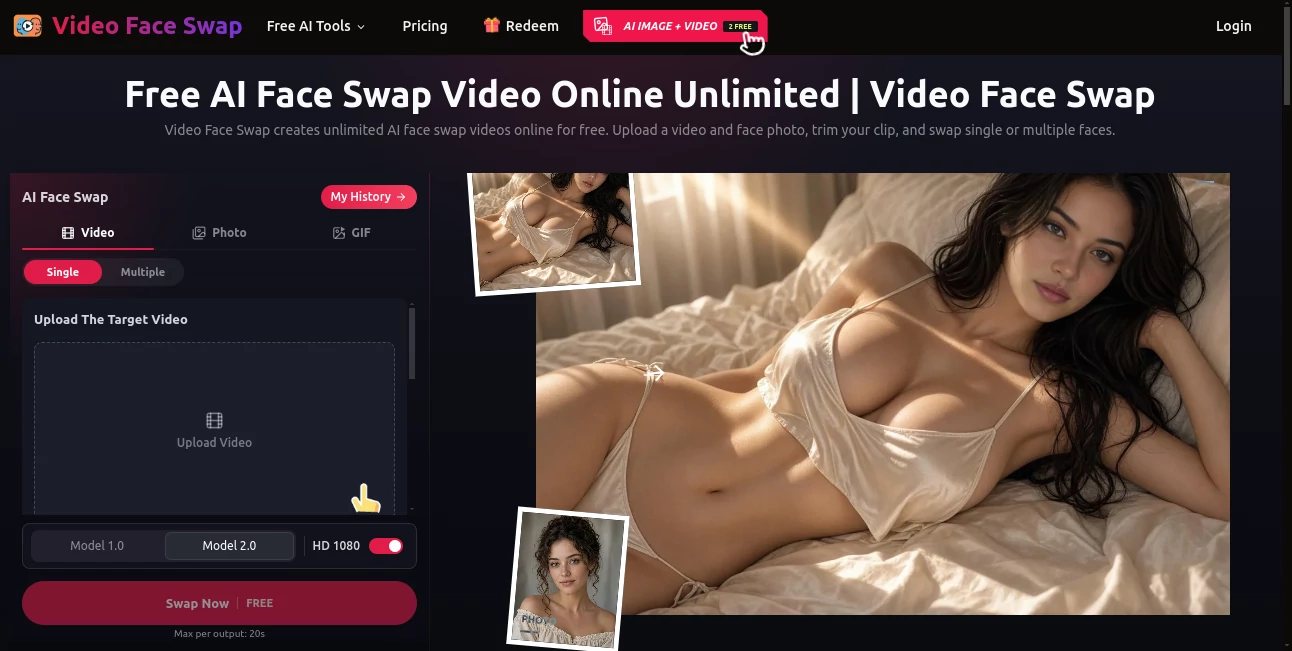
Video Face Swap makes it surprisingly simple to replace faces in videos directly from a browser. Instead of dealing with complicated editing software, users can upload a video, add a clear face photo, trim the section they want to edit, and generate a new version with the replacement face.
The platform is particularly useful for short creative projects where speed matters. A creator working on a reaction clip, parody, fan edit, social media post, or quick visual experiment can test an idea without opening a full video editing suite. It also supports both single-face and multiple-face projects, giving users more flexibility when working with group footage.
The workflow is straightforward enough for casual users, while features such as HD 1080 output, clip trimming, face detection, and multiple-face replacement give more experienced creators useful control over the final result.
Key Features
- AI-powered face replacement for video content
- Single-face and multiple-face swapping modes
- Support for MP4, WEBM, and MOV video files
- Video uploads up to 300MB
- Replacement images in JPG, PNG, WEBP, and HEIC formats
- Support for HD 1080 output
- Built-in clip trimming before generation
- Browser-based workflow with no software installation
- Free generation option for short clips
- Additional support for GIF face swapping
User Interface
The interface keeps the main workflow focused on the task. Users begin by selecting a video, then upload the replacement face and choose between Single and Multiple modes. The preview and trimming controls make it possible to focus on the exact portion of footage that needs editing instead of processing an unnecessarily long clip.
For group videos, the Multiple option is especially useful. A suitable frame can be selected for face detection, after which different replacement images can be assigned to the detected people. This is a practical touch for party videos, group memes, fan edits, and other scenes containing several faces.
Accuracy & Performance
The quality of a face swap depends heavily on the source material. Clear footage, a visible face, and a replacement photo with a similar angle and lighting generally provide better results. When a face is heavily blurred, covered, turned away, or partially blocked by another person, the result can become less consistent.
The ability to trim a video before generation is useful from both a creative and practical perspective. Instead of processing an entire recording, users can isolate the important moment and test that section first. This makes experimentation quicker and helps avoid wasting time on footage that is not needed.
Capabilities
The platform goes beyond a basic one-person face replacement workflow. Single mode is suitable for straightforward edits, while Multiple mode can detect visible faces in a selected frame and associate different replacement photos with them.
It also supports GIF face swapping, making the service useful for another popular form of short visual content. Creators can turn familiar GIFs into personalized reactions, memes, and playful social posts without installing a desktop application.
For video uploads, MP4, WEBM, and MOV files under 300MB are supported. Replacement face images can be supplied as JPG, PNG, WEBP, or HEIC files under 20MB.
Security & Privacy
Face-swap services naturally involve sensitive visual material, so privacy deserves attention. The platform states that uploaded media is used to provide the requested service and related operations, and that uploaded media and generated outputs are not used to train AI models without the user's consent.
Users should still treat face-swapping responsibly. Only upload videos, photographs, and likenesses that they have permission to use, particularly when the resulting content may be published, shared publicly, or used commercially.
Use Cases
Short-form content: TikTok, Reels, Shorts, and similar platforms are natural use cases. Creators can test character swaps, reactions, comedy concepts, and short visual effects without building the edit manually.
Memes and fan edits: A familiar movie, game, anime, or entertainment clip can become a personalized meme or fan project. A well-lit replacement photo can make the experiment considerably more convincing.
Marketing concepts: Creative and marketing teams can explore alternative casting ideas, spokesperson concepts, or visual variations before investing in a reshoot. This can be useful during the early stages of a campaign.
Events and community videos: Birthday clips, party videos, team content, and community projects can benefit from the multiple-face workflow when several people appear in the same scene.
Creative experimentation: Video editors can use the service to test alternative characters or story ideas before committing to a more involved production process.
Pros and Cons
- Pros: Easy browser-based workflow, free option for short clips, single and multiple face modes, HD 1080 support, useful trimming controls, several supported video and image formats, and GIF face-swapping capabilities.
- Pros: No complicated editing software is required, making it approachable for users who simply want to test a face-swap idea quickly.
- Cons: Results can be affected by poor lighting, blurry footage, covered faces, extreme angles, or overlapping people.
- Cons: Longer or higher-volume processing may require credits rather than remaining within the free option.
- Cons: Users need to be careful about consent, likeness rights, and the legal status of the source material before publishing a generated video.
Pricing Plans
The platform provides a free option, allowing users to test face-swapping without committing to a paid workflow. The editor currently displays a free generation option for short videos, while longer clips and higher-volume usage can require credits.
The exact cost of credit-based processing is presented in the editor before generation, which is useful because users can see the applicable cost before committing to a longer edit. Guest users can also try the service without creating an account, while signing in provides longer history retention for generated creations.
How to Use It
- Upload an MP4, WEBM, or MOV video within the supported file size.
- Upload a clear replacement face image in JPG, PNG, WEBP, or HEIC format.
- Trim the video to the section that you actually want to process.
- Choose Single mode for one face or Multiple mode when several people need different replacement faces.
- For multiple faces, select a clear frame and use face detection to identify the people in the scene.
- Select the appropriate replacement face for each detected person.
- Choose the available generation option and start processing.
- Review the result carefully before downloading or sharing it.
Comparison with Similar Tools
Many face-swapping services focus primarily on a single image or require users to work through a more complicated editing environment. This platform takes a more focused approach by putting video face replacement at the center of the experience.
The combination of direct video uploading, trimming, Single and Multiple modes, HD output, and browser-based processing makes it especially appealing for short-form creative work. The GIF option also gives it an advantage for users who move between video clips and lightweight animated content.
It is not intended to replace a complete professional video editor. Instead, its strength is the speed of testing a specific face-swap concept and producing a usable result without building the effect manually frame by frame.
Conclusion
For anyone who wants to experiment with AI face swapping without learning a complicated editing application, this platform offers a refreshingly direct workflow. Upload the footage, provide a replacement face, trim the important section, and let the system handle the frame-by-frame transformation.
Its support for multiple faces, HD output, GIF projects, and several common media formats makes it more versatile than a simple one-face demo. The best results still come from good source material, so a clear face, suitable lighting, and a sensible camera angle remain important.
Whether the goal is a quick meme, a short-form social video, a fan edit, a creative experiment, or an early marketing concept, it provides a practical way to turn an idea into a face-swapped video with relatively little setup.
Frequently Asked Questions (FAQ)
What is an AI video face swap?
An AI video face swap replaces a visible person's face in a video with a face supplied through a separate image. The system processes the selected footage across its frames and generates a new video for review.
Can I swap multiple faces in one video?
Yes. Multiple mode allows users to detect visible faces in a selected frame and assign a different replacement image to each detected person.
What video formats are supported?
Supported video formats include MP4, WEBM, and MOV. The video uploader currently accepts files below 300MB.
What image formats can I use for the replacement face?
The supported replacement image formats are JPG, PNG, WEBP, and HEIC, with a maximum file size of 20MB.
Can I use it without signing up?
Yes. Users can try the free generation option as guests. Guest creations have a limited retention period, while signing in allows generated creations to remain available for longer.
How can I get better face-swap results?
Use a clear video where the face is visible and not heavily covered or blurred. A replacement photo with a similar camera angle and lighting can also improve consistency. If faces overlap or turn away from the camera, selecting a clearer frame may help.
Is there a GIF face-swap option?
Yes. A dedicated GIF workflow allows users to upload supported GIF files and replace faces in short animated content.
Can the generated videos be used commercially?
Commercial use depends on whether you have the necessary rights and permissions for the source video, replacement image, and likenesses involved. Users should review the applicable terms and local laws before commercial publication.
Are uploaded videos used to train AI models?
The platform states that uploaded media and generated outputs are not used to train AI models without the user's consent.
What happens if a face is blurry or partially hidden?
Face replacement may become less reliable when a face is blurred, covered, turned sideways, or overlaps with another person. Using clearer footage or a better-matched replacement image can improve the result.
Is the service suitable for professional video editing?
It can be useful for testing creative concepts, short social content, fan edits, and quick visual experiments. For complete professional productions, it is better viewed as a specialized face-swapping tool that can complement a full video editing workflow.
AI Video Generator , AI Face Swap Generator , AI GIF Generator .
These classifications represent its core capabilities and areas of application. For related tools, explore the linked categories above.
Video Face Swap details
Website unavailable — View Alternatives
Pricing
- Freemium
Apps
- Web App
Categories

Video Face Swap Alternatives Product

Sora by Open…

AiSora

FreeWanVideo

Getforge.stu…

Seedance2 Vi…

Banana 2 Edi…

MiniMax H3

Seedance AI …

Kling 3 AI
