Video to Transcript
What is Video to Transcript?
Video content is full of useful information, but finding one sentence inside a long recording can be frustrating. Video To Transcript makes that process much simpler by turning spoken content from videos and audio into readable, timestamped text that can be searched, reviewed, translated, and reused.
The platform supports video uploads as well as video links, including YouTube URLs. It is designed for practical everyday work rather than simply producing a block of text. Timestamps keep the transcript connected to the original recording, while features such as speaker recognition, AI notes, translation, MindMap generation, and export options make the resulting text more useful.
It is particularly handy when a two-hour interview needs to become a few pages of notes, when a student wants searchable lecture material, or when a content team needs to turn an existing video into captions, articles, social posts, or documentation.
Key Features
- Convert uploaded video and audio files into text.
- Process supported video links, including YouTube URLs.
- Generate timestamped transcripts for easier source checking.
- Recognize and separate different speakers.
- Edit speaker names after transcription.
- Create AI-generated notes, summaries, key points, and action items.
- Ask questions about the transcript using AI.
- Translate transcript content into multiple languages.
- Organize long transcripts with MindMap functionality.
- Copy, download, and export transcript content for further use.
- Support common video formats such as MP4, MOV, AVI, and MKV, with uploads up to 5GB.
- Start using the service without creating an account.
User Interface
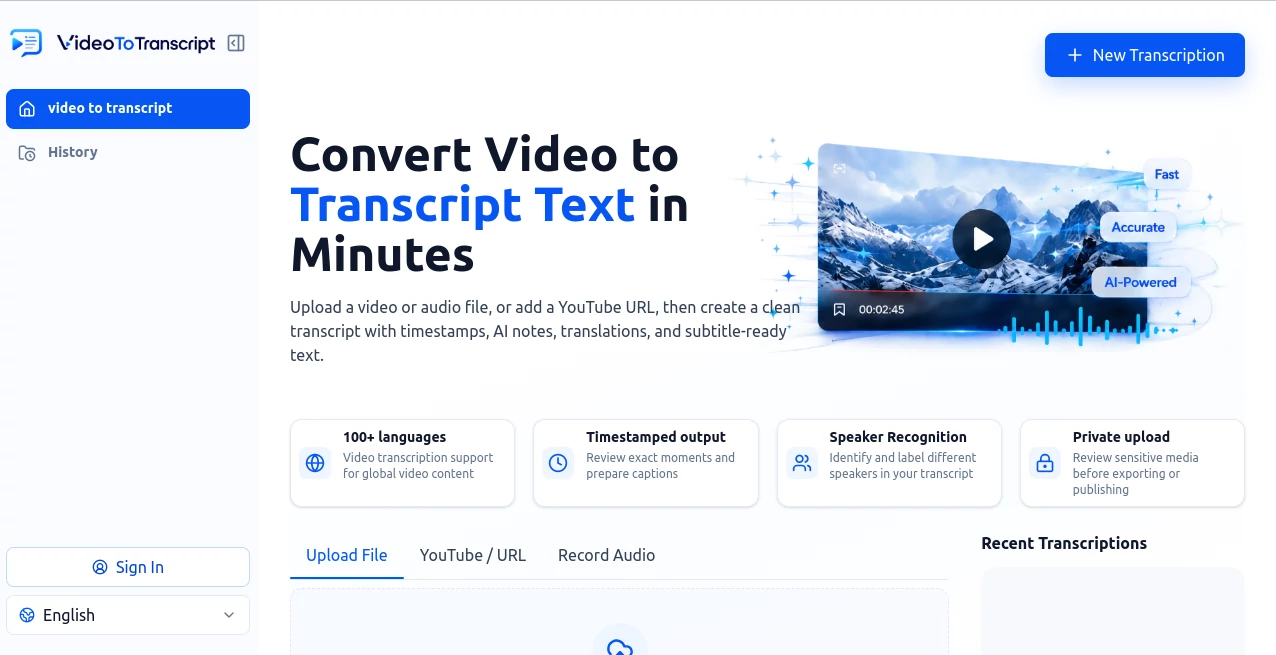
The interface is built around a straightforward transcription workflow. Users can upload a file, provide a video URL, or record audio, then choose whether speaker separation is needed. The upload area supports drag-and-drop, making it easy to start without navigating through complicated menus.
Once processing is complete, the transcript is presented with timestamps and tools for reviewing and working with the text. The result feels more like a workspace for handling recorded information than a simple converter. For someone dealing with interviews or meetings every week, that distinction can save a surprising amount of time.
Accuracy & Performance
Transcription quality naturally depends on the recording itself. Clear speech, limited background noise, and distinct speakers generally produce better results. The timestamped output is especially useful because important sections can be checked against the original video rather than blindly trusting the generated text.
For professional work, names, dates, numbers, product terms, technical vocabulary, and quotations should still be reviewed before publication. This is particularly important with interviews, research recordings, and videos containing multiple people speaking at once.
Capabilities
The platform goes beyond basic speech-to-text conversion. After a transcript is created, users can work with the content through AI notes and questions, making it easier to identify important ideas without manually scanning every paragraph.
Translation is useful for multilingual teams and creators, while the MindMap feature can turn a long conversation or lecture into a more structured overview. Timestamped text also provides a practical foundation for captions, documentation, research notes, content briefs, and other forms of repurposed material.
Another useful detail is speaker editing. When several people appear in an interview, panel, meeting, or training session, assigning meaningful names to speakers makes the finished transcript considerably easier to understand.
Security & Privacy
Video files can contain considerably more information than ordinary documents, including names, customer details, private conversations, business plans, and other sensitive material. The platform provides a private upload workflow, but users should still review generated transcripts carefully before exporting or publishing them.
For sensitive recordings, it is good practice to confirm that names, contact information, confidential statements, financial details, and other private information are handled appropriately before sharing the resulting transcript.
Use Cases
Students and educators: Lectures and lessons can become searchable study material. Instead of replaying an entire class to find one explanation, students can search the transcript and jump to the relevant timestamp.
Content creators: A finished video can become the starting point for show notes, captions, content outlines, newsletters, quotes, and social media material. This makes older video libraries much easier to reuse.
Marketing and SEO teams: Webinars, interviews, demonstrations, and educational videos can provide source material for articles, FAQs, landing-page ideas, and content briefs.
Researchers and journalists: Timestamped interviews make it easier to verify quotations and return to the exact moment where a statement was made.
Businesses and teams: Recorded meetings, onboarding sessions, training videos, and customer interviews can be converted into searchable documentation and follow-up notes.
Pros and Cons
Pros
- Simple upload and video-link workflow.
- Supports large video files up to 5GB.
- Timestamped transcripts make verification easier.
- Speaker recognition is useful for interviews and meetings.
- AI notes and transcript questions add value beyond basic transcription.
- Translation and MindMap tools support broader content workflows.
- Transcripts can be copied, downloaded, and reused.
- Free access is available without requiring login to get started.
Cons
- Transcription quality can vary with audio quality and speaker clarity.
- Important professional or technical transcripts still require human review.
- Overlapping speech and heavy background noise can make transcription more difficult.
- Free usage may be subject to limits depending on the current product settings.
Pricing Plans
The service allows users to get started for free without logging in, which makes it easy to test the transcription workflow before committing to regular use. The website does not prominently present a fixed paid-plan structure in the main product information, and available usage limits can depend on the current service configuration.
For occasional transcription, the free starting option can be particularly convenient. Users with larger or recurring transcription requirements should check the current account and usage conditions before planning a high-volume workflow.
How to Use It
Step 1: Open the transcription workspace and choose whether you want to upload a file, provide a supported video URL, or record audio.
Step 2: Upload a compatible video or audio file. Common supported video formats include MP4, MOV, AVI, and MKV, with files up to 5GB.
Step 3: Enable speaker detection when the recording contains multiple people, such as an interview, meeting, panel, or training session.
Step 4: Generate the transcript and wait for the recording to be processed.
Step 5: Review the timestamped transcript. Edit speaker names and check important names, numbers, terminology, and quotations against the original recording.
Step 6: Use the available AI tools to create notes, ask questions about the recording, translate sections, or organize the information into a MindMap.
Step 7: Copy, download, or export the finished transcript for captions, documents, research, content production, or internal notes.
Comparison with Similar Tools
Many transcription services focus primarily on converting speech into text. This platform takes a broader approach by combining transcription with timestamps, speaker recognition, AI-assisted transcript analysis, translation, MindMap organization, and export options.
The biggest advantage is therefore not simply obtaining text from a recording. It is having several practical ways to work with that text afterward. Someone who only needs occasional captions may prefer a simpler transcription service, while researchers, students, creators, marketers, and teams can benefit from having analysis and organization tools available alongside the transcript.
Another useful distinction is the ability to work from both uploaded media and supported video links. That gives users more flexibility when their source material is already stored online rather than locally on their computer.
Conclusion
Turning recorded speech into useful information should not require repeatedly replaying the same video. This platform provides a practical way to transform recordings into searchable, timestamped text and then take that material further with speaker editing, AI notes, questions, translation, MindMap organization, and export tools.
It is a strong fit for anyone who regularly works with interviews, lectures, webinars, meetings, training videos, research recordings, or creator content. The ability to start without logging in also makes it easy to test with a real recording and see whether the workflow fits your needs.
Frequently Asked Questions (FAQ)
What does video to transcript mean?
It means converting spoken words inside a video into readable text. A useful transcript can also include timestamps, speaker labels, and additional tools for reviewing or reusing the content.
Can I transcribe a YouTube video?
Yes. Supported YouTube URLs can be entered into the platform to generate or extract transcript content, depending on the available captions and video support.
Can I upload my own video?
Yes. Users can upload video files directly. Supported formats include MP4, MOV, AVI, and MKV, with uploads of up to 5GB.
Does it recognize different speakers?
Yes. Speaker detection can distinguish different speakers in supported recordings, and speaker names can be edited afterward to make the transcript easier to read.
Can I translate a transcript?
Yes. Translation tools are available for working with transcript content across multiple languages, making the output more useful for multilingual audiences and teams.
Can I summarize a video transcript?
Yes. AI Notes can help turn lengthy recordings into summaries, key points, and action items. Users can also ask questions about the transcript to locate specific information.
Can I create subtitles from the transcript?
A reviewed timestamped transcript can be prepared for subtitle workflows such as SRT or VTT. Timing and line breaks should still be checked before publishing.
Is the service free?
You can start for free without logging in. Free usage may have limits depending on the current product settings.
How accurate is AI video transcription?
Accuracy depends on factors such as speech clarity, background noise, accents, overlapping speakers, and specialized terminology. Important information should always be checked against the original recording.
AI Transcriber , AI Transcription , AI Speech to Text , AI Captions or Subtitle .
These classifications represent its core capabilities and areas of application. For related tools, explore the linked categories above.
Video to Transcript details
Website unavailable — View Alternatives
Pricing
- Free
Apps
- Web App
Categories

Video to Transcript Alternatives Product

YTVidHub-you…

AI Subtitle …

Zeemo AI
Video Transl…

SuperAI
TuCanChat
AudioScribe

TO MD
FluentDictat…