


















Vismuse
What is Vismuse?
Creating eye-catching product images and marketing visuals used to mean hiring photographers, scheduling shoots, or spending hours in design software. This tool changes that completely. You can feed it a product URL, a brief description, or even just an idea, and it generates professional-looking ad creatives, social media posts, and lifestyle shots that actually look like they came from a studio. I’ve seen small store owners go from plain product photos to scroll-stopping visuals in minutes, and the difference in engagement is noticeable right away. It feels like having a creative team on call whenever you need fresh content.
Introduction
Visuals are everything in e-commerce and marketing today, but not everyone has the budget or time for professional photography sessions. Vismuse bridges that gap by turning simple inputs into high-quality, on-brand images that sell. Whether you’re an independent seller launching new products, a marketer running campaigns, or a creator building a portfolio, it makes the process fast and surprisingly effective. The results often look polished enough to use directly in ads or social posts, saving both time and money while still feeling authentic to your brand voice. It’s one of those tools that makes you wonder how you ever managed without it.
Key Features
User Interface
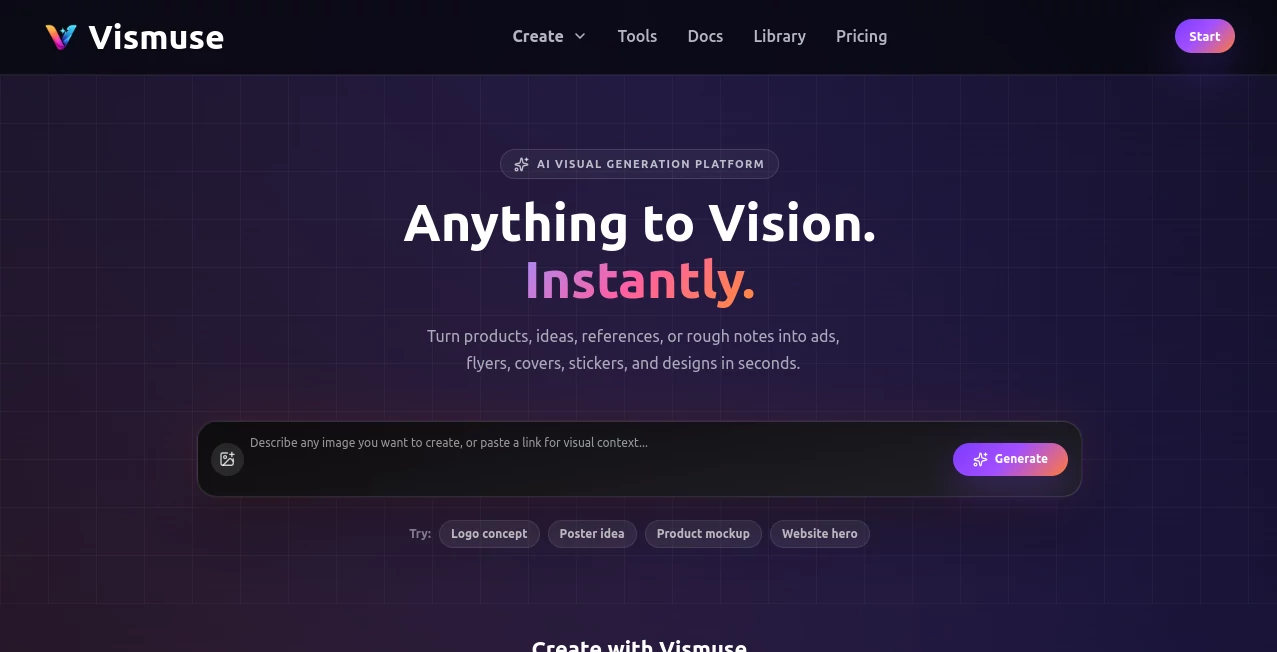
The dashboard is clean and inviting. You can start with a product URL, upload images, or simply type a description of what you want. Options for style, aspect ratio, and use case (product ad, social post, lifestyle shot, etc.) are easy to find without feeling overwhelming. Generation is fast, and you get multiple variations to choose from. It’s designed so you can go from idea to finished visual in a few clicks, even if you’re not a designer.
Accuracy & Performance
It understands product details well—colors, textures, context—and translates your brief into images that look realistic and on-brand. The AI avoids common issues like distorted hands or weird proportions, delivering results that feel commercial-ready. Processing is quick, and the consistency across different product types (fashion, electronics, home goods, beauty) is impressive. Many users report that the first or second variation is often usable with little to no editing.
Capabilities
You can generate product ads, lifestyle scenes, social media carousels, banners, album covers, flyers, and more. It supports text-to-image, image-to-image variations, and prompt refinement for precise control. Different styles are available so you can match your brand aesthetic—minimal, vibrant, cinematic, etc. The output quality is high enough for professional use, and the variety of formats makes it easy to create content for different platforms.
Security & Privacy
Your product data and generated images are handled securely. The platform focuses on delivering value without unnecessary data collection or sharing. For businesses uploading product catalogs or brand assets, this respectful approach provides confidence that their visuals stay protected.
Use Cases
An online clothing store generates fresh lifestyle shots for new arrivals without scheduling models or photographers. A beauty brand creates consistent product ads across multiple platforms from a single brief. A small home goods seller turns plain product photos into appealing lifestyle scenes that boost conversions. Content creators quickly build visual assets for campaigns or social calendars. It’s particularly powerful for anyone who needs regular, high-quality visuals but doesn’t have a full design team on hand.
Pros and Cons
Pros:
- Fast turnaround from idea to professional-looking visuals.
- Strong understanding of product context and branding.
- Versatile output suitable for ads, social, and marketing materials.
- Easy enough for non-designers while powerful for pros.
- Saves significant time and cost compared to traditional photography.
Cons:
- Very specific or unusual product angles may need prompt refinement.
- Heavy daily usage benefits from a paid plan.
- Some highly custom brand styles require a few iterations to perfect.
Pricing Plans
It offers a free tier with enough generations to test the quality and workflow on real products. Paid plans provide higher volume, faster processing, priority features, and commercial usage rights. The pricing feels fair for the time and professional results it delivers—many small businesses say it pays for itself after just one product launch or campaign.
How to Use Vismuse
Start by entering a product URL, uploading images, or typing a detailed description. Choose the output style and format that fits your needs (ad, social post, lifestyle, etc.). Generate several variations and pick the ones you like best. Refine the prompt if needed for even better alignment with your brand. Download the high-resolution images and use them directly in your store, ads, or social content. The whole process is quick enough that you can refresh your visuals regularly without stress.
Comparison with Similar Tools
Many AI image generators produce generic results or struggle with product-specific context. This one excels at understanding commercial needs—creating images that actually look like they belong in real ads and stores. It balances speed, quality, and ease of use better than broader tools, while staying more focused and practical than overly complex design platforms. For sellers and marketers who need consistent, conversion-friendly visuals, it often becomes the preferred choice.
Conclusion
Great product visuals can make or break a sale, but creating them consistently is hard. This tool removes the biggest barriers, letting you produce professional marketing content quickly and affordably. It empowers small businesses and creators to compete visually with bigger players without big budgets. When your products look as good as they perform, customers notice. For anyone serious about their online presence, Vismuse is a smart, practical investment in better visuals and better results.
Frequently Asked Questions (FAQ)
How fast can I generate images?
Most generations complete in seconds, so you can create multiple options quickly.
Do the images look realistic enough for ads?
Yes—many users report results good enough for professional campaigns and store listings.
Can I upload my own product photos as reference?
Absolutely—it works well with text, URLs, or uploaded images for better accuracy.
Is it suitable for beginners?
Very much so—the interface is simple while still giving powerful results.
Are there usage limits on the free plan?
Yes, but it’s generous enough to test thoroughly before upgrading.
AI Photo & Image Generator , AI Marketing Plan Generator , AI Art Generator , AI Design Generator .
These classifications represent its core capabilities and areas of application. For related tools, explore the linked categories above.

Vismuse Alternatives Product

Klyra AI

Seedream 5.0…
VexImg

Nano Banana …

Nano Banana …

Nano Banana 2

Gemini AI Ph…

Banana AI

ComicsMaker
