
Viso Suite
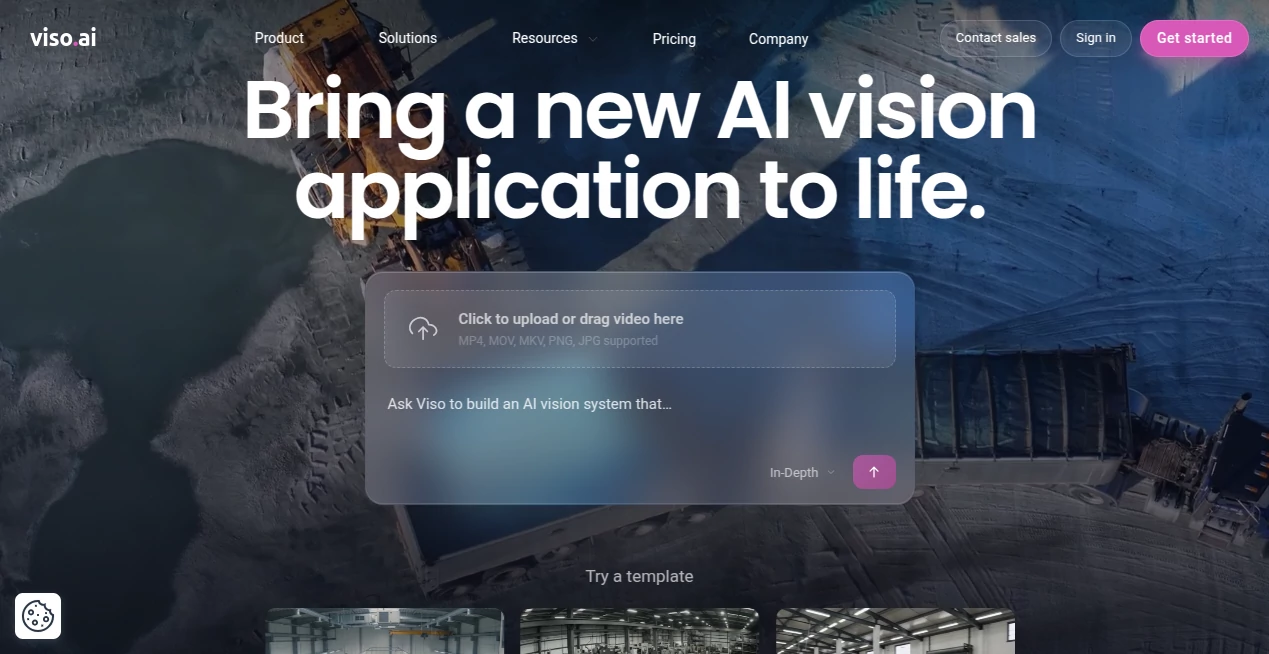
What is Viso Suite?
Viso is an end-to-end computer vision platform designed for organizations that want to turn camera and visual data into useful, automated intelligence. Instead of assembling separate tools for model development, application building, deployment, and monitoring, the platform brings these stages together in one environment.
Its newer approach to visual AI also makes it possible to create vision agents from a simple description of what a user wants a camera to understand. This makes the technology interesting not only for experienced AI engineers, but also for teams that need to test an idea quickly without building an entire computer vision stack from scratch.
For larger organizations, the platform is designed around real-world deployment. Existing IP cameras can be connected, applications can run in the cloud, on-premises, or at the edge, and teams can manage computer vision projects across multiple locations. The result is a practical approach to bringing visual intelligence into everyday business operations.
Key Features
- Prompt-based creation of AI vision agents for visual analysis and detection.
- No-code and low-code tools for building custom computer vision workflows.
- Support for existing IP cameras and different hardware environments.
- Visual AI capabilities for understanding objects, activities, interactions, relationships, and situations.
- Deployment across cloud, on-premises, and edge infrastructure.
- Tools for collecting and annotating visual data when custom model development is required.
- Integration with AI models, cameras, software systems, and computing hardware.
- Application lifecycle management covering development, deployment, monitoring, and updates.
- Connectors for integrating vision applications with other business systems.
- Enterprise features for access management, governance, security, and large-scale operations.
User Interface
The interface is built around visual workflows rather than forcing users to manage every part of a computer vision application through code. Teams can combine cameras, models, processing components, rules, and actions using a visual development environment.
This approach is particularly useful during the experimentation stage. A developer can assemble a workflow and test it, while a business specialist can still understand what the application is designed to detect or analyze. More technical teams can extend the platform with custom code and additional components when a project requires deeper control.
Accuracy & Performance
Performance depends heavily on the camera quality, environment, selected AI capabilities, processing hardware, and the complexity of the task. The platform is designed to support real-time computer vision as well as analysis of recorded images and video.
Its Visual General Intelligence approach goes beyond simple object detection. Systems can reason about activities, relationships, sequences, hazards, and situations, which can be useful when the goal is to understand what is happening in a scene rather than simply identify individual objects.
The architecture also supports edge deployment, which can be valuable when low latency, local processing, or reduced dependence on transferring video to the cloud is important.
Capabilities
The platform covers a broad portion of the computer vision lifecycle. Teams can collect visual data, annotate images and video, work with existing or custom AI models, build applications, connect hardware and software, and deploy applications to production environments.
For teams using the newer vision-agent workflow, the process can be considerably shorter. A user can describe what the system should recognize or analyze, test the resulting application with video, and refine its logic without rebuilding the entire application from the beginning.
Possible applications include safety monitoring, PPE detection, restricted-area monitoring, equipment inspection, object counting, traffic analysis, crowd analytics, predictive maintenance, and reading information from physical instruments.
Security & Privacy
Security is an important part of the platform's enterprise design. Depending on the deployment and plan, organizations can use features such as role-based access, single sign-on with SAML, security controls, audit logs, and governance features.
The platform also supports cloud, on-premises, and edge deployment models. This flexibility can help organizations design computer vision systems around their own infrastructure and privacy requirements rather than moving every workload to a single environment.
The company states that its enterprise offering supports security and privacy requirements including SOC 2, ISO 27001, GDPR, and CCPA. Organizations handling sensitive camera footage should still evaluate the exact deployment architecture, data flows, retention policies, and configuration required for their individual environment.
Use Cases
One of the strongest aspects of the platform is the range of problems that can be approached with the same underlying infrastructure. Manufacturing teams can use computer vision for equipment inspection, quality control, safety monitoring, and operational analysis. Construction companies can monitor PPE compliance, restricted zones, and potentially unsafe situations.
Retail and transportation organizations can analyze people movement, occupancy, traffic, and other visual patterns. Security teams can create systems for detecting unusual events or monitoring specific areas. Infrastructure operators can connect existing cameras and use AI to identify conditions that would otherwise require continuous human observation.
A practical example would be a warehouse with several existing cameras. Instead of asking employees to watch every feed continuously, a vision application could monitor selected areas and generate an alert when a predefined safety condition or operational event occurs.
This makes the technology especially appealing when an organization already has cameras in place but is not getting much intelligence from the footage they produce.
Pros and Cons
Pros
- End-to-end computer vision development and deployment.
- Prompt-based vision agent creation for faster experimentation.
- No-code and low-code development options.
- Supports cloud, on-premises, and edge environments.
- Can work with existing IP camera infrastructure.
- Strong focus on enterprise-scale computer vision.
- Flexible enough for both business teams and technical developers.
- Useful across many industries and computer vision scenarios.
Cons
- The broader enterprise platform can be more than a small project needs.
- Advanced computer vision deployments may require technical knowledge and careful configuration.
- Performance and results depend on camera quality, infrastructure, and the selected vision workflow.
- Enterprise pricing is not publicly listed as a fixed monthly amount.
- Teams with very simple image-analysis requirements may prefer a more specialized tool.
Pricing Plans
The platform currently offers a free entry point for users who want to experiment with AI vision. The Free plan costs $0 per month and includes daily credits, AI vision agents, the Visual General Intelligence engine, unlimited collaborators, and connectors. A credit card is not required to get started.
The Pro plan starts at $25 per month and adds a larger credit allowance, credit rollovers, on-demand credit top-ups, unlimited AI vision agents, third-party API connectors, and two-factor authentication.
The Business plan starts at $50 per month and adds capabilities such as priority processing, SSO/SAML, role-based access, a notification center, security controls, and email support.
Enterprise customers receive a more extensive package designed for large organizations. Pricing is based on company size and requirements, with features such as volume-based credit pricing, dedicated support, edge deployments, onboarding services, custom connectors, audit logs, advanced governance, and sharing controls.
How to Use the Platform
- Create an account and start with the free plan if you want to test the platform.
- Provide a video or describe the computer vision problem you want to solve.
- Let the vision system create an initial application or workflow.
- Test the application using sample footage or connected camera sources.
- Refine the detection logic, rules, thresholds, or desired outputs.
- Connect the application to the systems or services that should receive its results.
- Move the finished application to the appropriate cloud, on-premises, or edge environment.
- Monitor the application and continue improving it as operational requirements change.
For more traditional computer vision projects, teams can also work with datasets, annotation tools, AI models, visual application components, and deployment infrastructure as part of the broader platform.
Comparison with Similar Tools
Many computer vision services focus on a particular part of the process, such as image recognition, model training, video analytics, or API-based detection. The main difference here is the attempt to bring those pieces into a broader application platform.
Compared with building a solution entirely from open-source frameworks, this approach can reduce the amount of infrastructure and application plumbing a team has to maintain itself. Developers can still work with models, code, containers, APIs, and custom components, but they do so inside a managed environment.
Compared with single-purpose vision APIs, the platform is more suitable when an organization expects to build several different visual applications or operate computer vision across multiple cameras and locations. On the other hand, a small project that only needs one straightforward detection API may not require such a broad platform.
The newer prompt-driven vision workflow also creates another distinction. Instead of starting every project with dataset preparation and model training, teams can begin by describing what they want the system to understand and then refine the resulting application.
Conclusion
Viso takes a broad approach to computer vision by combining AI vision development, visual reasoning, deployment, integrations, and operational management in one platform. Its combination of no-code tools, developer extensibility, edge support, and enterprise controls makes it particularly interesting for organizations that want to move computer vision projects beyond small proofs of concept.
The prompt-based vision-agent experience is also a compelling option for teams that want to test ideas quickly without immediately investing in a traditional model-training workflow. Meanwhile, larger organizations can use the enterprise platform to connect existing cameras, create multiple applications, and manage visual intelligence across their operations.
For businesses looking at computer vision as an ongoing capability rather than a single isolated project, this platform offers a strong combination of flexibility, scalability, and practical deployment options.
Frequently Asked Questions (FAQ)
What is this platform used for?
It is used to build, deploy, and operate computer vision applications that analyze images, video, and camera feeds. Common applications include safety monitoring, inspection, object counting, traffic analysis, equipment monitoring, and other visual intelligence tasks.
Can I use it without coding?
Yes. The platform provides no-code and low-code development tools, and its newer vision-agent workflow allows users to describe a visual problem and create an application from that description. Developers can still use code and custom components when required.
Can it work with existing cameras?
Yes. Existing IP cameras and CCTV systems can be integrated, making it possible for organizations to add AI capabilities without necessarily replacing their current camera infrastructure.
Does it support edge AI?
Yes. Applications can be deployed at the edge as well as in cloud and on-premises environments. This can be useful for applications that need low latency or local processing.
Is there a free plan?
Yes. The Free plan costs $0 per month and provides credits that can be used to create and run AI vision agents. It is designed to let users explore the platform without a paid subscription.
What industries can use it?
Computer vision applications can be built for manufacturing, construction, retail, transportation, security, agriculture, public infrastructure, and many other industries where cameras can provide useful operational information.
Is it suitable for enterprise deployments?
Yes. Enterprise capabilities include large-scale deployment options, governance, access controls, security features, dedicated support, edge deployments, and tools intended for organizations operating across multiple locations and cameras.
AI Data Mining , AI Image Recognition , AI Developer Tools , AI Monitor & Report Builder .
These classifications represent its core capabilities and areas of application. For related tools, explore the linked categories above.

Viso Suite Alternatives Product

volume shade…

Latency Atlas

Privacy Scru…

ImgUnblur

GPTLocalhost

LocaFlow

Reverse Imag…

DemoDash

Instantly Id…