Vitara.ai
What is Vitara.ai?
Vitara AI is an AI-powered development platform designed to turn software ideas into working web and mobile applications through natural language. Instead of starting with an empty code editor and manually assembling every part of a project, users can describe what they want to build and let the platform generate the underlying application.
The approach is particularly appealing for founders, developers, freelancers, and non-technical creators who want to move quickly from an idea to a usable product. A request such as building a CRM, inventory system, financial dashboard, or leave management application can become the starting point for a complete project.
What makes the experience more interesting is that it is not limited to generating isolated snippets. The platform is built around full-stack development, covering frontend interfaces, backend functionality, APIs, authentication, databases, and deployment as part of the development workflow.
Key Features
- Natural-language application development through prompt-based instructions.
- Full-stack application generation rather than simple code completion.
- React-based frontend development for modern responsive interfaces.
- Node.js backend capabilities with authentication and APIs.
- Browser-based development without a complicated initial setup.
- GitHub integration for version control and continued development.
- Prompt-based iterations for changing features and application design.
- Editable source code that can be inspected, modified, downloaded, and deployed.
- Support for both web and mobile application development.
User Interface
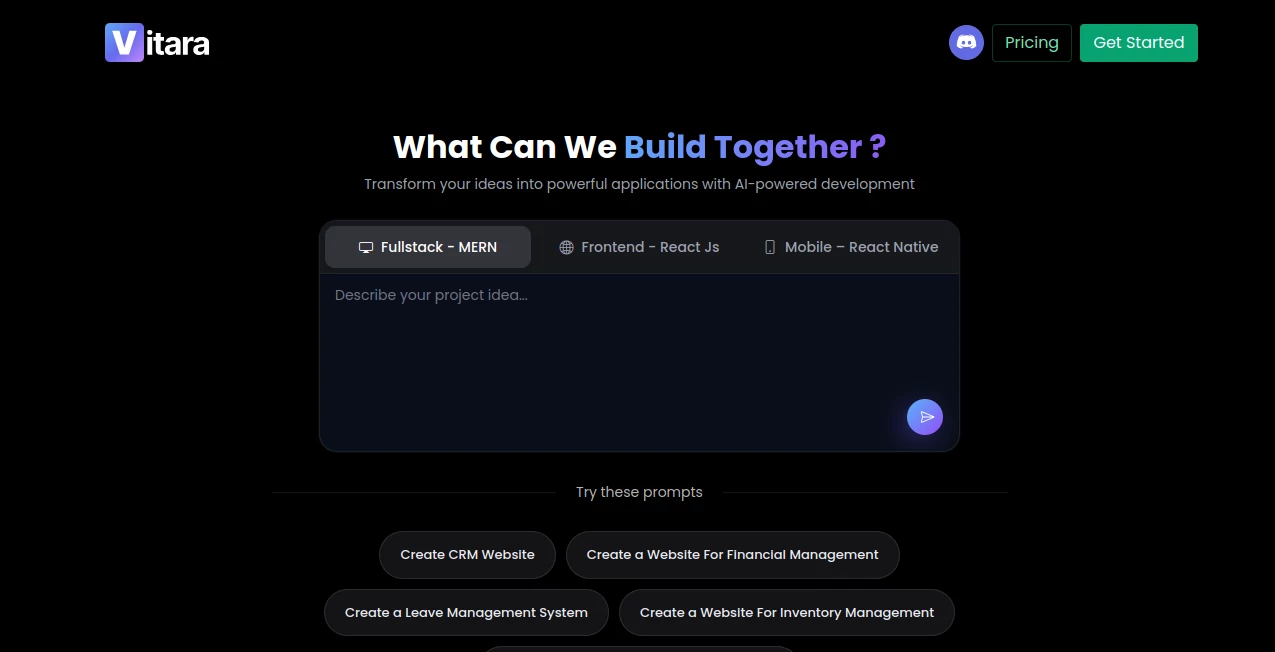
The browser-based interface keeps the starting point straightforward: describe an idea, provide instructions, and begin building. This is useful for people who would rather explain a product in plain language than spend the first hour configuring a development environment.
The workflow also makes experimentation easier. A founder could start with a simple sales dashboard, review the generated result, and then ask for additional functionality instead of rebuilding the project from scratch. For experienced developers, the generated code remains accessible for further refinement.
Accuracy & Performance
Performance is one of the platform's central selling points. Its website states that complete features can be produced in minutes rather than days and describes the development workflow as capable of reducing development time by up to 12 times.
Of course, generated software still benefits from human review, particularly when an application contains complex business rules, sensitive data, or unusual integrations. The real advantage is the reduction of repetitive development work and the speed at which a functional starting point can be produced.
Capabilities
The platform goes beyond simple code generation. Its development environment is designed to produce both frontend and backend components, allowing a natural-language request to become a more complete application architecture.
Frontend projects can use React, while the backend environment provides Node.js functionality, authentication, real-time subscriptions, and automatic APIs. The platform also supports prompt-based modifications, meaning users can describe a change and regenerate the relevant parts of an existing project.
Another useful capability is the connection with GitHub. This gives developers a practical path for taking an AI-assisted project into a more familiar version-control workflow, rather than keeping the entire development process locked inside the browser.
Security & Privacy
According to the platform's own information, project code is securely stored and regularly backed up, while data is encrypted both at rest and in transit. Users retain ownership of their code and data and can download the generated source code for deployment.
These features make the platform more suitable for serious product development than an environment intended only for quick prototypes. Nevertheless, teams working with confidential business information should always review the provider's current privacy and security terms before using sensitive data in any AI-powered development environment.
Use Cases
There are plenty of situations where prompt-driven application development can save considerable time. A startup founder can use it to turn an early product concept into a working prototype before committing substantial development resources.
Developers can also use the platform for repetitive internal applications, dashboards, CRUD systems, management tools, and early versions of customer-facing products. For example, a team could describe an inventory management system, generate the initial structure, and then manually refine the business logic.
It can also be useful for agencies and freelancers handling several projects at once. Creating the first version of a dashboard, landing application, CRM, or administrative system can become considerably faster when the initial implementation is generated from a detailed description.
- Rapid MVP development
- Internal business dashboards
- CRM and management systems
- Inventory applications
- Financial management applications
- Administrative tools
- Web application prototypes
- Mobile application concepts
- Client projects and freelance development
Pros and Cons
Pros
- Build applications from natural-language descriptions.
- Supports both frontend and backend development.
- Useful for rapid prototyping and MVP creation.
- React and Node.js provide a familiar technical foundation.
- Generated code remains editable.
- GitHub integration supports a conventional development workflow.
- Browser-based development reduces initial setup work.
- Offers a free tier for getting started.
Cons
- Complex applications still require technical review and testing.
- AI-generated code should not be treated as automatically production-ready without verification.
- Developers wanting complete control over every implementation detail may prefer a traditional development environment.
- Usage limits vary by pricing level.
Pricing Plans
The platform provides a free starting option with limited daily and monthly prompt credits, allowing users to experiment with AI-assisted development before paying for additional capacity.
The Build plan is listed at $20 per month and adds increased usage, code editing and downloading, private projects, faster processing, and custom-domain capabilities. The Scale plan is listed at $50 per month and is intended for users who need higher usage limits.
Pricing and included limits can change over time, so users should verify the current plan details before subscribing.
How to Use Vitara AI
- Open the browser-based development environment and start a new project.
- Describe the application you want to create in clear, specific language.
- Include important details such as the pages, features, user roles, data requirements, and preferred workflow.
- Review the generated application and test its main functionality.
- Use additional prompts to request design or functionality changes.
- Inspect and manually edit the generated source code when necessary.
- Connect the project with GitHub if you want version control and continued development outside the platform.
- Download or deploy the completed application when it is ready.
Comparison with Similar Tools
AI development platforms such as Lovable, Bolt, Cursor, and Windsurf have made prompt-assisted software development increasingly accessible, but they do not all approach the problem in exactly the same way.
The strongest distinction here is the emphasis on complete full-stack application generation. Traditional AI coding assistants are often centered around helping developers write, understand, or modify code inside an existing development workflow. This platform instead aims to start with an idea and take users toward a complete application with frontend, backend, APIs, authentication, and deployment capabilities.
That makes it especially attractive to users who want to describe a product rather than manually construct its initial architecture. Developers who prefer working directly inside an IDE may still find dedicated coding assistants more comfortable for detailed day-to-day engineering work.
Conclusion
Prompt-driven development is changing the way people approach software creation, and this platform takes that idea beyond simple code suggestions. Its combination of natural-language development, full-stack generation, React, Node.js, GitHub integration, editable code, and deployment capabilities creates a practical environment for turning ideas into working applications.
It is particularly compelling for startups, independent developers, agencies, and creators who need to validate ideas quickly. The ability to describe a feature, see it implemented, and continue refining the application through additional prompts can remove a significant amount of repetitive work from the early stages of development.
For anyone curious about building a real application without spending the first stage of the project setting up every component manually, this is a promising approach to modern AI-assisted development.
Frequently Asked Questions (FAQ)
What is this AI development platform?
It is an AI-powered full-stack development platform that lets users create web and mobile applications from natural-language prompts.
Can it generate both frontend and backend code?
Yes. The platform is designed to generate complete frontend and backend components rather than focusing only on individual code snippets.
Does it require traditional coding knowledge?
The platform is designed to make application development accessible through natural language, so users can begin without traditional coding. However, technical knowledge remains valuable when reviewing, testing, securing, and extending generated applications.
Can developers edit the generated code?
Yes. Generated source code can be inspected and edited within the development environment or exported for work in another editor.
Does it support GitHub?
Yes. GitHub integration is provided for version control, collaboration, and continued development.
Can it create mobile applications?
Yes. The platform supports mobile development alongside web application development.
Is there a free plan?
Yes. A free tier with limited daily and monthly prompt credits is available for users who want to explore the development workflow before upgrading.
Is this a no-code platform?
Not exactly. It uses natural language to generate real source code rather than hiding the underlying implementation completely. Users can inspect, modify, and deploy the generated code.
Who can benefit most from this platform?
Startup founders, developers, freelancers, agencies, product teams, and creators who want to prototype or build applications faster can all benefit from this type of AI-assisted development workflow.
AI Website Builder , AI Code Generator , AI Developer Tools , AI App Builder .
These classifications represent its core capabilities and areas of application. For related tools, explore the linked categories above.
Vitara.ai details
Website unavailable — View Alternatives
Pricing
- Freemium
Apps
- Web App
- Android App
- Windows App
Categories