Vocallab AI
What is Vocallab AI?
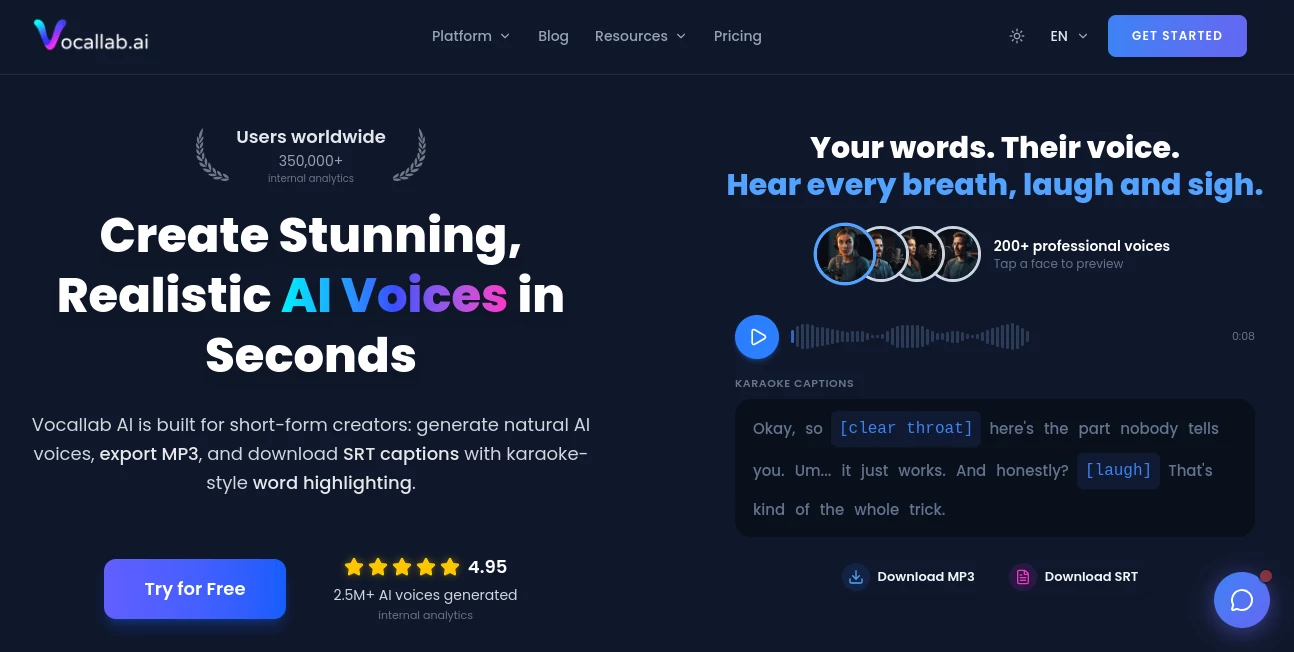
Creating professional voiceovers no longer requires expensive recording equipment or hours of editing. This platform brings together realistic text-to-speech, voice cloning, and automatic caption generation in a single workspace designed for modern content creators. Whether you're producing YouTube Shorts, TikTok videos, marketing content, podcasts, or online courses, it helps transform written scripts into natural-sounding narration within seconds. Its fast workflow and commercial-ready output make it an excellent choice for creators who publish content regularly.
Key Features
User Interface
The dashboard is clean, beginner-friendly, and focused on speed. Generating speech, cloning a voice, downloading audio, and exporting captions can all be completed with just a few clicks. Everything is organized to reduce unnecessary steps, making daily production feel effortless.
Accuracy & Performance
The generated voices sound expressive with smooth pronunciation and realistic pacing instead of robotic speech. Audio is created in just a few seconds, while word-level caption timing helps keep subtitles perfectly synchronized with narration.
Capabilities
- Generate natural AI voiceovers from text.
- Clone voices from audio samples for consistent narration.
- Access a library of more than 300 professional voices.
- Export high-quality MP3 audio and synchronized SRT subtitle files.
- Create karaoke-style word highlighting for short-form videos.
- Commercial usage rights included with paid plans.
- API access available for advanced workflows.
Security & Privacy
User content is securely processed, while custom voice data is protected and handled with privacy in mind. The service also states that commercial projects can be produced confidently using licensed voice models.
Use Cases
- YouTube and TikTok voiceovers.
- Podcast narration.
- Social media advertisements.
- Educational videos and tutorials.
- Product explainers.
- Storytelling and recurring character narration.
Pros and Cons
- Pros
- Natural-sounding AI voices.
- Fast voice generation.
- Built-in voice cloning.
- Automatic subtitle export with word highlighting.
- Commercial license on paid plans.
- Simple workflow for creators.
- Cons
- Free plan offers limited generation time.
- Higher usage requires a paid subscription.
Pricing Plans
A free trial allows new users to test the platform before upgrading. Paid subscriptions begin with an affordable Lite plan for individuals and a Pro plan that provides more monthly audio generation, higher-quality exports, faster processing, commercial use, and API access. Additional minutes can also be purchased whenever needed.
How to Use Vocallab AI
Enter or paste your script, select a preferred voice or create a cloned voice, generate the narration, preview the result, and export the finished MP3 together with synchronized SRT captions. The files can then be imported directly into popular video editors for final production.
Comparison with Similar Tools
Many voice generation platforms focus only on text-to-speech. This solution stands out by combining realistic narration, unlimited voice cloning, karaoke-style captions, commercial licensing, and one-click exports in a single workflow. For creators producing short-form content every day, having these features together saves valuable editing time.
Conclusion
For creators looking to speed up video production without sacrificing audio quality, this platform delivers an impressive balance of realism, simplicity, and practical features. From voice cloning to synchronized captions, every part of the workflow is designed to help publish polished content faster while maintaining a consistent brand voice.
Frequently Asked Questions (FAQ)
Is there a free version?
Yes. A free plan lets users test voice quality before choosing a paid subscription.
Can the generated audio be used commercially?
Yes. Paid plans include commercial usage rights for professional projects.
Does it support voice cloning?
Yes. Users can create custom cloned voices for consistent narration across multiple projects.
Can subtitles be exported?
Yes. The platform exports synchronized SRT files with word-level timing and karaoke-style highlighting.
Who is this platform best suited for?
It is ideal for YouTubers, TikTok creators, marketers, educators, agencies, and anyone who regularly produces narrated video content.
AI Voice Cloning , AI Text to Speech , AI Speech Synthesis , AI Voice & Audio Editing .
These classifications represent its core capabilities and areas of application. For related tools, explore the linked categories above.

Vocallab AI Alternatives Product

Gpt Realtime…

AI2AI project

Voice Art
vo4 ai

Krisp

Fish Voice
Qwen3 TTS
Seed Audio

mp3tourl